Android App Developers in Qatar: Skills, Technologies & Business Solutions

Professional Android app development combines modern mobile technologies, intuitive interfaces, secure architecture, and business system integrations.
Android App Developers in Qatar: Skills, Technologies & Business Solutions in 2026
Android applications have become an important part of how businesses communicate with customers, deliver services, manage operations, and build digital products. From online shopping and food delivery to healthcare platforms and employee management systems, Android apps can help organizations create convenient digital experiences.
However, developing a professional Android application involves much more than designing screens and writing code. Businesses need developers who understand programming languages, application architecture, backend integration, database management, security, performance optimization, and the Google Play publishing process.
For companies operating in Qatar, choosing experienced Android app developers in Qatar means finding a development team that can understand local business requirements while building applications that are reliable, scalable, and suitable for different Android devices.
A professional Android development team should be able to translate a business idea into a functional application, select appropriate technologies, integrate existing systems, and provide technical support after launch.
This guide explores the skills, technologies, development capabilities, and business considerations that matter when working with Android app developers in Qatar in 2026.
What Do Android App Developers Do?
Android app developers design, build, test, deploy, and maintain applications that run on Android-powered smartphones, tablets, and other supported devices.
Their responsibilities extend beyond programming. They work with designers, backend developers, project managers, and business stakeholders to ensure that an application meets its intended requirements.
Typical responsibilities include:
Understanding business requirements and user expectations.
Planning application features and technical architecture.
Designing mobile interfaces and navigation.
Developing Android applications using suitable technologies.
Connecting applications to databases and backend services.
Integrating APIs and third-party platforms.
Implementing authentication and security controls.
Testing functionality and device compatibility.
Preparing applications for Google Play distribution.
Maintaining applications through updates and improvements.
For example, a retail company in Doha may need an Android application that allows customers to browse products, create accounts, place orders, make payments, and receive delivery updates.
Developers must connect the customer-facing application with the business's product database, inventory system, payment service, and order-management platform.
This is why professional Android development requires both mobile engineering knowledge and an understanding of business systems.
Why Businesses in Qatar Need Skilled Android App Developers
Qatar has a growing digital business environment, with organizations exploring mobile applications, cloud platforms, automation, and connected business systems.
The Ministry of Communications and Information Technology's Digital Agenda 2030 outlines national objectives around digital infrastructure, digital economic growth, innovation, and technology adoption.
Within this environment, Android applications can support businesses that want to improve customer access and streamline everyday operations.
1. Better Customer Accessibility
A mobile application gives customers a direct way to interact with a business.
Depending on the industry, customers may be able to:
Browse products and services.
Book appointments.
Place orders.
Track deliveries.
Manage accounts.
Receive notifications.
Contact customer support.
Access digital documents.
For example, a restaurant in Qatar could provide an Android application through which customers explore menus, place orders, select delivery options, and receive order updates.
2. Improved Business Operations
Android applications can also support internal business activities.
Companies may develop employee applications for:
Attendance management.
Task assignments.
Field-service operations.
Sales reporting.
Inventory monitoring.
Employee communication.
Delivery management.
A logistics company, for instance, could provide drivers with an application for viewing delivery assignments, updating order status, and sharing location information with authorized management systems.
3. More Direct Customer Communication
Push notifications can help businesses communicate relevant information to application users.
Examples include:
Appointment reminders.
Order confirmations.
Delivery updates.
Payment notifications.
Account alerts.
Important service announcements.
Notifications should be relevant and permission-aware rather than excessive promotional messages.
4. Integration With Existing Business Software
An Android application does not have to operate independently.
It can communicate with existing business platforms through APIs and secure backend services.
This makes it possible to connect mobile applications with:
CRM systems.
ERP software.
Inventory management platforms.
Payment gateways.
Customer databases.
Booking systems.
Accounting software.
Cloud infrastructure.
Businesses looking for connected digital solutions can also explore custom software development services.
Essential Technical Skills of Professional Android App Developers
When evaluating Android app developers in Qatar, businesses should look beyond a list of programming languages.
A capable developer should understand how different technical components work together to create a stable application.
1. Kotlin Programming
Kotlin is one of the primary programming languages used in modern Android development.
It offers concise syntax, null-safety features, and compatibility with Java-based Android projects.
Android developers use Kotlin to implement:
Application logic.
User authentication.
Data processing.
API communication.
Navigation.
Background operations.
Application features.
Developers should understand how to write maintainable Kotlin code rather than simply knowing basic syntax.
They should also be comfortable with coroutines and asynchronous programming when applications need to communicate with servers or process background tasks.
Businesses can review the official Android development documentation to understand the tools and technologies used in modern Android projects.
2. Java and Android Development Knowledge
Although Kotlin is widely used for modern Android development, Java remains relevant in many existing applications.
Some businesses need developers to maintain older applications, update existing functionality, or integrate new features into Java-based projects.
A development team with knowledge of both languages can help organizations manage legacy systems and plan gradual improvements.
3. Jetpack Compose
Jetpack Compose is Google's modern toolkit for building native Android user interfaces.
It allows developers to create application interfaces using Kotlin-based components.
Developers can use it to build:
Login and registration screens.
Product catalogues.
Navigation menus.
Customer dashboards.
Booking interfaces.
Profile screens.
Interactive application components.
Compose also supports reusable UI components, helping developers maintain consistency across different application screens.
Read the official Jetpack Compose documentation for more information.
4. Android Studio and Development Tools
Android Studio is the official integrated development environment for Android applications.
Developers use it to write code, manage projects, inspect layouts, run emulators, debug errors, and prepare application builds.
A professional development workflow may include:
Android Studio.
Gradle build tools.
Android SDK.
Android Emulator.
Git version control.
Automated testing tools.
Performance profiling tools.
These tools help development teams manage application code and test functionality before release.
5. API and Backend Integration
Most business applications need to exchange information with external systems.
For example, an e-commerce application may retrieve products from a backend, submit orders, verify payment status, and update customer information.
Android developers should understand:
REST APIs.
JSON data exchange.
Authentication tokens.
API error handling.
Secure network communication.
Backend integration.
Database synchronization.
This expertise is particularly important for businesses building applications that connect with existing websites or management platforms.

Native Android Development vs Cross-Platform Development
Businesses sometimes need to decide whether they should build a native Android application or use a cross-platform framework.
Both approaches can be suitable, depending on the project requirements.
Consideration | Native Android | Cross-Platform |
|---|---|---|
Development approach | Android-specific development | Shared code for multiple platforms |
Common technology | Kotlin | Flutter or React Native |
Android integration | Direct Android ecosystem access | Depends on framework and integrations |
Code sharing | Limited between platforms | Greater code reuse |
Best suited for | Android-focused applications | Projects targeting Android and iOS |
Maintenance | Android-specific codebase | Shared and platform-specific code |
When Should a Business Choose Native Android Development?
Native development may be suitable when:
The application is primarily designed for Android users.
Advanced Android-specific functionality is required.
The application needs detailed platform integration.
The business requires specialized performance optimization.
The project involves complex device capabilities.
When Is Cross-Platform Development a Better Choice?
Cross-platform development may be useful when:
The business wants Android and iOS applications.
Shared application functionality is important.
The project benefits from a common development codebase.
The team needs to maintain similar experiences across platforms.
The correct choice depends on functionality, budget, development resources, integrations, and future requirements.
Businesses planning applications for multiple platforms can explore mobile application development solutions.
How Android App Developers Build Scalable Applications
A professional Android application should be designed with future improvements in mind.
An application that works for a small number of users may require architectural changes if the business expands its services or introduces additional functionality.
Google's Android application architecture guidelines recommend separating responsibilities into appropriate layers and managing application data through well-defined structures.
1. User Interface Layer
The UI layer manages what users see and how they interact with the application.
It includes:
Screens.
Buttons.
Navigation.
Forms.
Menus.
Interactive components.
The interface should remain clear and responsive across different screen sizes.
2. Data Layer
The data layer manages information used by the application.
It may communicate with:
Remote APIs.
Local databases.
Cloud services.
User preferences.
External data providers.
A well-organized data layer makes it easier to maintain application functionality.
3. Business Logic Layer
Some applications benefit from a separate domain layer that manages reusable business rules.
For example, an ordering application may need logic for:
Calculating order totals.
Applying discounts.
Checking delivery eligibility.
Validating customer information.
Managing order status.
Keeping these responsibilities organized makes complex applications easier to maintain and test.
4. Backend and Cloud Infrastructure
The backend supports operations that should not be handled entirely on the user's device.
It may manage customer accounts, payments, orders, notifications, business rules, and databases.
A typical architecture could look like this:
Android Application → Secure API → Backend Services → Database → Business Systems
This architecture allows an application to communicate with multiple business platforms without exposing sensitive backend operations directly to the mobile client.
Android App Features Businesses Can Develop in Qatar
The right features depend on the industry, customers, and business objectives.
Here are some practical examples.
E-Commerce and Retail Applications
Retail businesses can use Android applications to provide:
Product catalogues.
Product search and filters.
Shopping carts.
Customer accounts.
Secure checkout.
Order tracking.
Wishlist functionality.
Promotional notifications.
Loyalty programmes.
For example, a retail business in Doha could connect its Android application to an inventory platform so customers can view available products and place orders.
Restaurant and Food Delivery Applications
Restaurant applications can include:
Digital menus.
Food categories.
Online ordering.
Pickup and delivery options.
Payment integration.
Order tracking.
Customer reviews.
Loyalty rewards.
A restaurant may also connect its application to a central order-management system to coordinate orders across multiple branches.
Healthcare Applications
Healthcare organizations may require Android applications for:
Appointment booking.
Patient account management.
Appointment reminders.
Doctor information.
Digital reports.
Secure communication.
Clinic service information.
Healthcare applications require careful handling of personal information, access permissions, and applicable privacy requirements.
Education Applications
Educational institutions can use Android applications for:
Student accounts.
Course access.
Class schedules.
Learning materials.
Attendance.
Notifications.
Online assessments.
Communication between students and teachers.
These features can help institutions provide digital access to learning services.
Real Estate Applications
Real estate companies may develop applications with:
Property listings.
Search filters.
Property images.
Location information.
Viewing requests.
Customer enquiries.
Agent communication.
Saved properties.
A connected backend can help agents manage enquiries and update property information.
Logistics and Delivery Applications
Logistics applications may support:
Driver accounts.
Delivery assignments.
GPS-based location services.
Delivery status updates.
Proof of delivery.
Route information.
Customer notifications.
Administrative reporting.
These capabilities can improve coordination between delivery teams and business managers.
Arabic and English Support: An Important Consideration for Qatar
Businesses serving customers in Qatar may need applications that support both Arabic and English.
Language support should be considered during the initial design process rather than added as an afterthought.
Important considerations include:
Right-to-left layouts: Arabic interfaces should display text, navigation, alignment, and relevant icons appropriately.
Language switching: Users should be able to switch between available languages without losing important application information.
Localized content: Product descriptions, service information, notifications, and forms should be available in the appropriate language.
Date and number formatting: Developers should consider locale-specific formatting requirements.
Testing: Both language versions should be tested on different Android devices and screen sizes.
An application should provide a consistent experience regardless of the selected language.

Security Requirements Every Android Development Team Should Understand
Security should be considered from the beginning of an Android development project.
An application may process customer accounts, contact information, payments, business records, or other confidential information.
Poor security practices can create risks for both users and businesses.
Professional developers should consider the following measures.
Secure Authentication
Applications should use appropriate authentication mechanisms to verify user identities.
Depending on the project, this may include secure login, multi-factor authentication, session management, and account recovery.
Data Encryption
Sensitive information should be protected during transmission and stored using appropriate security mechanisms.
Permission Management
Applications should request only the device permissions required for their functionality.
For example, a delivery application may require location access, while a simple shopping application may not need continuous location tracking.
Secure API Communication
Communication between mobile applications and backend services should use secure connections and appropriate authentication controls.
Regular Security Testing
Development teams should review dependencies, identify vulnerabilities, test access controls, and address security issues through maintenance updates.
For technical guidance, businesses can consult the Android security documentation.
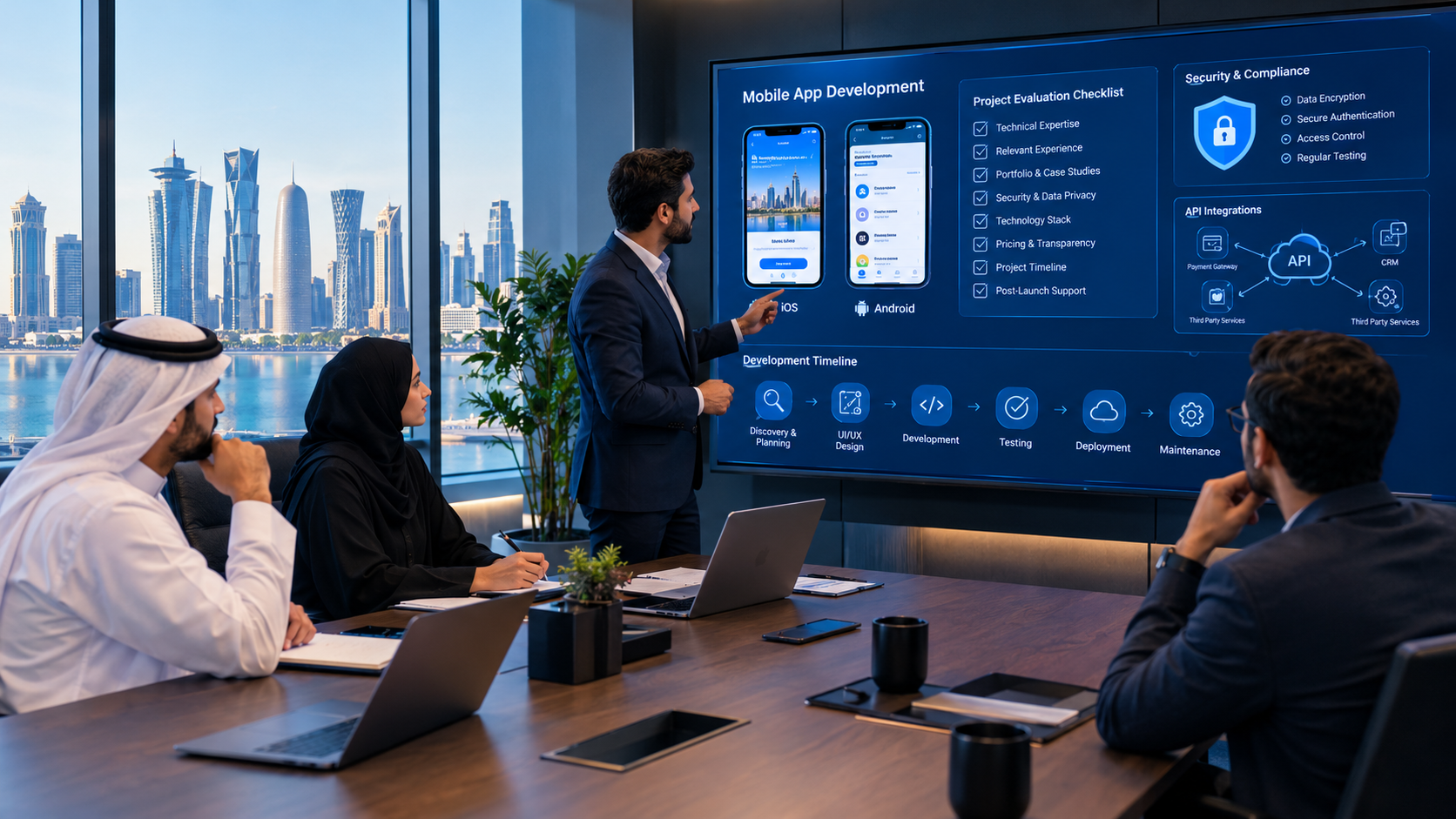
The Android App Development Process: From Idea to Launch
A structured development process helps businesses understand project requirements and manage expectations.
Step 1: Business Requirement Analysis
Developers discuss the business idea, intended users, required functionality, and expected outcomes.
The goal is to understand what the application needs to accomplish.
Step 2: Project Scope and Feature Planning
The team identifies essential features and separates them from optional improvements.
A Minimum Viable Product (MVP) can help businesses launch an initial version without building every possible feature immediately.
Step 3: UI/UX Design
Designers create screen layouts, navigation structures, and interactive prototypes.
The designs should reflect the application purpose and the expectations of its users.
Step 4: Technical Architecture
Developers choose the appropriate programming approach, backend architecture, APIs, databases, and integrations.
Technical decisions should support the project's current requirements and anticipated growth.
Step 5: Android Application Development
The development team implements the approved designs and functionality.
This may include authentication, navigation, database communication, notifications, payments, and other features.
Step 6: Backend and Third-Party Integrations
The application is connected to required business systems.
Examples include payment providers, CRM platforms, inventory systems, maps, and cloud services.
Step 7: Testing and Quality Assurance
Testing should cover:
Functional performance.
Different screen sizes.
Android version compatibility.
API responses.
Login and authentication.
Payment workflows.
Security.
Application speed.
Network interruptions.
Error handling.
Step 8: Google Play Preparation and Release
The application is prepared for distribution.
This may include application signing, release builds, store descriptions, screenshots, privacy information, testing tracks, and compliance with applicable Google Play requirements.
Developers should consult the Google Play Console documentation when preparing an application for release.
Step 9: Maintenance and Continuous Improvement
After launch, the application may require:
Bug fixes.
Android compatibility updates.
Security improvements.
Performance optimization.
New features.
API updates.
User-experience improvements.
A maintenance plan helps businesses keep their applications useful as technology and user requirements change.
What Affects the Cost of Hiring Android App Developers in Qatar?
The cost of Android app development depends on the project's technical requirements and overall scope.
There is no single price that applies to every application.
A basic information application is different from a custom e-commerce platform connected to payment services, inventory management, customer accounts, and administrative dashboards.
Several factors influence the development budget.
Cost Factor | How It Affects the Project |
|---|---|
Application complexity | More complex workflows require additional development |
Number of features | Each feature adds design, coding, and testing requirements |
UI/UX design | Custom interfaces and advanced interactions require additional work |
Backend development | APIs, databases, and business logic increase project scope |
Third-party integrations | External services may require additional implementation |
Security requirements | Additional safeguards and testing may be necessary |
Testing | Device and compatibility testing adds project effort |
Maintenance | Ongoing support and updates create recurring costs |
How Businesses Can Manage Development Costs
Businesses can manage their budgets by:
Defining the main purpose of the application.
Prioritizing essential features.
Starting with a realistic MVP.
Reusing suitable existing backend systems where possible.
Avoiding unnecessary integrations.
Planning future improvements in phases.
Agreeing on deliverables before development begins.
A clear project scope helps developers prepare a more realistic proposal.
How to Evaluate Android App Developers in Qatar
Selecting a development team is an important business decision.
A low initial quotation does not necessarily mean that a project will provide better long-term value.
Businesses should evaluate technical capabilities, communication, project planning, and ongoing support.
1. Review Relevant Technical Experience
Ask developers about their experience with Kotlin, Java, Android Studio, Jetpack Compose, APIs, databases, and application architecture.
The technologies should match the project's requirements.
2. Examine Previous Projects
Review available portfolios and ask whether the team can explain the technical challenges involved in similar applications.
You can explore Galaxium Coding's projects and portfolio to learn more about its technology work.
3. Understand the Development Process
A professional proposal should explain:
Project requirements.
Main features.
Development stages.
Testing responsibilities.
Expected deliverables.
Communication arrangements.
Maintenance options.
4. Discuss Ownership and Documentation
Clarify ownership of source code, application assets, developer accounts, and project documentation.
These details should be agreed upon before development starts.
5. Ask About Post-Launch Support
An application may need updates after launch.
Ask who will handle bug fixes, security improvements, compatibility updates, and future feature requests.
6. Evaluate Communication
Developers should be able to explain technical decisions in clear business language.
Regular progress updates and transparent discussions help prevent misunderstandings.
Why Consider Galaxium Coding for Android App Development?
Choosing a development partner involves finding a team that understands both technology and business objectives.
Galaxium Coding is a technology company offering digital development solutions, including mobile applications, software development, web applications, and connected business systems.
Businesses exploring an Android application can consider the company's mobile application development services when planning a custom digital product.
Depending on the project requirements, an application may need to connect with backend services, databases, business automation, or other software platforms.
Galaxium Coding also provides software development services for businesses planning broader digital systems.
The right development approach should be based on the actual project requirements rather than selecting technologies simply because they are popular.
Before starting a project, businesses should define their target users, essential features, integrations, security expectations, and long-term objectives.
Final Thoughts
Android applications can help businesses in Qatar improve customer experiences, simplify internal processes, and develop new digital services.
However, successful application development depends on more than writing code.
Businesses need developers who understand Kotlin, Android architecture, user-interface design, API integration, security, testing, and ongoing maintenance.
A well-planned application should solve a genuine business problem, provide a convenient user experience, and support future improvements.
Whether you are planning an e-commerce application, healthcare platform, delivery system, educational product, or custom business application, selecting the right development approach is an important first step.
If you are planning a new Android application, contact Galaxium Coding to discuss your business requirements, technical objectives, and potential development approach.
Frequently Asked Questions (FAQs)
1. What do Android app developers in Qatar specialize in?
Android app developers in Qatar can specialize in building native Android applications, mobile interfaces, backend integrations, e-commerce applications, booking systems, business management apps, and custom digital products.
2. Which programming language is best for Android app development?
Kotlin is a leading choice for modern Android development. Java is also used, particularly in existing applications and projects that require compatibility with older codebases.
3. What is Jetpack Compose?
Jetpack Compose is a modern Android UI toolkit that allows developers to create native application interfaces using Kotlin.
4. How long does it take to develop an Android application?
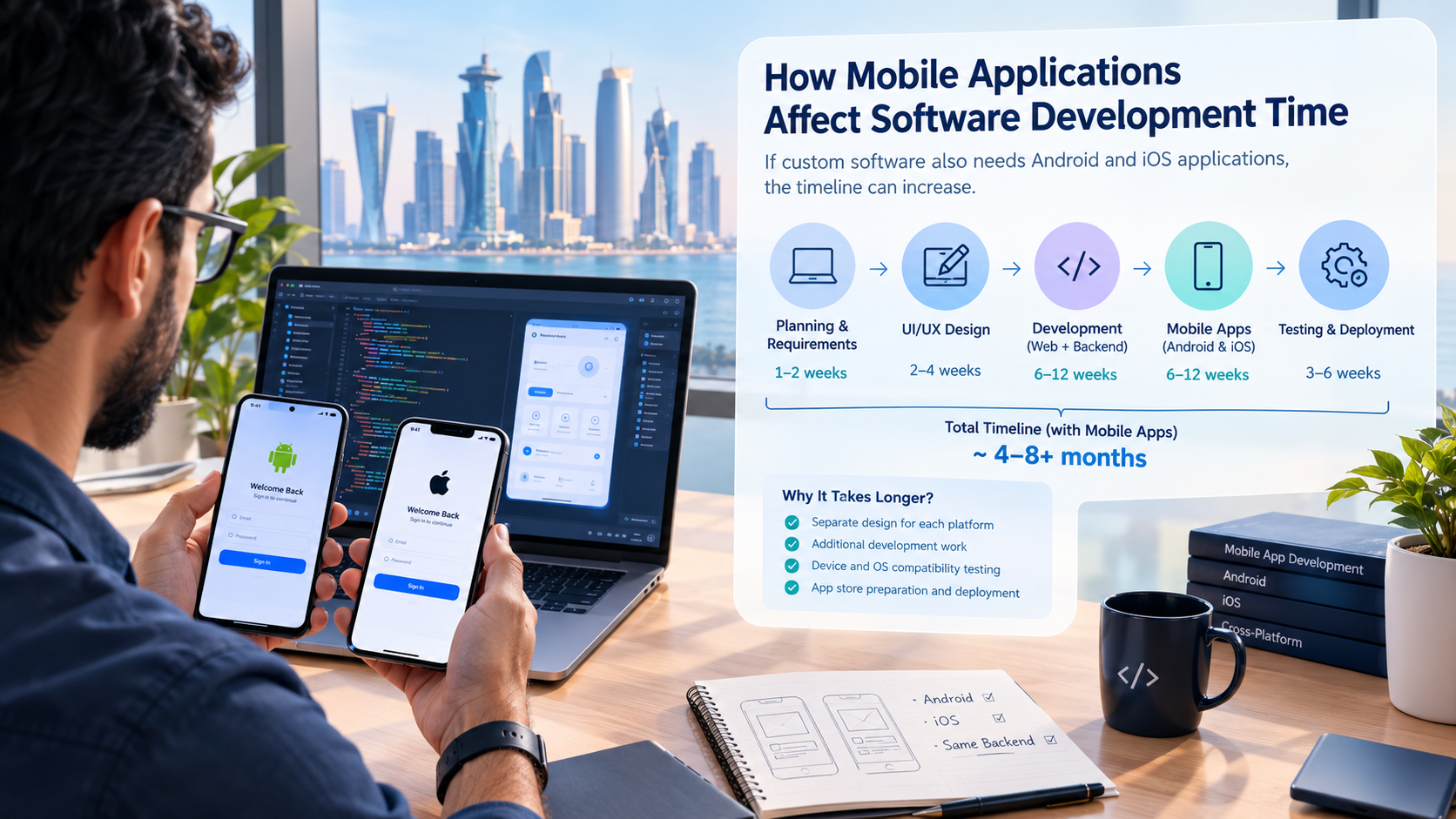
The development timeline depends on application complexity, number of features, backend requirements, integrations, design, and testing. A small application generally requires less work than a complex business platform.
5. Can Android developers build applications for businesses in Doha?
Yes. Android applications can be developed for businesses operating in Doha and other parts of Qatar, with features tailored to their customers, services, and operational requirements.
6. Can an Android application support Arabic and English?
Yes. Developers can implement multilingual interfaces, Arabic right-to-left layouts, language switching, and localized content.
7. Can an Android application connect to an existing website?
Yes. An Android application can communicate with a website's backend through APIs when the existing system provides suitable integration capabilities.
8. Can Android applications integrate with payment gateways?
Yes. Developers can integrate compatible payment services through secure APIs and payment-provider SDKs, subject to the provider's requirements and supported markets.
9. What is the difference between Kotlin and Flutter?
Kotlin is a programming language commonly used for native Android development. Flutter is a cross-platform UI framework that uses Dart and can support applications for multiple platforms.
10. Do Android applications require ongoing maintenance?
Yes. Applications may require security updates, bug fixes, operating-system compatibility improvements, performance optimization, and new functionality after launch.
11. Can an Android application connect with CRM and ERP systems?
Yes. Applications can communicate with CRM and ERP platforms through APIs and backend services, depending on the integration capabilities of those systems.
12. How do I choose the right Android app development company in Qatar?
Evaluate technical expertise, previous projects, development processes, security practices, integration capabilities, communication, code ownership, and post-launch support.
13. Does Galaxium Coding provide mobile application development services?
Galaxium Coding offers mobile application development solutions. Businesses can discuss their project requirements, platform needs, and technical objectives with the company.