AI-Native Development: How Businesses Are Building Smarter Software in 2026

AI-native development integrates artificial intelligence into software architecture to create smarter, more adaptable business applications.
AI-Native Development: How Businesses Are Building Smarter Software in 2026
Artificial intelligence is changing the way businesses approach digital products. Traditional software applications generally follow predefined instructions, rules, and workflows. While these systems remain essential, businesses increasingly want applications that can understand information, recognize patterns, generate responses, and adapt to changing requirements.
This shift is creating interest in AI-native development, an approach that makes artificial intelligence a fundamental part of software architecture rather than an additional feature introduced after development.
Instead of building a conventional application and adding a chatbot or AI integration later, developers design AI capabilities into the system from the beginning. This can include intelligent search, predictive recommendations, natural language interaction, automated decision support, and context-aware functionality.
For businesses in Qatar and international markets, AI-native development presents opportunities to create more intelligent customer experiences, improve internal operations, and develop digital products around evolving business needs.
Companies exploring custom software development services can consider AI-native architecture when planning applications that require intelligent functionality, flexible integrations, and long-term scalability.
This guide explains what AI-native development means, how it works, its architecture, business applications, benefits, challenges, and implementation considerations in 2026.
What Is AI-Native Development?
AI-native development is an approach to designing and building software in which artificial intelligence is a core component of the application's functionality and architecture.
In a traditional application, developers usually implement predefined business rules. The software processes information according to programmed instructions and returns expected results.
An AI-native application can go further by using machine learning models, large language models, data retrieval systems, and intelligent processing components to handle tasks that require contextual understanding or predictions.
For example, a conventional customer support application may display predefined answers based on selected categories. An AI-native customer support platform could interpret a customer's question, retrieve relevant information, understand the conversation context, and generate an appropriate response.
Key Characteristics of AI-Native Software
AI-native applications commonly include several characteristics:
AI-first architecture: Artificial intelligence is considered during the initial system design rather than treated as an optional addition.
Context-aware functionality: Applications can use relevant information to generate more meaningful responses.
Intelligent data processing: AI models can analyze large amounts of structured and unstructured information.
Adaptive experiences: Applications can personalize selected features based on user behavior and available data.
Continuous improvement: Performance can be evaluated using feedback, monitoring, and model updates.
Integrated AI services: Applications connect models, databases, APIs, and business systems through defined interfaces.
Not every AI-native application requires every capability. The architecture should depend on the product's purpose, data requirements, risk level, and expected user experience.
AI-Native Development vs Traditional Software Development
One of the most important differences between AI-native and traditional software development is how the application processes information and responds to users.
Traditional software generally relies on predefined rules and deterministic logic. AI-native applications introduce model-based capabilities that can interpret complex inputs and generate outputs based on available context.
Area | Traditional Development | AI-Native Development |
|---|---|---|
Application logic | Predefined rules | Rules combined with AI capabilities |
Data processing | Structured processing | Structured and unstructured data |
User interaction | Forms and fixed commands | Natural language and contextual interaction |
Recommendations | Manually configured rules | AI-driven recommendations |
Search | Keyword and filter-based | Semantic and contextual search |
Personalization | Predefined preferences | AI-supported personalization |
Decision support | Fixed conditions | Model-assisted analysis |
Architecture | Conventional application components | Application components with integrated AI services |
Traditional software remains suitable for many business applications. An accounting system, for example, needs accurate calculations and predictable financial rules.
AI-native architecture becomes useful when a product needs capabilities such as interpreting documents, understanding user requests, identifying patterns, or generating context-sensitive information.
The right approach is not always to replace traditional software. Many modern applications combine conventional software engineering with carefully selected AI components.
How AI-Native Development Works
AI-native applications combine several technical components to provide intelligent functionality.
The exact architecture varies according to the application, but most systems involve an application interface, backend services, AI models, data sources, and integration layers.
1. Understanding Business Requirements
The first stage is identifying what the application needs to accomplish.
Developers and business stakeholders should determine:
Which problems should the application solve?
What information will users provide?
Which tasks require intelligent processing?
What data should the AI system access?
Which decisions require human approval?
How will application performance be measured?
For example, a company may want to build an intelligent employee assistance platform that answers questions about internal policies, leave procedures, and company documentation.
The development team must understand the organization's information sources, user permissions, expected responses, and security requirements before selecting an AI model.
2. Designing the AI-Native Architecture
After defining the requirements, developers design the system architecture.
This includes selecting appropriate models, application frameworks, databases, APIs, and infrastructure.
A typical architecture may include:
Frontend application
Backend services
AI model integration
Data storage
Retrieval and search components
API communication
Authentication and authorization
Monitoring and analytics
The architecture should also support fallback behavior when an AI service becomes unavailable or produces an unreliable response.
Businesses developing complex platforms may benefit from custom web application development to connect intelligent functionality with practical business interfaces.
3. Integrating AI Models
AI models provide the intelligence behind many AI-native features.
Developers can integrate suitable models through APIs or deploy models within controlled infrastructure, depending on performance, privacy, cost, and technical requirements.
Different models support different capabilities.
For example:
Large language models can interpret and generate natural language.
Machine learning models can identify patterns and generate predictions.
Computer vision models can analyze images and visual information.
Speech models can process spoken language.
Embedding models can convert information into numerical representations for semantic search.
Model selection should be based on the actual task rather than simply choosing the most advanced available model.
4. Connecting Business Data
An AI model becomes more useful when it can access accurate and relevant information.
AI-native systems may connect to:
Business databases
Internal documents
Customer information
Product catalogs
Knowledge bases
Enterprise applications
External APIs
For example, an AI-powered retail application may need access to product descriptions, inventory availability, customer preferences, and order information.
Access should be restricted according to user permissions and business requirements.
5. Testing and Improving the Application
Testing is essential because AI-generated responses may vary depending on the input and available context.
Developers should evaluate:
Response accuracy
Data retrieval quality
Application performance
Model reliability
Security
User experience
Error handling
Operating costs
AI-native applications also require ongoing monitoring because model behavior, data quality, and user expectations can change over time.
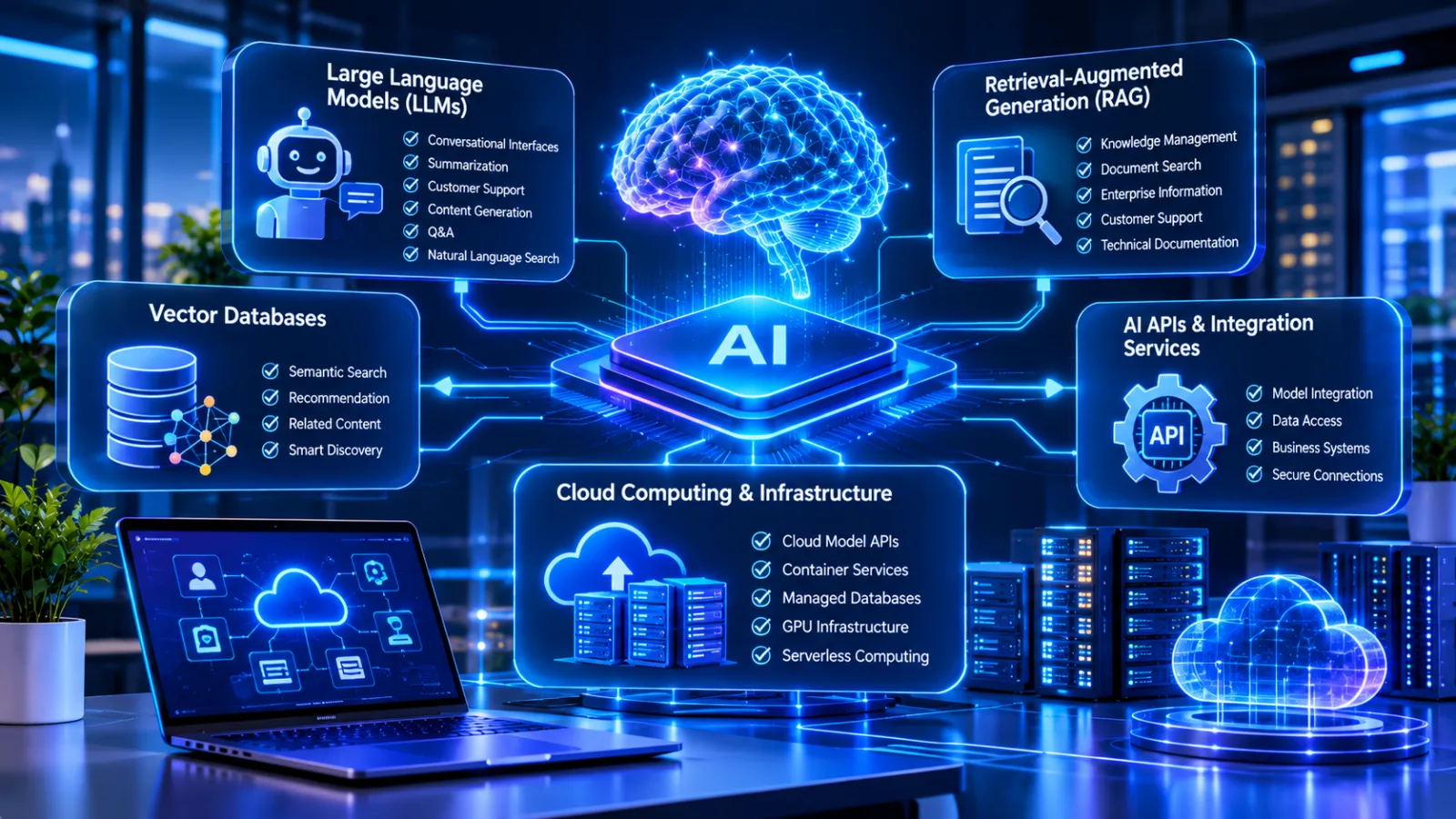
Core Technologies Used in AI-Native Development
AI-native software relies on a combination of technologies rather than a single development framework.
1. Large Language Models (LLMs)
Large language models allow applications to understand and generate human language.
They can support:
Conversational interfaces
Document summarization
Intelligent customer support
Content generation
Question answering
Natural language search
An enterprise application, for example, could allow employees to ask questions about company policies without manually searching through multiple documents.
2. Retrieval-Augmented Generation (RAG)
Retrieval-Augmented Generation connects AI models with external information sources.
Rather than relying only on information learned during training, a RAG system retrieves relevant information from approved data sources and provides it to the model as context.
This approach is useful for applications involving:
Internal knowledge management
Customer support
Document search
Enterprise information retrieval
Technical documentation
Businesses can explore the differences between RAG and fine-tuning when deciding how to provide specialized information to an AI application.
3. Vector Databases
Vector databases store numerical representations of information called embeddings.
These representations help applications identify content with similar meanings, even when users do not enter the exact words contained in a document.
For example, a user searching for information about employee holidays may receive relevant documents containing phrases such as annual leave or vacation policy.
Vector search is particularly useful for semantic search, recommendation systems, and RAG applications.
4. AI APIs and Integration Services
APIs allow software applications to communicate with external AI services and other business platforms.
An AI-native application may use APIs to:
Send user requests to an AI model
Retrieve information from databases
Access customer records
Process payments through authorized services
Connect with external business applications
Return generated responses to users
Secure API design is important because AI applications may interact with sensitive information and business-critical systems.
5. Cloud Computing and Infrastructure
Cloud infrastructure provides resources for hosting applications, managing databases, processing requests, and deploying AI services.
Depending on the application, businesses may use:
Cloud-based model APIs
Containerized application services
Managed databases
GPU-enabled infrastructure
Serverless computing
Monitoring and logging platforms
Businesses can explore cloud and DevOps solutions when planning infrastructure for scalable AI-native applications.
Key Benefits of AI-Native Development for Businesses
AI-native development can help organizations create applications that support more intelligent interactions and information processing.
However, the benefits depend on selecting appropriate use cases and implementing reliable technical foundations.
1. More Intelligent Customer Experiences
Customers increasingly expect digital platforms to provide convenient and relevant interactions.
AI-native applications can support natural language interfaces, intelligent search, personalized recommendations, and contextual assistance.
For example, an online retail platform could help customers find products based on descriptions rather than requiring them to navigate multiple categories.
This can make digital experiences more accessible and convenient.
2. Better Use of Business Data
Many organizations collect information from different departments and applications.
AI-native systems can help make this information more useful by supporting document analysis, semantic search, summarization, and pattern recognition.
An organization could develop an internal platform that allows authorized employees to retrieve relevant information from multiple business documents through a single interface.
3. More Flexible Application Functionality
Traditional applications often require developers to create separate rules for different situations.
AI-native functionality can support more flexible interactions when users provide varied inputs or ask questions in natural language.
For example, a business management application could allow managers to request a summary of selected operational data instead of navigating several reports manually.
The underlying calculations and permissions should still be handled through reliable software logic.
4. Personalized Digital Services
AI can help applications adapt selected experiences according to user preferences and behavior.
Possible applications include:
Personalized product recommendations
Learning content suggestions
Intelligent search results
Customer assistance
Customized dashboards
Personalization should remain transparent and respect user privacy.
5. Support for Business Innovation
AI-native architecture creates opportunities for businesses to develop digital products with capabilities that may be difficult to implement through traditional rule-based functionality alone.
Organizations can experiment with new services, intelligent features, and improved customer interactions while evaluating their commercial value.
Real-World Applications of AI-Native Development
AI-native development can support several industries. The most suitable applications depend on business requirements, available data, and the level of automation that can be introduced safely.
1. Healthcare and Medical Applications
Healthcare applications can use AI to support information retrieval, appointment assistance, administrative document processing, and patient communication.
For example, a medical center could develop an application that helps patients find appointment information and retrieves approved healthcare service details.
AI-generated medical information must be handled carefully. Clinical decisions should remain under qualified healthcare professionals, and sensitive patient information requires appropriate protection.
2. Banking and Financial Services
Financial organizations can explore AI-native capabilities for document processing, customer assistance, transaction monitoring, and financial information retrieval.
An intelligent banking application might allow customers to ask questions about account services and receive answers based on approved information.
Financial calculations, transaction authorization, and regulatory controls must remain governed by reliable systems and established approval procedures.
3. Retail and E-Commerce
Retail businesses can use AI-native applications to improve product discovery, customer assistance, and personalized shopping experiences.
Examples include:
Semantic product search
Intelligent product recommendations
Automated product information assistance
Customer query interpretation
Shopping preference analysis
These features can be integrated into web application development solutions designed around business requirements.
4. Education and E-Learning
Educational platforms can use AI to provide interactive learning experiences.
Possible features include:
AI-powered learning assistants
Personalized study recommendations
Educational content search
Automated practice questions
Learning progress summaries
For example, a learning platform could help students locate relevant lessons based on the topics they find difficult.
Educational AI should support teachers and learners rather than replace professional educational judgment.
5. Real Estate and Property Management
Real estate platforms can use AI-native functionality to help users search property information and understand market data.
Potential applications include:
Natural language property search
Property recommendation systems
Document information extraction
Customer inquiry assistance
Property data analysis
For example, a user could describe a preferred property in everyday language, and the application could retrieve matching listings based on available information.
6. Logistics and Supply Chain Management
AI-native applications can support logistics operations by analyzing available information and helping employees understand operational conditions.
Potential features include delivery information retrieval, demand forecasting, shipment updates, and exception identification.
A logistics application may combine AI-based analysis with traditional tracking systems and business rules to support better operational visibility.
AI-Native Development Opportunities in Qatar
Qatar's growing digital economy creates opportunities for organizations to explore intelligent applications across different industries.
The country's National Artificial Intelligence Strategy and digital transformation initiatives demonstrate an interest in developing AI capabilities and encouraging responsible technology adoption.
The Ministry of Communications and Information Technology also publishes AI principles and guidelines for Qatar, providing guidance on ethical AI use and responsible implementation.

Industries That Can Explore AI-Native Applications
Healthcare: Medical centers and healthcare organizations can investigate intelligent appointment assistance, document retrieval, and administrative applications.
Finance: Financial businesses can explore intelligent customer interfaces, financial information retrieval, and document processing.
Education: Schools and educational organizations can investigate AI-powered learning platforms and student support applications.
Retail: Retailers can use intelligent product discovery and customer assistance to improve online shopping experiences.
Real Estate: Property companies can explore intelligent property search and information management.
Enterprise Operations: Businesses can develop AI-native internal applications that connect employees with approved company information.
For organizations operating in Qatar, implementation should consider data protection, information security, sector-specific requirements, language preferences, and the sensitivity of business information.
Arabic and English support may also be important for applications serving diverse customer groups.
AI adoption should be based on genuine operational needs rather than adding AI functionality simply because it is available.
Security and Privacy Considerations in AI-Native Development
Security should be part of AI-native architecture from the beginning.
Unlike conventional applications, AI-native systems may process natural language inputs, retrieve external information, and interact with business tools through AI-powered components.
These capabilities introduce additional security considerations.
1. Data Privacy and Protection
AI applications may process customer records, employee information, business documents, and other confidential data.
Developers should establish clear rules regarding:
What information the application can collect
Where data is stored
Which AI services can access it
How long information is retained
Which users can retrieve specific records
Whether information is transferred to external providers
2. Access Control and Authentication
Users should only access information and functionality they are authorized to use.
Role-based access control, secure authentication, and API authorization can help prevent unauthorized access.
AI systems must also respect the same permissions as the underlying business applications.
3. AI Output Validation
AI-generated responses can contain inaccurate information or misunderstand user requests.
Important business operations should use validation rules and approval procedures rather than accepting every generated response automatically.
4. Prompt Injection and Unsafe Tool Access
An AI application may receive malicious instructions through user inputs or retrieved documents.
Developers should limit what AI components can access and which actions they can perform.
For example, an AI assistant that can retrieve company information should not automatically receive permission to modify financial records or approve transactions.
Google Cloud's guidance on securing multi-agent AI systems discusses human oversight, agent permissions, and security controls.
5. Monitoring and Continuous Security Testing
AI-native applications should be monitored after deployment.
Development teams should review unusual requests, access patterns, model performance, system errors, and potential security incidents.
Regular testing and updates help maintain application reliability as the system evolves.
Challenges of AI-Native Development
Although AI-native development creates new opportunities, businesses should understand its limitations before investing in an implementation.
1. Higher Technical Complexity
AI-native systems may require additional components, including model integrations, data pipelines, vector databases, retrieval systems, and monitoring tools.
How to address it: Begin with a clear architecture and introduce only the components needed for the initial application.
2. AI Model Costs
Some AI services charge according to usage, processing volume, or model selection.
Applications with frequent requests or large amounts of data may experience significant operating costs.
How to address it: Estimate usage, compare suitable models, monitor API consumption, and optimize unnecessary processing.
3. Inaccurate AI Responses
AI models can generate incorrect information or provide responses that do not match the available evidence.
How to address it: Use trusted data sources, retrieval validation, structured outputs, testing, and human review for important decisions.
4. Data Quality Problems
AI applications depend on the quality and relevance of their input data.
Incomplete, outdated, or inconsistent information can reduce the usefulness of generated results.
How to address it: Organize data sources, remove unnecessary duplication, establish update procedures, and evaluate retrieval quality.
5. Integration Difficulties
Connecting AI functionality with older business systems may require additional engineering work.
How to address it: Review existing APIs, databases, authentication systems, and software dependencies before beginning implementation.
6. Ongoing Maintenance
AI-native applications need continuous technical support because models, integrations, data sources, and business requirements can change.
How to address it: Establish monitoring, maintenance schedules, testing procedures, and a clear process for updating models and application components.
How to Plan an AI-Native Development Project
A successful AI-native project begins with a business problem rather than a technology choice.
Businesses should follow a structured approach to avoid unnecessary complexity and investment.
Step 1: Identify the Business Problem
Determine what the application should improve.
For example, a company may want to reduce the time employees spend searching through internal documents.
Step 2: Select Suitable AI Use Cases
Identify the tasks where AI provides meaningful value.
Not every application feature requires artificial intelligence. Standard calculations, financial transactions, and fixed business rules may be better handled through conventional programming.
Step 3: Evaluate Available Data
Review the information required by the application.
Check its accuracy, availability, structure, ownership, and access permissions.
Step 4: Select the Technology Stack
Choose suitable models, programming frameworks, databases, APIs, and cloud infrastructure.
Technology selection should reflect the application's performance, privacy, scalability, and budget requirements.
Step 5: Develop an Initial Version
Start with a limited set of features and build a working prototype or minimum viable product.
This allows the business to evaluate functionality before expanding the application.
Step 6: Test Security and Performance
Evaluate the application's response quality, speed, reliability, data access controls, and operating costs.
Test both normal use cases and unexpected inputs.
Step 7: Deploy and Monitor
After successful testing, deploy the application using suitable infrastructure.
Monitor performance, collect user feedback, and improve the system according to actual usage.
AI-Native Development vs AI-Assisted Development
These terms are related but describe different approaches.
AI-assisted development generally refers to using artificial intelligence to support the software development process. Examples include code generation, debugging assistance, and automated documentation.
AI-native development focuses on how the software product itself is designed and operates.
Comparison | AI-Assisted Development | AI-Native Development |
|---|---|---|
Main purpose | Help developers build software | Build software around AI capabilities |
AI role | Supports engineering activities | Core part of the application |
Example | AI coding assistant | Intelligent business application |
Architecture | Conventional architecture with AI tools | Architecture designed for AI functionality |
User experience | May remain unchanged | Can include intelligent interactions |
Data usage | Mainly development context | Application data and model context |
A company can use AI-assisted development tools to build an AI-native application. The two approaches can work together, but they are not interchangeable.
How to Choose an AI-Native Software Development Company
Businesses planning an AI-native application should evaluate their development partner carefully.
The right development team should understand both software engineering and the technical requirements of AI integration.
Consider the following factors:
1. AI and Software Engineering Knowledge
Look for a team that understands application architecture, AI model integration, databases, APIs, and backend development.
2. Understanding of Business Requirements
A development partner should understand the business problem before recommending technologies.
3. Data Security Practices
Ask how the team approaches authentication, data privacy, API security, and access permissions.
4. Integration Capabilities
Check whether the development team can connect AI functionality with existing websites, applications, and enterprise systems.
5. Testing and Maintenance
Discuss how the application will be tested, monitored, updated, and supported after launch.
6. Scalability
The architecture should be capable of supporting changing requirements, additional users, and increased data processing needs.
Businesses can review Galaxium Coding's software development services and project portfolio when exploring digital development options.
The Future of AI-Native Development
AI-native development is likely to become increasingly relevant as businesses explore more intelligent digital products.
Several areas deserve attention:
More Context-Aware Applications
Applications will continue to explore ways to use relevant business information to provide more useful responses and personalized experiences.
Greater Integration Between AI and Business Systems
AI capabilities may become more deeply connected with enterprise applications, databases, and operational platforms.
More Specialized AI Models
Businesses may use different models for language processing, visual analysis, prediction, and industry-specific tasks.
Stronger AI Governance
As AI becomes more involved in business operations, organizations will need clearer policies for permissions, monitoring, transparency, and human accountability.
More Intelligent User Interfaces
Natural language interaction and conversational search may become more common in business applications, reducing the need to navigate complicated menus for certain tasks.
The long-term direction will depend on improvements in model reliability, infrastructure, security, and the ability of businesses to implement AI responsibly.
Conclusion
AI-native development represents an important shift in how businesses design and build modern software.
Rather than treating artificial intelligence as an optional feature, this approach integrates intelligent capabilities into the application architecture from the beginning.
From contextual search and personalized experiences to document processing and intelligent business applications, AI-native solutions can help organizations explore new ways of delivering digital services.
However, successful implementation requires more than selecting an AI model. Businesses must consider data quality, software architecture, security, integration, performance, and ongoing maintenance.
For organizations in Qatar and international markets, the most effective strategy is to identify a genuine business need and build an AI-native solution around measurable requirements.
Galaxium Coding helps businesses explore modern digital solutions through custom software, web applications, mobile applications, and technology integration.
If your organization is planning an intelligent application or exploring AI-native software architecture, contact Galaxium Coding to discuss your development requirements.
Frequently Asked Questions (FAQs)
1. What is AI-native development?
AI-native development is an approach to building software in which artificial intelligence is integrated into the application's core architecture and functionality rather than added as an optional feature later.
2. What is the difference between AI-native and traditional software?
Traditional software generally relies on predefined rules and programmed logic. AI-native software combines conventional programming with AI capabilities such as natural language understanding, intelligent search, predictions, and contextual processing.
3. Is AI-native development suitable for small businesses?
Yes. Small businesses can explore AI-native features through focused applications such as intelligent customer support, document search, recommendation systems, and internal knowledge assistants. The project should match the available budget and operational requirements.
4. Which technologies are used in AI-native development?
Common technologies include large language models, machine learning frameworks, vector databases, AI APIs, cloud infrastructure, backend frameworks, and data integration tools.
5. Does AI-native software require cloud infrastructure?
Not always. Some applications use cloud-based AI services, while others may require private or locally hosted infrastructure. The appropriate option depends on security, performance, privacy, and cost requirements.
6. Can AI-native applications connect with existing business software?
Yes. Developers can connect AI-native applications with existing systems through APIs, databases, and integration services, provided the systems support appropriate access and communication methods.
7. Is AI-native development more expensive than traditional software development?
It can involve additional costs for AI models, infrastructure, data preparation, integration, and ongoing monitoring. However, the total investment depends on the application's complexity and selected technologies.
8. Is AI-native development secure?
It can be designed securely, but security requires careful implementation. Important considerations include data protection, authentication, access permissions, model output validation, monitoring, and human oversight.
9. Can AI-native applications support Arabic and English?
Yes. Developers can select suitable multilingual models and design applications that support Arabic and English interactions. Language quality should be tested against the application's actual users and requirements.
10. How do businesses get started with AI-native development?
Businesses should identify a practical use case, evaluate available data, select appropriate AI technologies, develop an initial version, test the application, and expand functionality based on measured results.
11. What industries can benefit from AI-native software?
Healthcare, finance, education, retail, real estate, logistics, and professional services can explore AI-native applications according to their operational requirements and data availability.
12. Does AI-native development replace traditional software engineering?
No. AI-native applications still require programming, system architecture, databases, testing, security, and maintenance. Artificial intelligence complements conventional software engineering rather than eliminating its importance.


