What Is DevOps and Why Does Your Business Need It?
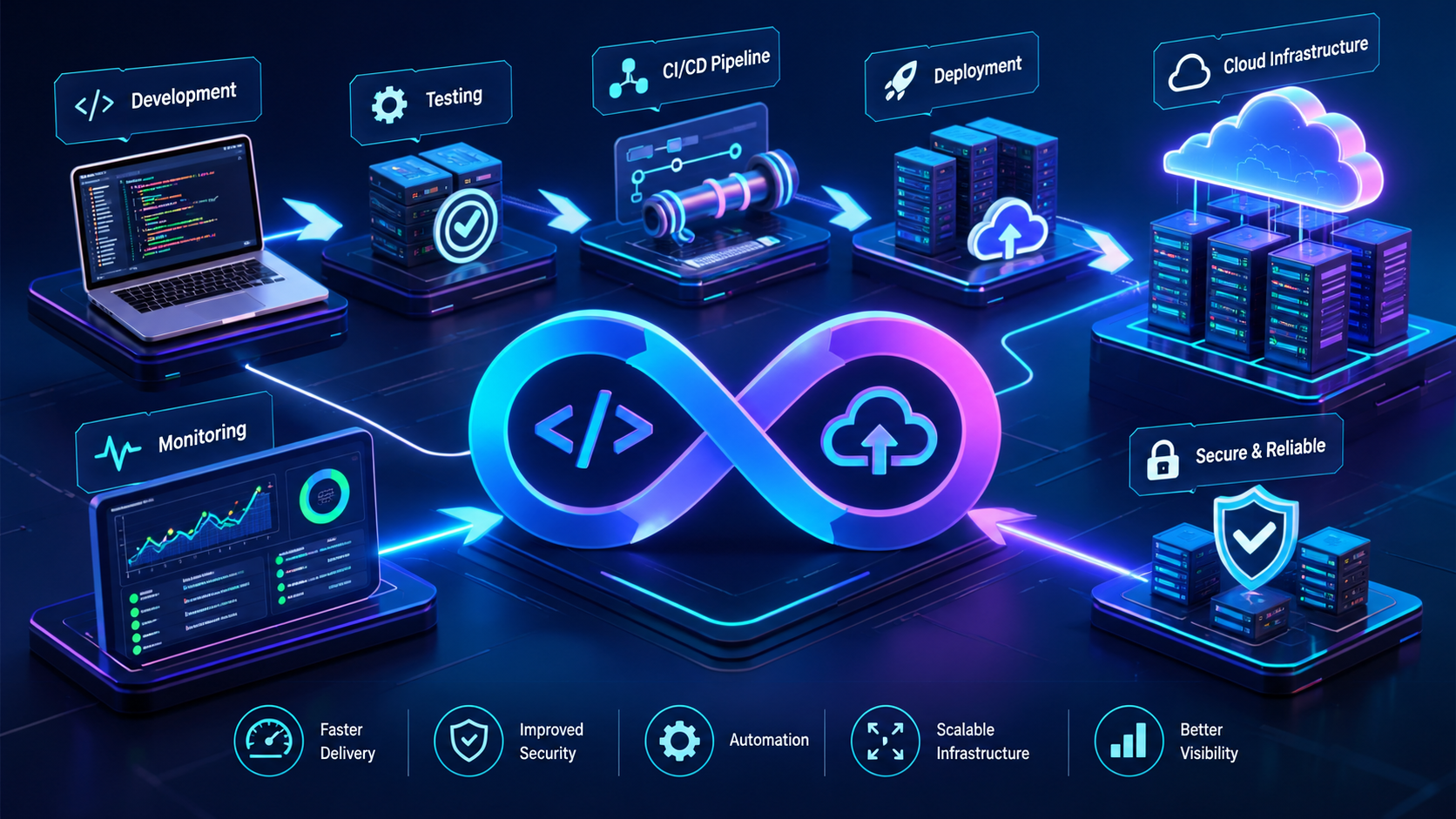
DevOps connects software development, automated testing, cloud deployment, and continuous monitoring to support reliable software delivery.
What Is DevOps and Why Does Your Business Need It?
Modern businesses depend on software to manage customers, process transactions, deliver services, and support daily operations. But developing an application is only one part of the process. Businesses must also test it, deploy updates, maintain infrastructure, monitor performance, and resolve problems without unnecessarily disrupting customers.
This is where DevOps becomes important.
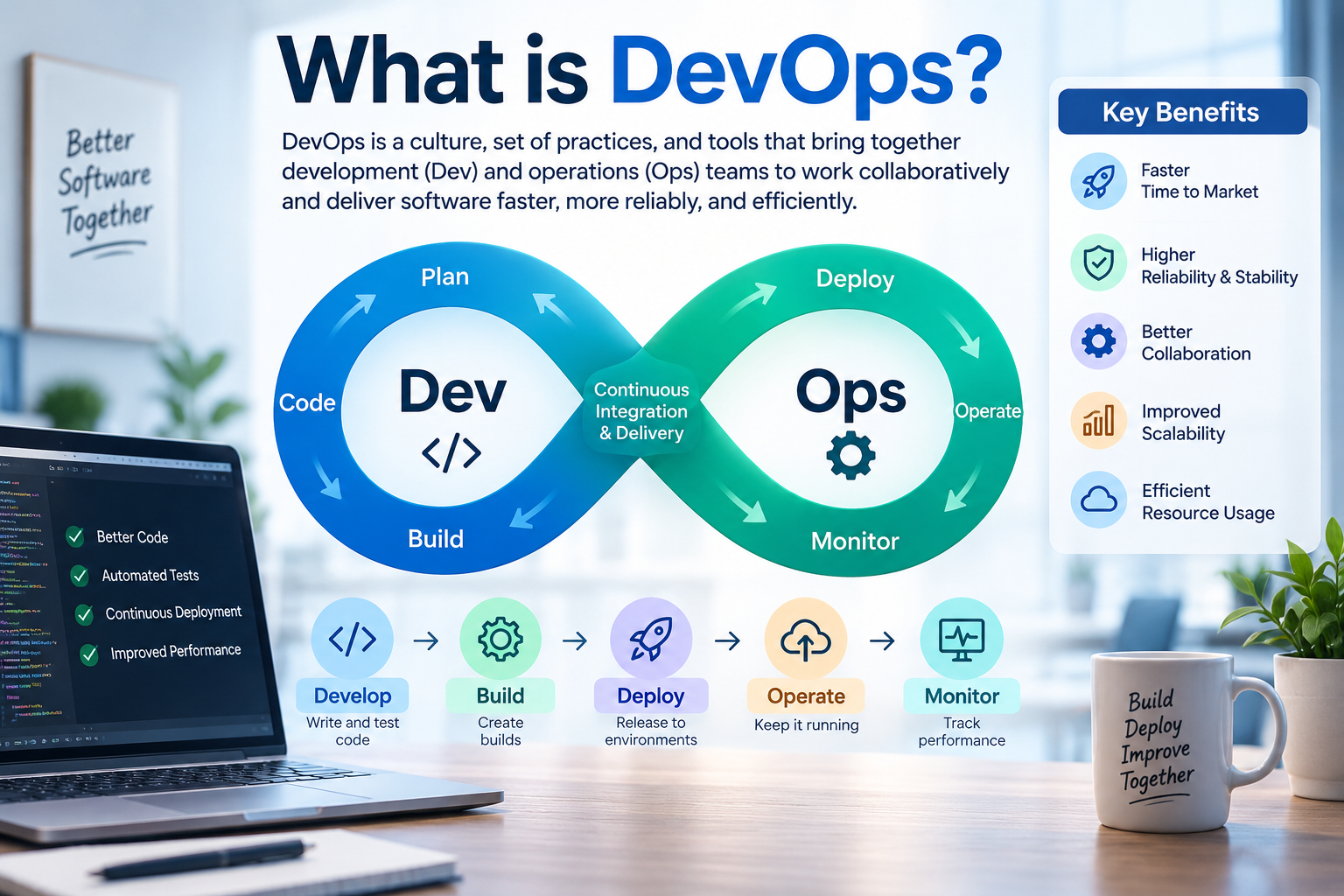
DevOps is a combination of practices, processes, tools, and cultural principles that brings software development and IT operations closer together. It helps teams build, test, release, monitor, and improve applications more efficiently through collaboration and automation.
For businesses investing in digital transformation, DevOps can help make software delivery more consistent, reduce repetitive manual work, improve visibility into system performance, and support reliable application updates.
Whether you operate an e-commerce platform, a customer relationship management (CRM) system, a mobile application, or a cloud-based business platform, a suitable DevOps strategy can help your technology evolve alongside your business.
Companies exploring cloud and DevOps solutions can use these practices to establish a more structured approach to deployment, infrastructure management, monitoring, and ongoing software improvement.
In this guide, we explain what DevOps means, how it works, its business benefits, the tools involved, implementation steps, security considerations, and what companies in Qatar should consider before adopting it.
What Is DevOps?
DevOps combines the words Development and Operations.
Development teams focus on creating and improving software, while operations teams help ensure that applications, servers, databases, and supporting infrastructure operate reliably.
Traditionally, these teams could work separately. Developers might complete a feature and hand it over to operations, only for deployment problems to emerge because the production environment differs from the development environment.
DevOps encourages shared responsibility across the software lifecycle. Teams collaborate earlier, automate repeatable tasks, test changes continuously, and use monitoring data to improve the application after release.
According to the official AWS explanation of DevOps, DevOps combines cultural philosophies, practices, and tools to improve an organisation's ability to deliver applications and services at high velocity.
In practical terms, DevOps helps answer five important questions:
How can developers deliver software updates more efficiently?
How can businesses identify problems before they affect customers?
How can releases become more consistent and repeatable?
How can infrastructure be managed with fewer manual errors?
How can teams maintain application reliability as demand grows?
DevOps is not simply a software product that a business purchases. It is an approach to organising work, improving processes, automating delivery, and managing software throughout its lifecycle.
Why Does Your Business Need DevOps?
Businesses need DevOps when software delivery, infrastructure management, or application maintenance becomes difficult to manage using manual processes and disconnected teams.
For example, imagine an online business that releases website updates only after several days of manual coordination. Every update requires a developer to prepare the files, an administrator to configure the server, and another employee to test the application.
A small configuration mistake could cause downtime, delay a marketing campaign, or interrupt customer orders.
A suitable DevOps workflow can automate many of these activities, run tests before release, and make deployment more consistent.
The main business reasons to consider DevOps include the following.
1. Faster Software Delivery
Businesses frequently need to introduce new features, fix bugs, improve user experiences, and respond to changing customer expectations.
Without an organised delivery process, even a small change may require considerable manual work.
DevOps practices can automate code building, testing, and deployment so teams can release changes more efficiently.
For example, an online retailer might need to update its checkout process before a seasonal campaign. An automated delivery pipeline can run the required tests and prepare the update for release without repeating every deployment step manually.
Faster delivery does not mean skipping quality checks. The goal is to make the process more efficient while maintaining appropriate testing and approval controls.
2. Fewer Deployment Errors
Manual deployments can be vulnerable to inconsistent configurations, forgotten steps, incorrect files, and human error.
DevOps helps teams document and automate deployment procedures. The same defined process can be used across development, testing, staging, and production environments.
This makes releases more repeatable and easier to troubleshoot.
3. Better Application Reliability
A software product must continue working after launch. Users expect websites, mobile applications, customer portals, and business systems to remain accessible and responsive.
DevOps encourages teams to monitor application health, track errors, measure performance, and establish procedures for responding to incidents.
This makes it easier to identify problems and understand their causes.
DevOps cannot eliminate every outage, but it can improve a business's ability to detect, investigate, and recover from failures.
4. More Efficient Use of Resources
Developers and operations specialists can spend significant time performing repetitive tasks such as configuring servers, preparing releases, running routine checks, and investigating recurring issues.
Automation can reduce some of this work.
Teams can then devote more attention to product improvements, infrastructure optimisation, security, and customer requirements.
5. Support for Business Growth
As an application attracts more users, the infrastructure supporting it may need to handle additional traffic, larger databases, more integrations, or new features.
DevOps practices can help businesses manage these changes through automated infrastructure provisioning, deployment workflows, monitoring, and capacity planning.
This is particularly relevant for growing SaaS businesses, e-commerce platforms, and companies introducing new digital services.
How Does DevOps Work?
DevOps connects the different stages of the software delivery lifecycle into a continuous process.
A typical workflow looks like this:
Plan → Code → Build → Test → Release → Deploy → Operate → Monitor → Improve
Each stage contributes to the quality and reliability of the final product.
1. Planning
The team identifies business requirements, defines features, prioritises work, and decides how changes will be delivered.
For example, a business may request a new customer dashboard with sales reports and account management features.
The team breaks the work into manageable tasks and establishes acceptance criteria.
2. Coding
Developers write application code and store changes in a version control system such as Git.
Version control records changes, supports collaboration, and helps teams investigate when a problem was introduced.
3. Building
The application is compiled or packaged into a form that can be tested and deployed.
Automated build processes help ensure that the application is assembled consistently.
4. Testing
Automated tests check whether the application behaves as expected.
Depending on the product, these can include unit tests, integration tests, API tests, security checks, and end-to-end tests.
For example, a payment application might test whether a successful transaction updates the order correctly and whether a failed transaction produces an appropriate response.
5. Releasing and Deploying
Once the required checks pass, the application can be prepared for release and deployed to the appropriate environment.
Some businesses automatically deploy approved changes. Others require manual approval before production deployment, especially when changes affect sensitive systems.
6. Operating
The operations process includes maintaining infrastructure, managing configurations, controlling access, handling backups, and supporting application availability.
Cloud infrastructure and automation can make these activities more consistent.
7. Monitoring and Improving
After deployment, teams review application metrics, logs, errors, performance, and user feedback.
If a new release causes an unexpected issue, monitoring can help the team identify it and decide whether to fix, roll back, or disable the affected functionality.
The information collected also helps teams improve future releases.
What Is CI/CD in DevOps?
Continuous integration and continuous delivery or deployment are among the most important DevOps practices.
Although the terms are related, they describe different activities.
Continuous Integration (CI)
Continuous integration means developers regularly integrate their code changes into a shared repository. Automated builds and tests help detect problems early.
Without CI, multiple changes may remain separate for long periods and become difficult to combine safely.
With CI, smaller changes are checked more frequently.
Continuous Delivery (CD)
Continuous delivery extends CI by automatically preparing validated changes for release. A person may still need to approve deployment to production.
This approach helps businesses keep software in a release-ready state.
Continuous Deployment
Continuous deployment goes a step further. Changes that pass the required automated checks can be released to production automatically, subject to the pipeline's rules.
It requires suitable testing, monitoring, and recovery procedures.
Practice | Main purpose |
|---|---|
Continuous integration | Integrate code changes and detect issues early |
Continuous delivery | Keep validated changes ready for release |
Continuous deployment | Automatically release qualifying changes to production |
The right approach depends on the application's risk, business requirements, testing maturity, and regulatory obligations. Not every business needs fully automated production deployment.
Essential DevOps Tools and Technologies
DevOps relies on a combination of tools rather than a single platform. The appropriate selection depends on the development language, hosting environment, team experience, security needs, and application architecture.
1. Version Control
Tools such as Git help developers track changes, collaborate, review code, and maintain a history of the application.
Common platforms include GitHub, GitLab, and Bitbucket.
2. CI/CD Automation
CI/CD platforms automate workflows such as building applications, running tests, checking code, and deploying approved changes.
Examples include GitHub Actions, GitLab CI/CD, Jenkins, and Azure Pipelines.
3. Containers
Docker packages applications and their dependencies into containers. Containers can help applications run more consistently across different environments.
They are useful when teams need repeatable application environments or want to simplify deployment.
4. Container Orchestration
Kubernetes helps manage containerised applications across clusters of machines. It supports activities such as scheduling, scaling, and maintaining desired application states.
However, Kubernetes introduces operational complexity. A small website or internal application may not need it.
5. Infrastructure as Code (IaC)
Infrastructure as Code allows teams to define infrastructure through configuration files or code rather than relying entirely on manual setup.
Tools such as Terraform and AWS CloudFormation can help teams create repeatable infrastructure configurations.
6. Cloud Platforms
Cloud platforms provide computing, storage, networking, databases, and managed services that can support DevOps workflows.
Examples include Amazon Web Services (AWS), Microsoft Azure, and Google Cloud.
Businesses can select infrastructure based on performance requirements, existing technology, security needs, budget, and operational capabilities.
7. Monitoring and Logging
Monitoring and logging tools help teams understand what happens inside applications and infrastructure.
Depending on the architecture, options may include Prometheus, Grafana, the Elastic Stack, and cloud-native monitoring services.
Useful information includes response times, error rates, resource usage, failed requests, and service availability.
8. Configuration and Deployment Management
Configuration management and deployment tools help maintain consistent environments and automate operational tasks.
The specific tools depend on whether the business uses virtual machines, containers, managed cloud services, or a combination of environments.
The important principle is to select tools that solve actual operational problems. Introducing too many platforms can increase cost and maintenance work without improving delivery.
Key Benefits of DevOps for Businesses
DevOps can produce benefits across software engineering, customer experience, operations, and business planning.
Improved Collaboration
When developers, operations specialists, testers, and security professionals share responsibility, problems can be identified earlier.
Teams also gain a clearer understanding of how development decisions affect production systems.
More Consistent Releases
Automated workflows reduce dependence on individual employees remembering every deployment step.
Documented pipelines make release processes easier to repeat, review, and improve.
Earlier Problem Detection
Automated tests and monitoring help identify issues at different stages of the software lifecycle.
Finding a defect before production can be less disruptive than discovering it after customers encounter it.
Better Visibility
Monitoring dashboards, deployment records, logs, and incident reports give teams more information about system health and software delivery.
This supports evidence-based decisions instead of relying entirely on assumptions.
More Controlled Scaling
Infrastructure automation can make it easier to provision additional resources or reproduce environments when demand changes.
Scaling still requires sound architecture, capacity planning, and cost management.
Potential Cost Efficiency
DevOps may reduce repetitive manual work, avoid some deployment-related incidents, and improve infrastructure utilisation.
However, new tools, cloud resources, training, and engineering time also cost money. The financial outcome depends on implementation quality and the business's starting point.
DevOps vs. Traditional Software Development
Traditional software delivery often involves separate development and operations responsibilities, with releases occurring through a series of manual handovers.
DevOps promotes collaboration, automation, and continuous feedback throughout the lifecycle.
Area | Traditional approach | DevOps approach |
|---|---|---|
Team collaboration | More separate responsibilities | Shared delivery and operational goals |
Testing | May rely heavily on manual checks | Automates suitable tests |
Deployment | Can involve repetitive manual steps | Uses repeatable deployment pipelines |
Feedback | May arrive late in the process | Monitoring and feedback are continuous |
Infrastructure | May require manual configuration | Can use automation and Infrastructure as Code |
Releases | Often grouped into larger releases | Can support smaller, more frequent releases |
These are general patterns, not absolute rules. Traditional teams can use automation, and DevOps teams still need planning, approvals, documentation, and manual intervention where appropriate.
The main distinction is the way teams coordinate work and manage the software lifecycle.
What Is the Difference Between DevOps, DevSecOps, and Agile?
These terms are related, but they are not interchangeable.
DevOps
DevOps focuses on collaboration between development and operations, automated delivery, system reliability, and continuous improvement.
DevSecOps
DevSecOps integrates security into the software delivery lifecycle.
Instead of waiting until the application is ready for release, teams incorporate security reviews, dependency checks, access controls, and appropriate security testing throughout development and deployment.
The AWS guide to DevSecOps explains how security becomes a shared responsibility across the software development process.
Agile
Agile is an approach to software development that emphasises iterative delivery, collaboration, customer feedback, and adapting to change.
Agile can help teams decide what to build and how to organise development work. DevOps helps connect that work to testing, release, deployment, and operations.
A business can use Agile and DevOps together: Agile supports iterative planning and development, while DevOps helps teams deliver and maintain the resulting software.
How Different Businesses Can Use DevOps
DevOps is not limited to large technology companies. Its value depends on the complexity of the software, frequency of updates, operational risks, and need for reliable delivery.
E-Commerce Businesses
Online retailers depend on product catalogues, checkout systems, payment integrations, inventory, and customer accounts.
DevOps can help teams test changes to these components, deploy updates consistently, and monitor performance during busy periods.
For example, an online store introducing a new discount feature can test how it interacts with shopping carts and payment calculations before deploying it.
SaaS Companies
Software-as-a-Service businesses often release features and fixes regularly.
CI/CD pipelines, monitoring, and infrastructure automation can support repeatable releases across multiple services or environments.
Financial Services
Financial applications require careful handling of transactions, permissions, sensitive data, and operational risks.
DevOps can support controlled releases, audit trails, automated testing, and security checks. High-risk changes may still require additional review and approval.
Healthcare Platforms
Healthcare applications may handle confidential records, appointments, staff workflows, and integrations.
DevOps practices can help teams manage updates and monitor service reliability, provided that security, privacy, access controls, and applicable regulatory requirements are addressed.
Education Platforms
Learning management systems and student portals need reliable access to lessons, assessments, and student information.
Automated testing and deployment can help teams maintain these services while introducing improvements.
Enterprise Business Software
CRM, ERP, inventory, HR, and reporting systems often connect multiple departments.
DevOps can help businesses manage integrations, test changes, maintain environments, and reduce the risks associated with updating interconnected applications.
Businesses developing tailored platforms can explore custom software development services to understand how software architecture and operational requirements should be considered together.

DevOps Considerations for Businesses in Qatar
Businesses in Qatar increasingly rely on digital services, cloud infrastructure, e-commerce, customer portals, and integrated business systems. For these organisations, DevOps can support the reliable delivery and maintenance of software used by customers and employees.
However, adopting DevOps requires more than choosing a cloud provider.
1. Understand Data and Security Requirements
Before selecting an infrastructure design, identify the type of data the application handles, who can access it, where it will be stored, and what security obligations apply.
Organisations should assess relevant Qatari laws, contractual requirements, industry rules, and customer commitments with appropriate professional advice where necessary.
2. Select a Suitable Hosting Architecture
A business may choose public cloud services, managed hosting, private infrastructure, or a hybrid arrangement.
The right option depends on workload requirements, data handling, availability expectations, existing systems, and operational capabilities.
3. Plan for Business Continuity
Companies should consider backups, recovery procedures, monitoring, incident response, and acceptable recovery times.
These measures are particularly important for customer-facing systems and applications supporting daily business operations.
4. Consider Integration Requirements
A new application may depend on payment gateways, CRM platforms, ERP systems, third-party APIs, or mobile applications.
Deployment and testing processes should account for these dependencies.
5. Match DevOps to Business Size
A startup may only need source control, automated tests, a simple deployment pipeline, and basic monitoring.
An enterprise with multiple applications, teams, and environments may require more advanced automation, governance, access controls, and observability.
For Qatar-based organisations, the objective should be to establish a DevOps approach that fits the actual business environment rather than adopting unnecessary complexity.
How to Implement DevOps in Your Business
A successful DevOps implementation should begin with a clear understanding of existing problems and business objectives.
Step 1: Assess Your Current Software Delivery Process
Document how your organisation currently develops, tests, deploys, and maintains applications.
Identify recurring problems such as slow releases, configuration errors, long approval cycles, limited monitoring, or frequent production incidents.
Step 2: Define Measurable Objectives
Choose outcomes that matter to the business.
Examples include:
Reducing the time needed to prepare a release.
Improving deployment success rates.
Reducing recovery time after incidents.
Increasing automated test coverage for critical workflows.
Improving visibility into application errors.
Making infrastructure configuration more consistent.
Record the current baseline so that improvements can be measured.
Step 3: Establish Version Control and Code Review
Ensure that application code and relevant configuration files are managed through version control.
Introduce suitable code review practices and define how changes are approved and merged.
Step 4: Build a CI Pipeline
Automate application builds and the tests most relevant to the product.
Start with high-value checks, such as unit tests, integration tests, code-quality checks, and dependency scanning where appropriate.
Step 5: Automate Deployment
Create a repeatable process for deploying the application to development, testing, staging, and production environments.
Use production approvals or additional safeguards where the application's risk requires them.
Step 6: Improve Infrastructure Management
Where appropriate, introduce Infrastructure as Code, managed services, or containerisation to make environments more consistent.
Do not migrate every workload or adopt every technology at once. Choose improvements based on clear needs.
Step 7: Introduce Monitoring and Alerts
Track important application and infrastructure indicators, including availability, latency, errors, and resource utilisation.
Set useful alert thresholds and define who responds when an issue occurs.
Step 8: Integrate Security
Apply appropriate access permissions, protect credentials, review dependencies, and include security checks in development and deployment workflows.
Security should be considered from the beginning rather than treated as a final release task.
Step 9: Measure Results and Improve
Review deployment outcomes, incidents, performance, costs, and team feedback.
Use those findings to refine the process over time.
A phased approach helps businesses build confidence, learn from early results, and avoid unnecessary disruption.
Common DevOps Mistakes to Avoid
DevOps can create real value, but poor implementation may add complexity instead of reducing it.
Automating a Broken Process
Automation does not automatically make a poor workflow efficient. Review unnecessary steps and unclear responsibilities before automating them.
Buying Too Many Tools
A large collection of platforms can create integration challenges, overlapping costs, and additional maintenance work.
Start with a small, compatible toolset and expand when a clear requirement emerges.
Ignoring Security
A deployment pipeline may have access to source code, production environments, credentials, and infrastructure.
Protect these resources using least-privilege access, secure secrets management, appropriate approvals, and audit logging.
Neglecting Testing
Frequent releases are not useful if they repeatedly introduce defects.
Automate the tests that provide meaningful coverage, and retain additional manual testing for complex or high-risk scenarios.
Failing to Monitor Production
A successful deployment does not guarantee that an application will perform correctly under real-world conditions.
Monitor user-facing performance and define clear incident response procedures.
Expecting Immediate Results
DevOps involves changes to processes, responsibilities, tools, and team habits.
Businesses should set realistic goals, train staff, and improve the approach gradually.
DevOps Security: Why It Matters
Modern applications often connect databases, cloud services, APIs, third-party platforms, and customer information. Every connection and deployment process needs appropriate safeguards.
Important DevOps security practices include:
Access control: Give employees and automated processes only the permissions they need.
Secrets management: Avoid exposing passwords, API keys, certificates, and tokens in source code or logs.
Dependency scanning: Identify known vulnerabilities in application libraries and packages.
Code and configuration review: Examine changes that could introduce security weaknesses.
Secure deployment: Protect pipelines and restrict who can approve or initiate production releases.
Logging and monitoring: Collect useful security and operational events while protecting sensitive information.
Backups and recovery: Test recovery procedures rather than assuming backups will always work.
Incident response: Define how teams investigate and contain operational or security problems.
Businesses can also adopt DevSecOps practices to integrate security checks throughout the delivery pipeline.
The specific controls should reflect the application's risk profile, data sensitivity, business continuity requirements, and applicable legal obligations.
How Much Does DevOps Cost?
There is no single price for implementing DevOps. The cost depends on the existing technology environment, the complexity of the application, the level of automation required, and the skills available within the organisation.
A small application with an existing cloud deployment may need only a straightforward CI/CD pipeline and monitoring setup. A large enterprise platform may require several environments, infrastructure automation, complex integrations, security controls, and dedicated operational support.
Key cost factors include:
Cost factor | What influences the cost |
|---|---|
Initial assessment | Existing infrastructure, workflow complexity, and technical debt |
CI/CD implementation | Build processes, automated tests, deployment stages, and approvals |
Cloud infrastructure | Computing, storage, databases, networking, and data transfer |
Tooling | Licensing, managed services, and third-party platforms |
Security | Access controls, scanning, audit requirements, and compliance needs |
Monitoring | Log storage, metrics, alerts, dashboards, and retention |
Team training | Skills development and process changes |
Ongoing maintenance | Updates, incident response, optimisation, and operational support |
How Can Businesses Control DevOps Costs?
Start by improving the delivery process for one application or service.
Use managed services where they are appropriate, remove unused infrastructure, monitor cloud spending, and avoid deploying tools that do not address a specific requirement.
Businesses should also consider the total cost of ownership rather than looking only at the initial setup. Ongoing support, monitoring, training, and infrastructure usage can form a significant part of the overall cost.
A DevOps investment should be evaluated against measurable outcomes, such as less manual work, more predictable releases, fewer avoidable incidents, and improved service reliability.
How to Choose a DevOps Service Provider
If your business does not have the required in-house expertise, working with a suitable technology partner may help establish the right processes and infrastructure.
Before choosing a provider, consider the following questions.
Technical Experience
Can the provider work with your current application architecture, programming languages, cloud environment, databases, and integrations?
Security Approach
How will access, credentials, deployment permissions, monitoring, and recovery procedures be handled?
Automation Strategy
Will the provider automate the most important parts of your workflow, or introduce unnecessary tools and complexity?
Monitoring and Support
What monitoring will be established? Who will respond to incidents? What support arrangements will be available after implementation?
Documentation and Knowledge Transfer
Will your internal team receive documentation, training, and access to the relevant configurations and operational procedures?
Cost Transparency
Can the provider explain implementation costs, recurring infrastructure charges, tool licensing, and ongoing support requirements?
The best provider is not necessarily the one proposing the largest technology stack. It is the one that can explain how the proposed approach addresses your business requirements and how its results will be evaluated.
How Galaxium Coding Can Support Your Cloud and DevOps Requirements
Businesses planning a new digital product or improving an existing application need to consider development, deployment, infrastructure, and ongoing maintenance together.
Galaxium Coding provides technology services covering areas such as software development, web applications, mobile applications, and cloud and DevOps solutions.
Depending on a project's requirements, a structured technology approach may involve:
Understanding the application's architecture and deployment needs.
Reviewing existing infrastructure and release processes.
Identifying opportunities for build, test, and deployment automation.
Improving infrastructure configuration and environment consistency.
Establishing appropriate monitoring and operational practices.
Planning security, scalability, and ongoing maintenance.
For example, a company developing a customer portal may need a development workflow that allows new features to be tested before release, deployment procedures that reduce configuration mistakes, and monitoring that helps identify performance problems.
The implementation should be tailored to the application rather than based on the assumption that every business needs the same tools.
You can explore Galaxium Coding's projects and portfolio to learn more about its technology work, or review its cloud and DevOps services for relevant service information.
If your organisation is planning a new application, modernising an existing platform, or improving its deployment process, contact Galaxium Coding to discuss your requirements.
The Future of DevOps
DevOps continues to evolve as businesses adopt cloud-native architectures, automated testing, infrastructure automation, and AI-assisted engineering tools.
Several developments are worth watching.
Platform Engineering
Platform engineering focuses on providing internal tools and standardised workflows that help development teams build and deploy applications without managing every underlying infrastructure detail themselves.
For organisations with multiple teams, this can improve consistency and reduce duplicated effort.
GitOps
GitOps uses version-controlled declarations and automated processes to manage application or infrastructure states. It can help teams track changes and make infrastructure management more reviewable.
AI-Assisted Operations
AI-based tools can assist with log analysis, alert investigation, troubleshooting, and identifying unusual patterns.
However, AI-generated recommendations require suitable validation, and sensitive production actions should remain subject to appropriate controls.
Greater Focus on Software Supply Chain Security
Businesses are paying increasing attention to third-party dependencies, build processes, software provenance, and the security of deployment pipelines.
Security checks and clear access policies are important as applications become more interconnected.
FinOps and Cloud Cost Optimisation
Cloud costs are closely linked to infrastructure design and operational decisions. FinOps practices encourage engineering, finance, and business teams to understand cloud spending and make informed trade-offs between cost, performance, and reliability.
These developments do not eliminate the need for sound engineering. They make clear processes, good monitoring, security, and accountability even more important.
Final Thoughts
DevOps helps businesses connect software development and IT operations through collaboration, automation, continuous feedback, and more consistent delivery practices.
It can help organisations release updates efficiently, identify issues earlier, improve operational visibility, and manage growing applications more effectively.
However, adopting DevOps is not simply a matter of installing a CI/CD tool or moving an application to the cloud. It requires a clear understanding of business needs, suitable processes, security controls, monitoring, and ongoing improvement.
For businesses in Qatar and elsewhere, a sensible starting point is to identify the biggest problem in the current software delivery process and address it with a measurable, practical improvement.
Begin with the essentials: version control, appropriate automated testing, a repeatable deployment process, monitoring, and secure access. Expand the approach as your application and team become more mature.
The ultimate goal is not to use the most tools. It is to deliver and maintain software that serves customers reliably and supports business growth.
Frequently Asked Questions (FAQs)
1. What is DevOps in simple words?
DevOps is an approach that brings software development and IT operations together. It uses collaboration, automation, testing, and monitoring to help teams deliver and maintain software more efficiently.
2. Why is DevOps important for businesses?
DevOps can help businesses improve release consistency, reduce repetitive manual tasks, identify issues earlier, improve system visibility, and manage applications as they grow.
3. Is DevOps only for large companies?
No. Small businesses and startups can use DevOps practices too. A small application may need only version control, automated testing, a basic deployment pipeline, and monitoring.
4. What are the main stages of DevOps?
A typical DevOps lifecycle includes planning, coding, building, testing, releasing, deploying, operating, monitoring, and continuous improvement.
5. What is the difference between DevOps and CI/CD?
DevOps is a broader approach involving culture, processes, tools, collaboration, and operations. CI/CD refers to practices that automate code integration, testing, and software delivery or deployment.
6. Which tools are commonly used in DevOps?
Common tools include Git, GitHub Actions, GitLab CI/CD, Jenkins, Docker, Kubernetes, Terraform, cloud platforms, and monitoring tools such as Prometheus and Grafana. The best selection depends on the project.
7. Does DevOps improve software security?
DevOps can support security through automated checks, controlled deployments, access management, monitoring, and repeatable infrastructure. Security still depends on how these practices are designed and maintained.
8. How long does DevOps implementation take?
The timeline varies. A basic pipeline for an existing application may be implemented much faster than a complex enterprise environment involving multiple applications, integrations, security requirements, and infrastructure changes. An assessment is needed to estimate the work.
9. Is DevOps the same as cloud computing?
No. Cloud computing provides computing resources and services over a network. DevOps is a set of practices for developing, delivering, and operating software. They are often used together, but DevOps can also be applied to on-premises and hybrid environments.
10. How much does DevOps implementation cost in Qatar?
The cost depends on the application, infrastructure, tools, automation requirements, security needs, team expertise, and ongoing support. Businesses should obtain a project-specific assessment rather than rely on a universal price.
11. What is DevSecOps?
DevSecOps integrates security practices throughout software development and delivery. It encourages teams to identify and address security risks earlier instead of treating security as a final step.
12. How can my business get started with DevOps?
Start by reviewing the current development and deployment process, identifying recurring problems, setting measurable objectives, and automating a manageable part of the workflow. Add testing, monitoring, security controls, and infrastructure automation as needed.