Cloud Security for Business Applications: A Complete Guide for Modern Businesses

Cloud security helps businesses protect application data, manage user access, and maintain reliable digital operations.
Cloud Security for Business Applications: A Complete Guide for Modern Businesses
Cloud technology has changed how businesses build, deploy, and manage their applications. Companies now use cloud-based CRM platforms, ERP systems, HR software, accounting applications, customer portals, e-commerce platforms, and mobile applications to manage daily operations.
However, moving business applications to the cloud does not automatically make them secure. Sensitive information can still be exposed through weak passwords, excessive user permissions, insecure APIs, software vulnerabilities, misconfigured cloud services, or inadequate backup procedures.
Cloud security for business applications is the combination of technologies, policies, configurations, and operational practices used to protect cloud-hosted software, business data, user accounts, and supporting infrastructure against unauthorized access, data loss, service disruption, and cyberattacks.
For businesses in Qatar and other growing digital markets, cloud security is an important part of building reliable digital operations. A secure application should allow authorized employees and customers to access the information they need without exposing confidential data to unauthorized users.
This guide explains how cloud security works, which threats businesses should understand, which security controls matter most, and how organizations can protect their business applications throughout their lifecycle.
What Is Cloud Security for Business Applications?
Cloud security refers to the practices used to protect applications, data, networks, identities, databases, and infrastructure operating in cloud environments.
Business applications may run entirely in the cloud or combine cloud services with on-premises systems. They can include internally developed applications, third-party SaaS products, customer-facing platforms, and enterprise systems.
Examples include:
Customer relationship management (CRM) software.
Enterprise resource planning (ERP) systems.
Human resource and payroll applications.
Online stores and payment-related applications.
Customer and employee portals.
Inventory and order management systems.
Mobile applications connected to cloud APIs.
AI-powered business applications.
Document management and collaboration platforms.
Each application has its own security requirements. An employee scheduling tool may require basic identity and access controls, while a financial platform may require more restrictive permissions, detailed audit trails, stronger transaction controls, and carefully managed integrations.
The objective is not simply to place software behind a secure cloud network. It is to protect the complete application environment, including its users, data, interfaces, dependencies, and administrative controls.
Businesses developing new platforms can incorporate these requirements into their custom software development strategy rather than trying to address every security issue after launch.
Why Is Cloud Security Important for Businesses?
Business applications increasingly contain information that directly affects customers, employees, revenue, and operations. If an application becomes unavailable or its data is compromised, the consequences can extend beyond the technology department.
1. Protecting Sensitive Business Data
Applications can store names, contact details, employee records, customer histories, financial transactions, contracts, commercial documents, and internal reports.
Unauthorized access may expose information that customers and employees expect an organization to protect.
Businesses should classify their data according to sensitivity and apply appropriate controls to each category. Public product information, for example, does not require the same restrictions as payroll records or confidential financial documents.
2. Preventing Unauthorized Access
Cloud applications may be accessible from offices, homes, mobile devices, and different geographic locations. This flexibility is useful, but it also increases the importance of identity verification and access management.
Security controls should ensure that users can access only the applications, records, and functions they are authorized to use.
3. Supporting Business Continuity
Cloud security also includes preparation for system failures, accidental deletion, ransomware, and other incidents that can interrupt operations.
Reliable backups, recovery procedures, monitoring, and tested incident-response plans can help organizations restore critical services when problems occur.
4. Maintaining Customer Confidence
Customers expect businesses to handle their information responsibly. A security incident can undermine confidence, damage commercial relationships, and create additional investigation and recovery costs.
A clear security approach helps businesses demonstrate that data protection is part of their operational planning.
5. Supporting Regulatory and Contractual Obligations
Depending on the organization, industry, data involved, and contractual relationships, businesses may need to meet specific privacy, security, retention, and reporting obligations.
Companies operating in Qatar should assess the requirements applicable to their activities instead of assuming that every cloud provider or software configuration automatically satisfies them.
Common Cloud Security Risks for Business Applications
Understanding the main threats helps businesses prioritize their security investments.
Weak Passwords and Compromised Accounts
Passwords may be reused across services, exposed through phishing, or stolen from compromised devices. If an administrator account is taken over, an attacker may gain access to sensitive data or change important application settings.
Recommended controls:
Require multi-factor authentication (MFA), particularly for administrators and users accessing sensitive systems.
Encourage unique passwords and use approved password managers.
Apply account lockout or risk-based authentication controls where appropriate.
Review suspicious login attempts.
Remove access promptly when employees leave or change roles.
Misconfigured Cloud Infrastructure
Cloud services provide many configuration options. An incorrectly configured storage service, database, network rule, or administrative interface can unintentionally expose business information.
For example, an organization may store customer documents in a cloud storage service but accidentally configure the container for public access.
Recommended controls:
Keep storage and databases private by default.
Review permissions and network exposure before deployment.
Use automated configuration checks where available.
Monitor changes to security-sensitive settings.
Review cloud environments regularly, not only during initial setup.
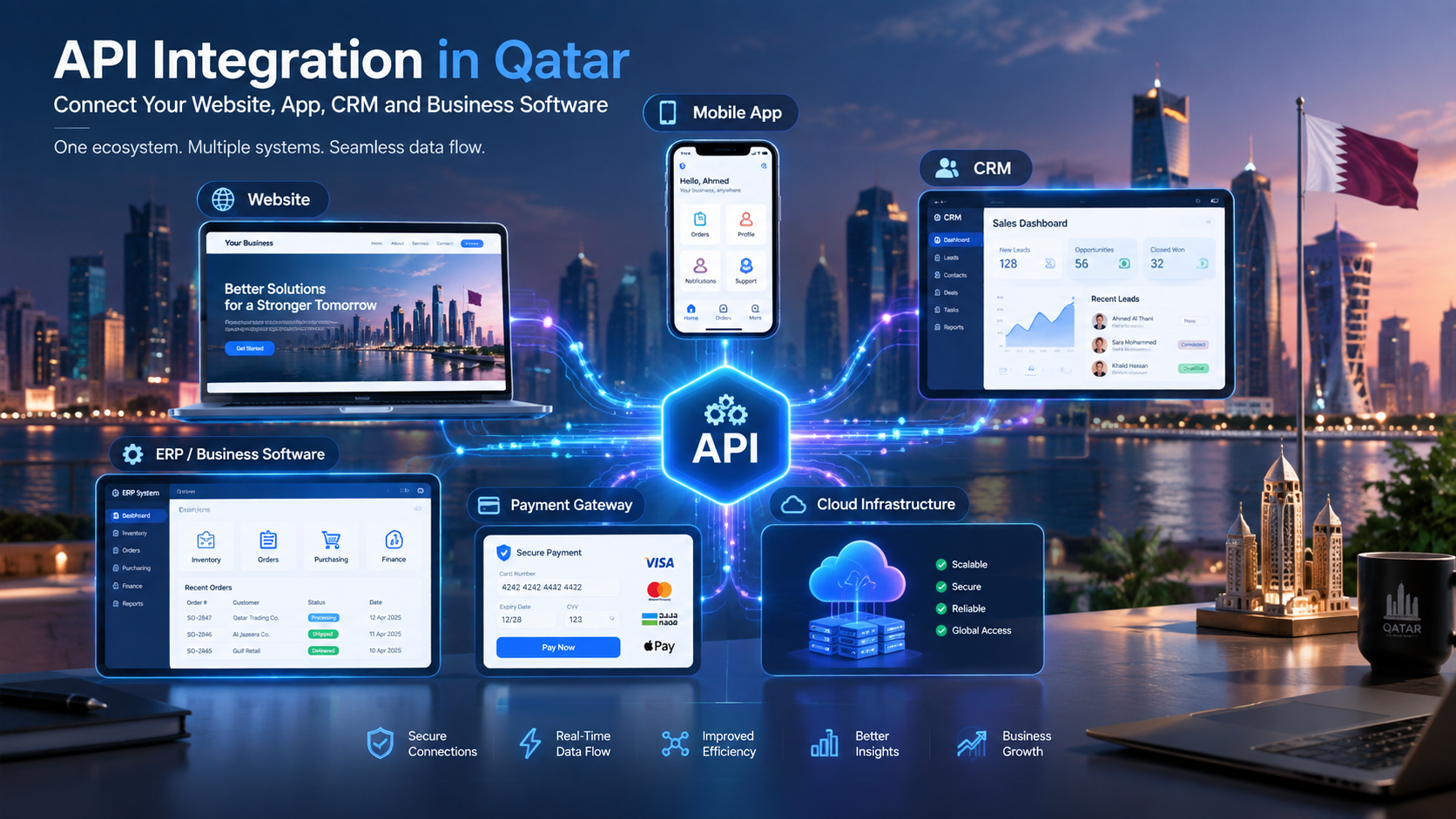
Insecure APIs
Business applications frequently use application programming interfaces (APIs) to connect websites, mobile apps, CRM platforms, ERP systems, payment services, and other tools.
An API can become a security weakness if it fails to verify permissions correctly, exposes unnecessary information, accepts untrusted input, or allows excessive requests.
For example, a customer should not be able to change an account identifier in an API request and retrieve another customer's order history.
Recommended controls:
Authenticate API clients appropriately.
Enforce authorization for every protected operation and data object.
Validate input on the server.
Limit request rates where appropriate.
Protect API credentials and rotate them when necessary.
Log security-relevant API activity.
Test APIs for common authorization and injection weaknesses.
Businesses integrating multiple platforms should include security requirements in their web application development and integration architecture.
Excessive User Permissions
Employees do not all need the same level of access. A sales representative may need customer details and sales opportunities, while an accountant may need financial records. Neither role should automatically receive unrestricted administrative access.
Excessive permissions increase the damage that can result from compromised accounts or mistakes.
Recommended controls:
Apply the principle of least privilege.
Define permissions according to job responsibilities.
Separate administrative duties from ordinary user activities.
Review privileged accounts periodically.
Remove unused accounts and permissions.
Unpatched Software and Vulnerable Dependencies
Business applications depend on operating systems, frameworks, libraries, plugins, databases, and third-party services. Known vulnerabilities in these components can provide attackers with opportunities to compromise systems.
Recommended controls:
Maintain an inventory of application components.
Monitor security advisories from relevant vendors.
Prioritize updates according to risk and exposure.
Test important updates before production deployment.
Replace unsupported software components.
Include dependency scanning in the development process.
Data Loss and Ransomware
Accidental deletion, malicious encryption, compromised administrator accounts, and infrastructure failures can make important information unavailable.
A backup is useful only if it is protected and can be restored successfully.
Recommended controls:
Establish backup schedules based on business needs.
Restrict access to backup systems.
Keep protected or isolated copies where appropriate.
Encrypt backup data when suitable.
Test restoration procedures regularly.
Define recovery time and recovery point objectives for critical applications.
Phishing and Social Engineering
Attackers may trick employees into revealing credentials, approving fraudulent requests, or downloading malicious files. Cloud applications can be affected even when the underlying cloud infrastructure is functioning correctly.
Recommended controls:
Train employees to identify suspicious messages.
Provide a simple process for reporting suspected phishing.
Use MFA and suitable email security controls.
Verify sensitive financial or account-change requests through trusted channels.
Limit the permissions available to compromised accounts.
Essential Cloud Security Measures for Business Applications
A strong cloud security strategy uses multiple layers of protection. No single tool can eliminate every risk.
1. Identity and Access Management
Identity and access management (IAM) controls determine who can access an application and what they can do.
An effective IAM strategy includes:
Individual user accounts rather than shared credentials.
Role-based access control (RBAC).
Multi-factor authentication.
Least-privilege permissions.
Secure administrator access.
Timely account deactivation.
Periodic access reviews.
Controlled service accounts for application-to-application communication.
The National Institute of Standards and Technology explains how access-control requirements differ across infrastructure, platform, and software cloud service models in its SP 800-210 cloud access-control guidance.
2. Data Encryption
Encryption helps protect information from unauthorized disclosure.
Businesses should consider encryption in two important states.
Encryption in transit: Protects information as it moves between users, applications, APIs, databases, and other services. HTTPS using appropriately configured TLS is a common example.
Encryption at rest: Protects stored information in databases, storage systems, and backups when supported and correctly configured.
Encryption should be supported by sound key management. Access to encryption keys must be restricted, and key rotation, recovery, and revocation procedures should be planned according to the environment's needs.
Encryption does not replace access controls. An application that legitimately decrypts information for an authorized user must still verify that the user has permission to view it.
3. Secure Application Development
Security should be incorporated throughout the software development lifecycle.
Developers should consider:
Input validation and output encoding.
Secure authentication and session management.
Server-side authorization checks.
Protection against injection vulnerabilities.
Secure error handling.
Dependency and secret scanning.
Security testing before major releases.
Separation of development, testing, and production environments.
Code review for security-sensitive changes.
Credentials and API keys should not be hard-coded into public source code or exposed in client-side application bundles.
A secure development process reduces the likelihood that common vulnerabilities will reach production.
4. Network Security
Cloud networks should be designed to limit unnecessary access to applications and infrastructure.
Useful controls can include private networking, restrictive firewall rules, network segmentation, secure administrative access, and web application firewalls where appropriate.
Databases should not normally be exposed directly to the public internet merely because a web application needs to use them. Instead, the application should access the database through a controlled connection with suitable authentication and permissions.
Network controls should complement application-level authorization rather than replace it.
5. Continuous Monitoring and Logging
Security monitoring helps organizations identify suspicious activity and investigate incidents.
Depending on the application, useful events to record include:
Successful and failed authentication attempts.
Privileged account activity.
Changes to access permissions.
Security configuration changes.
Unusual API request patterns.
Administrative actions.
Unexpected data exports.
Application errors associated with possible attacks.
Logs should be protected from unauthorized modification and retained for a period appropriate to operational, legal, and contractual requirements.
Monitoring should also include a defined response process. An alert has limited value if nobody is responsible for investigating it.
6. Backup and Disaster Recovery
Cloud providers offer different backup and recovery capabilities, but businesses remain responsible for understanding whether those capabilities meet their application requirements.
A recovery plan should specify:
Which systems and data must be backed up.
How frequently backups are created.
How long backup copies are retained.
Who can access or delete backups.
How recovery is performed.
How restoration is tested.
Which services must be restored first.
Two useful planning measures are the recovery time objective (RTO), which defines the target time for restoring a service, and the recovery point objective (RPO), which defines the acceptable amount of data loss measured in time.
For example, a company might decide that its order-processing system should be restored within a few hours and that only a limited period of recent transactions can be lost. The actual targets should be based on business impact, cost, and technical feasibility.
7. Vulnerability Management and Security Testing
A secure application needs ongoing assessment after launch.
Security activities may include vulnerability scanning, penetration testing, configuration reviews, dependency analysis, and targeted testing after major architectural changes.
Testing should be authorized, appropriately scoped, and conducted in a way that avoids unnecessary disruption to production services.
Identified issues should be recorded, assigned a severity, given an owner, and tracked through remediation and verification.
Cloud Security and the Shared Responsibility Model
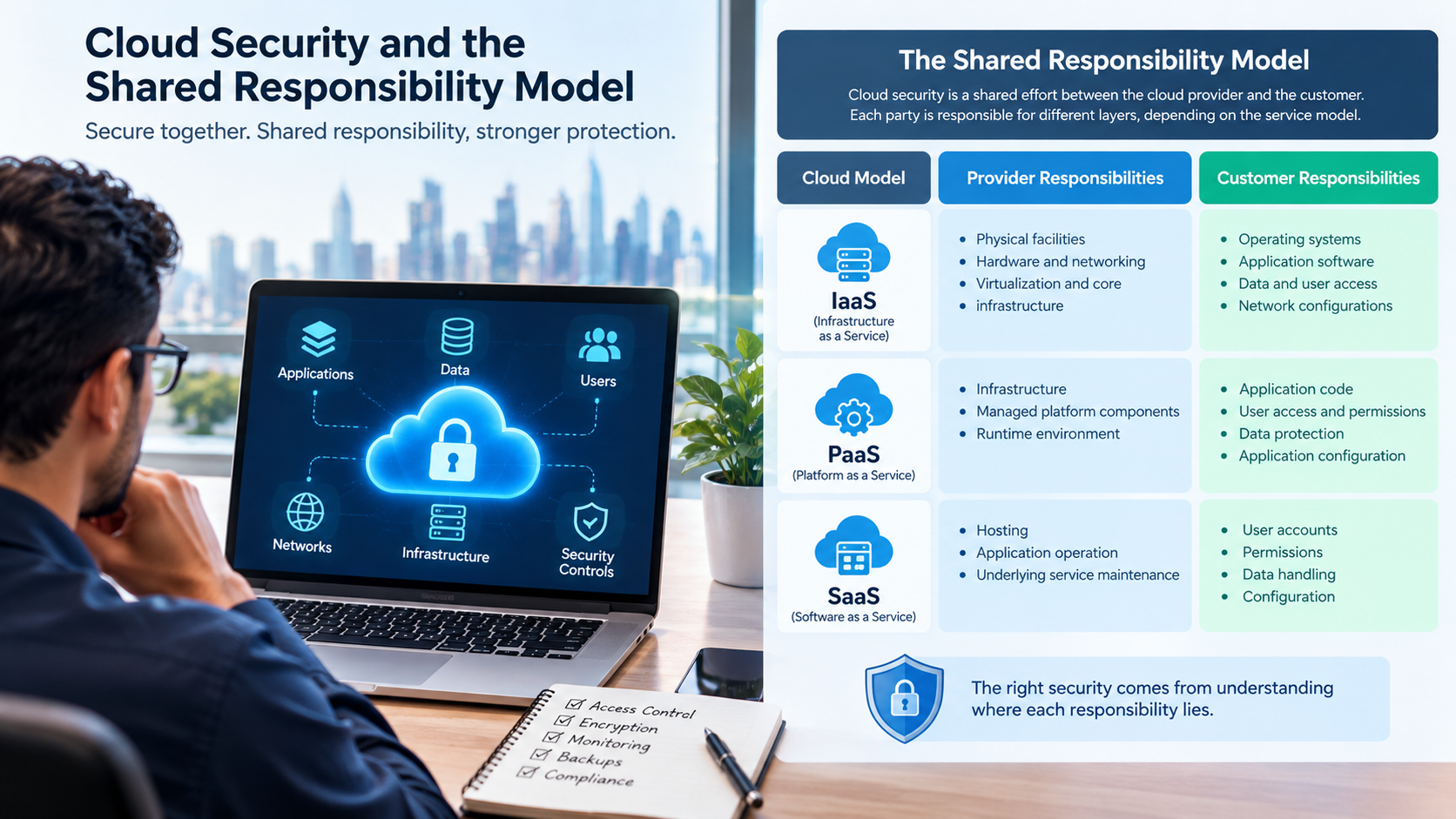
One of the most important cloud security concepts is the shared responsibility model.
Cloud providers protect certain parts of the service, while customers remain responsible for other aspects. The exact division depends on the service model, provider, product, and configuration.
Cloud model | Typical provider responsibilities | Typical customer responsibilities |
|---|---|---|
Infrastructure as a Service (IaaS) | Physical facilities, hardware, and underlying infrastructure | Operating systems, application software, identities, data, and many network configurations |
Platform as a Service (PaaS) | Infrastructure and managed platform components | Application code, user access, data protection, and application configuration |
Software as a Service (SaaS) | Hosting, application operation, and underlying service maintenance | User accounts, permissions, data handling, configuration, and appropriate use |
This is a general comparison, not a universal allocation of every control.
For example, a SaaS provider may manage the application servers, but a customer may still be responsible for removing access when an employee leaves, configuring external sharing, and protecting administrator accounts.
Businesses should review the cloud provider's documentation and contract to understand the actual division of responsibilities.
Cloud Security for Different Business Applications
Security controls should reflect what an application does and the consequences of its compromise.
CRM and Sales Management Software
CRM systems store customer details, enquiries, communication histories, quotations, and sales opportunities.
Important security measures include role-based access, secure APIs, audit logs, controlled data exports, and safeguards for integrations with email and messaging platforms.
A sales employee should generally access the customer records needed for their role without automatically receiving unrestricted access to all financial or administrative information.
ERP and Business Management Systems
ERP platforms can connect finance, purchasing, inventory, HR, sales, and operational reporting.
Because multiple departments share information, permission design and segregation of duties are particularly important. Sensitive actions, such as changing supplier bank details or approving payments, may require additional verification or independent approval.
Businesses implementing custom software development solutions should define access rules for each department and workflow before deployment.
HR and Payroll Applications
HR systems may contain employee contact details, employment documents, attendance information, salaries, and performance records.
Recommended controls include restricted access to personnel records, strong administrator authentication, secure document storage, controlled exports, and appropriate retention practices.
Managers should see the information required for their responsibilities, while payroll and HR administrators should receive only the permissions necessary for their work.
E-Commerce and Payment-Connected Applications
Online stores can handle customer accounts, orders, addresses, inventory, and payment-related workflows.
Security measures should cover customer authentication, checkout integrity, API permissions, administrative access, and protection against abuse.
Businesses should avoid storing sensitive payment data unless they have a clear, compliant reason and the appropriate security arrangements. Where possible, appropriately selected payment providers can reduce the amount of sensitive payment information handled directly by the application.
Mobile Applications Connected to the Cloud
Mobile applications often connect to cloud APIs and backend databases. Protecting the mobile interface alone is not enough.
The backend must verify permissions for every protected operation. Sensitive tokens should be stored using appropriate platform security features, API credentials should not be embedded as secrets in the application, and communication should use properly configured encrypted connections.
Galaxium Coding's mobile application development services can be considered by businesses planning connected mobile experiences that require secure communication with backend systems.
Cloud Security Considerations for Businesses in Qatar
Organizations in Qatar should evaluate cloud security in the context of their industry, customers, operational requirements, contracts, and applicable laws.
Understand Applicable Data Protection Requirements
Qatar's personal data protection framework includes Law No. 13 of 2016 on Protecting Personal Data Privacy. Businesses should assess how the law applies to their processing activities and determine whether additional sector-specific requirements or contractual obligations apply.
Read the official Qatar legal portal for legislation and consult qualified legal or compliance professionals when interpreting obligations for a specific business.
Cloud hosting location alone does not establish compliance. Organizations should also examine access arrangements, data transfers, processing purposes, retention, security safeguards, and contractual responsibilities.
Evaluate Cloud Provider and Hosting Arrangements
Before choosing a cloud service, businesses should understand:
Where relevant data is stored and processed.
Which provider personnel or subcontractors may access it.
How identities and administrative privileges are managed.
What encryption and backup capabilities are available.
How incidents are communicated and handled.
What happens to business data when a contract ends.
Which service-level and recovery commitments apply.
Requirements will differ between a small internal application and a platform processing sensitive or regulated information.
Plan for Arabic and English Business Workflows
Businesses serving customers in Qatar may operate applications in both Arabic and English. Security controls should work consistently across languages, user interfaces, and mobile devices.
For example, account recovery, approval notifications, and suspicious-login alerts should remain understandable to their intended users. Language support should not result in weaker authentication or inconsistent access restrictions.
Consider Industry-Specific Risks
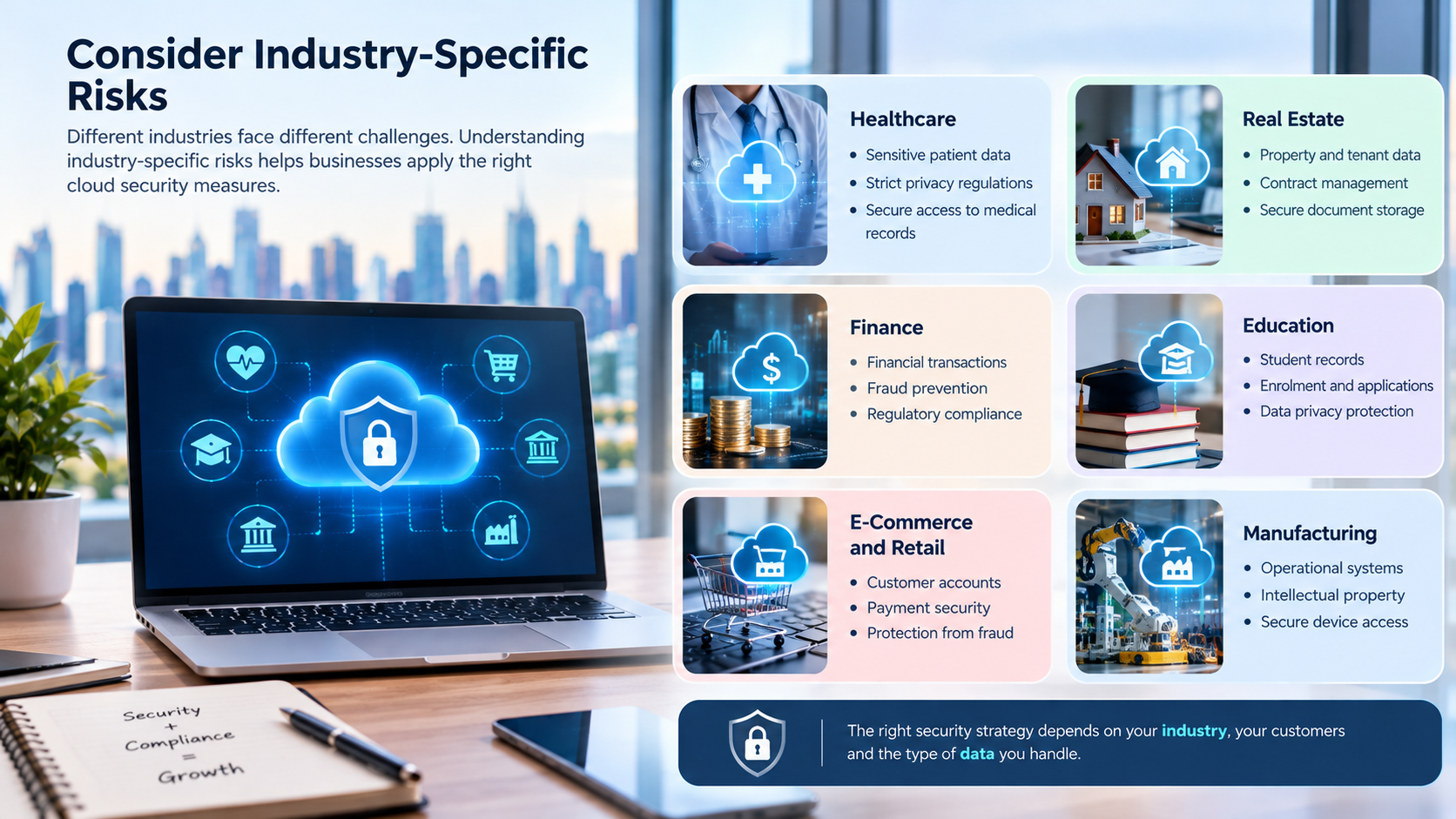
A real estate platform may need to protect contracts, customer enquiries, and property documents. A healthcare application may process sensitive patient information. A retail platform may need to secure orders and customer accounts.
The security plan should follow the information being processed and the consequences of unauthorized access, rather than applying the same settings to every application.
How to Implement Cloud Security Step by Step
Businesses do not need to implement every advanced security tool at once. A structured process helps prioritize the most important risks.
Step 1: Inventory Applications and Data
Identify cloud-hosted applications, databases, integrations, storage locations, user groups, and external service providers.
Determine which systems contain sensitive data and which services would cause the greatest disruption if unavailable.
Step 2: Perform a Risk Assessment
For each important application, assess threats such as account compromise, unauthorized data access, data loss, misconfiguration, and service interruption.
Prioritize risks based on likelihood, business impact, exposure, and existing controls.
Step 3: Establish Identity and Access Controls
Require MFA for privileged users, review administrator accounts, remove unnecessary access, and create role-based permissions.
Use separate identities for employees and services wherever appropriate, and avoid sharing administrator credentials.
Step 4: Secure Data and Infrastructure
Review public exposure, network rules, storage permissions, database access, encryption settings, and secret management.
Apply secure defaults and document exceptions that are necessary for business operations.
Step 5: Review Application Code and Integrations
Assess authentication, authorization, APIs, third-party libraries, and external connections.
Test whether users can access only their own permitted information and whether sensitive operations require suitable checks.
Step 6: Configure Monitoring and Backups
Enable relevant security logs and alerts. Assign responsibility for investigating incidents and responding to suspicious activity.
Create protected backups, document recovery steps, and conduct restoration tests.
Step 7: Test Before Deployment
Perform functional testing, security testing, permission checks, and recovery exercises appropriate to the application's risk.
Resolve critical issues before release and record any remaining risks that require formal acceptance.
Step 8: Maintain Security After Launch
Review access regularly, apply updates, investigate alerts, test backups, and reassess security when the application changes.
Cloud security is an ongoing operational responsibility rather than a one-time installation task.
Common Cloud Security Mistakes to Avoid
Even businesses using reputable cloud platforms can introduce weaknesses through poor configuration or incomplete processes.
Relying only on the cloud provider: Providers secure parts of their services, but customers still need to configure applications, manage identities, and protect data.
Giving every employee administrator access: Broad permissions increase the impact of compromised accounts and accidental changes.
Assuming encryption solves every problem: Encryption helps protect information, but it cannot prevent every form of misuse by an authorized account or vulnerable application.
Skipping backup restoration tests: A backup that cannot be restored within the required timeframe may not provide the protection the business expects.
Ignoring API security: A polished web or mobile interface does not prevent unauthorized requests sent directly to the backend.
Delaying updates: Unsupported components and known vulnerabilities can create avoidable exposure.
Treating compliance as a certificate: Compliance documentation can be useful evidence, but it does not automatically establish that an organization's own application is configured securely.
Failing to plan for incidents: Businesses should know who investigates an incident, who can isolate a compromised system, how data is recovered, and when customers or relevant authorities must be notified.
How Much Does Cloud Security Cost for Business Applications?
There is no single price for securing a business application. Costs depend on the application's complexity, hosting environment, sensitivity of the data, user base, integrations, regulatory obligations, and level of security assurance required.
Typical cost categories include:
Cost category | What it may cover |
|---|---|
Cloud infrastructure | Hosting, networking, storage, and security-related services |
Identity and access management | MFA, identity providers, privileged access controls, and account administration |
Monitoring | Log storage, alerting, security monitoring tools, and investigation |
Backup and recovery | Backup storage, recovery environments, and restoration testing |
Security testing | Vulnerability assessments, code analysis, and penetration testing |
Maintenance | Security patches, dependency updates, configuration reviews, and incident response |
Compliance support | Risk assessments, documentation, legal advice, and relevant audits |
A small application with limited users may need a relatively straightforward set of controls. A large ERP platform with several integrations and sensitive financial records will usually require more extensive planning, testing, and monitoring.
The best approach is to estimate security costs alongside development, hosting, maintenance, and recovery requirements rather than treating security as an optional expense after launch.
How to Choose a Cloud Security or Software Development Partner
A technology partner should be able to explain how security will be designed, implemented, tested, and maintained.
Before selecting a provider, ask:
How will user identities and permissions be managed?
How will sensitive data be encrypted and protected?
How will APIs and third-party integrations be secured?
What security testing will be performed before launch?
How will vulnerabilities and software updates be managed?
What backup and recovery procedures are included?
Which monitoring and incident-response responsibilities belong to each party?
How will security requirements change as the application grows?
Look for clear documentation, defined responsibilities, practical testing procedures, and an understandable maintenance plan. Avoid relying solely on broad claims that a system is completely secure.
Businesses planning connected cloud platforms can explore Galaxium Coding's cloud and DevOps solutions. The appropriate architecture should depend on the business's actual requirements, risk profile, and operational priorities.
The Future of Cloud Security for Business Applications
Cloud security continues to evolve as businesses adopt more automation, AI, connected devices, and distributed application architectures.
Several developments deserve attention.
Zero-Trust Security
Zero-trust approaches emphasize explicit verification, least-privilege access, and continuous evaluation of access conditions. Instead of assuming that a user or device is trustworthy because it is inside a network, systems make access decisions using appropriate identity and security signals.
Automated Security Monitoring
Automated tools can help identify configuration changes, unusual login patterns, suspicious API activity, and known vulnerabilities. Automation can speed up detection, but organizations still need sensible alert thresholds, clear response procedures, and human oversight where decisions carry significant consequences.
DevSecOps
DevSecOps integrates security checks into development and deployment workflows. Automated code analysis, dependency scanning, infrastructure configuration checks, and controlled deployment pipelines can help teams detect issues earlier.
Security for AI-Enabled Applications
AI-powered business applications may connect to documents, customer records, internal knowledge bases, and external services. These systems need traditional application controls as well as safeguards against unauthorized data retrieval, unsafe tool use, and inappropriate access to connected systems.
AI functionality should inherit the relevant permissions of the underlying user and application. It should not become an unrestricted route to confidential business data.
Final Thoughts
Cloud security for business applications requires more than choosing a reputable hosting provider. It involves protecting identities, controlling permissions, encrypting data, securing APIs, monitoring activity, maintaining software, and preparing for recovery when incidents occur.
For businesses in Qatar, the right strategy should also account for applicable data protection obligations, industry requirements, contractual commitments, and the needs of local users.
The most effective approach is to make security part of the application's design from the beginning and continue reviewing it throughout the software lifecycle. Businesses that combine practical safeguards with clear responsibilities and tested recovery procedures are better prepared to manage risk as their digital operations grow.
If your organization is planning a new business application, modernizing an existing platform, or connecting multiple cloud-based systems, explore Galaxium Coding's technology services or contact the team to discuss your requirements.
Frequently Asked Questions
1. What is cloud security for business applications?
Cloud security for business applications is the collection of controls, technologies, and practices used to protect cloud-hosted software, data, user accounts, APIs, and infrastructure against unauthorized access, data loss, and cyber threats.
2. What are the biggest cloud security risks for businesses?
Common risks include compromised accounts, weak passwords, misconfigured storage, excessive permissions, insecure APIs, unpatched software, phishing, ransomware, and inadequate backup or recovery procedures.
3. Is cloud software automatically secure?
No. Cloud providers protect their own parts of the service, but security also depends on customer configuration, application design, user permissions, data handling, and ongoing maintenance.
4. How can businesses protect cloud applications from unauthorized access?
Businesses can use MFA, role-based access control, least-privilege permissions, secure session management, individual user accounts, regular access reviews, and monitoring of suspicious activity.
5. Is encryption enough to secure a cloud application?
No. Encryption protects data in transit and at rest when implemented correctly, but it should be combined with authentication, authorization, secure development, monitoring, vulnerability management, and backup protection.
6. How often should businesses review cloud security?
Security should be monitored continuously where practical. Access permissions, cloud configurations, software vulnerabilities, and backup recovery procedures should also be reviewed periodically and after significant changes, incidents, or newly identified risks.
7. Does a business remain responsible for security when using SaaS software?
Yes. Although the SaaS provider typically manages the underlying service, customers may remain responsible for user access, data sharing, configuration, account security, and compliance with their own obligations. The precise division depends on the service and agreement.
8. What should Qatar businesses consider before selecting cloud services?
They should evaluate the provider's security controls, data storage and processing arrangements, access management, backup and recovery capabilities, incident procedures, contractual terms, and applicable Qatar data protection and industry requirements.
9. What is the difference between cloud security and cybersecurity?
Cybersecurity is the broader discipline of protecting systems, networks, applications, and information from digital threats. Cloud security focuses on risks and controls associated with cloud-based infrastructure, platforms, applications, and services.
10. Can custom business software be designed with cloud security from the beginning?
Yes. Security requirements can be incorporated into architecture, identity management, database design, API development, testing, deployment, monitoring, and maintenance. The controls should be selected according to the application's risks and business requirements.