Software Integration Services in Qatar: Connecting Your Business Systems
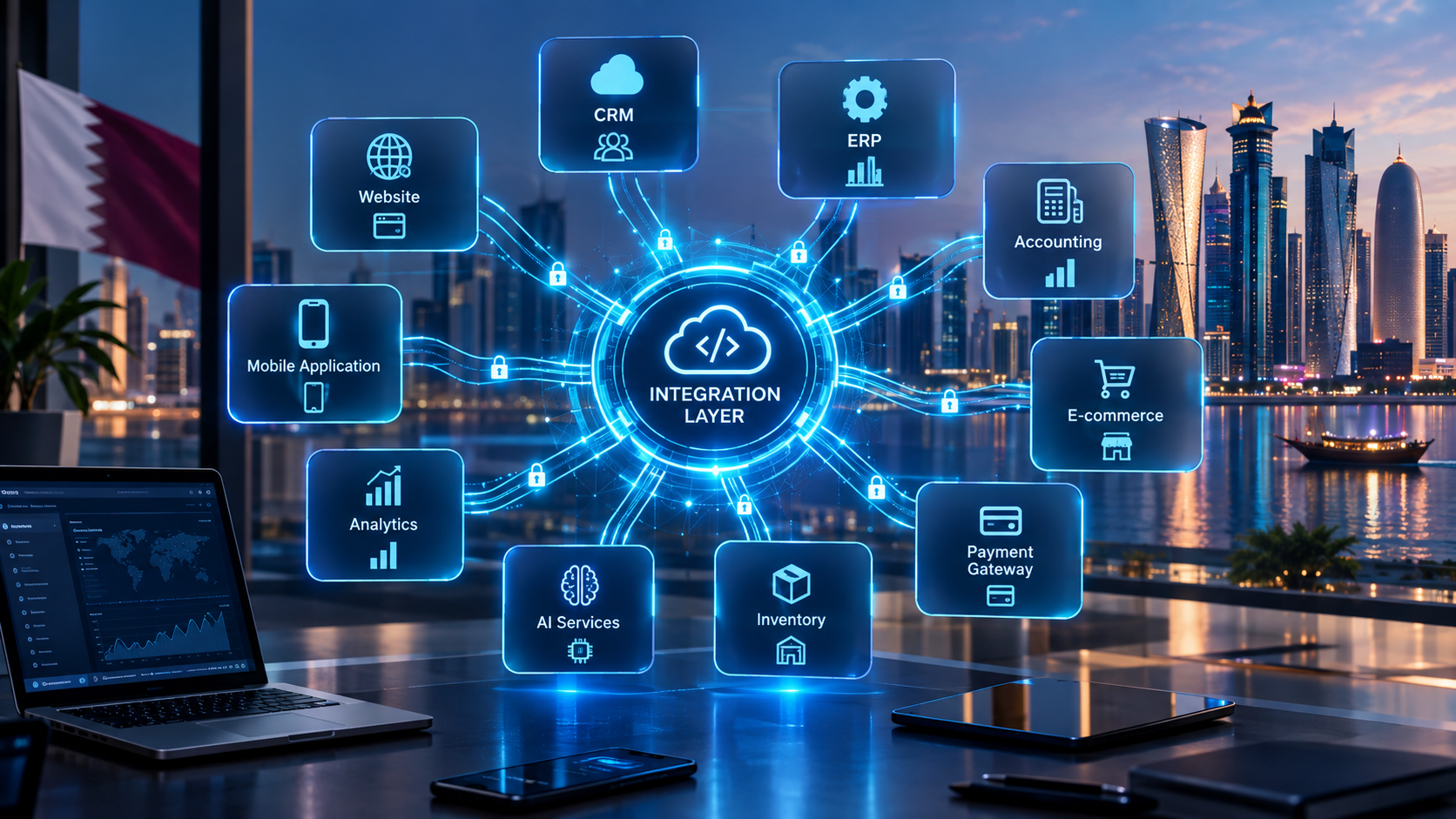
Software integration connects CRM, ERP, e-commerce, accounting, mobile and other business systems into a connected digital ecosystem.
Software Integration Services in Qatar: Connecting Your Business Systems
Businesses rarely use just one software system.
A company may have a website for customers, a CRM for sales, accounting software for finance, an ERP for operations, an HR platform for employees, an inventory system for stock, a payment gateway for transactions and a mobile application for customers or staff.
Each system may work well individually.
The challenge begins when these systems need to communicate with one another.
An employee may have to copy a customer from a website into a CRM. A sales order may need to be entered manually into an accounting system. Inventory information may need to be updated in several applications. Managers may have to combine information from different platforms before preparing a report.
This is where software integration services become important.
Software integration connects different applications, databases, APIs, cloud platforms and business systems so that information can move between them according to defined business rules.
For businesses in Qatar, integration can support workflows across sales, finance, operations, customer service, e-commerce, HR and management.
Businesses looking to build or modernize connected systems can also explore custom software development solutions designed around their specific workflows.
What Are Software Integration Services?
Software integration services involve connecting two or more software systems so they can exchange data or trigger actions.
The systems being connected could include:
CRM platforms
ERP systems
Accounting software
Websites
Web applications
Mobile applications
E-commerce platforms
Payment gateways
Inventory systems
HR software
Payroll systems
Customer databases
Email platforms
SMS services
Communication platforms
Cloud applications
Analytics platforms
AI services
Third-party APIs
A simple integration might transfer customer information from a website into a CRM.
A more advanced integration could connect an entire business workflow:
Website → CRM → ERP → Inventory → Payment → Accounting → Customer Notification
The objective is not simply to connect software.
The objective is to make the overall business process more connected and efficient.
Why Do Businesses Need Software Integration?
The need for integration usually appears when a business starts using multiple systems.
A small company might initially manage everything in one application or spreadsheet.
As the company grows, different departments often adopt specialized software.
For example:
Sales
The sales team uses a CRM to manage leads and customers.
Finance
The finance team uses accounting software to manage invoices and payments.
Operations
The operations team uses an ERP or business management system.
E-Commerce
The online store manages products and orders.
HR
The HR team manages employee information and attendance separately.
Customer Service
Customer support may operate through email, WhatsApp or another communication platform.
The problem is that these systems can create data silos.
The same customer might exist in several systems.
The same order might need to be entered more than once.
The same information may be stored in multiple places.
Integration can connect these systems so that information can move automatically where appropriate.
What Problems Can Software Integration Solve?
Software integration can address several common operational problems.
1. Repetitive Data Entry
Without integration, employees may have to enter the same information into multiple systems.
For example:
Customer submits website form
↓
Employee receives enquiry
↓
Employee opens CRM
↓
Employee creates lead
↓
Employee sends notification
With integration, the workflow could become:
Customer submits website form
↓
CRM automatically creates lead
↓
Sales employee receives notification
↓
Customer receives acknowledgement
This can reduce repetitive administrative work.
2. Duplicate Data
When information is maintained separately, different systems can contain different versions of the same customer or transaction.
Integration can help establish clearer data flows and reduce unnecessary duplication.
3. Delayed Information
Manual processes can create delays.
For example, an order may be received by an e-commerce system but not immediately reflected in inventory or accounting.
An integrated workflow can allow information to move between systems much faster.
4. Limited Visibility
Management may struggle to obtain a complete picture when information is spread across multiple platforms.
Integration can bring relevant information together for dashboards and reporting.
5. Manual Errors
Copying information from one system to another creates opportunities for mistakes.
Automated data exchange can reduce some forms of manual entry, although integrations themselves still require testing and monitoring.
How Does Software Integration Work?
There is no single integration architecture suitable for every business.
The correct approach depends on the software being connected, available APIs, data requirements, security requirements, business processes and expected transaction volume.
A basic architecture could look like this:
Application A → API → Integration Layer → API → Application B
For example:
Website → API → CRM
A more complex architecture might look like:
Website
↓
API / Integration Layer
↓
CRM
↓
ERP
↓
Accounting
↓
Analytics
The integration layer can contain business rules that determine what information is transferred, when it is transferred and how it should be transformed.
APIs and Software Integration
APIs are one of the most common technologies used for modern software integration.
An API allows one application to communicate with another according to defined rules.
For example, a website might request customer information from a CRM through an API.
A payment system may send transaction information to another application.
An e-commerce platform may send order information to an ERP.
Modern API management platforms can also provide capabilities for publishing, securing, monitoring and managing APIs. Microsoft’s current API Management documentation, for example, covers API gateways, authentication, authorization, policies and API lifecycle management.
For businesses with APIs that need structured management, cloud and DevOps solutions can form part of a broader integration architecture.
Common Types of Software Integration
Software integration can take different forms depending on the systems and business requirements.
API Integration
API integration connects applications through APIs.
Common examples include:
CRM APIs
Payment APIs
E-commerce APIs
Accounting APIs
Maps APIs
Communication APIs
AI APIs
Government or third-party service APIs where officially supported
API integration is particularly useful when applications need real-time or near-real-time communication.
Database Integration
In some environments, systems may exchange information through databases or controlled data-access mechanisms.
Database integration requires careful consideration of:
Data structure
Permissions
Security
Data consistency
Performance
Backup
Ownership
Synchronization
Direct database access should not automatically be assumed to be the best solution. In many modern architectures, controlled APIs provide a clearer integration boundary.
Cloud Integration
Businesses increasingly use cloud-based applications.
Integration may connect:
Cloud CRM
Cloud ERP
Cloud storage
Cloud databases
Cloud analytics
Cloud communication services
Cloud AI platforms
Cloud integration can allow distributed systems to communicate without requiring all applications to operate from the same infrastructure.
Application Integration
Application integration connects different software applications to support a particular business workflow.
For example:
CRM → ERP → Accounting
A sales representative creates a customer and order in the CRM.
The integration sends relevant information to the ERP.
The ERP processes the order.
Accounting receives the required financial information.
E-Commerce Integration
E-commerce businesses frequently require multiple systems to work together.
A typical workflow can look like:
Customer places order
↓
E-commerce website
↓
Payment
↓
Inventory
↓
Warehouse
↓
Delivery
↓
Accounting
↓
Customer notification
Without integration, employees may have to transfer information manually between different platforms.
Mobile Application Integration
Mobile applications often need access to the same business data used by websites and internal software.
A connected architecture could look like:
Website → Backend/API ← Mobile App
The backend can then communicate with:
CRM
ERP
Inventory
Payment systems
Customer databases
Analytics
AI services
Businesses planning connected mobile experiences can explore mobile application development services alongside their broader integration requirements.
Examples of Software Integration for Qatar Businesses
Software integration can be applied across many industries.
Retail
A retail company might connect:
E-Commerce → Inventory → POS → Accounting → CRM
When a customer purchases a product online, the system can update relevant records across connected platforms.
Real Estate
A real estate company could connect:
Website → Lead Management → CRM → Sales Team → Customer Notifications
When a visitor submits an enquiry, the lead can be transferred to the CRM and assigned to the appropriate sales representative.
Hospitality
A hospitality business may connect:
Website
Booking system
Payment gateway
Customer database
CRM
Marketing platform
Accounting system
The goal is to reduce unnecessary manual movement of booking and customer information.
Healthcare
Healthcare-related systems may involve:
Appointment platforms
Patient portals
Billing
Notifications
Internal management systems
Reporting
Because healthcare information can be sensitive, security, authorization and applicable regulatory requirements need particular attention.
Education
An education organization may need to connect:
Website → Student Registration → Student Management → Fee System → Notifications
A connected system can reduce repeated data entry and improve administrative workflows.
Logistics
A logistics company could integrate:
Order → Warehouse → Delivery → Tracking → Customer Notification → Accounting
Each stage can exchange relevant information with the next system.
Professional Services
A consulting or professional-services company may connect:
Website → CRM → Proposal → Contract → Invoice → Accounting
This can create a more continuous workflow from lead generation through billing.
Software Integration for CRM and ERP Systems
CRM and ERP systems are frequently at the center of business integration projects.
A CRM generally focuses on customer-related activities such as:
Leads
Contacts
Sales opportunities
Customer communication
Sales pipelines
An ERP may manage:
Finance
Inventory
Procurement
Operations
HR
Orders
Reporting
Connecting the two can create a more complete business workflow.
For example:
Website enquiry
↓
CRM lead
↓
Sales opportunity
↓
Customer
↓
ERP order
↓
Inventory
↓
Invoice
↓
Accounting
The exact workflow depends on the business and software platforms.
Website and Software Integration
A modern business website does not have to operate as an isolated information page.
It can connect to internal business systems.
A website may communicate with:
CRM
ERP
Payment gateway
Inventory
Booking software
Customer accounts
Marketing platforms
Analytics
AI services
For example:
Website enquiry
↓
CRM
↓
Sales notification
↓
Follow-up
↓
Customer record
This type of architecture can turn a website into an active part of the business operation.
Businesses requiring connected browser-based systems can also consider web application development instead of treating the website and internal business software as completely separate environments.
Payment Integration
Payment integration is another common requirement.
An online business may need its website or application to communicate with a payment service.
A typical workflow could be:
Customer
↓
Checkout
↓
Payment Gateway
↓
Payment Confirmation
↓
Order System
↓
Inventory
↓
Accounting
The exact payment architecture depends on the payment provider, supported APIs, transaction requirements and security controls.
Payment integration should be tested carefully because errors can affect both customer experience and financial records.
WhatsApp, Email and Notification Integration
Customer communication is another area where integration can create useful workflows.
For example:
Website enquiry
↓
CRM
↓
Notification
↓
Sales Representative
A business may also use automated notifications for:
Order confirmations
Appointment reminders
Payment notifications
Delivery updates
Customer support
Lead follow-up
Internal alerts
The availability and implementation of specific communication integrations depend on the provider's current APIs, permissions and policies.
AI and Software Integration
Artificial intelligence can also become part of an integrated software ecosystem.
Instead of operating as a completely separate AI tool, AI can be connected to business systems where appropriate.
For example:
Customer message
↓
AI
↓
CRM
↓
Customer information
↓
Business rules
↓
AI response
↓
Customer
Other potential applications include:
AI-powered customer support
Lead qualification
Document processing
Data analysis
Internal knowledge assistants
Voice agents
Product recommendations
Automated reporting
However, AI integration requires careful consideration of data access, permissions, accuracy, security and human oversight.
The AI should only access the information it is authorized to use.
What Technologies Are Used for Software Integration?
The technology stack depends on the project.
Common components can include:
REST APIs
GraphQL
SOAP
Webhooks
JSON
XML
OAuth
API gateways
Authentication services
Cloud services
Databases
Message queues
Workflow engines
Serverless functions
Integration platforms
Monitoring systems
Modern API management platforms can support multiple API styles and integration patterns. Microsoft Azure API Management, for example, currently documents support for REST APIs and integration scenarios involving SOAP, WebSocket and GraphQL APIs.
Webhooks
A webhook allows one system to notify another system when a particular event occurs.
For example:
Payment completed
↓
Webhook
↓
Order system receives event
↓
Order status updated
Webhooks can be useful when a business needs event-driven communication rather than repeatedly checking another system for changes.

Security in Software Integration
Integration increases connectivity, but connectivity also increases the importance of security.
Every connection between systems should be evaluated carefully.
Important areas include:
Authentication
The system should verify who or what is making the request.
Authorization
Authentication alone is not enough.
The system should also determine what the user or application is allowed to access.
Encryption
Sensitive information should be protected during transmission and, where appropriate, at rest.
API Security
APIs should be designed and protected according to their risk profile.
Access Control
Applications should receive only the permissions they actually need.
Logging
Important integration events should be logged where appropriate so problems can be investigated.
Monitoring
Failed requests, unusual traffic and system errors should be monitored.
Secrets Management
API keys, tokens and credentials should not be casually stored in application code.
Modern API-management systems can provide mechanisms for authentication and authorization, including OAuth-based approaches.
For businesses in Qatar, security planning should also consider applicable contractual, industry and legal requirements rather than assuming that one security model fits every organization.
Data Mapping and Transformation
One of the most overlooked parts of integration is data mapping.
Two systems may store the same concept differently.
For example:
System A
customer_name
System B
fullName
The integration needs to understand that these fields represent the same information.
Other differences can include:
Date formats
Currency formats
Address structures
Customer IDs
Product IDs
Status values
Tax information
Phone numbers
Language fields
Data transformation may therefore be required between systems.
A good integration project defines these mappings before development begins.
Real-Time vs Batch Integration
Not every integration needs to operate in real time.
Real-Time Integration
Information moves shortly after an event occurs.
Example:
Customer pays → Payment confirmed → Order updated
This is useful when immediate information is important.
Batch Integration
Information is transferred periodically.
Example:
Every night → Sales data transferred to reporting system
Batch integration may be suitable when real-time information is unnecessary.
The right choice depends on business requirements, system capabilities, cost, performance and operational needs.
How Much Do Software Integration Services Cost in Qatar?
There is no universal software integration price.
The cost can vary significantly depending on the project.
Important factors include:
Number of systems
Number of APIs
API quality
Data volume
Integration complexity
Real-time requirements
Security requirements
Authentication
Data transformation
Custom business rules
Existing infrastructure
Testing requirements
Cloud infrastructure
Monitoring
Documentation
Maintenance
Number of users
Number of branches
Third-party licensing
Legacy systems
A simple two-system integration can be very different from a multi-system enterprise integration.
For example:
Integration | Relative Complexity |
|---|---|
Website → CRM | Lower |
Website → CRM → Email | Low to moderate |
E-commerce → Inventory | Moderate |
CRM → ERP → Accounting | Moderate to high |
ERP → CRM → Mobile App → Analytics | High |
Enterprise multi-system integration | Potentially very high |
The correct way to estimate a project is to understand the actual systems, workflows, data and integration requirements before development begins.
Software Integration Implementation Process
A structured integration project can generally follow these stages.
Step 1: Identify the Business Problem
Start with the workflow rather than the technology.
Ask:
What is currently manual?
Where is information duplicated?
Where do delays occur?
Which systems need to communicate?
Which employees are affected?
Step 2: Map Existing Systems
Document the current software environment.
For example:
Website
↓
CRM
↓
ERP
↓
Accounting
↓
Reporting
Identify what each system does and where information currently lives.
Step 3: Identify Integration Requirements
Determine:
What data needs to move?
In which direction?
How frequently?
What triggers the transfer?
Which system is the source of truth?
What happens when a request fails?
Step 4: Review Available APIs
Before building a custom connector, check whether the existing systems provide suitable APIs, webhooks, SDKs or integration mechanisms.
Step 5: Design the Architecture
Define how the systems will communicate.
The architecture may include:
APIs
API gateway
Backend services
Webhooks
Databases
Message queues
Authentication
Monitoring
Step 6: Define Data Mapping
Determine how fields and values from one system correspond to another.
Step 7: Build the Integration
Develop the required connectors, APIs, workflows and transformation logic.
Step 8: Test
Testing should cover:
Successful requests
Failed requests
Invalid data
Authentication
Authorization
Duplicate events
Network failures
API limits
Data consistency
Performance
Security
Step 9: Deploy
Deploy the integration carefully, preferably with appropriate staging and production environments.
Step 10: Monitor and Maintain
Integration is not finished simply because it works on launch day.
APIs can change.
Third-party services can change.
Credentials can expire.
Business requirements can evolve.
Monitoring and maintenance are therefore important parts of long-term integration.
Common Software Integration Mistakes
1. Integrating Systems Without Understanding the Workflow
Connecting two systems does not automatically improve a business process.
First understand what the process should accomplish.
2. Ignoring Data Ownership
Businesses should know which system is the authoritative source for important information.
For example, if both CRM and ERP can edit customer information, the integration needs clear rules.
3. Treating Security as an Afterthought
Security should be included during architecture and development rather than added only after integration is complete.
4. Ignoring Error Handling
What happens when an API is unavailable?
What happens when payment succeeds but the order system does not respond?
A reliable integration needs defined failure-handling procedures.
5. Not Monitoring Integrations
An integration can silently fail if nobody monitors it.
Monitoring should identify relevant failures and operational problems.
6. Building Too Much at Once
Businesses do not always need every possible integration immediately.
A phased approach can be more practical.
Start with the workflows that provide the clearest operational value.
Custom Integration vs Off-the-Shelf Integration Platforms
Businesses generally have several options.
Approach | Suitable When |
|---|---|
Built-in integration | Software already supports the required connection |
Integration platform | Multiple standard applications need to communicate |
Custom API integration | Specific business logic is required |
Custom software | Integration is part of a larger business system |
Hybrid approach | Some connections are standard while others are highly customized |
There is no universally correct choice.
A standard integration platform can be useful for common workflows.
Custom development can become more appropriate when the business requires specialized logic, unique workflows, legacy-system connectivity or a highly controlled architecture.
How to Choose a Software Integration Company in Qatar
Choosing an integration provider involves more than asking whether the company can connect two APIs.
Consider the following.
Technical Experience
Ask whether the provider understands:
APIs
Databases
Cloud systems
Authentication
Security
Webhooks
Integration architecture
Testing
Monitoring
Understanding of Your Business
A technically correct integration can still be a poor solution if it does not match the actual business workflow.
Documentation
The provider should document important integration components, configurations and workflows.
Security Approach
Ask how authentication, authorization, credentials and sensitive data will be handled.
Scalability
Consider whether the architecture can support future growth.
Maintenance
Clarify who will maintain the integration when third-party APIs change.
Support
Ask about:
Bug fixing
Monitoring
Updates
Technical support
Future integrations
System changes
Businesses can review Galaxium Coding's projects and portfolio when evaluating the company's broader software and technology work.
Why Software Integration Matters for Digital Transformation in Qatar
Digital transformation is not simply about purchasing more software.
A company can have excellent individual applications and still operate inefficiently if those applications are disconnected.
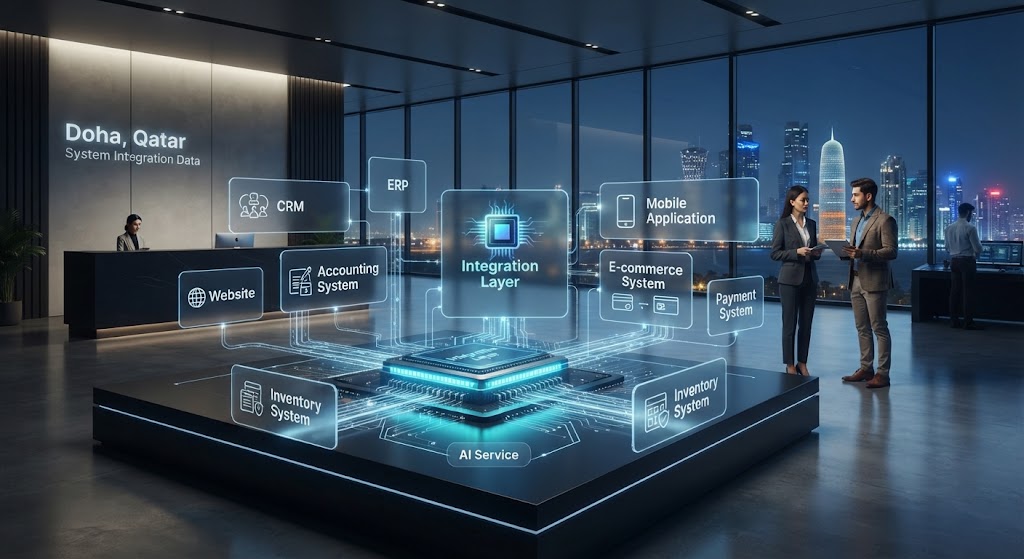
The bigger opportunity is to create a connected technology environment.
For example:
Website
↕
CRM
↕
ERP
↕
Accounting
↕
Inventory
↕
Mobile App
↕
AI
↕
Analytics
This creates a more connected digital ecosystem.
For Qatar-based businesses, the exact architecture should be based on the company's industry, operational requirements, customer expectations, technology environment and applicable requirements.
The objective should not be to integrate everything simply because integration is technically possible.
The objective is to connect the systems that genuinely need to communicate.
What Does a Connected Business System Look Like?
Consider an online retailer.
A customer places an order.
Stage 1: Customer
The customer orders through the website.
Stage 2: Payment
The payment system confirms the transaction.
Stage 3: Inventory
The inventory system updates stock.
Stage 4: Operations
The warehouse receives the required information.
Stage 5: Delivery
The delivery process begins.
Stage 6: Accounting
Relevant transaction information reaches the accounting system.
Stage 7: Customer Notification
The customer receives an order confirmation or delivery update.
Stage 8: Analytics
Management can analyze sales and operational data.
The important point is that the business is not simply using eight different pieces of software.
It is creating one connected workflow across multiple systems.
Why Choose Galaxium Coding for Software Integration?
Galaxium Coding is a Qatar-focused technology company working across areas including custom software, web applications, mobile applications, cloud solutions, business automation, AI and API-based integrations.
Software integratio n often sits between several of these capabilities.
A business may need:
A custom backend
Web application development
Mobile application development
API integration
CRM connectivity
ERP integration
Cloud infrastructure
AI integration
Business automation
Data dashboards
The right solution depends on the existing technology environment and the business objective.
Galaxium Coding can approach integration as part of the wider software ecosystem rather than treating every connection as an isolated technical task.
Businesses can learn more about Galaxium Coding or explore its wider technology services before planning an integration project.
Final Thoughts
Software integration services can help businesses move from disconnected applications toward connected digital workflows.
The value is not simply in making systems communicate.
The real value comes from connecting the right systems, the right data and the right business processes.
A successful integration strategy should consider:
Business workflows
APIs
Data mapping
Security
Authentication
Error handling
Monitoring
Scalability
Maintenance
Cost
Future requirements
For a business in Qatar, the best integration architecture will depend on its industry, existing software, operational model and growth plans.
The first step is therefore not to ask, “Which integration technology should we use?”
A better starting question is:
“Which business process should become more connected, and what systems need to communicate to make that happen?”
Once that is clear, the appropriate integration architecture can be designed around the actual business.
If your business has disconnected CRM, ERP, accounting, website, mobile, e-commerce or other software systems, you can contact Galaxium Coding to discuss the integration requirements and explore a suitable technical approach.
Frequently Asked Questions
What are software integration services?
Software integration services connect different applications, databases, APIs and business systems so they can exchange information or trigger business processes.
What systems can be integrated?
Depending on available integration capabilities, businesses can connect CRM, ERP, accounting, websites, mobile apps, e-commerce platforms, payment systems, inventory software, HR systems, cloud services and other applications.
Is API integration the same as software integration?
Not exactly. API integration is one method of software integration. Software integration can also involve webhooks, databases, middleware, integration platforms, message queues and other technologies.
How much does software integration cost in Qatar?
There is no fixed price. Cost depends on the number and complexity of systems, APIs, data volume, security, custom business logic, testing, infrastructure and maintenance requirements.
Can old software be integrated with new software?
Potentially, yes. The feasibility depends on the capabilities of the existing software. Legacy systems may require custom connectors, middleware, database integration or other approaches.
Can CRM and ERP systems be integrated?
Yes. CRM and ERP systems can often be integrated so customer, sales, order, inventory and financial information can move between systems according to defined business rules.
Can a website be integrated with a CRM?
Yes. A website can potentially send enquiries, registrations, customer information or other events to a CRM through an API or another supported integration method.
Can mobile applications connect to business software?
Yes. Mobile applications commonly communicate with backend APIs that connect to CRM, ERP, databases, payment systems and other business platforms.
Is software integration secure?
Integration can be designed with security controls such as authentication, authorization, encryption, access restrictions, secure credential management, logging and monitoring. The appropriate controls depend on the systems and data involved.
How long does software integration take?
The timeline depends on the number of systems, API availability, data complexity, custom business rules, security requirements, testing and deployment requirements. A simple integration may be significantly faster than an enterprise-wide integration project.
Does software integration eliminate manual work completely?
Not necessarily. Integration can automate suitable parts of a workflow, but some processes still require human decisions, approvals, exception handling or customer interaction.
Should every business integrate all its software?
No. Integration should be based on actual business requirements. Connecting systems that do not need to communicate can add unnecessary complexity and cost.
What should a business do before starting an integration project?
Start by documenting the current workflow, identifying disconnected systems, determining where manual work occurs, identifying the data that needs to move and defining the desired outcome. A technical assessment can then determine the appropriate integration architecture.