Custom ERP vs Ready-Made ERP: Which Is Better?
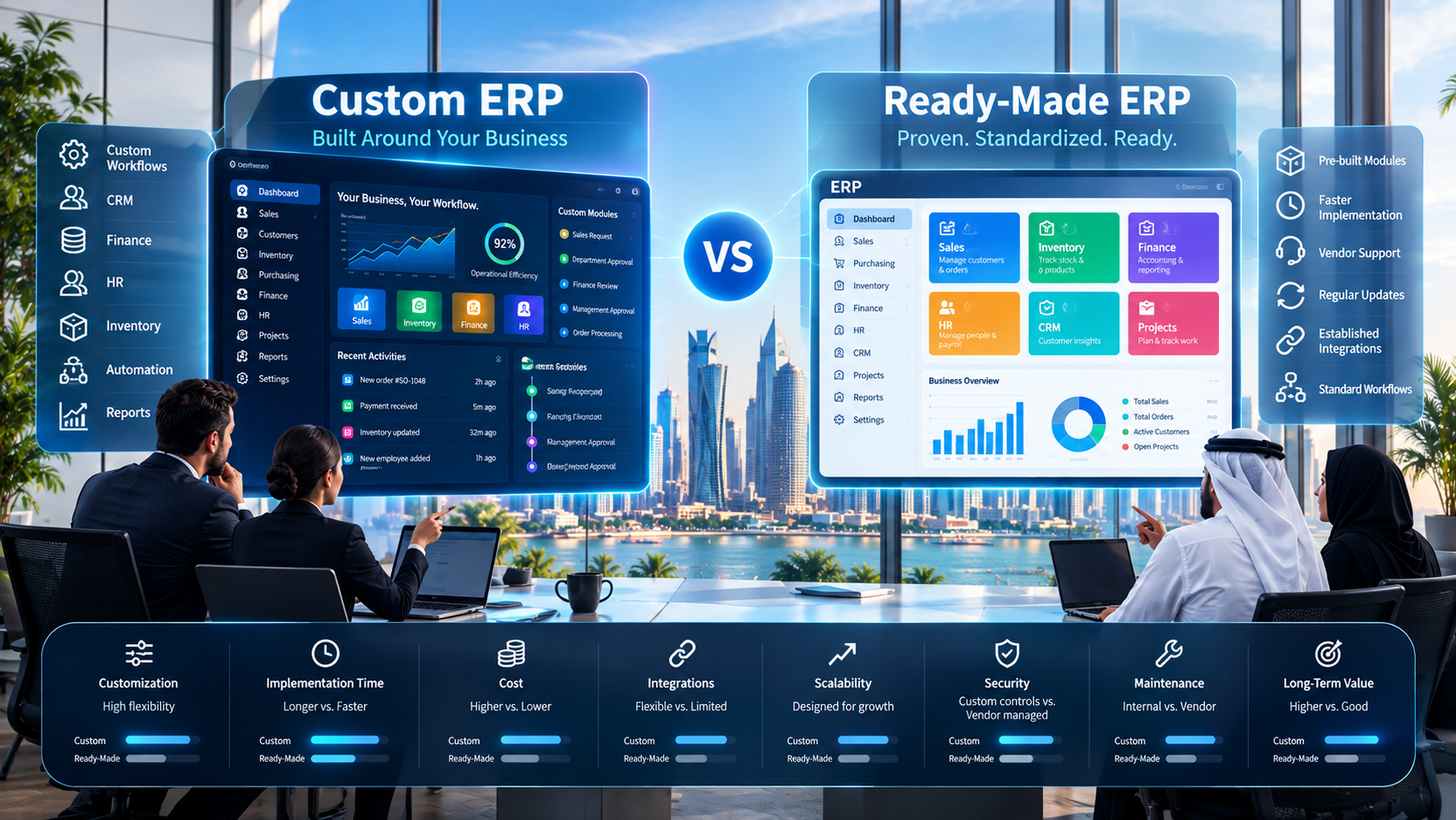
Custom ERP offers greater control over business-specific workflows, while ready-made ERP provides established functionality and potentially faster implementation. The right approach depends on business requirements.
Custom ERP vs Ready-Made ERP: Which Is Better?
Choosing an Enterprise Resource Planning (ERP) system is one of the more significant technology decisions a growing business can make.
An ERP can connect sales, finance, accounting, inventory, procurement, HR, CRM, projects, reporting, and other business operations through a centralized platform.
But there is an important decision to make before implementation:
Should you buy a ready-made ERP or build a custom ERP around your business?
Both approaches have advantages and limitations.
A ready-made ERP provides an existing platform with pre-built functionality, established workflows, integrations, and vendor support. A custom ERP can be designed around a company's specific processes, data structures, integrations, reporting requirements, and future plans.
The right decision depends on what the business actually needs.
This guide compares custom ERP vs ready-made ERP across cost, flexibility, implementation, integrations, scalability, security, maintenance, business processes, and long-term strategy.
What Is an ERP System?
ERP stands for Enterprise Resource Planning.
An ERP system connects multiple business functions through a shared technology platform.
Depending on the organization, an ERP may include:
Accounting and finance
Sales
CRM
Inventory
Procurement
Human resources
Payroll
Project management
Customer management
Reporting
Business analytics
Document management
Workflow automation
Mobile applications
AI-powered features
For example, a sales transaction could move through a connected workflow:
Customer → Sales → Inventory → Invoice → Payment → Accounting → Management Reporting
Instead of employees maintaining separate information in spreadsheets and disconnected applications, an ERP can create a centralized environment for managing business data.
Businesses evaluating a broader ERP strategy can also explore Galaxium Coding's software development services when standard business software does not fully match their requirements.
What Is a Ready-Made ERP?
A ready-made ERP is an existing software platform developed for a broad market.
The software typically includes a collection of pre-built modules and features that businesses can configure according to their requirements.
A ready-made ERP may provide:
Accounting
Sales management
Inventory
Procurement
HR
Payroll
CRM
Reporting
Project management
User management
Workflow tools
Integrations
The business purchases or subscribes to the software and then configures the available functionality.
Advantages of Ready-Made ERP
A ready-made ERP can provide:
Faster implementation
Existing functionality
Established workflows
Existing integrations
Vendor support
Regular updates
Predictable software capabilities
Lower initial development effort
For businesses with relatively standard processes, these characteristics can make implementation simpler.
Limitations of Ready-Made ERP
The main limitation is that the software has already been designed.
Although many ERP platforms provide configuration and customization options, there may still be boundaries around:
Business workflows
Database structures
Reporting
User interfaces
Integrations
Automation
Industry-specific requirements
If the company's processes are significantly different from the ERP's standard workflows, employees may have to adapt their processes to the software.
What Is a Custom ERP?
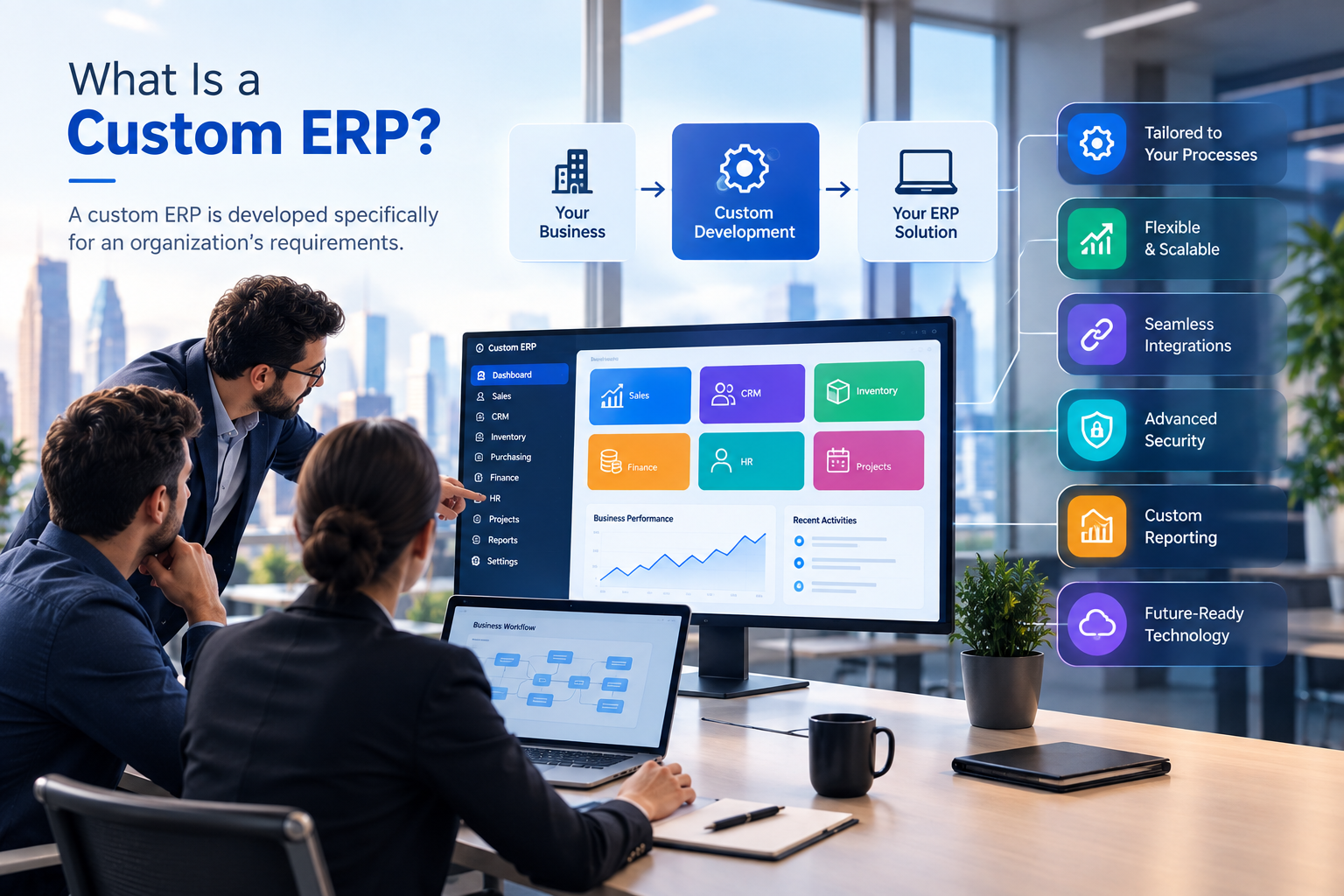
A custom ERP is developed specifically for an organization's requirements.
Instead of selecting an existing platform and adapting the business to it, the development process starts by understanding how the company operates.
The ERP can then be designed around:
Business workflows
Departments
User roles
Approval processes
Reporting requirements
Data structures
Integrations
Automation
Security requirements
Future expansion
A custom ERP can be developed as a complete platform or as a phased system where additional modules are introduced over time.
Advantages of Custom ERP
A custom ERP can provide:
High customization
Greater control over workflows
Custom reporting
Business-specific automation
Specialized integrations
Industry-specific functionality
Flexible user roles
Custom dashboards
Greater control over the technology architecture
Limitations of Custom ERP
Custom ERP development also requires more planning and technical involvement.
Potential considerations include:
Higher initial development effort
Longer development timelines
Requirement analysis
UI/UX design
Testing
Data migration
Deployment
Ongoing maintenance
Security updates
Future development
A custom ERP therefore requires a long-term technology strategy rather than treating development as a one-time project.
Custom ERP vs Ready-Made ERP: Quick Comparison
Factor | Custom ERP | Ready-Made ERP |
|---|---|---|
Development | Built specifically for the business | Already developed |
Initial development effort | Generally higher | Generally lower |
Implementation | Can take longer | Often faster |
Customization | Very high | Depends on platform |
Workflow flexibility | Designed around business processes | Based on existing platform |
Integrations | Can be built around requirements | Depends on available integrations |
Scalability | Can be designed for future requirements | Depends on vendor/platform |
Reporting | Fully customizable | Based on available reporting tools |
Updates | Managed by business/development partner | Usually managed by vendor |
Maintenance | Requires technical maintenance | Usually vendor-supported |
Ownership/control | Greater control over solution | Primarily controlled by provider |
Best fit | Specialized or complex requirements | Standardized business requirements |
The table shows why there is no universal answer to the question of which ERP approach is better.
The more important question is:
Which approach fits the business requirements?
Custom ERP vs Ready-Made ERP: Detailed Comparison
1. Cost
Cost is one of the first factors businesses consider when choosing an ERP.
A ready-made ERP may have a lower initial implementation or development requirement because the core platform already exists.
However, the total cost may include:
Software licenses
Monthly or annual subscriptions
Number of users
Additional modules
Customization
Integrations
Implementation
Data migration
Training
Support
Upgrades
Additional storage or infrastructure
Custom ERP development generally requires a larger initial investment because the software must be designed and developed for the organization.
However, the financial comparison should not stop at the initial development cost.
Businesses should consider the total cost of ownership.
For example:
Ready-Made ERP
Initial software cost
Implementation
Customization
Subscription
Additional modules
Integrations
Training
Support
Custom ERP
Requirements analysis
Design
Development
Testing
Deployment
Infrastructure
Maintenance
Future development
The cheaper initial option is not automatically the cheaper long-term option.
The correct comparison depends on the business's expected usage, growth, customization requirements, and duration of use.
2. Customization
Customization is one of the biggest differences between the two approaches.
A ready-made ERP starts with functionality that has already been developed.
Businesses can often configure:
Users
Permissions
Workflows
Fields
Reports
Dashboards
Modules
But customization depends on what the platform allows.
A custom ERP starts from the organization's requirements.
This means the system can be designed around specific processes.
Example
Imagine a company with this approval workflow:
Sales Request → Department Approval → Finance Review → Management Approval → Order Processing
If a ready-made ERP cannot support this process without significant workarounds, employees may need to use:
Emails
Spreadsheets
Manual approvals
Separate applications
A custom ERP could be designed around the complete workflow.
The benefit is not customization for its own sake.
The benefit is creating software that reflects how the business actually operates.
3. Implementation Time
Ready-made ERP software can generally start from an existing product.
Implementation may involve:
Requirements gathering
ERP selection
Configuration
Data migration
Integration
Testing
Training
Deployment
Custom ERP development adds additional stages:
Business analysis
Requirements documentation
Architecture
UI/UX design
Database design
Backend development
Frontend development
API development
Integration
Testing
Deployment
Training
Maintenance
This means a custom ERP can require more time before the complete system is operational.
However, a business should also consider whether faster implementation results in a good operational fit.
A system that launches quickly but requires employees to work around its limitations may create additional operational challenges later.
4. Business Process Fit
This is often one of the most important considerations.
A ready-made ERP is generally designed around common business processes.
A custom ERP can be designed around the company's own workflows.
Consider two companies.
Company A: Standard Distribution Business
It needs:
Sales
Purchasing
Inventory
Accounting
Basic reporting
Its processes are relatively standard.
A ready-made ERP may provide most of what the company needs.
Company B: Specialized Enterprise
It needs:
Complex approval chains
Multiple branches
Specialized pricing
Industry-specific calculations
Customer portals
Mobile workflows
Custom reports
Multiple third-party integrations
The company may require significantly more customization.
In this situation, the business should compare the cost and complexity of customizing an existing ERP against developing a system specifically around its requirements.
5. Integrations
Modern businesses rarely operate with only one software platform.
An ERP may need to connect with:
CRM
Accounting software
Payment gateways
E-commerce platforms
Websites
Mobile applications
HR systems
Banking systems
Inventory platforms
Customer portals
Analytics tools
AI services
A ready-made ERP may offer APIs and pre-built integrations.
However, businesses need to verify that those integrations actually support their required workflows.
A custom ERP can be designed around the company's existing technology environment.
For example:
Website → API → ERP → Inventory → Accounting
Or:
Mobile App → API → ERP → CRM → Customer Portal
Businesses that need custom integrations can also consider web application development when a web-based interface or connected business application is part of the wider ERP ecosystem.
6. Scalability
An ERP should not only support today's business.
It should also be evaluated against future requirements.
A company might begin with:
20 employees
1 branch
1 warehouse
2,000 customers
Several years later, it could have:
150 employees
Multiple branches
Multiple warehouses
Thousands of customers
Multiple sales channels
A ready-made ERP may support growth through additional users, modules, infrastructure, or subscription tiers.
A custom ERP can be architected around the company's expected growth.
The important point is that scalability should be considered before implementation rather than after the system reaches its limits.
7. Reporting and Analytics
Business leaders often need more than standard reports.
They may want to understand:
Sales by branch
Sales by employee
Customer acquisition
Inventory turnover
Outstanding payments
Procurement activity
Employee performance
Operational costs
Profitability
Customer activity
Ready-made ERP systems usually provide standard dashboards and reporting tools.
Some also allow businesses to create custom reports.
Custom ERP development can provide complete control over the reporting structure.
For example, management might require a dashboard that combines:
Sales + Inventory + Finance + Customers + Employees + Operations
into a single view.
The decision should therefore consider how important customized analytics are to the business.
8. Security and Data Control
ERP platforms often contain highly sensitive information.
This can include:
Financial records
Customer information
Employee data
Payroll
Supplier information
Contracts
Sales data
Business reports
Security should therefore be evaluated before selecting or developing an ERP.
Businesses should consider:
Authentication
Role-based access
User permissions
Data encryption
Secure APIs
Audit logs
Backups
Monitoring
Hosting
Disaster recovery
With a ready-made ERP, businesses need to understand how the vendor handles security, hosting, updates, backups, and access control.
With custom ERP development, security requirements can be incorporated into the system architecture.
Neither approach automatically guarantees better security.
Security depends on architecture, implementation, configuration, infrastructure, maintenance, and organizational practices.
9. Maintenance and Updates
ERP software requires ongoing maintenance regardless of which approach is selected.
Ready-Made ERP
The vendor generally handles:
Product updates
Security patches
Bug fixes
New releases
Platform improvements
However, businesses may need to adapt when the vendor changes functionality, pricing, integrations, or product policies.
Custom ERP
The organization and its development partner may handle:
Security updates
Bug fixes
Performance optimization
Database maintenance
API changes
Infrastructure
New features
Integration updates
Custom ERP therefore requires a defined maintenance plan.
Businesses should discuss post-launch support before development begins.
10. Vendor Dependency
Ready-made ERP creates a relationship with the software provider.
The business may depend on the vendor for:
Software availability
Product updates
Support
Pricing
Integrations
Platform policies
Feature development
This is not necessarily a problem, but it should be understood before implementation.
A business should ask:
Can we export our data?
What happens if pricing changes?
What happens if a required feature is discontinued?
Can we integrate other systems?
What happens if we want to change providers?
With custom ERP, the organization generally has greater control over the software solution, but that control comes with responsibility for development and maintenance.
When Does Ready-Made ERP Make Sense?
A ready-made ERP may be appropriate when:
Business processes are relatively standard
The company needs faster implementation
Existing ERP functionality meets most requirements
The organization wants vendor-managed updates
Existing integrations are sufficient
The business prefers a subscription or licensing model
Extensive customization is not required
For example, a growing company that primarily needs accounting, inventory, sales, purchasing, and basic reporting may find that an existing ERP provides sufficient functionality.
When Does Custom ERP Make Sense?
A custom ERP may be worth evaluating when:
Business processes are highly specialized
Existing ERP systems do not fit important workflows
The company requires complex integrations
Industry-specific functionality is required
Custom dashboards are essential
Business-specific automation is important
The organization requires specialized portals
Mobile workflows are important
The company expects significant future expansion
Custom development can also be useful when the ERP needs to become part of a larger technology ecosystem.
For example:
ERP + CRM + Website + Mobile App + AI + Automation + Analytics
This approach can connect multiple business functions through shared systems and APIs.
What About a Hybrid ERP Strategy?
Businesses do not always have to choose between a completely ready-made ERP and a completely custom ERP.
A hybrid approach can combine an existing ERP with custom applications and integrations.
For example:
Ready-Made ERP
↓
Custom API Layer
↓
Custom CRM
↓
Mobile Application
↓
Customer Portal
This approach can allow a business to use established ERP functionality while developing custom solutions around areas where its requirements are different.
A hybrid model can therefore be worth considering during the technology planning stage.
Custom ERP vs Ready-Made ERP for Qatar Businesses
Businesses operating in Qatar may have additional considerations when evaluating ERP systems.
Depending on the organization, these may include:
Arabic and English interfaces
Local business workflows
Multiple branches
Employee management
Accounting requirements
Customer portals
Mobile access
Cloud infrastructure
Data security
Payment integrations
Business automation
Industry-specific processes
For example, a company serving both Arabic- and English-speaking users may need bilingual interfaces, reports, documents, and notifications.
A business with multiple branches may require consolidated reporting.
A company with field employees may need mobile access to ERP workflows.
The requirements should be documented before selecting the technology approach.
ERP for Different Industries
The right ERP architecture can vary significantly by industry.
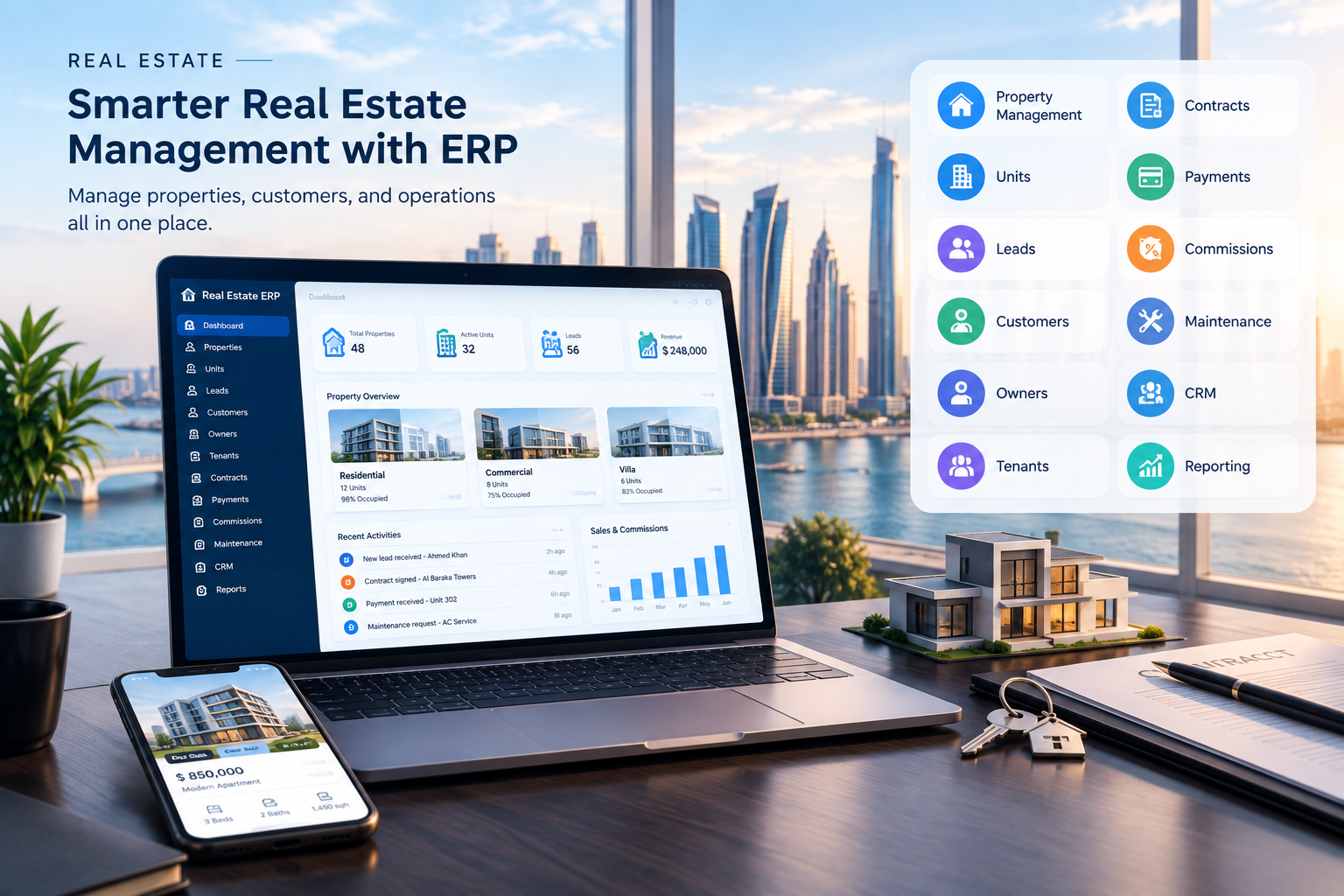
Real Estate
A real estate organization may require:
Property management
Units
Leads
Customers
Owners
Tenants
Contracts
Payments
Commissions
Maintenance
CRM
Reporting
Construction
A construction company may require:
Projects
Procurement
Materials
Employees
Contractors
Budgets
Expenses
Documents
Project reporting
Retail
A retail business may require:
Products
Inventory
POS
Purchasing
Sales
Customers
Payments
Promotions
Accounting
Professional Services
A professional services company may require:
CRM
Leads
Customers
Projects
Employees
Tasks
Timesheets
Billing
Accounting
Reporting
These differences illustrate why ERP selection should begin with business requirements rather than software features alone.
How to Decide Between Custom ERP and Ready-Made ERP
A structured decision process can make the evaluation easier.
Step 1: Document Your Current Systems
List every system your business currently uses.
For example:
Accounting
CRM
HR
Inventory
E-commerce
Website
Mobile app
Payroll
Reporting
Step 2: Map Your Workflows
Document how information moves between departments.
For example:
Lead → Sales → Quotation → Order → Inventory → Invoice → Payment
Then identify where employees currently use spreadsheets, emails, or manual processes.
Step 3: Identify Your Must-Have Features
Separate requirements into:
Essential
Features required for the business to operate.
Important
Features that improve productivity.
Future
Features that may be required later.
This prevents the ERP project from becoming unnecessarily large.
Step 4: Identify Integration Requirements
Document all systems that need to communicate with the ERP.
Ask:
Is an API available?
What data needs to move?
How frequently should it synchronize?
Which system is the source of truth?
What happens when synchronization fails?
Step 5: Compare Total Cost
Evaluate:
Initial cost
Subscription
Customization
Implementation
Integration
Training
Maintenance
Infrastructure
Future development
Step 6: Evaluate Long-Term Fit
Ask whether the chosen approach can support the business for the next several years.
The objective should not simply be to solve today's problem.
A Simple Decision Framework
The following questions can help structure the decision:
Question | Ready-Made ERP | Custom ERP |
|---|---|---|
Do we need rapid implementation? | Often suitable | May require more time |
Are our processes standard? | Often suitable | May be unnecessary |
Are our workflows highly specialized? | May require customization | Can be designed around them |
Do we need unique integrations? | Depends on platform | Can be developed specifically |
Do we need specialized reporting? | Depends on platform | Can be built to requirements |
Do we need complete control? | Vendor-dependent | Greater control |
Do we need extensive customization? | Platform-dependent | High flexibility |
Do we want vendor-managed updates? | Usually | No |
Do we have a long-term development partner? | Not always required | Usually important |
This is not a ranking. It is a way to match the technology approach with the actual business requirements.
Common Mistakes When Choosing an ERP
1. Choosing Based Only on Price
The cheapest initial option may not produce the lowest long-term cost.
Always evaluate the total cost of ownership.
2. Choosing Too Many Features
An ERP with hundreds of features is not automatically the right ERP.
Businesses should prioritize the features they actually need.
3. Ignoring Integrations
An ERP that cannot communicate effectively with existing systems may create new silos.
4. Ignoring Employee Workflows
The software should support employees rather than create unnecessary complexity.
5. Forgetting Data Migration
Moving data from spreadsheets or old software can become a significant project.
Plan migration before implementation.
6. Treating Implementation as the Finish Line
ERP deployment is only the beginning.
Employees need training, systems need monitoring, and workflows may need improvement.
7. Ignoring Future Growth
The ERP should be evaluated against future users, branches, transactions, integrations, and modules.
Can AI Be Added to an ERP?
Modern ERP systems can potentially integrate AI into business workflows.
Examples include:
AI-powered reporting
Natural-language business queries
Document processing
Automated data extraction
Sales assistance
Customer service
Forecasting
Inventory analysis
Workflow automation
For example, an authorized manager could ask:
“Which customers have not purchased from us in the last six months?”
An AI-enabled business platform could potentially retrieve the relevant information from connected systems.
Another example:
“Which products are approaching low inventory levels?”
The system could analyze inventory data and provide a response.
AI functionality should be implemented with appropriate authentication, authorization, data access controls, and security.
Why API Integration Matters
An ERP rarely exists in isolation.
Modern business technology often looks like:
Website → API → ERP → CRM → Accounting → Inventory → Analytics
Mobile applications may connect through the same backend:
Mobile App → API → Business Platform → Database
APIs can allow different systems to communicate without requiring employees to manually transfer information between applications.
For companies building a larger digital ecosystem, cloud and DevOps solutions may also become relevant for infrastructure, deployment, monitoring, scalability, and application operations.
Custom ERP vs Ready-Made ERP: Which One Should You Choose?
The answer depends on the business.
A ready-made ERP may fit when:
Processes are standard
Existing features cover the requirements
Implementation speed is important
Existing integrations are sufficient
Vendor support is preferred
A custom ERP may fit when:
Processes are specialized
Workflows require extensive customization
Integrations are complex
Reporting is highly specific
The business requires specialized automation
The organization needs greater control over its platform
A hybrid approach may fit when:
Existing ERP functionality is useful
Some business processes require customization
Custom integrations are needed
The company wants to extend rather than replace existing systems
The important point is that there is no universal winner.
The appropriate approach is the one that fits the organization's requirements, resources, processes, and long-term technology strategy.
How Galaxium Coding Can Help
ERP projects require more than software development.
They require an understanding of:
Business processes
User roles
Data
Integrations
Security
Reporting
Automation
Infrastructure
Future growth
Galaxium Coding is a Qatar-based technology company providing custom software, web applications, mobile applications, cloud solutions, AI, business automation, and ERP-style business platforms.
Businesses can review Galaxium Coding's projects and portfolio to explore its technology work.
When an organization requires a system designed around its own processes, a custom development approach can be considered alongside ready-made ERP options.
The evaluation should begin with requirements rather than assuming that one technology model is appropriate for every company.
Final Thoughts
The question “Custom ERP vs ready-made ERP: which is better?” does not have one answer that applies to every business.
Ready-made ERP systems can provide established functionality, faster implementation, existing integrations, vendor support, and standardized workflows.
Custom ERP systems can provide greater flexibility around business processes, integrations, reporting, automation, user roles, and long-term development.
The decision should be based on:
Business processes
Required modules
Customization
Implementation timeline
Integrations
Security
Scalability
Total cost of ownership
Maintenance
Long-term business strategy
For businesses with standard requirements, an existing ERP may provide the functionality needed.
For businesses with specialized processes, complex integrations, or unique operational requirements, custom ERP development may be worth evaluating.
For others, a hybrid strategy may provide a practical balance.
The best ERP decision starts by understanding the business—not by selecting software first.
If your organization is evaluating ERP options, contact Galaxium Coding to discuss your business requirements, workflows, integrations, and software goals.
Frequently Asked Questions
Is custom ERP better than ready-made ERP?
Neither is automatically better. Ready-made ERP can be suitable when standard functionality matches business requirements, while custom ERP can be appropriate when an organization has specialized workflows, integrations, reporting, or automation requirements.
Is custom ERP more expensive than ready-made ERP?
Custom ERP generally requires greater initial development effort. However, the overall comparison should include licensing, subscriptions, customization, integrations, implementation, maintenance, training, infrastructure, and future development.
How long does it take to build a custom ERP?
There is no universal timeframe. Development time depends on the number of modules, business complexity, integrations, data migration, user requirements, design, security, testing, and project scope.
Can a ready-made ERP be customized?
Many ready-made ERP systems provide configuration and customization options. The extent depends on the platform, its architecture, available APIs, modules, and vendor policies.
Can custom ERP integrate with existing software?
Yes. A custom ERP can be designed to communicate with CRM systems, accounting platforms, payment gateways, websites, mobile applications, inventory systems, and other software through APIs and integrations.
Is custom ERP suitable for small businesses?
It can be, particularly when a small or growing business has workflows that existing software cannot support effectively. However, the business should evaluate the development investment and long-term requirements before choosing custom development.
Can ERP software work with mobile applications?
Yes. ERP systems can expose selected functionality through APIs so mobile applications can access appropriate business data and workflows.
Can AI be integrated into an ERP?
Yes. AI can potentially support reporting, document processing, forecasting, natural-language queries, customer service, analytics, and business automation. Access controls and data security should be considered carefully.
What should I consider before buying an ERP?
Consider your business processes, required modules, users, integrations, data, security requirements, implementation timeline, total cost of ownership, scalability, vendor support, and future technology plans.
Should a business replace all existing software with an ERP?
Not necessarily. A business may replace some systems while integrating others. A hybrid architecture can sometimes connect an ERP with existing CRM, e-commerce, mobile, accounting, or specialized applications.
How do I choose an ERP development company in Qatar?
Review the company's experience with business software, ERP, integrations, databases, cloud infrastructure, security, mobile applications, automation, and ongoing maintenance. It is also useful to review real projects and understand how the company approaches requirements analysis and implementation.