CRM Development Company in Qatar: Custom CRM Solutions for Growing Businesses

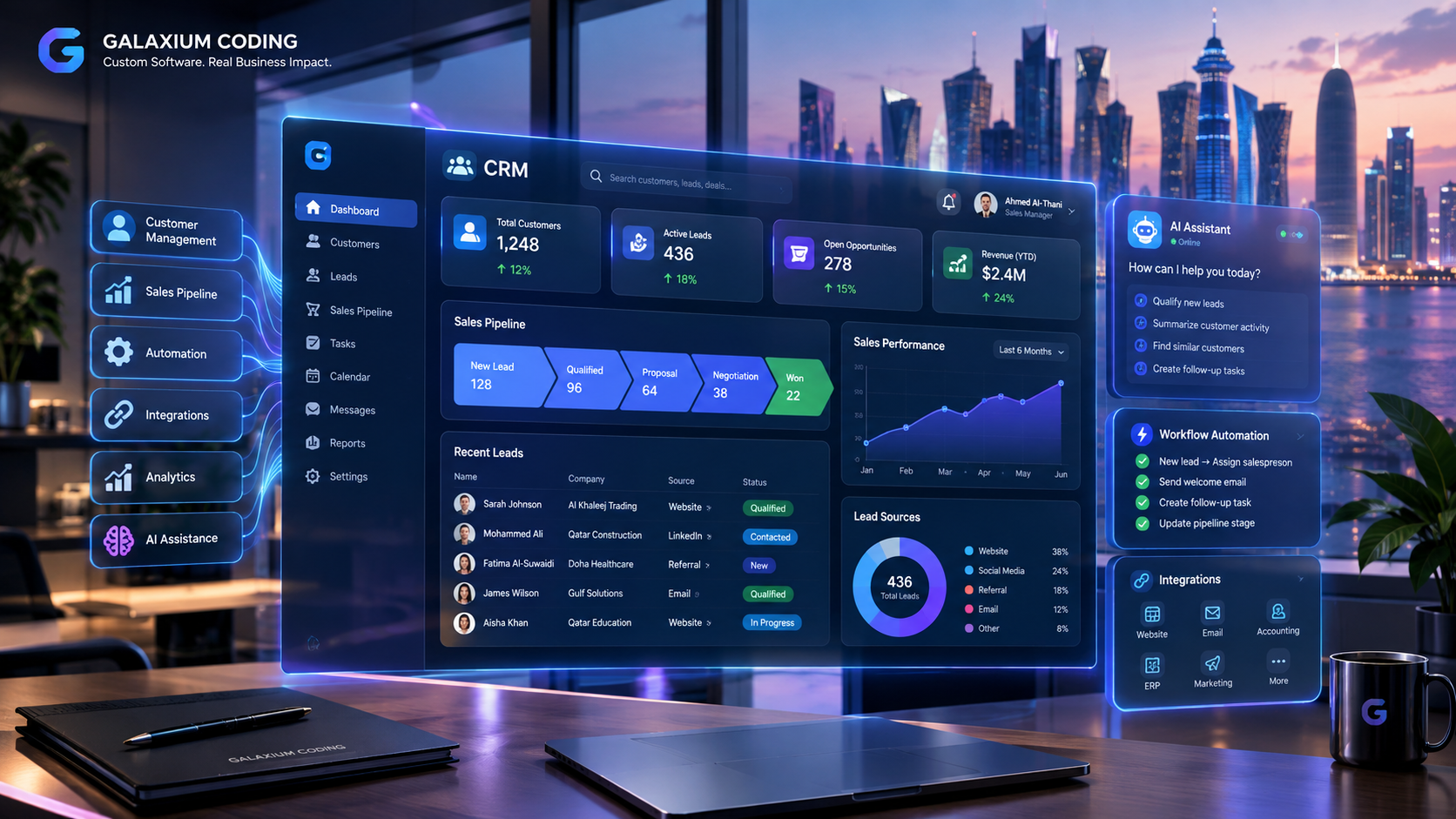
Custom CRM development in Qatar connecting customer management, sales, automation and business intelligence.
CRM Development Company in Qatar
Customer relationships are at the center of almost every growing business.
Companies receive enquiries through websites, phone calls, email, social media, messaging platforms, referrals, and other channels. Sales teams then need to qualify those enquiries, follow up with prospects, manage opportunities, send quotations, record communication, and convert prospects into customers.
When this information is managed through spreadsheets, emails, messaging applications, and disconnected software, it can become difficult to maintain a complete view of the customer journey.
A Customer Relationship Management (CRM) system brings these activities into a centralized platform.
For businesses in Qatar, a CRM can be designed around the company's sales process, industry requirements, team structure, customer journey, reporting needs, and existing software.
Galaxium Coding is a Qatar-based technology and software development company that develops custom business software, web applications, mobile applications, CRM systems, business automation solutions, and other digital platforms. Businesses can explore its custom software development services when they need a CRM designed around their own workflows.
This guide explains what CRM development involves, the features a modern CRM can include, how custom CRM software works, common integrations, implementation considerations, security, costs, industry use cases, and how to choose a CRM development company in Qatar.
What Is CRM Software?
CRM stands for Customer Relationship Management.
CRM software is designed to help organizations manage information and activities related to prospects and customers.
A CRM can centralize information such as:
Leads
Prospects
Contacts
Customers
Sales opportunities
Follow-ups
Communication history
Sales activities
Tasks
Appointments
Quotations
Customer notes
Documents
Sales pipelines
Reports
Notifications
Instead of storing customer information across multiple spreadsheets and applications, employees can work from a shared system.
A basic customer journey may look like:
Website Enquiry → Lead → Qualification → Follow-Up → Opportunity → Quotation → Customer
A more advanced CRM can connect this process with:
Website → CRM → Sales → ERP → Accounting → Payment → Customer Support → Reporting
The objective is not simply to store customer information.
The objective is to create a structured system for managing customer relationships throughout the business lifecycle.
Why Businesses in Qatar May Need Custom CRM Development
Not every company manages sales and customer relationships in the same way.
A real estate company may need property and lead management.
A construction company may need project-related enquiries and long sales cycles.
A healthcare organization may need appointment-related customer workflows.
An education company may need student enquiries, course interests, counselling and admission follow-ups.
A B2B company may need account management, sales opportunities, quotations and multiple contacts under one organization.
A generic CRM may provide many useful features, but businesses sometimes require workflows that are specific to their operations.
Custom CRM development allows the system to be designed around those requirements.
For example, a company may require:
Lead Capture → Automatic Assignment → Sales Follow-Up → Opportunity → Quotation → Approval → Customer → After-Sales Support
The software can then be designed around this workflow.
Custom CRM vs Ready-Made CRM
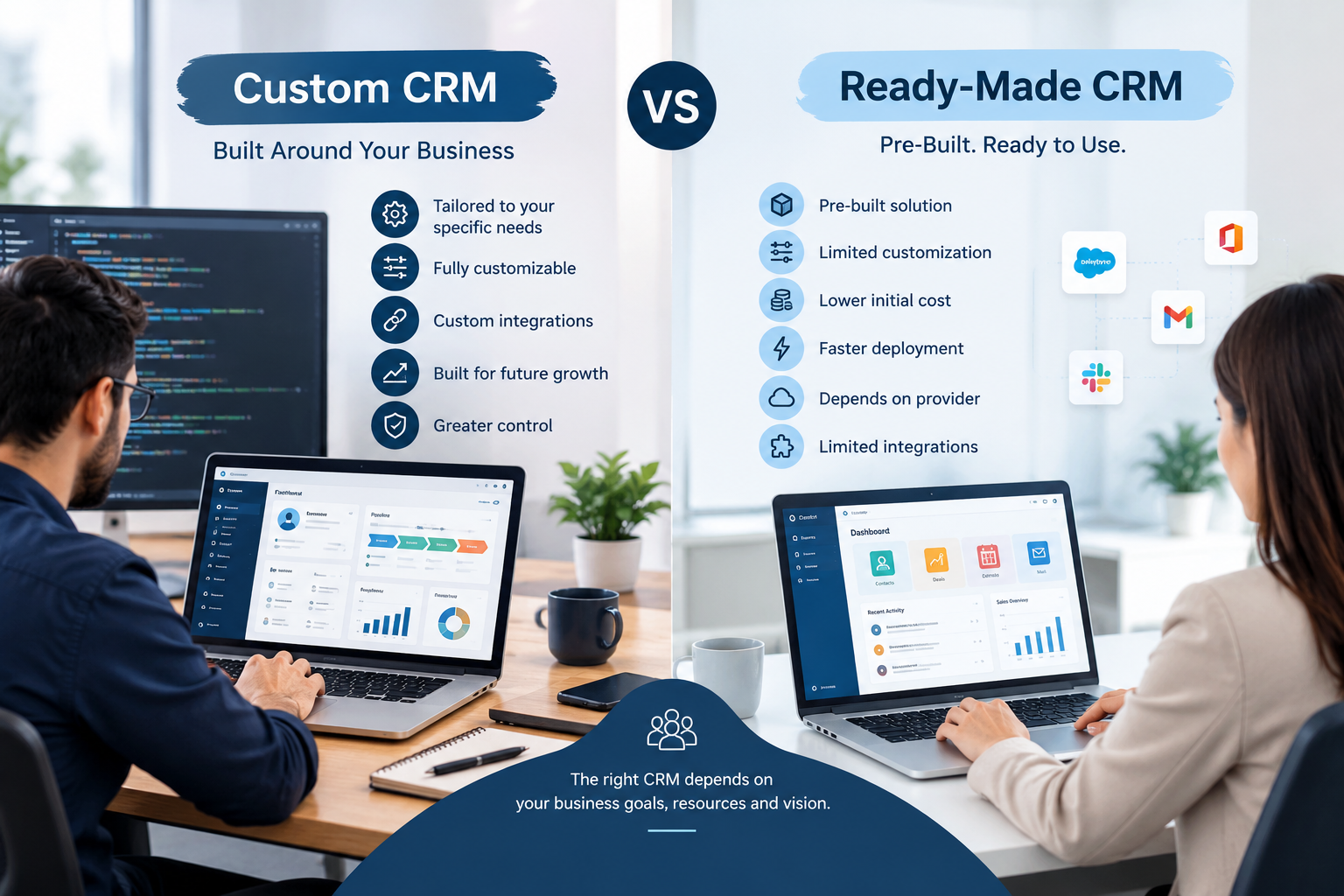
One of the first decisions businesses need to make is whether to use an existing CRM product or develop a custom system.
Requirement | Ready-Made CRM | Custom CRM |
|---|---|---|
Standard CRM features | Usually available | Can be developed |
Custom workflows | May be limited | Designed around requirements |
Unique business processes | May require workarounds | Can be built directly |
Integrations | Depends on available integrations | Can be developed around requirements |
User interface | Usually standardized | Can be customized |
Industry-specific features | Depends on platform | Can be designed specifically |
Scalability | Depends on provider | Architecture can be planned around growth |
Ownership/control | Depends on provider | Can be structured according to project requirements |
Neither approach is automatically appropriate for every business.
A ready-made CRM can be practical when the company's requirements closely match the available functionality.
Custom CRM development becomes more relevant when the business has specialized workflows, integration requirements, industry-specific processes, or needs a platform that connects CRM with other internal systems.
What Does a CRM Development Company Do?
A CRM development company does more than create screens and databases.
A professional CRM project normally begins by understanding the business.
The development process can include:
Business analysis
Requirement gathering
Workflow mapping
CRM architecture
UI/UX design
Database design
Backend development
Frontend development
API development
Third-party integrations
Security implementation
Testing
Deployment
Training
Maintenance and improvements
The technology should follow the business requirement rather than the other way around.
Key Features of Custom CRM Software
A modern CRM can contain different features depending on the organization's requirements.
1. Lead Management
Lead management is one of the core functions of CRM software.
A CRM can capture and organize leads from different sources.
For example:
Website forms
Landing pages
Phone enquiries
Social media
Email
Advertising campaigns
Referrals
Manual entry
Third-party platforms
A sales employee can then see where a lead came from, who is responsible for it, what stage it is in, and what action should happen next.
2. Contact Management
Contact management allows businesses to maintain structured customer information.
A contact record may include:
Name
Company
Phone number
Email
Industry
Location
Assigned employee
Customer status
Previous interactions
Notes
Documents
Opportunities
Tasks
This creates a centralized customer record rather than forcing employees to search through different systems.
3. Sales Pipeline Management
A CRM can provide a visual representation of sales opportunities.
For example:
New Lead → Qualified → Meeting → Proposal → Negotiation → Won/Lost
Managers can use the pipeline to understand where opportunities are located and which deals require attention.
4. Follow-Up Management
Missed follow-ups can create problems for sales teams.
A CRM can provide:
Follow-up reminders
Tasks
Notifications
Scheduled activities
Assigned responsibilities
Customer history
Next-action tracking
For example:
Lead Created → Follow-Up Tomorrow → Meeting Scheduled → Proposal Sent → Follow-Up Next Week
This creates a more structured sales process.
5. Customer Communication History
A CRM can maintain records of customer interactions where the required communication channels and integrations are available.
The objective is to give authorized employees a clearer view of previous interactions.
Instead of asking:
“What happened with this customer?”
The employee can review the relevant customer record and activity history.
6. Sales Reports and Dashboards
Management often needs information about sales performance.
A CRM dashboard can potentially show:
New leads
Active opportunities
Converted leads
Lost opportunities
Sales pipeline
Follow-up activities
Sales representatives
Conversion rates
Revenue-related information
Lead sources
Customer activity
The exact reports should be determined by the organization's requirements.
7. User Roles and Permissions
Different employees should not necessarily have access to the same information.
A CRM can use role-based permissions for:
Administrators
Sales representatives
Sales managers
Customer service teams
Marketing teams
Management
Other authorized users
Permissions can determine what users can view, create, edit, approve, or delete.
8. Task and Activity Management
CRM software can also function as an activity-management platform.
Users may create:
Calls
Meetings
Tasks
Follow-ups
Appointments
Reminders
Internal activities
These activities can be associated with leads, contacts, customers, or opportunities.
CRM Automation for Qatar Businesses
Automation can make CRM systems significantly more useful.
For example:
New Website Enquiry
↓
CRM Automatically Creates Lead
↓
Lead Assigned to Sales Representative
↓
Sales Representative Receives Notification
↓
Follow-Up Task Created
↓
Lead Moves Through Sales Pipeline
↓
Manager Views Activity on Dashboard
This reduces the amount of manual administrative work required to move information between systems.
Business automation can also connect CRM with other platforms.
A broader workflow could look like:
Website → CRM → Sales → Quotation → Accounting → Payment → Customer Notification
Businesses interested in connected workflows can also explore business software development solutions designed around specific operational requirements.
CRM Integrations
A CRM rarely operates completely alone.
Depending on the project, it may need to communicate with other systems.
Website Integration
A website can send enquiries directly into the CRM.
For example:
Customer submits form → CRM creates lead → Sales team receives notification
This can reduce manual data entry.
Businesses that need browser-based platforms can also consider web application development for customer portals, employee systems, dashboards, and CRM interfaces.
Mobile Application Integration
Sales employees may need access to customer information while working outside the office.
A mobile CRM application can provide access to appropriate information and functions.
Potential features include:
Lead management
Customer records
Notifications
Follow-ups
Tasks
Appointments
Sales pipeline
Activity updates
Businesses requiring mobile CRM functionality can explore mobile application development as part of a broader CRM project.
Accounting Integration
CRM and accounting systems can potentially exchange information.
For example:
Customer → CRM → Sales → Invoice → Payment
This can reduce duplicated data entry where appropriate integrations are available.
ERP Integration
A CRM can also become part of a larger ERP or business management platform.
For example:
Lead → Customer → Sales Order → Inventory → Invoice → Payment
This can create a connected flow between customer management and business operations.
API Integrations
APIs can allow CRM software to communicate with other applications.
Depending on the requirements, integrations may include:
Payment systems
Email platforms
SMS services
Accounting software
ERP systems
Websites
E-commerce platforms
Maps
Customer portals
AI services
Business applications
The exact integration requirements should be defined during the discovery and planning stage.
AI-Powered CRM Development
Artificial intelligence can add another layer of functionality to modern CRM systems.
However, AI should be implemented to solve a specific business problem rather than simply because AI is popular.
Possible applications include:
AI Lead Qualification
AI can help analyze incoming enquiries and organize leads according to predefined business rules.
AI Customer Assistance
An AI assistant can potentially answer common customer questions or direct customers toward the appropriate service.
Sales Assistance
AI can help sales teams summarize customer activity, organize information, or identify follow-up tasks.
Automated Data Processing
AI and automation can potentially help process information received from forms, documents, or other systems.
Business Insights
AI-powered reporting can help organizations explore customer and sales information in more natural ways.
A possible workflow is:
Customer Enquiry → AI Processing → Lead Qualification → CRM → Sales Employee
The actual implementation should depend on the organization's data, processes, security requirements, and business objectives.
CRM Development for Different Industries
A CRM does not need to be identical across industries.
Real Estate
A real estate CRM may manage:
Property leads
Buyers
Sellers
Owners
Tenants
Agents
Property interests
Site visits
Follow-ups
Deals
Commissions
For example:
Property Enquiry → Lead → Property Match → Viewing → Negotiation → Deal
Education
An education CRM may manage:
Student enquiries
Course interests
Applications
Admissions
Parent enquiries
Counselling
Follow-ups
Student communication
CRM functionality can become part of a broader education technology platform.
Healthcare
A healthcare-related CRM may support workflows involving:
Patient enquiries
Appointment requests
Communication
Follow-ups
Service information
Customer support
Healthcare systems require careful consideration of privacy, security, access controls, and applicable requirements.
Hospitality
Hospitality businesses may use CRM functionality to manage:
Guest information
Booking-related enquiries
Customer preferences
Follow-ups
Loyalty programs
Customer communication
B2B Companies
B2B organizations often have longer sales cycles.
A CRM may help manage:
Company → Contacts → Opportunity → Meeting → Proposal → Negotiation → Contract
This can be useful when several employees participate in the sales process.

CRM Development for Small and Medium Businesses
A small business does not necessarily need a large enterprise CRM from the beginning.
A practical approach may be to start with core features:
Leads
Contacts
Customers
Sales pipeline
Follow-ups
Tasks
Basic reports
Additional features can then be introduced as the organization grows.
For example:
Phase 1
Lead management
Customer management
Sales pipeline
Follow-ups
Basic dashboard
Phase 2
Website integration
Notifications
Advanced reporting
Mobile access
Automation
Phase 3
ERP integration
Accounting integration
AI features
Customer portal
Advanced analytics
This phased approach can help organizations focus on the most important business problems first.
CRM Security and Data Protection
CRM software can contain valuable business information.
This may include:
Customer information
Contact details
Sales data
Business documents
Communication history
Employee information
Commercial information
Security should therefore be considered from the beginning of development.
Depending on the system, security measures can include:
Authentication
Role-based access
Permission management
Encryption
Secure APIs
Input validation
Activity logging
Backups
Monitoring
Secure infrastructure
Organizations should also consider their contractual, regulatory, industry-specific, and internal data requirements.
Cloud-Based CRM Development
A cloud-based CRM can provide access to business information through internet-connected devices, subject to the system's authentication and security controls.
Potential advantages include:
Remote access
Centralized data
Easier deployment
Scalability
Centralized updates
Integration with cloud services
Cloud architecture should still be designed according to the application's security, performance, availability, and data requirements.
Businesses that require cloud infrastructure can explore cloud and DevOps solutions as part of their broader technology strategy.
How Much Does CRM Development Cost in Qatar?
There is no single price for custom CRM development.
The cost depends on the scope and complexity of the project.
A basic CRM with:
Leads
Contacts
Customers
Sales pipeline
Tasks
Basic reporting
will have very different requirements from an enterprise CRM containing:
Multiple departments
Complex workflows
Advanced permissions
Mobile applications
AI
ERP integration
Accounting integration
Payment systems
Customer portals
Advanced analytics
Multiple branches
Extensive automation
Important cost factors can include:
1. Number of Features
More modules generally require more design, development, integration, and testing.
2. Customization
A CRM built around unique workflows may require more development than a system based mainly on standard functionality.
3. Integrations
Third-party integrations can add technical complexity.
4. Mobile Applications
Developing mobile applications alongside the CRM increases project scope.
5. AI and Automation
Advanced automation and AI functionality may require additional architecture, APIs, testing, and monitoring.
6. User Roles
A system with many departments and permission levels may require more complex access management.
7. Reporting
Advanced dashboards and business intelligence requirements can increase development complexity.
8. Data Migration
Moving information from spreadsheets or existing CRM systems requires planning, cleaning, mapping, and testing.
Businesses should therefore request a detailed scope before comparing CRM development quotations.
CRM Development Process
A structured CRM development process can reduce uncertainty.
Step 1: Business Discovery
The development team first needs to understand:
How leads arrive
How sales employees work
How follow-ups happen
How customers are managed
Which systems are already used
What problems employees experience
What management needs to see
Step 2: Requirements
The requirements should define:
Features
User roles
Workflows
Integrations
Reports
Notifications
Security requirements
Mobile requirements
Step 3: UI/UX Design
The interface should be designed for the actual users.
Sales employees, managers, administrators, and customers may all require different experiences.
Step 4: Development
The frontend, backend, database, APIs, authentication, workflows, and other components are developed.
Step 5: Integration
The CRM is connected with required external systems.
Step 6: Testing
The software should be tested for:
Functionality
Usability
Security
Performance
Integrations
Different user roles
Real-world workflows
Step 7: Deployment
After testing, the system can be deployed to the appropriate infrastructure.
Step 8: Training
Employees need to understand how the new system works.
Step 9: Maintenance
CRM software may require:
Security updates
Bug fixes
Performance improvements
New features
Integration updates
Infrastructure maintenance
How to Choose a CRM Development Company in Qatar
Choosing a CRM development partner should involve more than comparing prices.
1. Understand Their Development Capabilities
Ask whether the company develops custom business applications or mainly provides standard websites.
A CRM requires databases, business logic, user management, workflows, dashboards, APIs, and security.
2. Review Relevant Projects
Ask to see relevant software projects or demonstrations where available.
You can also review Galaxium Coding's projects and portfolio to understand the company's broader technology work.
3. Discuss Your Workflow
Explain how your business actually operates.
A capable development team should be interested in the business process behind the software.
4. Ask About Integrations
If your CRM needs to communicate with websites, accounting systems, ERP platforms, payment services, mobile applications, or other software, discuss these requirements before development starts.
5. Ask About Security
Understand how authentication, permissions, backups, infrastructure, and data security will be handled.
6. Ask About Scalability
The CRM should be capable of evolving as business requirements change.
7. Clarify Support
Ask about:
Maintenance
Bug fixing
Updates
Monitoring
Technical support
Future development
8. Request a Clear Scope
The proposal should clearly explain what is included.
This makes it easier to understand the difference between development quotations.
Why Choose Galaxium Coding for CRM Development?
Galaxium Coding is a Qatar-based technology and software development company working across custom software, web applications, mobile applications, business automation, AI, cloud solutions, and business management systems.
Its broader software-development capabilities can support CRM projects involving:
Custom CRM systems
Business management software
Web applications
Mobile applications
API integrations
Business automation
AI integration
Dashboards
Cloud solutions
ERP-style platforms
The development approach should begin with understanding the business requirement and then determining the appropriate technology and architecture.
For companies evaluating whether they need a custom CRM, ready-made CRM, or a broader business platform, the first step should be identifying the actual operational problem.
You can learn more about Galaxium Coding and explore the company's technology capabilities before defining your CRM project.
Frequently Asked Questions
What is a CRM development company?
A CRM development company designs and develops customer relationship management software for businesses. Depending on the project, this can include lead management, customer records, sales pipelines, automation, dashboards, integrations, mobile applications, and other business functions.
Why choose custom CRM development?
Custom CRM development can be useful when a business has unique workflows, specialized requirements, complex integrations, or needs software designed around its existing operations.
How much does CRM development cost in Qatar?
There is no fixed CRM development price. Cost depends on features, integrations, number of users, customization, mobile applications, automation, AI, reporting, security requirements, and overall system complexity.
Can a CRM integrate with an existing website?
Yes. A CRM can potentially receive website enquiries through forms or APIs and create leads automatically, depending on the website and integration architecture.
Can CRM software include mobile applications?
Yes. A CRM project can include mobile applications for sales teams, managers, customers, or other authorized users depending on the requirements.
Can CRM be integrated with ERP?
Yes. CRM and ERP functionality can be connected so customer and sales information can move between customer-management and operational processes.
Can AI be added to a CRM?
Yes. AI can be integrated for use cases such as lead qualification, customer assistance, information processing, sales support, reporting, and workflow automation. The appropriate use case depends on the business.
Is a custom CRM better than a ready-made CRM?
The answer depends on the company's requirements. A ready-made CRM may be appropriate when its features and workflows match the business. Custom CRM development can be considered when the organization needs specialized functionality or integrations.
Can a CRM be developed for a specific industry?
Yes. CRM systems can be designed around industry-specific workflows such as real estate, education, healthcare, hospitality, professional services, B2B sales, and other industries.
How long does CRM development take?
Development time depends on project scope. A basic CRM and an enterprise CRM with mobile applications, AI, integrations, advanced reporting, and multiple departments require very different amounts of development work. A detailed timeline should be established after requirements are defined.
Final Thoughts
A CRM is more than a database of customer names.
A well-planned CRM can connect lead generation, sales activities, customer communication, follow-ups, reporting, automation, and business operations.
For businesses in Qatar, the right approach depends on the organization's size, industry, sales process, existing technology, integration requirements, and future plans.
Some companies may be better served by a ready-made CRM.
Others may need a customized CRM.
Some may eventually require a broader platform connecting:
CRM → Sales → ERP → Accounting → Operations → Mobile → AI → Automation
The important step is to start with the business problem rather than simply choosing software features.
If your organization is considering a CRM project, you can contact Galaxium Coding to discuss the requirements and determine what type of technology solution fits your business.