How to Build an Online Store in Qatar: A Complete Guide for Businesses

A modern online store connects customers, products, payments, inventory and delivery into one digital commerce system.
How to Build an Online Store in Qatar: A Complete Guide for Businesses
Building an online store in Qatar involves much more than creating product pages and adding a shopping cart. A successful e-commerce store needs the right business structure, website architecture, product catalogue, payment system, delivery workflow, security controls and customer experience.
For businesses targeting customers in Qatar, there are also local considerations such as commercial registration, e-commerce licensing, Arabic and English experiences, payment options, delivery coverage and compliance requirements.
Qatar's Ministry of Communications and Information Technology supports SME digital transformation across areas including web presence, e-commerce and cloud services, while the Ministry of Commerce and Industry manages business registration and commercial licensing processes. Qatar's SME digital transformation resources provide additional information for businesses moving into digital commerce.
This guide explains how to build an online store in Qatar step by step and what businesses should consider before launching.
Why Build an Online Store in Qatar?
An online store allows a business to sell products beyond the limitations of a physical location.
Instead of depending only on customers who visit a shop, an e-commerce platform can allow customers to:
Browse products
Search and filter items
View prices and product information
Add products to a shopping cart
Complete checkout
Make online payments
Select delivery options
Receive order confirmations
Track orders
Contact customer support
Return or exchange products according to the business policy
For businesses already operating a physical store, e-commerce can become another sales channel.
For startups, an online store can provide the foundation for a digital-first business.
The important point is that an online store should be treated as a business system rather than simply a website.
A modern e-commerce workflow can look like this:
Customer → Online Store → Checkout → Payment → Order Management → Inventory → Delivery → Customer Notification
As the business grows, additional systems can be connected:
Online Store → CRM → Accounting → Inventory → Delivery → Mobile App → Analytics → Automation
Businesses that need more than a standard website can also explore custom software development to build systems around their specific operational requirements.
Step 1: Define Your Online Store Business Model
Before choosing a technology platform, decide what you are actually going to sell and how the business will operate.
An online store might sell:
Fashion products
Electronics
Beauty products
Home products
Food and packaged goods
Sports products
Automotive accessories
Digital products
B2B products
Subscription-based products
Locally manufactured products
The business model affects the technology you need.
For example, a small retailer selling 50 products may need a relatively straightforward e-commerce platform.
A B2B distributor with thousands of products may require:
Customer-specific pricing
Wholesale accounts
Purchase orders
Credit limits
Sales representatives
Bulk ordering
ERP integration
Inventory synchronization
Multiple warehouses
Therefore, the first question should not be:
"Which e-commerce platform should I use?"
It should be:
"How should my online business work?"
Step 2: Complete the Business and E-Commerce Requirements
One of the most important parts of building an online store in Qatar is understanding the applicable business registration and licensing requirements before development begins.
Qatar's Ministry of Commerce and Industry provides business establishment and commercial registration services through its digital services and Single Window ecosystem. Businesses should verify the commercial activity, registration requirements and applicable approvals for their specific business model. Qatar Ministry of Commerce and Industry business services provides the current official information.
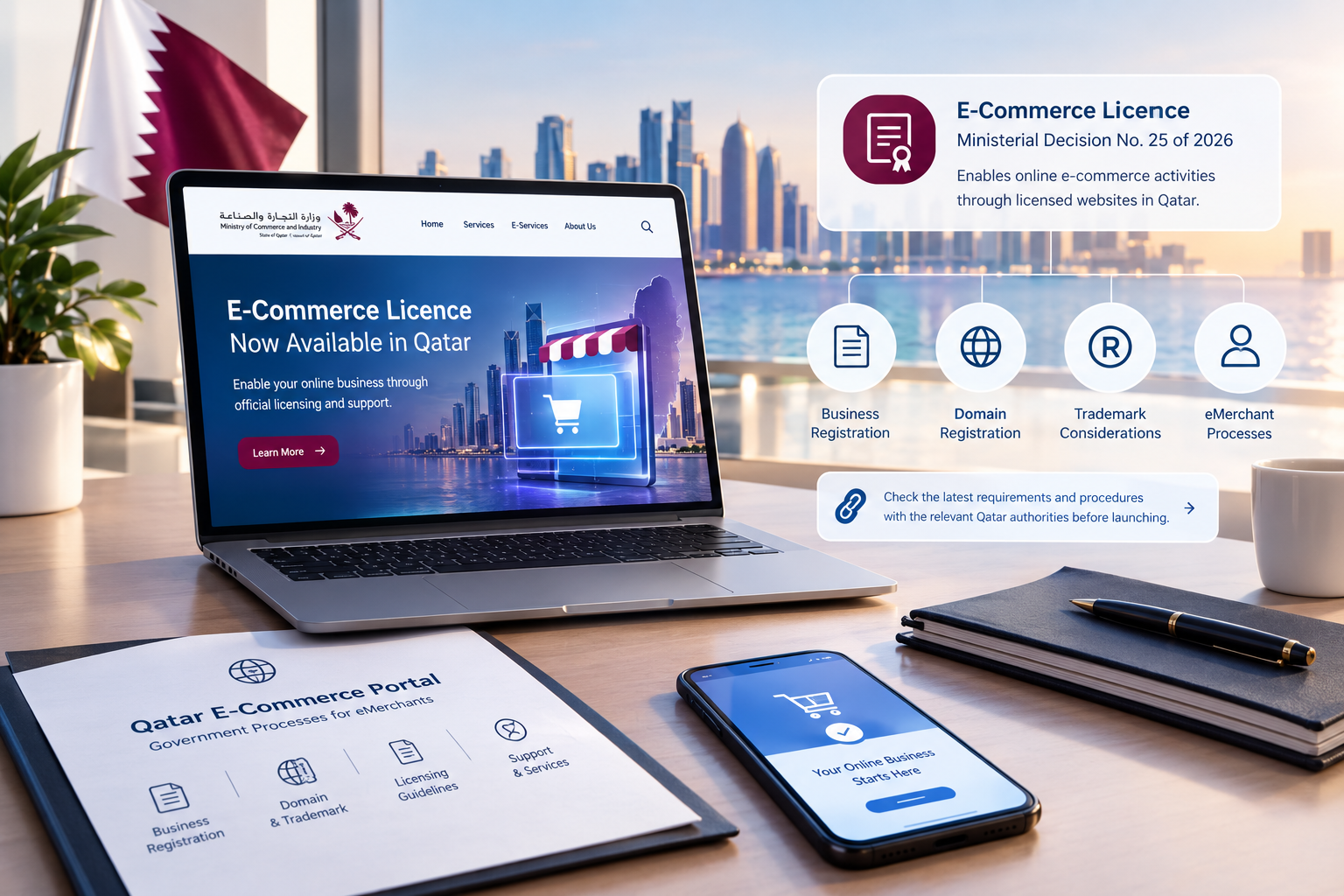
Qatar's E-Commerce Licence
There is an important recent development for businesses operating online.
In September 2026, Qatar's Ministry of Commerce and Industry announced the launch of an E-Commerce Licence, established under Ministerial Decision No. 25 of 2026. The ministry stated that the licence enables e-commerce activities to be established and operated online through licensing the website designated for the activity in Qatar. Read the Ministry's announcement on the E-Commerce Licence.
Because licensing rules and procedures can change, businesses should verify the requirements directly with the relevant Qatar authorities before launching.
The Qatar eCommerce Portal also explains government processes for becoming an eMerchant, including business registration, domain and trademark considerations.
Do Not Treat Compliance as a Last-Minute Task
Before development starts, create a checklist covering:
Business registration
Commercial activity
Applicable e-commerce licence
Domain
Trademark considerations
Payment provider requirements
Consumer information
Invoicing
Privacy requirements
Terms and conditions
Returns and refunds
Delivery policies
The exact requirements depend on the business activity and structure, so professional or official confirmation should be obtained where necessary.
Step 3: Choose the Right E-Commerce Development Approach
There is no single technology solution that is suitable for every online store.
Businesses generally have three broad approaches.
Option 1: Hosted E-Commerce Platform
A hosted platform provides many standard e-commerce functions without requiring the business to develop everything from scratch.
It may provide:
Product management
Shopping cart
Checkout
Customer accounts
Order management
Basic analytics
Themes
Payment integrations
Extensions
This approach can be suitable for businesses that want to launch relatively quickly and have standard requirements.
Option 2: Open-Source E-Commerce Platform
An open-source solution can provide greater control over the website and its functionality.
Businesses may customize:
Design
Product structure
Checkout
Integrations
Customer accounts
Inventory
Promotions
Business workflows
However, businesses are responsible for areas such as hosting, security, maintenance, updates and customization.
Option 3: Custom E-Commerce Platform
A custom online store is developed around the specific business requirements.
This approach can be useful when the business needs:
Custom product logic
Complex pricing
Multiple customer types
B2B ordering
Custom dashboards
ERP integration
CRM integration
Multiple warehouses
Advanced inventory
Custom delivery workflows
Subscription functionality
Advanced automation
Unique checkout processes
Businesses with complex requirements can consider web application development instead of forcing their business processes into a generic template.
Which Approach Should You Choose?
Requirement | Standard Platform | Custom Development |
|---|---|---|
Small product catalogue | Suitable | May be unnecessary |
Standard checkout | Suitable | Possible |
Basic online payments | Suitable | Possible |
Complex pricing | May require customization | Strong fit |
B2B workflows | May require customization | Strong fit |
ERP integration | Depends on platform | Strong fit |
Custom customer portal | Limited or customized | Strong fit |
Advanced automation | Extensions/integrations | Strong fit |
Unique business model | May require significant customization | Strong fit |
The right choice depends on requirements, budget, timeline and long-term growth plans.
Step 4: Plan the Store Structure
Before designing the website, create the information architecture.
A typical online store may include:
Main Pages
Home
Shop
Categories
Product pages
About Us
Contact
FAQ
Shipping Policy
Returns and Refunds
Privacy Policy
Terms and Conditions
Customer Areas
Register
Login
My Account
Orders
Addresses
Wishlist
Saved payment information where supported
Order tracking
Business Areas
Product management
Inventory
Orders
Customers
Discounts
Reports
Payments
Delivery
Content management
A clear structure makes the store easier to navigate and gives search engines a better understanding of the website.
Step 5: Design the Product Catalogue
Product pages are at the centre of an online store.
Every product should provide enough information for the customer to make a purchasing decision.
A product page may include:
Product name
High-quality images
Price
Discount where applicable
Product description
Specifications
Available variants
Size or dimensions
Colour
Stock availability
Delivery information
Return information
Related products
Reviews where applicable
Add-to-cart button
Buy-now option where appropriate
Product Images Matter
Online shoppers cannot physically inspect the product.
Good product photography should therefore show:
Different angles
Product details
Scale where relevant
Packaging where useful
Variants
Usage context where appropriate
Avoid placing unnecessary text over product images.
The visual presentation should help the customer understand what they are buying.
Step 6: Build a Simple and Effective Shopping Experience
An online store should make buying as straightforward as possible.
A typical customer journey is:
Product Discovery → Product Page → Add to Cart → Cart → Checkout → Payment → Confirmation
Every unnecessary step can create friction.
Make Navigation Simple
Customers should be able to quickly find:
Categories
Products
Search
Filters
Cart
Account
Contact options
For stores with many products, filters can be particularly useful.
For example, a fashion store may allow customers to filter by:
Brand
Size
Colour
Price
Category
An electronics store may use:
Brand
Storage
Screen size
Price
Product type
Features
Step 7: Add Online Payment Integration
Payment integration is one of the most important parts of an e-commerce project.
The basic workflow is:
Customer → Checkout → Payment Gateway → Payment Verification → Order Creation → Confirmation
A proper integration needs to handle different transaction states, including:
Successful payments
Failed payments
Cancelled transactions
Pending transactions
Refunds
Payment verification
Order confirmation
Qatar Central Bank describes the country's retail payment infrastructure and identifies a centralized payment gateway for processing certain debit and prepaid card transactions issued by banks in Qatar for e-commerce transactions with merchants in Qatar. Qatar Central Bank retail payment systems.
The actual payment provider and merchant requirements should be confirmed before development because onboarding, supported payment methods and technical requirements vary.
Payment Security
The store should never treat payment security as an afterthought.
Businesses should consider:
HTTPS
Secure payment-provider integration
Access control
Secure authentication
Data protection
Server security
Monitoring
Regular updates
Backup procedures
Where possible, sensitive payment processing should be handled through appropriately secured payment infrastructure rather than storing unnecessary payment information on the store's own servers.
Step 8: Plan Delivery and Order Fulfilment
A customer placing an order is only the beginning.
The business must also fulfil it.
A useful workflow is:
Order Received → Payment Confirmed → Inventory Checked → Order Prepared → Delivery Assigned → Customer Notified → Delivered
Your online store should define:
Delivery areas
Delivery charges
Free-delivery conditions
Estimated delivery times
Same-day delivery where offered
Delivery status
Failed deliveries
Returns
Exchanges
Refunds
For Qatar-based businesses, delivery planning should reflect the actual geographic coverage and operational model of the company.
If the business works with a third-party delivery provider, an API integration may allow orders and delivery information to move automatically between systems.
Step 9: Connect Inventory With the Online Store
Inventory problems can quickly damage customer trust.
Imagine a customer orders a product online, but the business discovers that it is actually out of stock.
A properly designed system can help reduce these problems.
Inventory management may include:
Stock quantity
Product variants
Low-stock alerts
Reserved stock
Warehouse inventory
Incoming stock
Out-of-stock status
Inventory adjustments
For businesses with multiple locations, the system may need to track inventory separately.
For example:
Location | Product A | Product B |
|---|---|---|
Doha Store | 25 | 12 |
Warehouse | 150 | 70 |
Branch 2 | 18 | 8 |
The store can then be connected to inventory software or an ERP system.
Step 10: Connect the Store With CRM and Business Software
As an online business grows, managing everything from the e-commerce dashboard may become difficult.
Integration can connect the online store with:
CRM
ERP
Accounting
Inventory
Customer support
Email
WhatsApp
Delivery systems
Analytics
Mobile applications
For example:
Customer places order
↓
E-commerce system creates order
↓
Inventory decreases
↓
CRM updates customer activity
↓
Accounting system records transaction
↓
Warehouse receives order
↓
Delivery system receives shipment information
↓
Customer receives notification
This type of integration can reduce repetitive manual data entry.
Step 11: Consider Arabic and English Support
Many businesses in Qatar serve customers with different language preferences.
If your target audience requires both Arabic and English, bilingual functionality should be considered during the design stage rather than added at the end.
This may affect:
Navigation
Product descriptions
Buttons
Forms
Checkout
Error messages
Customer emails
Mobile layouts
SEO metadata
URL structures
Right-to-left layout
Arabic support is not simply a matter of translating English text.
The user interface should also work properly in a right-to-left environment.
A professional web development team can design the architecture to support both language experiences from the beginning.
Step 12: Make the Online Store Mobile-Friendly
Many customers will access an online store from smartphones.
The store should therefore work properly on:
Smartphones
Tablets
Laptops
Desktop computers
Important mobile considerations include:
Fast page loading
Large touch-friendly buttons
Easy navigation
Simple checkout
Readable product information
Mobile-friendly forms
Optimized images
Responsive layouts
Testing should be performed across different screen sizes before launch.
Step 13: Build Search Engine Optimization Into the Store
SEO should not be added only after the online store has been developed.
It should be considered from the beginning.
Product SEO
Each product should have:
Descriptive title
Useful product description
Optimized URL
Appropriate metadata
Descriptive image alt text
Relevant internal links
Category SEO
Category pages should clearly communicate:
What products are included
Who they are for
What makes them relevant
Which products customers can find
Technical SEO
The store should also consider:
Page speed
Mobile usability
Crawlability
Indexation
Canonical URLs
Structured data where appropriate
XML sitemap
Internal linking
HTTPS
Duplicate content control
SEO should support the customer journey rather than produce pages filled with repetitive keywords.
Step 14: Add Analytics and Conversion Tracking
An online store should provide data that helps the business understand customer behaviour.
Useful metrics include:
Website visitors
Product views
Add-to-cart rate
Checkout starts
Completed orders
Conversion rate
Average order value
Returning customers
Abandoned carts
Revenue by product
Revenue by channel
For example, if thousands of visitors view a product but very few add it to their cart, the business may need to examine:
Product pricing
Product information
Images
Reviews
Delivery charges
Availability
Page performance
Analytics turns the online store from a simple sales website into a measurable business channel.
Step 15: Add Customer Accounts and Personalization
Customer accounts can make repeat purchases easier.
An account area might include:
Personal information
Saved addresses
Order history
Current orders
Wishlist
Loyalty information
Support requests
For returning customers, the system can provide a faster purchasing experience.
Businesses can also introduce personalization where appropriate, such as:
Recently viewed products
Related products
Recommended products
Repeat-order suggestions
Personalization should be useful rather than intrusive.
Step 16: Secure the Online Store
Security is critical because an e-commerce website can contain business and customer information.
Important security areas include:
Website Security
Use:
HTTPS
Secure hosting
Updated software
Strong authentication
Access controls
Firewall protections where appropriate
Security monitoring
Admin Security
Not every employee should have full access.
For example:
User | Possible Access |
|---|---|
Store Manager | Products, orders, reports |
Warehouse Staff | Inventory, fulfilment |
Marketing Staff | Content, promotions |
Accountant | Financial information |
Administrator | System configuration |
Role-based access can reduce unnecessary exposure.
Backup and Recovery
A store should also have a recovery plan.
Consider:
Automated backups
Database backups
File backups
Recovery testing
Monitoring
Disaster recovery procedures
Security should be considered throughout development, deployment and maintenance.
Step 17: Test Everything Before Launch
Never launch an online store without thorough testing.
Functional Testing
Test:
Registration
Login
Product search
Filters
Cart
Checkout
Payment
Order creation
Emails
Notifications
Coupons
Refunds
Returns
Mobile Testing
Test the store on different:
Phones
Tablets
Browsers
Screen sizes
Payment Testing
Test:
Successful payment
Failed payment
Cancelled payment
Duplicate transaction scenarios
Refund workflow
Order confirmation
Performance Testing
Check:
Page speed
Image loading
Checkout performance
Server response
Database performance
Security Testing
Review:
Authentication
Access permissions
Admin accounts
Input validation
API security
Data protection
Software updates
A store should only be launched after the main customer and operational workflows have been tested.
Step 18: Launch the Store
Once development and testing are complete, prepare for launch.
Pre-Launch Checklist
Domain configured
SSL enabled
Products uploaded
Categories completed
Prices checked
Inventory checked
Payment gateway connected
Delivery settings configured
Policies published
Contact information verified
Arabic and English content checked where applicable
Mobile testing completed
SEO settings completed
Analytics configured
Backups enabled
Admin accounts secured
A soft launch can also be useful.
Instead of immediately directing a large audience to the store, test the purchasing process with a controlled group first.
This can reveal problems that were not identified during development.

How Much Does It Cost to Build an Online Store in Qatar?
There is no single fixed price for building an online store in Qatar.
The cost depends on the complexity of the project.
Factors include:
Number of products
Custom design
E-commerce platform
Custom development
Payment integration
Delivery integration
Inventory
Customer accounts
Arabic and English support
CRM integration
ERP integration
Mobile application
AI functionality
Analytics
Security requirements
Hosting
Maintenance
A small online store with standard requirements can be very different from a custom e-commerce platform connected to ERP, CRM, inventory, delivery and accounting systems.
Galaxium Coding's existing guide on website development costs in Qatar explains why functionality, integrations and technology can significantly affect project scope and cost.
Build in Phases
Businesses do not necessarily need every advanced feature on the first day.
A practical roadmap could be:
Phase 1
Online store
Product catalogue
Shopping cart
Checkout
Payments
Delivery
Basic analytics
Phase 2
CRM
Inventory integration
Advanced reporting
Customer accounts
Loyalty features
Phase 3
Mobile application
ERP integration
AI customer support
Advanced automation
Personalized recommendations
This approach can help a business launch its core e-commerce operation while keeping room for future growth.
Common Mistakes When Building an Online Store
1. Starting Development Without Requirements
If the business does not define its workflows first, important functionality may be missed.
2. Choosing Technology Only Because It Is Cheap
A low initial price does not necessarily mean lower total cost.
The platform should be evaluated according to the business requirements and future needs.
3. Ignoring Mobile Users
A store that works well on desktop but poorly on mobile can create unnecessary friction.
4. Making Checkout Too Complicated
Customers should not have to complete unnecessary steps.
5. Ignoring Inventory
Selling products that are not actually available creates operational problems.
6. Treating Security as an Afterthought
Security should be part of the architecture from the beginning.
7. Forgetting Delivery
An online order still needs to reach the customer.
8. Ignoring SEO During Development
Changing the store structure later can create unnecessary SEO work.
9. Building Everything at Once
Large projects can become unnecessarily complex when every possible feature is included in the first version.
10. Not Planning for Growth
The system should be capable of evolving as product volume, customers and orders increase.
Online Store vs Custom E-Commerce Platform
A basic online store and a custom e-commerce platform are not necessarily the same thing.
Area | Standard Online Store | Custom E-Commerce Platform |
|---|---|---|
Product catalogue | Standard | Custom |
Checkout | Standard | Custom workflows possible |
Payments | Standard integrations | Custom integrations possible |
Inventory | Basic/standard | Advanced |
CRM | Optional | Deep integration possible |
ERP | Optional | Custom integration |
B2B pricing | Limited/customized | Advanced |
Customer portal | Standard | Custom |
Automation | Extensions | Custom workflows |
Reporting | Standard | Custom dashboards |
Scalability | Depends on platform | Architecture designed around requirements |
Businesses should select the approach that matches their actual operating model.
How Galaxium Coding Can Help Build an Online Store in Qatar
Building an online store often involves more than front-end website design.
Depending on the project, businesses may require:
E-commerce development
Custom web applications
Payment integration
API integration
CRM integration
ERP integration
Inventory management
Customer portals
Business automation
Cloud infrastructure
Mobile applications
AI integration
Galaxium Coding provides web application development and custom software development for businesses that need digital systems built around their operational requirements.
For larger projects, cloud and DevOps solutions can also support hosting, deployment, scalability and infrastructure requirements.
Businesses can review Galaxium Coding's projects and portfolio to understand the company's broader technology capabilities.
The goal should not simply be to launch an attractive online store.
The goal should be to build an e-commerce system that supports:
Customers + Products + Payments + Inventory + Delivery + Business Operations
Future of E-Commerce in Qatar
The future of online retail is likely to involve increasingly connected digital systems.
An e-commerce platform can evolve from a simple store into a broader business ecosystem involving:
AI assistants
Automated customer support
Product recommendations
CRM
ERP
Mobile applications
Cloud infrastructure
Advanced analytics
Automated marketing
Inventory forecasting
Business intelligence
For example, an AI-powered customer assistant could potentially help answer product questions, provide order information or direct customers to relevant products, provided it is properly connected to the underlying business systems.
The important principle is to introduce technology according to actual business needs.
A small business does not need every advanced technology immediately.
A growing company can progressively expand its digital infrastructure.
Final Thoughts
Learning how to build an online store in Qatar involves understanding both technology and business operations.
A successful store needs more than:
A domain
Product images
A shopping cart
It needs a reliable system for:
Products
Customers
Payments
Orders
Inventory
Delivery
Security
Analytics
Customer support
Businesses should also verify their current Qatar registration and licensing requirements before launching. The regulatory environment can change, so official sources should be checked during implementation.
The best e-commerce solution is not necessarily the one with the most features.
It is the one that fits the business model, provides a smooth customer experience and can grow with the company.
If your business is planning an online store, e-commerce platform or a more advanced digital commerce system in Qatar, you can contact Galaxium Coding to discuss the project requirements.
Frequently Asked Questions
How much does it cost to build an online store in Qatar?
There is no universal price. The cost depends on the number of products, design, e-commerce platform, payment integration, delivery, inventory, customization, integrations and other functionality.
Do I need a business registration to operate an online store in Qatar?
Businesses should verify the applicable registration and licensing requirements for their activity. Qatar's official e-commerce resources state that businesses operating as eMerchants need to address business registration and related requirements. The Ministry of Commerce and Industry also provides current commercial registration and licensing services.
What is the E-Commerce Licence in Qatar?
In September 2026, Qatar's Ministry of Commerce and Industry announced an E-Commerce Licence under Ministerial Decision No. 25 of 2026 for e-commerce activities conducted through websites in Qatar. Businesses should check the ministry's current procedures and applicability to their specific activity before launch.
Do online stores in Qatar need online payment?
Not necessarily. The appropriate payment methods depend on the business model. However, businesses selling products online may integrate suitable electronic payment services to provide customers with a digital checkout experience.
Should my Qatar online store support Arabic and English?
If the business serves both Arabic- and English-speaking customers, bilingual support can be valuable. The implementation should consider content, navigation, forms, checkout, SEO and right-to-left interface behaviour.
Can an online store be connected to a CRM?
Yes. An online store can be connected to a CRM so customer information, enquiries, purchases and other relevant information can move between systems.
Can an online store connect to an ERP?
Yes. An e-commerce platform can potentially connect with ERP systems for inventory, accounting, orders, purchasing and other business processes.
Should I build a custom e-commerce platform?
A custom platform can make sense when the business has requirements that standard platforms cannot handle efficiently, such as complex pricing, B2B workflows, custom portals, advanced integrations or unique operational processes.
How long does it take to build an online store?
The timeline depends on the scope. A relatively simple store can be developed faster than a custom platform involving payment, delivery, inventory, CRM, ERP and other integrations.
Can I start small and add features later?
Yes. A phased approach can allow a business to launch its core store first and add advanced functionality as customer demand and operational requirements grow.
What should I consider before hiring an e-commerce development company in Qatar?
Consider:
Relevant experience
Technology approach
E-commerce functionality
Payment integration experience
Security
Mobile responsiveness
SEO
API integrations
Source-code ownership
Hosting
Maintenance
Post-launch support
The development partner should understand both the technical requirements and the business workflow.