How to Build a Custom CRM for Your Business
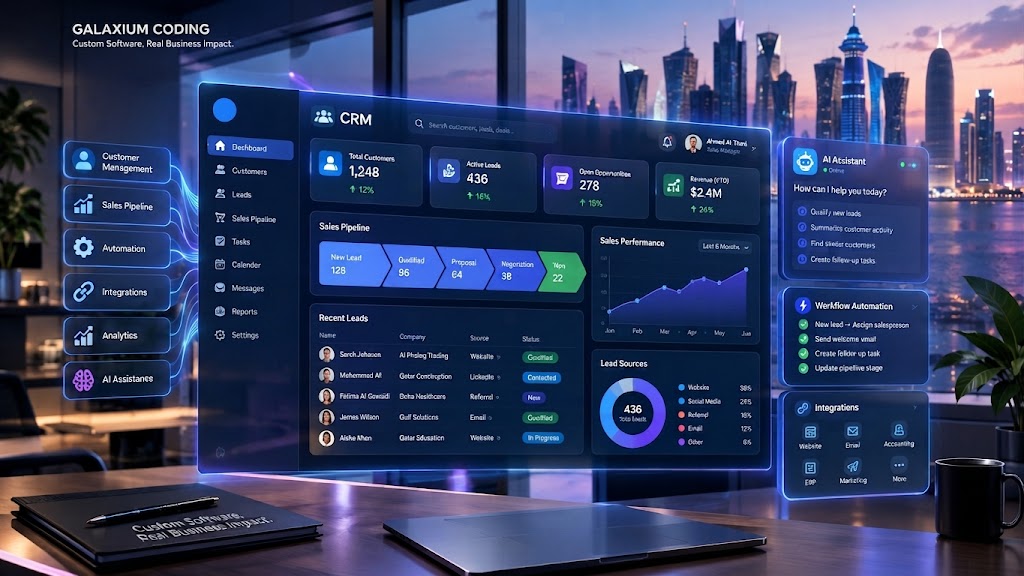
A custom CRM connects customer data, sales workflows, automation and business analytics in one centralized platform.
How to Build a Custom CRM for Your Business
A customer relationship management system can become one of the most important pieces of software in a growing business. It can centralize customer information, organize leads, track sales activities, automate follow-ups, manage communication and give management a clearer view of the sales pipeline.
However, not every business works the same way.
A real estate company may need property enquiries, agent assignments, viewing schedules and lead follow-ups. A B2B company may need account management, sales pipelines, quotations and recurring customer interactions. A healthcare organization may require appointments, customer records and communication workflows.
This is where a custom CRM can provide an advantage.
Instead of forcing employees to adapt their processes to a generic CRM, a custom system can be designed around the organization's actual workflows, users, data and business objectives.
For companies considering this approach, custom software development can provide a foundation for building a CRM that fits existing operations while leaving room for future integrations and automation.
This guide explains how to build a custom CRM from the initial idea through development, testing, deployment and continuous improvement.
What Is a Custom CRM?
A custom CRM is a customer relationship management platform developed specifically for the requirements of a particular organization.
A standard CRM generally provides predefined features and workflows. A custom CRM, by contrast, allows the business to decide:
What customer information should be stored
How leads should be created
How sales stages should work
Which employees can access different information
How follow-ups should be automated
Which systems should be integrated
What dashboards management needs
How notifications should work
Which reports should be generated
How the platform should evolve in the future
A basic CRM might look like:
Customer → Sales Representative → CRM → Report
A more advanced custom CRM could become:
Website → Lead → CRM → AI Qualification → Sales Team → Follow-Up → Proposal → Customer → Analytics
The objective is not simply to create another software application.
The objective is to create a system that helps the business manage customer relationships more effectively.
Why Build a Custom CRM?
Businesses usually consider custom CRM development when existing software no longer matches their operational requirements.
Common problems include:
Customer information stored in multiple systems
Duplicate records
Manual lead entry
Missed follow-ups
Poor visibility into sales performance
Difficult reporting
Too many spreadsheets
Disconnected communication channels
Limited integration capabilities
Complex approval processes
CRM features that employees never use
Subscription costs that increase with business growth
A custom CRM can address these issues by bringing important customer and sales processes into one environment.
A Simple Example
Imagine a company receives leads through its website.
Without integration:
Website → Email → Employee → Spreadsheet → CRM → Management Report
An employee may have to copy information between systems.
With an integrated custom CRM:
Website → CRM → Lead Assignment → Sales Notification → Follow-Up → Dashboard
The second workflow can reduce repetitive data entry and give management better visibility.
For businesses looking to build interconnected systems, Galaxium Coding's software development capabilities include enterprise systems, CRM and business management platforms, cloud-native applications and integrations.
Custom CRM vs. Ready-Made CRM
Before starting development, a business should determine whether custom development is actually necessary.
Factor | Ready-Made CRM | Custom CRM |
|---|---|---|
Initial setup | Usually faster | Requires planning and development |
Customization | Limited to available options | Designed around business requirements |
Workflow flexibility | Depends on platform | Highly flexible |
Integrations | Available integrations vary | Can be specifically developed |
User interface | Predefined | Custom-designed |
Scalability | Depends on vendor | Architecture can be designed for growth |
Ownership | Usually vendor-controlled | Business can control the custom solution |
Development cost | Subscription-based | Development investment |
Maintenance | Vendor-managed | Requires development/support |
Best for | Standard workflows | Unique or complex workflows |
A ready-made CRM may be the better choice if the business has conventional requirements and wants to start quickly.
Custom development becomes more attractive when the CRM must support specialized workflows, complex integrations or processes that existing products cannot handle efficiently.
Step 1: Define the Business Requirements
The first step in building a custom CRM is not coding.
It is requirements analysis.
Before developers begin designing screens or databases, the business should document how customer-related processes currently work.
Ask questions such as:
Where do leads come from?
Who receives new leads?
How are leads assigned?
What information is collected?
How many sales stages exist?
What triggers a follow-up?
Who approves quotations?
How are customer communications recorded?
What reports does management need?
Which employees need access?
Which existing systems need integration?
A useful approach is to document the current workflow.
Example Sales Workflow
Lead Received
↓
Lead Qualified
↓
Sales Representative Assigned
↓
Initial Contact
↓
Requirement Identified
↓
Proposal Sent
↓
Negotiation
↓
Won / Lost
↓
Customer Onboarding
↓
Follow-Up
This workflow becomes the foundation for the CRM.
If the workflow is not clearly understood before development begins, the resulting software may solve the wrong problem.
Step 2: Identify the CRM Users
Different employees need different CRM functionality.
For example:
Sales Representatives
They may need:
Lead lists
Customer profiles
Sales pipeline
Follow-up reminders
Notes
Calls
Emails
Tasks
Opportunities
Quotations
Sales Managers
Managers may need:
Team performance
Lead distribution
Conversion rates
Sales forecasts
Pipeline value
Employee activity
Approval workflows
Marketing Teams
Marketing users may need:
Lead sources
Campaign information
Customer segmentation
Marketing lists
Conversion tracking
Administrators
Administrators may need:
User management
Roles and permissions
System configuration
Audit logs
Integrations
Data management
Defining user roles early helps developers create appropriate permissions and interfaces.
Step 3: Define the Core CRM Modules
A custom CRM should be modular.
The exact modules depend on the business, but many systems include the following.
1. Lead Management
Lead management is often the starting point.
The module can store:
Lead name
Contact details
Company
Source
Industry
Lead status
Assigned employee
Notes
Follow-up date
Communication history
Leads could enter the CRM through:
Website forms
Manual entry
Email
Phone calls
Marketing campaigns
Mobile applications
API integrations
Other business systems
2. Customer Management
Once a lead becomes a customer, the CRM should maintain a complete customer profile.
This can include:
Contact information
Company information
Previous interactions
Sales history
Support history
Documents
Tasks
Notes
Orders
Contracts
Communication records
The goal is to create a single customer view.
3. Contact Management
A company may have several contacts.
For example:
ABC Trading
CEO
Sales Manager
Finance Manager
Procurement Officer
The CRM should allow employees to associate multiple contacts with the appropriate organization.
4. Sales Pipeline
A visual sales pipeline allows employees and managers to see where opportunities currently stand.
For example:
New Lead → Qualified → Meeting → Proposal → Negotiation → Won
Each opportunity can contain:
Expected value
Probability
Expected closing date
Assigned employee
Products or services
Notes
Tasks
Communication history
5. Task and Follow-Up Management
Follow-ups are critical in sales.
A custom CRM can create reminders for:
Phone calls
Meetings
Emails
Proposal follow-ups
Contract renewals
Customer check-ins
Automation can also create tasks automatically when certain conditions are met.
6. Communication History
A centralized communication timeline can show:
Calls
Emails
Messages
Meetings
Notes
Customer requests
Internal comments
This gives employees context before interacting with a customer.
7. Reporting and Dashboards
Management needs information, not just records.
A CRM dashboard might show:
New leads
Qualified leads
Open opportunities
Won deals
Lost deals
Sales value
Conversion rates
Employee performance
Lead sources
Follow-up activity
Dashboards should focus on decisions rather than simply displaying large amounts of data.
Step 4: Design the CRM Database
The database is one of the most important technical components of a custom CRM.
A simplified structure could include:
Users
→ User ID
→ Name
→ Role
→ Email
→ Status
Leads
→ Lead ID
→ Name
→ Contact information
→ Source
→ Status
→ Assigned user
Customers
→ Customer ID
→ Company
→ Contact information
→ Industry
→ Account status
Deals
→ Deal ID
→ Customer
→ Value
→ Stage
→ Probability
→ Closing date
Activities
→ Activity ID
→ Customer
→ User
→ Activity type
→ Date
→ Notes
The database should be designed to minimize unnecessary duplication while allowing efficient retrieval and reporting.
A poorly structured database can cause problems later, particularly when the CRM grows.
Step 5: Design the User Experience
A powerful CRM is not useful if employees find it difficult to use.
The user interface should make common tasks simple.
For example, a salesperson should be able to:
Open a customer
View previous interactions
See open opportunities
Add a note
Schedule a follow-up
Update the sales stage
without navigating through unnecessary screens.
Keep Important Information Visible
A customer profile might display:
Customer Name
Contact Information
Current Deal
Sales Stage
Last Contact
Next Follow-Up
Recent Activity
Documents
Notes
This reduces the time employees spend searching for information.
For CRM systems that require browser-based access, a web application development approach can provide a centralized interface accessible across supported devices.
Step 6: Choose the Technology Architecture
The technology stack should be selected according to requirements rather than trends.
A custom CRM may contain:
Frontend application
Backend services
Database
Authentication
API layer
File storage
Notification services
Analytics
Integration services
Cloud infrastructure
Galaxium Coding's software development approach supports technologies including .NET Core, Java, Python, Node.js, C#, PHP, SQL Server, PostgreSQL, MongoDB, Redis, Docker and Kubernetes, depending on project requirements.
Cloud Architecture
A growing CRM may need cloud infrastructure for:
Application hosting
Database hosting
Backups
File storage
Monitoring
Scaling
Disaster recovery
Cloud infrastructure can become particularly important when the CRM needs to support multiple offices, remote employees or increasing customer volumes.
For businesses requiring cloud infrastructure and deployment capabilities, cloud and DevOps solutions can be incorporated into the wider CRM architecture.
Step 7: Add Integrations
A CRM becomes much more useful when it can communicate with the rest of the business.
Possible integrations include:
Website
Email
Accounting software
ERP
Inventory systems
Payment platforms
Marketing platforms
Customer portals
Mobile applications
Business messaging
Analytics
AI services
Example: Website-to-CRM Integration
A customer submits a form:
Website Form
↓
API
↓
CRM
↓
Lead Created
↓
Salesperson Notified
↓
Customer Receives Confirmation
This eliminates unnecessary manual copying.
Businesses that already operate several digital systems should define integration requirements before development begins.
Step 8: Consider Mobile CRM Access
Sales teams are not always sitting at a desk.
A mobile CRM can allow employees to:
View customer information
Update leads
Add notes
Make follow-up tasks
Check appointments
Update sales stages
Receive notifications
Access customer history
For businesses that need a dedicated mobile experience, mobile application development can extend the CRM beyond the desktop environment.
A mobile application can communicate with the same backend and CRM database while providing an interface designed for smaller screens.
Step 9: Add Automation
Automation is one of the strongest reasons to build a custom CRM.
Instead of employees manually performing every repetitive task, the system can respond to predefined events.
For example:
New Lead
↓
Automatically assign salesperson
↓
Send notification
↓
Create follow-up task
↓
Send acknowledgement
↓
Start qualification workflow
Another example:
Deal Won
↓
Update customer status
↓
Create onboarding task
↓
Notify operations
↓
Generate customer welcome message
↓
Create follow-up schedule
Automation should focus on repetitive, predictable processes while allowing employees to handle situations that require judgment.
Step 10: Introduce AI Where It Adds Value
AI can extend a traditional CRM, but it should not be added simply because it is fashionable.
Useful applications may include:
Lead Qualification
AI can help analyze lead information and categorize prospects according to predefined criteria.
Customer Support Assistance
An AI assistant can help answer common questions or retrieve relevant customer information.
Sales Summaries
AI can summarize customer interactions and highlight important next steps.
Data Analysis
AI-powered analytics can help identify patterns in customer activity and sales data.
Document Processing
AI can potentially extract information from documents and transfer relevant data into business workflows.
Voice AI
Voice systems can assist with customer calls, appointment scheduling and other repetitive communication workflows where appropriate.
A broader AI-enabled business architecture could look like:
Customer → AI Assistant → CRM → Employee → Analytics
Galaxium Coding's existing technology content also discusses AI-powered CRM concepts, including lead qualification, document processing, voice calls, analytics and workflow automation.
Step 11: Build Security Into the CRM
A CRM contains sensitive business and customer information, so security should be considered from the beginning.
Important areas include:
Authentication
Authorization
Role-based access
Password security
Encryption
Secure APIs
Audit logs
Backups
Session management
Monitoring
Data retention
Access controls
Role-Based Access
For example:
Role | Customers | Leads | Reports | Administration |
|---|---|---|---|---|
Sales Representative | View/Edit | View/Edit | Limited | No |
Sales Manager | View/Edit | View/Edit | Yes | Limited |
Marketing | Limited | View/Edit | Yes | No |
Administrator | Yes | Yes | Yes | Yes |
The exact permission structure should be based on the organization's responsibilities.
Security is especially important when a CRM connects to external applications and APIs.
Step 12: Test the CRM
Testing should take place throughout development rather than only immediately before launch.
Testing may include:
Functional Testing
Does every feature work as intended?
Integration Testing
Do connected systems exchange information correctly?
Security Testing
Can unauthorized users access restricted information?
Performance Testing
Can the system handle the expected number of users and records?
User Acceptance Testing
Can actual employees complete their daily tasks successfully?
Mobile Testing
Does the system work correctly across supported devices?
A CRM should not be considered complete simply because the software runs.
It should be tested against real business workflows.
Step 13: Deploy the CRM
After testing, the CRM can be prepared for production.
Deployment may involve:
Production infrastructure
Database setup
Security configuration
Domain configuration
Data migration
User creation
Integration configuration
Backup setup
Monitoring
Final testing
A phased rollout can reduce risk.
Instead of moving the entire company to the new CRM immediately, a business can begin with one department or a limited group of users.
Step 14: Migrate Existing Customer Data
Many companies already have customer information stored in:
Excel
CSV files
Existing CRM software
Accounting systems
Email databases
Legacy applications
Data migration should be planned carefully.
The process may involve:
Extract → Clean → Map → Validate → Import → Verify
Duplicate records should be identified before migration.
For example:
John Smith – 5551234
and
John A. Smith – +974 5551234
could potentially represent the same customer.
Poor data migration can create problems even when the new CRM itself is technically well designed.
How Long Does It Take to Build a Custom CRM?
There is no single development timeline for every CRM.
A basic CRM with a limited number of modules may require significantly less development than an enterprise platform containing complex workflows, mobile applications, AI, analytics and multiple integrations.
The timeline can depend on:
Number of modules
Number of users
Database complexity
UI/UX requirements
Integrations
Automation
Mobile applications
AI functionality
Security requirements
Data migration
Testing
Cloud infrastructure
A practical development process might look like:
Requirements
↓
Architecture
↓
UI/UX
↓
MVP Development
↓
Testing
↓
Pilot
↓
Deployment
↓
Continuous Improvement
Starting with an MVP can allow the business to validate the most important workflows before investing in advanced features.
How Much Does a Custom CRM Cost?
The cost of a custom CRM depends heavily on complexity.
A CRM containing:
Leads
Customers
Sales pipeline
Tasks
Basic reports
is fundamentally different from a system containing:
CRM
ERP integration
Accounting
Inventory
Mobile application
AI
Voice AI
Advanced analytics
Multiple APIs
Complex automation
Enterprise security
Important cost factors include:
Number of users
Number of modules
Development complexity
Integrations
Database requirements
Mobile applications
AI functionality
Security
Cloud infrastructure
Data migration
Testing
Maintenance
Galaxium Coding's current guidance on custom software development similarly emphasizes modules, complexity, integrations, databases, AI, mobile applications and infrastructure as factors that can affect development requirements and cost.
Rather than asking only for a total price, businesses should ask what is included in the proposed scope.
How to Build a CRM in Phases
A phased approach can make a custom CRM easier to manage.
Phase 1: CRM Foundation
Build:
Authentication
Users
Leads
Customers
Contacts
Basic pipeline
Phase 2: Sales Management
Add:
Opportunities
Tasks
Follow-ups
Quotations
Sales dashboards
Phase 3: Communication
Add:
Email
Notifications
Communication history
Customer messaging
Phase 4: Integrations
Connect:
Website
Accounting
ERP
Marketing
Payment systems
Other APIs
Phase 5: Mobile
Add:
Mobile CRM
Push notifications
Mobile customer management
Phase 6: AI and Automation
Introduce:
Lead qualification
AI assistants
Automated summaries
Intelligent reporting
Workflow automation
This approach allows the business to build according to priorities rather than attempting to develop every possible feature at once.
Common Mistakes When Building a Custom CRM
1. Starting With Features Instead of Problems
A CRM should solve business problems.
Do not begin with:
"What features can we add?"
Begin with:
"What is slowing our employees down?"
2. Trying to Build Everything at Once
An oversized first release can increase complexity and delay deployment.
Start with the workflows that provide the greatest business value.
3. Ignoring User Experience
Employees will avoid a complicated CRM.
The interface should make daily work easier, not harder.
4. Poor Data Structure
If customer information is not properly organized, reporting and integrations can become difficult later.
5. Ignoring Integrations
A CRM that cannot communicate with important business systems may create another information silo.
6. Treating Security as an Afterthought
Security should be part of architecture and development from the beginning.
7. Failing to Plan for Growth
The CRM should have a path for:
More users
More customers
More records
More integrations
More modules
Mobile applications
AI capabilities
8. Skipping User Training
Even a well-designed CRM can fail if employees do not understand how to use it.
Training should be part of implementation.
How a Custom CRM Can Help Different Industries
A custom CRM can be adapted to industry-specific workflows.
Real Estate
A real estate CRM might include:
Property enquiries
Agent assignment
Property matching
Viewing schedules
Lead tracking
Follow-ups
Customer preferences
Education
An education organization could use CRM functionality for:
Student enquiries
Admissions
Parent communication
Follow-ups
Application tracking
Notifications
Professional Services
A consulting or professional-services business may require:
Client management
Leads
Projects
Meetings
Documents
Billing integration
Customer portals
E-Commerce
An e-commerce CRM could connect:
Customer → Orders → Support → Marketing → Loyalty
Construction
A construction-related business might require:
Customer enquiries
Project opportunities
Quotations
Client communication
Document management
Project handover
The important point is that the CRM should reflect the organization's actual workflow.
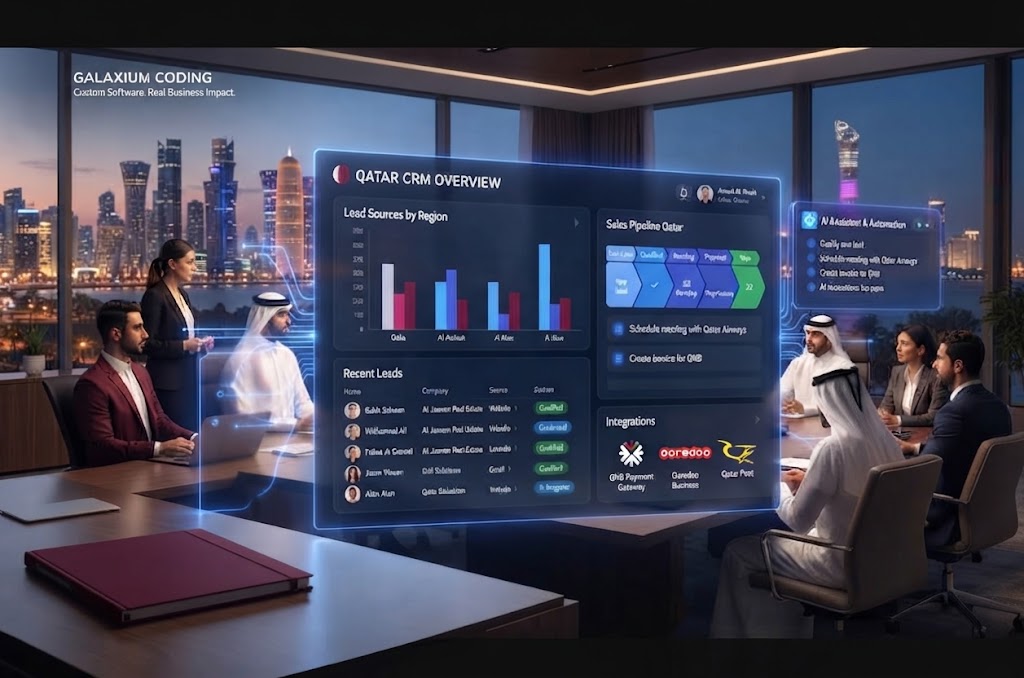
Custom CRM for Businesses in Qatar
Businesses in Qatar operate across a wide range of industries, including real estate, construction, professional services, education, retail, hospitality and technology.
A CRM for a Qatar-based organization may need to support:
Multiple branches
Sales teams
Local customer workflows
Arabic and English interfaces where required
Mobile sales teams
Website lead capture
Business messaging
Local operational processes
Integration with other business software
However, Qatar should not simply be added as a keyword.
The CRM architecture should be based on the actual requirements of the organization.
For businesses evaluating digital transformation, Galaxium Coding's broader technology work covers custom software, CRM-style platforms, web applications, mobile applications, cloud solutions and business automation.
What Should You Ask a CRM Development Company?
Before choosing a development partner, ask:
About Experience
Have you developed business management systems?
Can you show relevant projects?
Do you understand our industry?
About Technology
What architecture do you recommend?
What database will be used?
How will APIs be handled?
How will the system scale?
About Security
How will user permissions work?
How is customer data protected?
Are audit logs included?
What backup strategy will be used?
About Development
How will requirements be documented?
Will there be an MVP?
How frequently will we review progress?
How will testing be performed?
About Support
What happens after launch?
Is maintenance available?
How are bugs handled?
How are future features added?
The right development partner should be able to explain both the technology and the business reasoning behind the proposed solution.
Businesses can also review Galaxium Coding's projects and portfolio when evaluating its broader development capabilities.
When Should You Choose Custom CRM Development?
Custom CRM development may make sense when:
Your workflows are highly specialized
Existing CRMs require too many workarounds
Multiple systems need to be connected
You need complete control over workflows
Your business has complex permission requirements
You need industry-specific functionality
You expect substantial growth
You want to integrate AI or advanced automation
Your CRM needs to become part of a larger business platform
On the other hand, a ready-made CRM may be more appropriate when your requirements are standard and rapid deployment is more important than deep customization.
The right choice depends on business requirements, budget, timeline and long-term strategy.
The Future of Custom CRM Systems
CRM platforms are moving beyond simple customer databases.
The next generation of CRM systems is increasingly connected to:
AI
Automation
Mobile applications
Analytics
Business intelligence
Voice interfaces
Customer portals
ERP systems
Marketing platforms
Cloud infrastructure
A future CRM architecture could look like:
Website
↓
AI Assistant
↓
CRM
↓
Sales Automation
↓
ERP
↓
Mobile App
↓
Analytics
The objective is not to add technology for its own sake.
The objective is to create a connected business system where information moves efficiently and employees can make better decisions.
Final Thoughts
Building a custom CRM is a business transformation project as much as it is a software development project.
The best CRM is not necessarily the one with the largest number of features.
It is the one that fits the way your organization actually works.
A successful custom CRM project should begin with requirements, define users and workflows, design a strong data model, create a simple user experience, establish secure architecture, integrate important systems, test real-world processes and improve continuously after launch.
For many growing organizations, the CRM can also become the foundation for a larger digital ecosystem connecting websites, mobile applications, ERP systems, automation, analytics and AI.
If your business is considering a CRM designed around its own workflows, you can contact Galaxium Coding to discuss the requirements and explore a custom software approach.
Frequently Asked Questions
What is a custom CRM?
A custom CRM is customer relationship management software developed specifically around a business's workflows, data, users, integrations and operational requirements.
How much does it cost to build a custom CRM?
There is no universal price. Cost depends on the number of modules, users, integrations, database requirements, automation, security, mobile applications, AI and other project requirements.
How long does it take to build a custom CRM?
The timeline depends on complexity. A focused MVP can be developed more quickly than an enterprise CRM with multiple integrations, mobile applications, advanced analytics and AI.
Is a custom CRM better than Salesforce or another ready-made CRM?
Not necessarily. A ready-made CRM can be the better choice for businesses with standard requirements. Custom development becomes more attractive when workflows, integrations or industry requirements are highly specialized.
Can a custom CRM integrate with a website?
Yes. A custom CRM can be connected to a website through APIs or other integration methods so that enquiries and customer information can move automatically into the CRM.
Can a custom CRM include AI?
Yes. AI can be incorporated for applications such as lead qualification, customer support assistance, data analysis, summaries, document processing and workflow automation.
Can employees access a custom CRM on mobile devices?
Yes. A CRM can be designed as a responsive web application or extended through a dedicated mobile application, depending on the business requirements.
Is cloud hosting suitable for a custom CRM?
Cloud infrastructure can support application hosting, databases, backups, monitoring, scaling and integrations. The appropriate architecture depends on the CRM's security, performance and operational requirements.
Should a business build the entire CRM at once?
Usually, a phased approach is easier to manage. Businesses can begin with core CRM functionality and gradually add integrations, automation, mobile applications and AI.
How do I choose a CRM development company?
Evaluate the company's relevant development experience, technical capabilities, security approach, project methodology, communication process, portfolio and post-launch support.