How Long Does It Take to Develop Custom Software?
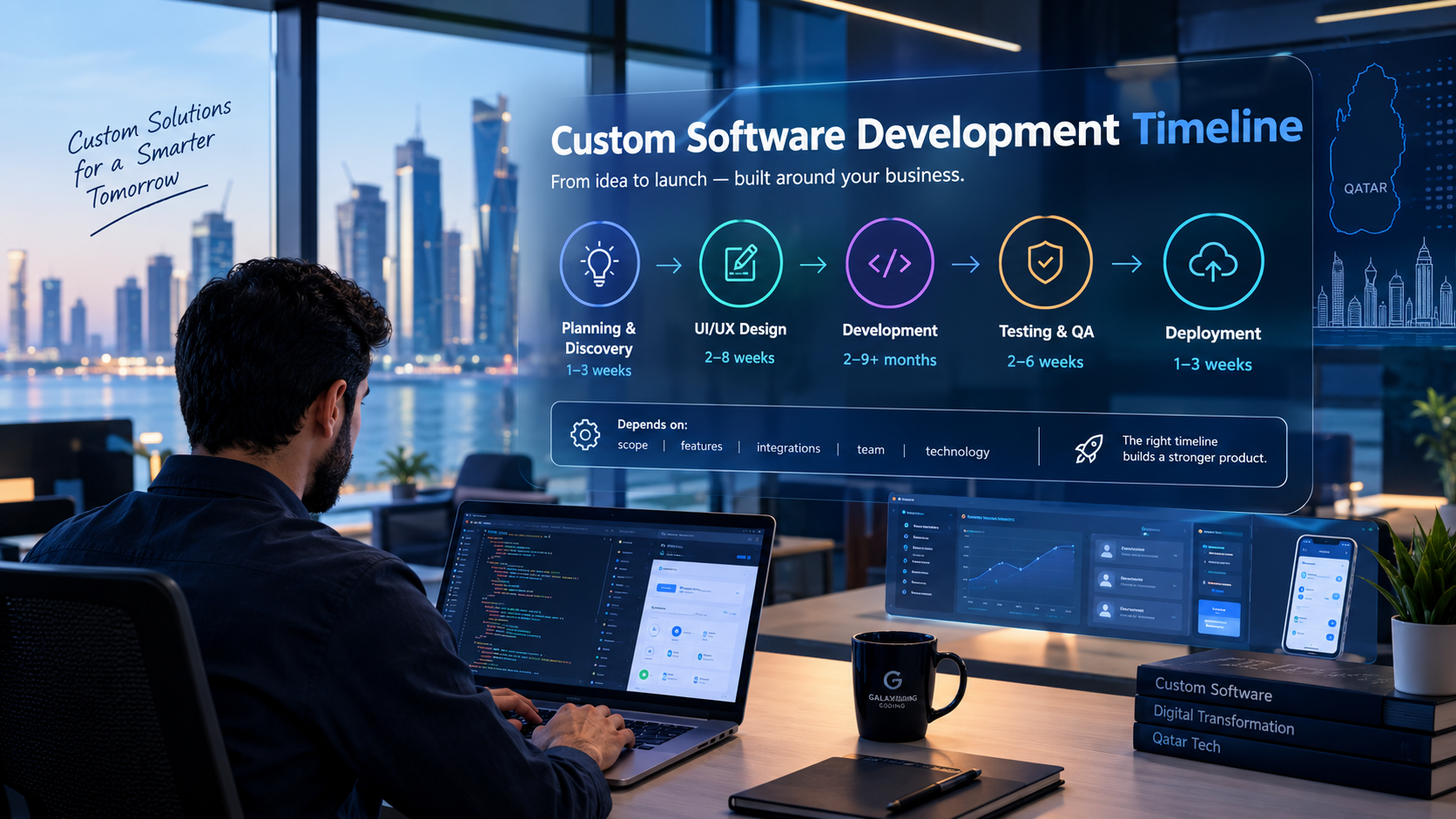
A custom software development timeline depends on project scope, features, integrations, testing and business requirements.
How Long Does It Take to Develop Custom Software?
Custom software development can take anywhere from a few months to more than a year, depending on the size, complexity, number of features, integrations, design requirements, security needs, and development approach.
A simple internal business application with a limited number of workflows may take considerably less time than a large enterprise platform combining CRM, ERP, HR, finance, inventory, mobile applications, AI, APIs, and advanced reporting.
There is therefore no single timeline that applies to every software project.
A useful way to think about the development timeline is:
Discovery → Requirements → Planning → UI/UX Design → Architecture → Development → Integration → Testing → Deployment → Training → Launch → Improvement
Businesses planning a tailored digital platform can explore custom software development services to understand how requirements can be converted into a structured development project.
The most important point is that software development time is primarily driven by scope and complexity, not simply by the number of developers working on a project.
Typical Custom Software Development Timeline
While every project is different, a general planning framework can look like this:
Project Type | Approximate Development Range |
|---|---|
Simple internal application | 2–4 months |
Small business management system | 3–6 months |
Medium custom business platform | 5–9 months |
Complex CRM, ERP or enterprise platform | 8–15+ months |
Large multi-system enterprise platform | 12–18+ months |
These are planning ranges, not guaranteed delivery times.
A project can move faster or slower depending on requirements, team structure, stakeholder availability, integrations, testing, data migration, security requirements, and changes during development.
For example, a basic internal approval system may have only a few user roles and workflows.
A business platform containing:
CRM
Sales
Inventory
Accounting
HR
Procurement
Customer portal
Employee portal
Mobile applications
Payment integration
Third-party APIs
AI features
Advanced reporting
will naturally require much more planning, development and testing.

Why There Is No Universal Software Development Timeline
One of the most common questions businesses ask is:
“How many months will it take to build my software?”
The answer depends on what “my software” actually includes.
Two companies may both request a “CRM,” but their requirements can be completely different.
Example 1: Basic CRM
A small business might need:
Leads
Customers
Sales opportunities
Follow-ups
Notes
Basic reports
This could be a relatively focused project.
Example 2: Advanced CRM
Another organization may require:
Lead management
Sales pipeline
Customer management
WhatsApp integration
Email integration
Automated follow-ups
Sales forecasting
Role-based permissions
Mobile application
Customer portal
Accounting integration
AI lead qualification
Advanced dashboards
The second system is not simply a larger version of the first. It introduces additional architecture, integrations, security requirements, testing scenarios and dependencies.
This is why a reliable timeline should be created after understanding the actual requirements.
What Determines How Long Custom Software Takes?
Several factors can significantly affect the development schedule.
1. Number of Features
The number of features is one of the most obvious factors.
A software system with five major functions will generally require less development work than one with dozens of interconnected functions.
For example:
Smaller scope
Login
User management
Customer records
Basic dashboard
Reports
Larger scope
User management
CRM
Sales
Inventory
Procurement
Accounting
HR
Payroll
Projects
Notifications
Customer portal
Mobile application
AI assistant
Reporting
Automation
The second project requires more than simply adding screens. Each module may have its own business rules, permissions, database relationships, integrations and testing requirements.
2. Complexity of Business Workflows
A software application becomes more complex when it has sophisticated business rules.
Consider an approval workflow.
A simple workflow might be:
Employee → Manager → Approved
A more complex workflow could be:
Employee → Department Manager → Finance → HR → Senior Management → Approved
The system may also need different rules depending on:
Department
Employee role
Transaction amount
Location
Customer type
Product type
Contract value
Approval level
Each additional rule can increase development and testing requirements.
3. UI/UX Design Requirements
Design can also affect the timeline.
A simple internal dashboard may require a relatively straightforward interface.
A customer-facing platform may require:
Responsive design
Multiple user journeys
Mobile optimization
Accessibility considerations
Interactive dashboards
Complex forms
Search and filtering
Notifications
Customer onboarding
Multiple languages
If the product needs both web and mobile experiences, the design effort can become even larger.
Businesses can also consider web application development when the software needs to operate through browsers across desktop, tablet and mobile devices.
4. Number of User Roles
Different user roles introduce additional permission and security requirements.
For example, an enterprise platform might have:
Super Admin
Administrator
Manager
Sales Employee
Accountant
HR Manager
Warehouse Employee
Customer
Supplier
Each role may have different permissions.
A salesperson might access:
Leads
Customers
Quotes
Orders
Follow-ups
An accountant may instead access:
Invoices
Payments
Financial reports
The development team needs to define, implement and test these permissions carefully.
5. Third-Party Integrations
Integrations can significantly affect development timelines.
A custom application may need to communicate with:
Payment gateways
Accounting software
CRM platforms
ERP systems
Email services
SMS services
Maps
Shipping platforms
Cloud storage
Identity providers
Government or business APIs
AI services
An integration is not simply a matter of connecting two systems.
Developers may need to handle:
API authentication
Data mapping
Request and response handling
Error handling
Rate limits
Webhooks
Security
Testing
Failure recovery
Monitoring
If several external systems are involved, the integration phase can become a major part of the project timeline.
How Long Does Each Stage of Development Take?
A custom software project can be divided into several major stages.
1. Discovery and Requirement Analysis
Typical range: 1–4 weeks
This stage focuses on understanding the business problem before development begins.
The team may examine:
Business objectives
Existing workflows
User roles
Required features
Existing systems
Integrations
Data requirements
Security requirements
Reporting needs
Mobile requirements
Future scalability
The output can include a clearer project scope, feature list, technical direction and development roadmap.
Skipping this stage can create problems later because unclear requirements often lead to changes during development.
2. Project Planning
Typical range: 1–3 weeks
Planning converts requirements into an actionable development roadmap.
This may include:
Feature prioritization
Technical planning
Development milestones
Team allocation
Architecture planning
Testing strategy
Deployment planning
Project dependencies
For larger projects, development may be divided into multiple releases.
3. UI/UX Design
Typical range: 2–8 weeks
The design timeline depends heavily on the number of screens and user journeys.
A small internal system might have:
Login
Dashboard
Customer page
Reports
Settings
A larger platform might have hundreds of screens covering multiple departments and user roles.
The design process can include:
User flows
Wireframes
Interface design
Responsive layouts
Design systems
Interactive prototypes
Design revisions
Good design can reduce confusion during development because developers have clearer specifications for the final interface.
4. Technical Architecture
Typical range: 1–4 weeks
Before major development begins, the technical foundation needs to be planned.
This can include:
Frontend architecture
Backend architecture
Database structure
APIs
Authentication
Authorization
Cloud infrastructure
File storage
Notifications
Security controls
Monitoring
Backup strategy
For simple software, architecture planning may be relatively straightforward.
For enterprise systems, architecture can become a major project activity.
5. Software Development
Typical range: 2–9+ months
Development is usually the largest part of the project.
The exact duration depends on the number of features, team structure and technical complexity.
Development may include:
Frontend development
Backend development
Database development
API development
Authentication
Permissions
Business logic
Notifications
Dashboards
Automation
Integrations
Mobile development
AI functionality
Large systems may be developed in parallel by multiple teams.
For example:
Team A → Frontend
Team B → Backend
Team C → Mobile
Team D → Integrations
QA Team → Testing
This can reduce calendar time, although coordination becomes more important.
How Long Does an MVP Take?
An MVP, or Minimum Viable Product, focuses on the smallest useful version of a product.
A typical custom software MVP may take approximately 2–5 months, depending on complexity.
For example, imagine a company wants to create a customer management platform.
Instead of immediately building:
CRM
Accounting
Inventory
HR
Mobile application
AI
Advanced analytics
Customer portal
the first release might focus on:
Login
Customer management
Lead management
Sales pipeline
Follow-ups
Basic reporting
The company can then launch the initial version, collect user feedback and gradually add additional capabilities.
MVP approach
Requirements → Design → Core Development → Testing → Launch
Full platform approach
Requirements → Design → Architecture → Multiple Modules → Integrations → Advanced Features → Extensive Testing → Deployment → Training → Continuous Development
The MVP approach can reduce initial time-to-launch, but it should not mean releasing software without adequate security or testing.
How Long Does Enterprise Software Take?
Enterprise software can take 8–15 months or longer, depending on its scope.
Large projects may involve multiple departments and complex processes.
For example:
Enterprise business platform
CRM
Sales
Finance
HR
Procurement
Inventory
Projects
Customer portal
Employee portal
Mobile application
Business intelligence
AI
Workflow automation
External integrations
Enterprise software also tends to require more attention to:
Security
Permissions
Data migration
Audit trails
Performance
Availability
Scalability
Integration testing
User acceptance testing
Training
Deployment planning
The development timeline should therefore account for the entire implementation rather than only coding.
How Integrations Affect the Timeline
Integrations deserve special attention because they can introduce dependencies outside the development team's direct control.
For example, suppose a business application needs to integrate with a payment provider.
The project may require:
Application → Backend → Payment API → Payment Provider → Webhook → Backend → Order Status
Every step needs to work correctly.
Now imagine the same software also connects to:
Accounting
CRM
SMS
Email
Inventory
Shipping
The number of possible interactions increases considerably.
Integration timelines can also be affected by:
API documentation
Access credentials
Sandbox availability
Vendor approval
API limitations
Data formats
Authentication requirements
Testing environments
Businesses should therefore identify integrations during the planning stage rather than adding them unexpectedly near launch.
How Mobile Applications Affect Software Development Time
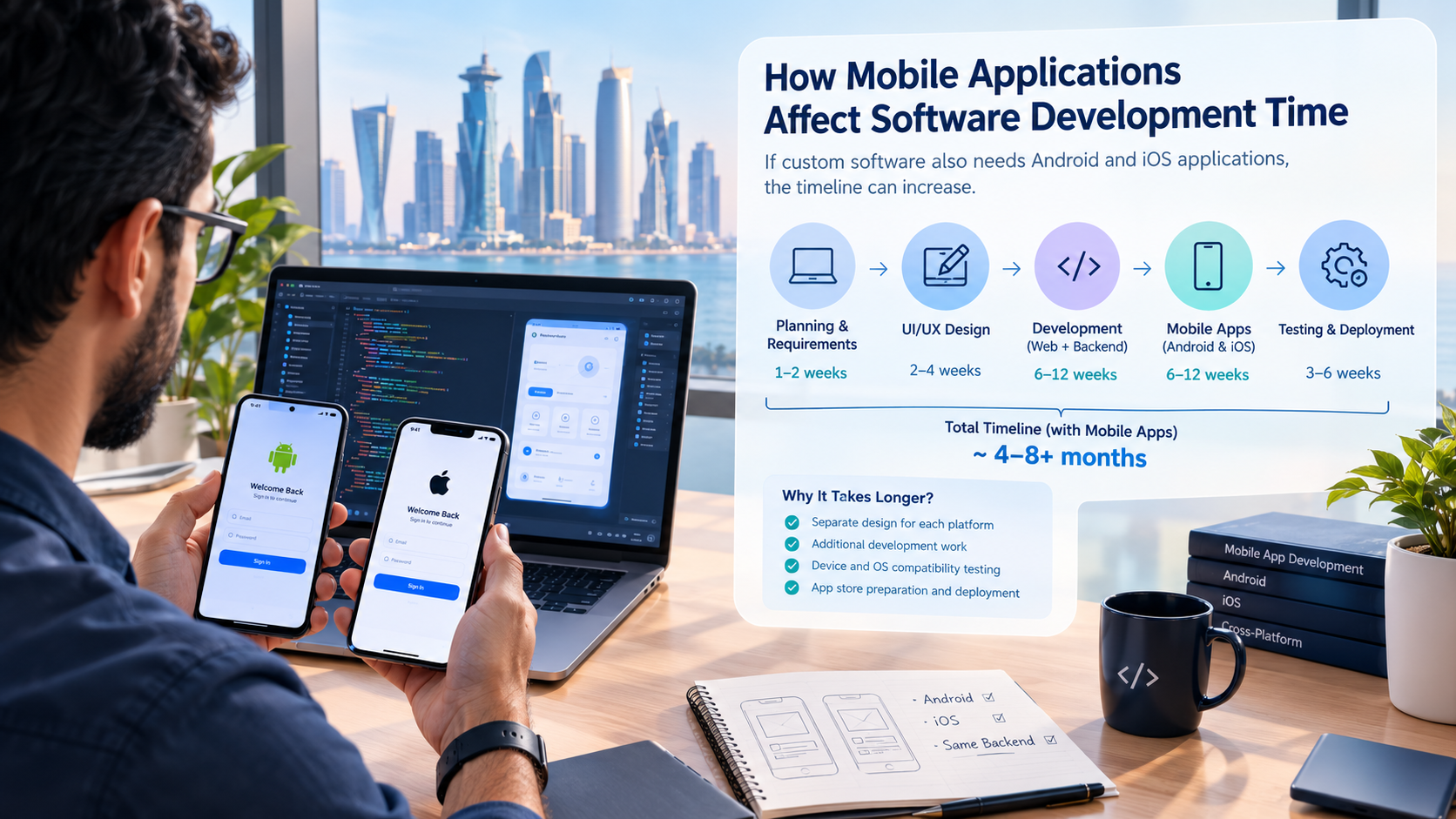
If custom software also needs Android and iOS applications, the timeline can increase.
A business platform might require:
Web Application + Backend + Android App + iOS App
The mobile applications may share backend services but still require:
Mobile UI
Authentication
Device compatibility
Push notifications
Mobile-specific workflows
App testing
App-store preparation
Device testing
For businesses requiring dedicated mobile solutions, mobile application development can be considered as part of the broader software architecture.
How AI Features Affect the Development Timeline
AI can add another layer of complexity.
For example, an AI-powered business system may need to:
Answer customer questions
Summarize CRM records
Qualify leads
Search internal documents
Generate reports
Recommend actions
Automate repetitive tasks
Assist employees
The AI feature itself is only part of the work.
The system may also need:
Data access controls
AI service integration
Prompt or workflow design
Context management
Permission handling
Monitoring
Testing
Error handling
Human review workflows
For example, an AI assistant connected to CRM data should not automatically expose every customer record to every employee.
The AI layer therefore needs to work within the application's existing security model.
How Testing Affects the Software Timeline
Testing should not be treated as something that happens only at the end.
Testing can take place throughout development.
Common testing activities include:
Functional Testing
Does each feature work as intended?
Integration Testing
Do different systems communicate correctly?
Performance Testing
Can the system handle the expected workload?
Security Testing
Are authentication, authorization and data protection working correctly?
Compatibility Testing
Does the application work across supported browsers and devices?
Regression Testing
Did a new change break an existing feature?
User Acceptance Testing
Can actual users complete their intended workflows?
Testing time depends on project complexity.
A system with 20 features may have fewer test scenarios than a platform with hundreds of interconnected workflows.
How Data Migration Can Delay a Software Project
Data migration is often underestimated.
A business may already have information stored in:
Excel files
Old databases
Legacy software
CRM platforms
Accounting systems
Separate departmental tools
Moving this information into a new system can require:
Data extraction
Data cleaning
Duplicate removal
Field mapping
Data transformation
Import
Validation
Testing
For example, a customer database may contain different formats for phone numbers, addresses or customer names.
Before migration, those records may need to be standardized.
The more historical data a project contains, the more time should be allocated to migration and validation.
How Scope Changes Affect Development Time
One of the biggest causes of schedule changes is scope expansion.
A project may start with:
“We need a sales management system.”
Later, requirements may become:
“Add inventory.”
Then:
“Add accounting.”
Then:
“Add HR.”
Then:
“Add a mobile app.”
Then:
“Add AI.”
Each addition may affect:
Database architecture
User permissions
UI/UX
APIs
Testing
Documentation
Deployment
Project management
This is why requirements should be prioritized before development begins.
A change-control process can help determine whether a new feature should:
Be included immediately
Move into a later release
Replace another feature
Become part of a future phase
What Can Businesses Do to Reduce Development Time?
Reducing development time does not necessarily mean asking developers to work faster.
It often means reducing uncertainty and unnecessary rework.
1. Define the Business Problem Clearly
Start with:
What problem should the software solve?
Instead of beginning with a long list of technologies, define the desired business outcome.
2. Prioritize Features
Separate requirements into:
Must have
Should have
Could have
Future
This helps the team focus on the most important functionality first.
3. Finalize Core Requirements Early
Frequent changes during development can increase rework.
Clear requirements help developers build against a stable target.
4. Identify Integrations Early
List all external systems before development begins.
This makes it easier to identify dependencies and technical risks.
5. Use an MVP Where Appropriate
A focused first release can allow businesses to launch useful functionality earlier.
Additional modules can then be developed in later phases.
6. Involve Real Users
Employees who will actually use the software can identify workflow problems that may not be obvious to management or developers.
Early feedback can reduce expensive changes later.
7. Plan Testing From the Beginning
Testing should be part of the development roadmap rather than an unexpected final step.
Can More Developers Make the Project Faster?
Adding developers can increase development capacity, but it does not automatically reduce the timeline proportionally.
Software projects involve dependencies.
For example:
Database Architecture → Backend → API → Frontend
Some tasks cannot begin until another task is sufficiently complete.
A larger team can also introduce additional communication and coordination requirements.
The more useful question is therefore not:
“How many developers should we hire?”
but:
“What team structure is appropriate for the project's scope and dependencies?”
A project might require:
Business analyst
UI/UX designer
Frontend developer
Backend developer
Mobile developer
QA engineer
DevOps engineer
Project manager
The exact team depends on the project.
Custom Software Timeline Example
Consider a medium-sized business that wants a custom management platform.
Phase 1 — Discovery
Weeks 1–2
The team documents:
Users
Workflows
Features
Integrations
Reports
Security requirements
Phase 2 — Design
Weeks 3–6
The team creates:
User flows
Wireframes
UI designs
Responsive layouts
Phase 3 — Architecture
Weeks 4–6
Technical planning covers:
Database
Backend
APIs
Authentication
Infrastructure
Phase 4 — Development
Weeks 7–20
The team develops:
User management
CRM
Sales
Dashboard
Reports
Notifications
Business workflows
Phase 5 — Integration
Weeks 14–21
The system connects with required external services.
Phase 6 — Testing
Weeks 17–23
QA covers:
Functional testing
Integration testing
Security testing
Compatibility testing
Regression testing
User acceptance testing
Phase 7 — Deployment and Training
Weeks 23–25
The system is prepared for production and users are trained.
This example illustrates why development stages can overlap. Design, architecture, development and testing do not always happen in completely separate blocks.
What Is the Biggest Factor in Software Development Time?
If one factor has to be highlighted, it is scope complexity.
Scope includes more than the number of screens.
It includes:
Features
Business rules
Integrations
User roles
Data
Security
Automation
Mobile applications
AI
Reporting
Performance requirements
Scalability
Compliance requirements
For example:
10 simple screens with straightforward workflows
can potentially be less complex than:
5 screens containing complicated approval rules, integrations and automation.
Therefore, screen count alone should not be used to estimate a project.
Custom Software Development Timeline for Qatar Businesses
For businesses in Qatar, project planning may also need to consider local business requirements.
Depending on the software, relevant considerations may include:
Arabic and English interfaces
Local business workflows
Payment integrations
Customer management
Employee management
Multi-branch operations
Mobile access
Data security
Business automation
Integration with existing business systems
However, these requirements should be evaluated based on the actual business rather than automatically added to every project.
For businesses considering a software project in Qatar, the development timeline should therefore be based on the company's workflows, users, required integrations and expected future growth.
Galaxium Coding provides technology services including custom software development, web applications, mobile applications and cloud-related solutions for business requirements.
How to Get a More Accurate Software Development Timeline
A development company should have enough information to estimate the project before providing a serious timeline.
Useful information includes:
Business Requirements
What problem does the software solve?
Users
Who will use it?
Features
What must the system do?
Integrations
Which external systems need to connect?
Platforms
Will it be:
Web only?
Mobile?
Web and mobile?
Internal?
Customer-facing?
Data
Does existing information need to be migrated?
Security
What permissions and security controls are required?
Scale
How many users, transactions or records are expected?
Future Plans
Will additional modules be added later?
The more clearly these questions are answered, the more useful the project estimate becomes.
Should Businesses Choose a Faster or More Detailed Development Approach?
Speed should not be the only consideration.
A rushed project can create problems such as:
Poor user experience
Technical debt
Security weaknesses
Incomplete testing
Unstable integrations
Difficult maintenance
Expensive rework
On the other hand, excessive planning without delivering useful functionality can delay business value.
A balanced approach is to define the core requirements, prioritize the first release, build in manageable stages and continuously validate the software with users.
Frequently Asked Questions
How long does it take to develop custom software?
Custom software development can take approximately 2–4 months for a relatively simple application, 3–9 months for many small-to-medium business systems, and 8–15+ months for complex enterprise platforms. The actual timeline depends on scope, integrations, design, security, testing and other project requirements.
Can custom software be developed in three months?
Yes, a focused software project or MVP can potentially be developed within three months when the scope is well defined and the system does not require extensive integrations or complex functionality.
How long does an MVP take to build?
A custom software MVP may take around 2–5 months, depending on the number of features, design complexity, integrations and technical requirements.
How long does enterprise software development take?
Enterprise software can take 8–15 months or longer when it includes multiple modules, departments, integrations, mobile applications, advanced security, reporting or AI functionality.
What takes the most time when developing custom software?
Development itself is usually a major part of the timeline, but complex requirements, integrations, data migration, testing, security and scope changes can also significantly affect the schedule.
Do integrations increase software development time?
Yes. Integrations can require API development, authentication, data mapping, error handling, testing and coordination with external service providers.
Does adding a mobile app increase the development timeline?
Usually, yes. A mobile application introduces additional design, development, device testing, notifications and deployment requirements, although it can share backend services with a web application.
Can AI increase software development time?
AI features can increase project complexity because they may require AI-service integration, data access controls, workflow design, testing, monitoring and additional security considerations.
Does changing requirements delay software development?
Frequent requirement changes can affect the timeline because they may require additional development, redesign, database changes, integration work and regression testing.
How can I make custom software development faster?
The most practical approaches include defining requirements early, prioritizing core functionality, identifying integrations early, using an MVP strategy where appropriate, involving real users and maintaining a clear change-control process.
How do I get an accurate custom software development estimate?
Start by documenting the business problem, users, features, workflows, integrations, platforms, security requirements and expected scale. A development team can then evaluate the scope and create a more meaningful project roadmap.
Final Thoughts
There is no universal answer to the question “How long does it take to develop custom software?”
A simple business application may take a few months, while a complex enterprise platform can require a year or longer.
The biggest factors include:
Scope
Features
Business workflows
User roles
UI/UX
Integrations
Mobile applications
AI functionality
Data migration
Security
Testing
Stakeholder feedback
Scope changes
The most reliable way to estimate a project is to understand the business requirements first and then create a development roadmap around the actual scope.
For businesses planning a new software platform, the objective should not simply be to build it as quickly as possible. The goal should be to create a reliable system that solves the intended business problem and can evolve as the organization grows.
Businesses can review Galaxium Coding's projects and portfolio to explore its technology work, or contact Galaxium Coding to discuss a custom software requirement.