How CRM Software Can Increase Sales and Improve Customer Management
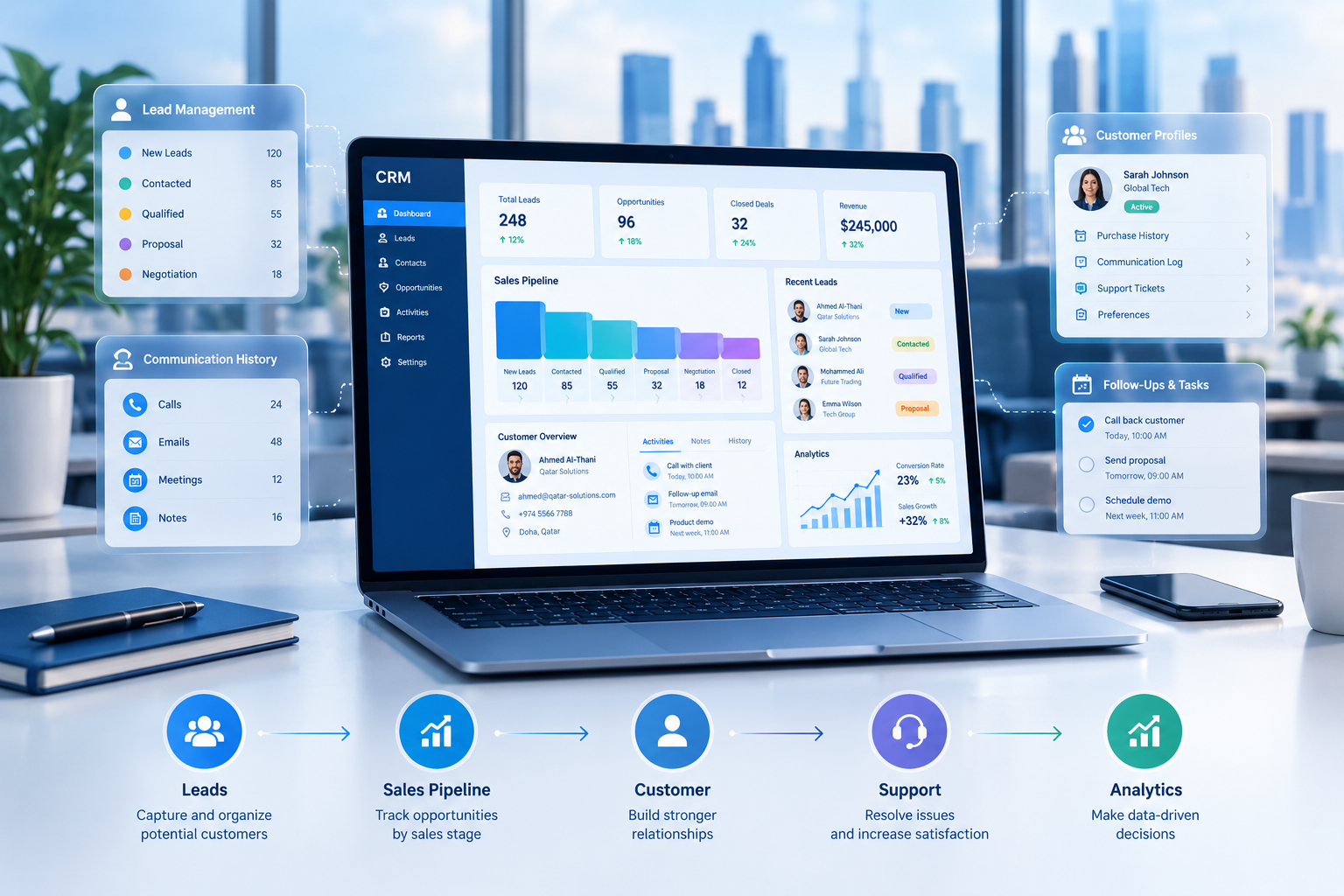
CRM software connects leads, sales activities, customer information, follow-ups, and business insights in one connected workflow.
How CRM Software Can Increase Sales and Improve Customer Management
Managing customers becomes increasingly difficult as a business grows.
A company may receive enquiries through its website, phone calls, email, social media, WhatsApp, referrals, advertisements, and other channels. Sales representatives may then store customer information in spreadsheets, email inboxes, messaging applications, notebooks, or separate software systems.
This creates a common problem: customer information becomes fragmented.
A CRM system can bring this information into a centralized environment where sales teams can manage leads, customers, opportunities, activities, follow-ups, and communication history.
CRM stands for Customer Relationship Management. Modern CRM software can support sales, marketing, customer service, automation, reporting, and customer-data management from a connected platform.
For businesses considering custom software development, CRM can also become part of a larger business-management ecosystem rather than functioning as an isolated application.
But how exactly can CRM software increase sales and improve customer management?
Let's examine the practical ways.

What Is CRM Software?
CRM software is a system used to organize and manage information about customers and prospects.
Instead of keeping customer information across multiple disconnected tools, a CRM can provide a centralized view of the customer relationship.
A typical CRM may contain:
Customer profiles
Contact information
Leads
Prospects
Sales opportunities
Sales pipelines
Follow-up activities
Communication history
Tasks
Appointments
Quotations
Customer notes
Sales representatives
Reports
Dashboards
Notifications
Customer-service interactions
The exact functionality depends on the CRM platform.
The fundamental idea is simple:
Capture customer information → organize it → track interactions → manage opportunities → follow up → measure results.
Microsoft describes CRM as software that connects customer data and business processes across areas such as sales, marketing, and service.
Why Businesses Need CRM Software
A small business may initially manage customers with spreadsheets and email.
This can work when there are only a few customers and enquiries.
As the business grows, however, the number of leads, customers, sales representatives, conversations, opportunities, and follow-ups can increase significantly.
For example:
A company receives 100 enquiries.
Some customers are contacted by phone.
Others communicate through email.
Some enquiries arrive through social media.
A sales employee records some leads in Excel.
Another employee keeps information in WhatsApp.
A manager asks for a sales report.
Now the company has to collect information from multiple places.
A CRM can bring these processes into a more structured workflow.
For example:
Customer enquiry
↓
Lead created
↓
Sales representative assigned
↓
Follow-up scheduled
↓
Opportunity qualified
↓
Quotation
↓
Negotiation
↓
Sale
↓
Customer management
This gives the sales team a clearer view of what is happening at every stage.
How CRM Software Can Increase Sales
CRM software does not automatically create sales.
Instead, it gives businesses tools that can help sales teams organize their work, respond to opportunities, manage pipelines, automate repetitive tasks, and make decisions using customer information.
Here are some of the major ways CRM can support sales growth.
1. Centralize Lead Information
One of the biggest advantages of CRM software is centralized lead management.
Without CRM, lead information may be scattered across:
Excel files
Email
Phone records
WhatsApp
Website forms
Social media
Marketing platforms
Paper notes
Individual employee records
A centralized CRM creates a common location for lead information.
A sales representative can potentially see:
Lead name
Company
Contact information
Source
Interest
Assigned salesperson
Current status
Previous conversations
Follow-up dates
Opportunity value
Notes
Next action
This reduces the need to search through multiple systems before speaking with a prospect.
2. Reduce Missed Follow-Ups
A potential customer may show interest today but make a purchase several days or weeks later.
If the sales representative forgets to follow up, the opportunity may disappear.
CRM software can help organize follow-up activities.
For example:
Monday
New enquiry received.
↓
Tuesday
Sales representative contacts customer.
↓
Friday
Follow-up reminder created.
↓
Next week
Quotation discussed.
↓
Following week
Final decision requested.
Instead of relying entirely on memory, the sales team can use tasks, reminders, notifications, and scheduled activities.
This is particularly useful when sales cycles are long.
3. Improve Sales Pipeline Visibility
A CRM sales pipeline allows businesses to see where opportunities are located within the sales process.
For example:
Stage | Number of Opportunities |
|---|---|
New Leads | 120 |
Contacted | 85 |
Qualified | 55 |
Proposal Sent | 32 |
Negotiation | 18 |
Closed | 12 |
The exact stages will vary by business.
A real estate company might use:
New enquiry → Property interested → Viewing → Negotiation → Agreement → Closed
A software company might use:
Lead → Discovery → Demo → Proposal → Negotiation → Contract
A service business might use:
Enquiry → Consultation → Quotation → Approval → Service delivery
The CRM can be configured around the organization's sales process.
4. Help Sales Representatives Prioritize Leads
Not every lead has the same potential.
A sales representative may have dozens or hundreds of open enquiries.
CRM systems can help teams organize leads according to factors such as:
Lead source
Customer interest
Deal value
Lead status
Engagement
Industry
Location
Previous purchases
Follow-up urgency
Sales stage
More advanced CRM platforms may also provide lead scoring, analytics, or AI-assisted recommendations.
Microsoft's current CRM documentation describes capabilities such as lead prioritization, sales automation, analytics, and AI-supported insights.
The purpose is not simply to collect more leads.
It is to help sales teams focus their time where it is most useful.
5. Automate Repetitive Sales Tasks
Sales employees can spend significant time on administrative activities.
Examples include:
Creating lead records
Assigning leads
Sending confirmation messages
Creating reminders
Updating lead status
Logging calls
Sending follow-up emails
Generating reports
Updating customer records
CRM automation can reduce some of this manual work.
For example:
Website enquiry
↓
CRM automatically creates lead
↓
Lead assigned to sales representative
↓
Sales representative receives notification
↓
Customer receives acknowledgement
↓
Follow-up task created
This allows employees to spend more time communicating with customers rather than repeatedly entering information.
6. Improve Response Times
Customers increasingly expect businesses to respond quickly.
If an enquiry arrives and nobody responds for several days, the prospect may contact another company.
A connected CRM can help sales teams identify new enquiries quickly.
For example:
10:05 AM
Customer submits enquiry.
10:05 AM
CRM creates lead.
10:06 AM
Sales representative receives notification.
10:10 AM
Customer receives initial response.
The exact response process depends on the business and its automation setup, but the underlying principle is important:
The faster a business can identify and act on a genuine opportunity, the less likely that opportunity is to be forgotten.
7. Give Managers Better Sales Visibility
Sales managers need more than a list of customers.
They need to understand what is happening across the sales team.
CRM dashboards can provide information such as:
New leads
Open opportunities
Closed deals
Sales pipeline
Sales activities
Conversion rates
Follow-up activity
Sales representative performance
Revenue by period
Lead sources
Customer activity
For example, a manager may discover that a large number of leads are being generated but relatively few are reaching the quotation stage.
That could lead to a useful business question:
Are sales representatives receiving enough qualified leads, or is there a problem in the qualification process?
CRM reporting does not automatically answer every business question, but it gives management structured information to investigate.
8. Track the Entire Customer Journey
CRM software can connect customer activity from the first enquiry through later interactions.
For example:
First enquiry
↓
Sales call
↓
Product demonstration
↓
Quotation
↓
Negotiation
↓
Purchase
↓
Customer support
↓
Renewal
This historical information can help employees understand the customer's relationship with the business.
A salesperson who speaks with an existing customer does not necessarily need to start from zero.
They may be able to review previous interactions before continuing the conversation.
A unified customer record is one of the major purposes of CRM technology.
How CRM Software Improves Customer Management
Increasing sales is only one part of CRM.
The other major purpose is improving the way businesses manage customer relationships.
1. Create a Single Customer Record
A customer may interact with several departments.
For example:
Sales
Customer service
Accounts
Marketing
Technical support
If every department keeps separate information, customers may have to repeat the same information multiple times.
A CRM can provide a shared customer record.
Depending on the system, employees may see:
Customer details
Purchase history
Communication history
Open issues
Previous quotations
Sales opportunities
Service requests
Notes
Preferences
Follow-up activities
This can create a more consistent customer experience.
2. Maintain Communication History
Customer conversations are valuable business information.
A CRM can potentially record:
Calls
Emails
Meetings
Notes
Support interactions
Sales activities
Follow-ups
For example, if a customer contacted the company last week about a quotation, the sales representative can review the previous interaction before contacting them again.
This reduces repetitive conversations and improves continuity.
3. Personalize Customer Interactions
Customers do not always want generic communication.
A business that understands customer history can potentially make communication more relevant.
For example, instead of sending the same message to every customer, a company could segment customers according to:
Products purchased
Industry
Customer type
Purchase frequency
Location
Engagement
Sales stage
Service history
CRM platforms can support customer segmentation and personalized communication when appropriate data is available.
4. Improve Customer Service Coordination
CRM can connect sales and customer service information.
Suppose a customer has purchased a product and later contacts support.
The support employee may need to know:
What the customer purchased
When they purchased it
Who handled the sale
Previous issues
Previous communication
Current service status
If the information is available through a connected CRM, the support employee can work with greater context.
This can also help sales and service teams coordinate customer communication.
5. Support Customer Retention
Winning a new customer is only one part of business growth.
Businesses also need to maintain existing relationships.
CRM can help companies monitor:
Customer activity
Follow-ups
Renewals
Service requests
Customer complaints
Previous purchases
Account activity
For example, a business offering annual contracts could create renewal reminders well before the contract expires.
The CRM does not guarantee retention, but it can make the process more systematic.
Microsoft's customer-relationship guidance identifies proactive outreach, personalized experiences, and unified customer information as factors businesses can use when managing relationships and supporting retention.
Key CRM Features That Support Sales and Customer Management
A CRM platform can contain many features.
The right combination depends on the business.
CRM Feature | How It Can Help |
|---|---|
Contact Management | Organizes customer information |
Lead Management | Tracks prospects from enquiry to qualification |
Sales Pipeline | Shows opportunities by sales stage |
Task Management | Organizes sales activities |
Follow-Up Reminders | Helps reduce missed activities |
Communication History | Keeps customer interactions together |
Reporting | Provides visibility into business activity |
Dashboards | Gives managers quick performance views |
Automation | Reduces repetitive administrative work |
Customer Segmentation | Helps organize customers into useful groups |
Notifications | Alerts employees about important activities |
Integration | Connects CRM with other business systems |
Mobile Access | Allows employees to access information remotely |
Analytics | Helps identify patterns and trends |
CRM Integration With Other Business Systems
CRM becomes more useful when it can communicate with other business applications.
For example:
Website
↓
CRM
↓
Sales
↓
ERP
↓
Accounting
↓
Customer
A company may want its CRM to connect with:
Website forms
E-commerce systems
Accounting software
ERP
Email
Marketing platforms
Payment systems
Customer portals
Mobile applications
WhatsApp or communication platforms
Analytics tools
AI services
Modern CRM platforms increasingly emphasize integration because customer information often exists across multiple systems.
Businesses requiring browser-based CRM functionality can also consider web application development for a system designed around their specific workflows.
CRM Automation: From Manual Work to Connected Workflows
Automation is one of the most valuable areas of modern CRM.
Consider a traditional process.
Manual Process
Customer submits form.
↓
Employee checks email.
↓
Employee copies information.
↓
Employee creates spreadsheet record.
↓
Employee informs sales representative.
↓
Sales representative contacts customer.
↓
Employee creates reminder.
↓
Manager requests report.
↓
Employee prepares report manually.
Now consider a connected workflow.
Automated CRM Process
Customer submits form.
↓
CRM creates lead.
↓
Lead is assigned automatically.
↓
Sales representative receives notification.
↓
Customer receives acknowledgement.
↓
Follow-up task is created.
↓
Sales representative updates lead status.
↓
Management dashboard updates.
The second process does not eliminate the need for employees.
Instead, it reduces repetitive administrative work and gives employees a structured workflow.
This is one reason CRM can work effectively alongside broader business automation strategies.
CRM for Different Industries
CRM requirements are not identical across industries.
CRM for Real Estate
A real estate company may need to manage:
Property enquiries
Buyers
Sellers
Tenants
Owners
Agents
Property viewings
Follow-ups
Offers
Contracts
Commissions
Customer communication
A real estate CRM might use a workflow such as:
Lead → Property Interest → Viewing → Offer → Negotiation → Contract → Closed
This can help agents and managers track where each opportunity stands.
CRM for Education
Educational organizations may manage:
Student enquiries
Course interests
Applications
Admissions
Parent enquiries
Counselling sessions
Follow-ups
A CRM can become part of a broader education platform.
Organizations looking to connect customer or student workflows with a wider digital platform can also explore education technology solutions.
CRM for Professional Services
Professional service businesses may manage:
Leads
Consultations
Proposals
Contracts
Clients
Appointments
Projects
Invoices
Follow-ups
A CRM can help connect the initial enquiry with the eventual client relationship.
CRM for Retail and E-Commerce
Retail and e-commerce businesses may use CRM to organize:
Customer profiles
Purchase history
Product interests
Marketing permissions
Loyalty activity
Customer service
Repeat purchases
CRM can be connected with e-commerce and business-management systems so customer activity is not isolated from sales and operational information.
CRM vs Spreadsheet: What Is the Difference?
Many small businesses begin with spreadsheets.
Spreadsheets can be useful for simple data management.
However, CRM software is designed specifically around customer relationships and sales workflows.
Spreadsheet | CRM |
|---|---|
Primarily data storage | Customer relationship management |
Manual updates | Workflow automation options |
Limited collaboration | Multi-user access and permissions |
Basic reporting | Sales dashboards and analytics |
Simple tables | Customer records and linked activities |
Manual reminders | Automated tasks and notifications |
Limited workflow support | Sales pipeline management |
Often isolated | Can integrate with other systems |
This does not mean every company needs a CRM immediately.
If a business has very few customers and a simple sales process, a spreadsheet may still be sufficient.
The question is whether the current system can support the company's growing operational requirements.
How to Measure CRM Success
Installing CRM software is not the same as achieving business results.
Businesses should define measurable objectives.
Useful CRM metrics can include:
Lead Response Time
How quickly does the sales team respond to new enquiries?
Lead Conversion Rate
What percentage of leads become qualified opportunities or customers?
Sales Cycle Length
How long does it take for opportunities to move from initial contact to closing?
Follow-Up Completion
How many planned follow-ups are completed?
Opportunity Conversion
How many sales opportunities become closed deals?
Customer Retention
How effectively does the company retain existing customers?
Customer Acquisition Source
Which channels generate the most useful leads?
Sales Activity
How many calls, meetings, proposals, and follow-ups are being completed?
Revenue by Source
Which lead sources contribute to revenue?
The most useful metrics depend on the business model.
A CRM should therefore be configured around actual business objectives rather than simply collecting as many metrics as possible.

How to Implement CRM Software Successfully
A CRM project should start with business requirements rather than technology alone.
Step 1: Identify the Business Problem
Ask:
What customer-management problem are we trying to solve?
Where are leads currently stored?
Why are follow-ups being missed?
Which information is difficult to find?
What reports does management need?
Step 2: Map the Current Sales Process
Document the existing workflow.
For example:
Lead → Contact → Qualification → Proposal → Negotiation → Sale
Identify where delays, duplication, or manual work occur.
Step 3: Define CRM Requirements
Decide which features are genuinely required.
These might include:
Lead management
Contact management
Pipeline management
Follow-ups
Reports
Dashboards
Notifications
Automation
Customer service
Integrations
Step 4: Plan Integrations
Determine which existing systems need to communicate with the CRM.
For example:
Website ↔ CRM ↔ ERP ↔ Accounting
This should be considered before development begins.
Step 5: Configure or Develop the CRM
Some businesses can use an existing CRM platform.
Others may require a customized solution because their workflows, approval processes, industry requirements, or integrations are unusual.
Galaxium Coding provides software development services for organizations that require customized digital systems.
Step 6: Migrate Customer Data
Existing customer data may exist in:
Spreadsheets
Databases
Existing CRM systems
Email platforms
Other business applications
Data should be reviewed and cleaned before migration.
Duplicate or incomplete records can reduce CRM quality.
Step 7: Train Employees
CRM adoption depends heavily on employees using the system correctly.
Training should explain:
How to create leads
How to update records
How to manage follow-ups
How to move opportunities
How to record customer interactions
How to generate reports
Step 8: Monitor and Improve
CRM implementation should not necessarily end when the software launches.
Businesses should review:
User adoption
Data quality
Workflow efficiency
Sales performance
Customer feedback
Automation opportunities
The system can then evolve as the business changes.
Should You Buy a CRM or Build a Custom CRM?
This depends on the organization's requirements.
A ready-made CRM may be suitable when the business needs standard functionality such as:
Contact management
Leads
Sales pipelines
Basic reporting
Standard integrations
Common sales workflows
Custom CRM development may become relevant when a company requires highly specific workflows.
For example:
Lead
↓
Sales Agent
↓
Manager Approval
↓
Document Verification
↓
Finance Approval
↓
Contract
↓
Payment
↓
Customer Portal
If an existing platform cannot support an important business process without extensive workarounds, a custom system may be considered.
Galaxium Coding's existing content also distinguishes between standard software and custom systems based on flexibility and business-specific workflows.
The decision should therefore be based on requirements rather than assuming that custom or ready-made software is automatically appropriate for every business.
Security and Customer Data
CRM systems contain valuable information.
Depending on the organization, this may include:
Names
Contact information
Company information
Purchase history
Communication records
Contracts
Sales information
Support history
Security should therefore be part of CRM planning from the beginning.
Important considerations can include:
User authentication
Role-based access
Permissions
Data encryption
Secure APIs
Backups
Audit logs
Access monitoring
Data retention
Secure integrations
Businesses should also consider applicable privacy and data-protection requirements for their jurisdiction and industry.
A CRM should make customer information easier to manage without making access controls an afterthought.
CRM and AI
Artificial intelligence is increasingly becoming part of modern CRM systems.
AI-supported CRM functionality can include:
Lead scoring
Sales recommendations
Customer segmentation
Automated summaries
Conversation analysis
Forecasting
Suggested follow-ups
Customer-service assistance
Data analysis
Natural-language queries
For example, instead of manually reviewing hundreds of customer records, a manager could potentially use an AI-enabled system to identify customers requiring follow-up.
However, AI should complement business processes rather than replace good CRM data management.
Poor data can produce poor insights.
A strong foundation therefore remains:
Accurate data + clear workflows + appropriate automation + responsible AI.
CRM for Businesses in Qatar
Businesses in Qatar operate across industries including:
Real estate
Construction
Retail
Hospitality
Professional services
Education
Healthcare
Logistics
Technology
Financial services
Each industry may have different customer-management requirements.
For example, a real estate company may prioritize property enquiries and agent follow-ups, while an education organization may prioritize student enquiries and admissions.
A Qatar-focused CRM should therefore be designed around the actual workflow of the organization rather than simply adding a location label to generic software.
For companies evaluating a broader digital strategy, CRM can also become one component of a larger platform connecting sales, operations, finance, customer service, mobile applications, and business analytics.
Common CRM Implementation Mistakes
1. Buying Too Many Features
More features do not necessarily mean better results.
A business should focus on the functionality employees actually need.
2. Ignoring User Adoption
A technically powerful CRM will not deliver its intended value if employees avoid using it.
3. Poor Data Quality
Duplicate, incomplete, or outdated customer records can undermine reporting and customer management.
4. Failing to Define the Sales Process
A CRM should reflect the organization's sales workflow.
5. Ignoring Integrations
If employees still have to copy information manually between systems, important efficiency opportunities may be lost.
6. Automating Everything
Automation should be applied where it makes sense.
Customer relationships often require human judgment, particularly during complex sales, negotiations, complaints, or sensitive interactions.
7. Treating CRM as Only a Sales Tool
Customer service, marketing, management, and operations may also benefit from shared customer information.
What Does a Modern CRM Workflow Look Like?
A connected CRM environment could look like this:
Website
↓
Customer Enquiry
↓
CRM Lead
↓
Automatic Assignment
↓
Sales Follow-Up
↓
Qualification
↓
Opportunity
↓
Quotation
↓
Negotiation
↓
Sale
↓
Customer Account
↓
Support
↓
Renewal / Repeat Purchase
↓
Analytics
This type of connected workflow allows businesses to manage the customer relationship beyond the initial sale.
Final Thoughts
CRM software can support sales and customer management by organizing customer information, improving pipeline visibility, reducing missed follow-ups, automating repetitive tasks, supporting reporting, and creating a more connected view of customer interactions.
The real value of CRM is not simply having another software application.
The value comes from creating a structured process around customer relationships.
For some businesses, an existing CRM may provide everything they need.
For others, CRM may need to integrate with ERP, accounting, e-commerce, mobile applications, customer portals, AI, or other business systems.
The right approach depends on the company's size, sales process, industry, existing technology, customer journey, and future requirements.
Businesses looking to build or improve a connected digital system can explore Galaxium Coding's projects and portfolio to understand the broader types of technology solutions the company works with.
If your organization is evaluating a CRM, custom business application, or integrated customer-management platform, you can contact Galaxium Coding to discuss the requirements and possible technical approach.
Frequently Asked Questions About CRM Software
What is CRM software?
CRM software is a technology system used to manage relationships and interactions with customers and prospects. It can centralize customer information, track sales activities, manage pipelines, support customer service, and automate workflows.
Can CRM software increase sales?
CRM software can support sales by helping businesses organize leads, manage pipelines, schedule follow-ups, automate repetitive tasks, improve customer visibility, and provide sales reporting. It does not guarantee increased sales; results depend on implementation, data quality, sales processes, and employee adoption.
How does CRM improve customer management?
CRM can centralize customer information and communication history so employees can access a more complete view of the customer relationship. This can support more consistent communication and coordinated customer service.
Is CRM only for large businesses?
No. CRM systems can be used by businesses of different sizes. The appropriate system depends on the organization's customer volume, sales process, budget, integrations, and operational requirements. Microsoft's CRM guidance notes that CRM solutions can also be suitable for smaller businesses.
Can CRM software automate follow-ups?
Yes. CRM systems can create tasks, reminders, notifications, workflows, and automated communications depending on the platform and configuration.
Can CRM integrate with ERP software?
Yes. CRM can be integrated with ERP and other business applications so relevant customer and transaction information can move between systems. The exact integration method depends on the platforms and APIs involved.
What industries can use CRM software?
CRM can be used across many industries, including real estate, education, retail, professional services, healthcare, construction, hospitality, technology, and logistics.
Should a business build a custom CRM?
Not necessarily. A ready-made CRM may be sufficient when standard functionality meets the business requirements. Custom CRM development can be considered when the organization has highly specific workflows, integrations, approval processes, or industry requirements.
What are the most important CRM features?
Commonly important features include contact management, lead management, sales pipelines, follow-up management, communication history, reporting, dashboards, automation, integrations, permissions, and customer-service functionality.
How long does CRM implementation take?
There is no single timeline. Implementation depends on the number of users, data migration requirements, integrations, customization, automation, security requirements, and overall system scope.
What is the difference between CRM and ERP?
CRM primarily focuses on customer relationships, leads, sales, marketing, and service. ERP generally covers broader business operations such as finance, inventory, procurement, HR, and operations. The two systems can also be integrated.