CRM Automation for Businesses in Qatar
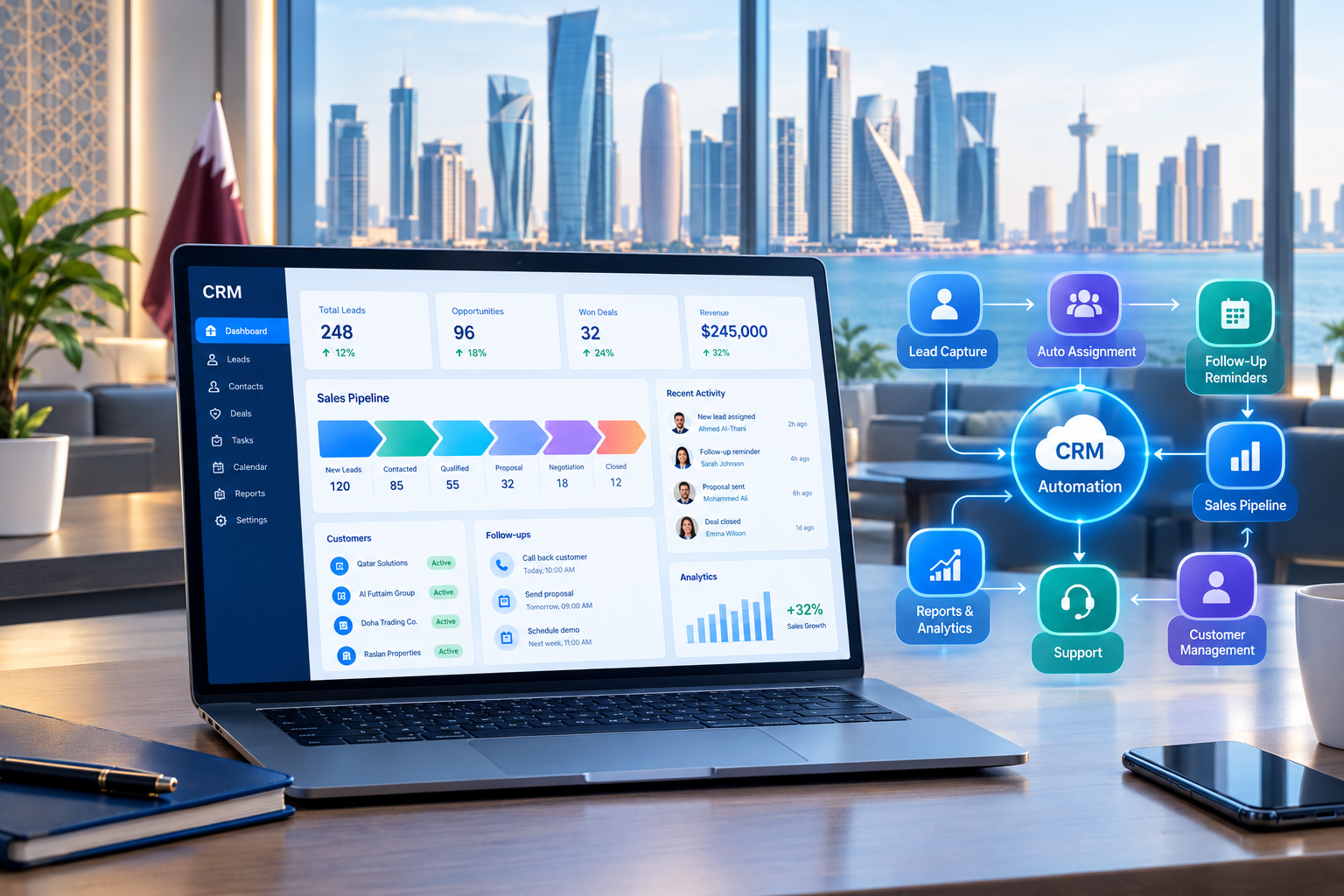
CRM automation can connect leads, sales workflows, customer communication, follow-ups, and business data in one structured process.
CRM Automation for Businesses in Qatar
Managing customers manually becomes increasingly difficult as a business grows.
Sales teams may receive enquiries through websites, phone calls, social media, email, messaging platforms, walk-ins, and advertising campaigns. Customer information can quickly become scattered across spreadsheets, inboxes, mobile phones, documents, and different software systems.
The problem is not simply having too much data.
The bigger problem is what happens after the data arrives.
Who follows up with a new lead?
Was the customer contacted?
When should the next follow-up happen?
Did the salesperson update the customer record?
Has the quotation been sent?
Which leads are still waiting for a response?
CRM automation can help businesses answer these questions through structured digital workflows.
Instead of requiring employees to perform every repetitive action manually, a CRM can automatically create records, assign leads, schedule follow-ups, send notifications, update stages, trigger tasks, and connect customer information across business systems.
For businesses in Qatar, this can be particularly useful for organizations handling high volumes of customer enquiries, sales opportunities, appointments, property leads, service requests, applications, or recurring customer interactions.
Businesses considering a CRM platform can also explore custom software development services when their workflows require functionality that standard CRM products cannot easily provide.
This guide explains what CRM automation is, how it works, what businesses can automate, and how to approach CRM automation as part of a broader digital strategy.
What Is CRM Automation?
CRM automation is the use of software workflows to automatically perform repetitive customer-management and sales activities.
A traditional CRM stores information about customers and leads.
An automated CRM can go further by taking predefined actions when specific events occur.
For example:
Customer submits enquiry → Lead created → Sales employee notified → Follow-up task created → Customer contacted → CRM stage updated
Without automation, an employee may need to perform each of these steps manually.
With automation, the CRM can handle appropriate parts of the workflow automatically while employees focus on activities that require human judgment.
Simple CRM Automation Example
Imagine a customer fills out a form on a company's website.
A manual process might look like this:
Website enquiry → Employee checks email → Copies information → Opens spreadsheet → Adds customer → Sends message → Sets reminder
An automated process could look like this:
Website enquiry → CRM creates lead → Lead assigned → Notification sent → Follow-up task created → Customer communication recorded
The second process reduces repetitive data entry and creates a clearer record of what happened.
Why CRM Automation Matters for Businesses in Qatar
CRM automation is not only a technology feature.
It can change how a business manages its customer journey.
Businesses in Qatar operate across many sectors, including real estate, education, professional services, retail, hospitality, healthcare, construction, automotive, financial services, and technology.
Many of these businesses share similar operational challenges:
Large numbers of enquiries
Multiple sales employees
Repeated follow-ups
Customer information spread across different systems
Manual reporting
Delayed responses
Duplicate data entry
Missed sales opportunities
Difficulty tracking customer activity
Different teams working with the same customer
Automation can connect these activities into structured workflows.
The objective should not be to automate everything.
The objective should be to identify repetitive processes where automation can make the business more consistent and easier to manage.
How CRM Automation Works
A CRM automation workflow usually contains three basic components:
1. Trigger
A trigger starts the workflow.
Examples include:
New lead created
Website form submitted
Customer status changed
Deal moved to a new stage
Appointment scheduled
Payment received
Follow-up date reached
Customer becomes inactive
2. Rule or Condition
The system determines what should happen.
For example:
If lead source = website and lead type = commercial property
the CRM could assign the lead to a specific sales team.
3. Action
The CRM performs an action.
Examples include:
Create a task
Send notification
Assign employee
Update customer record
Change sales stage
Send an email
Create appointment
Trigger an API
Generate a report
A complete workflow might therefore look like:
New lead → Check lead type → Assign salesperson → Create follow-up → Notify manager → Track response
This logic can be adapted to the actual business process.
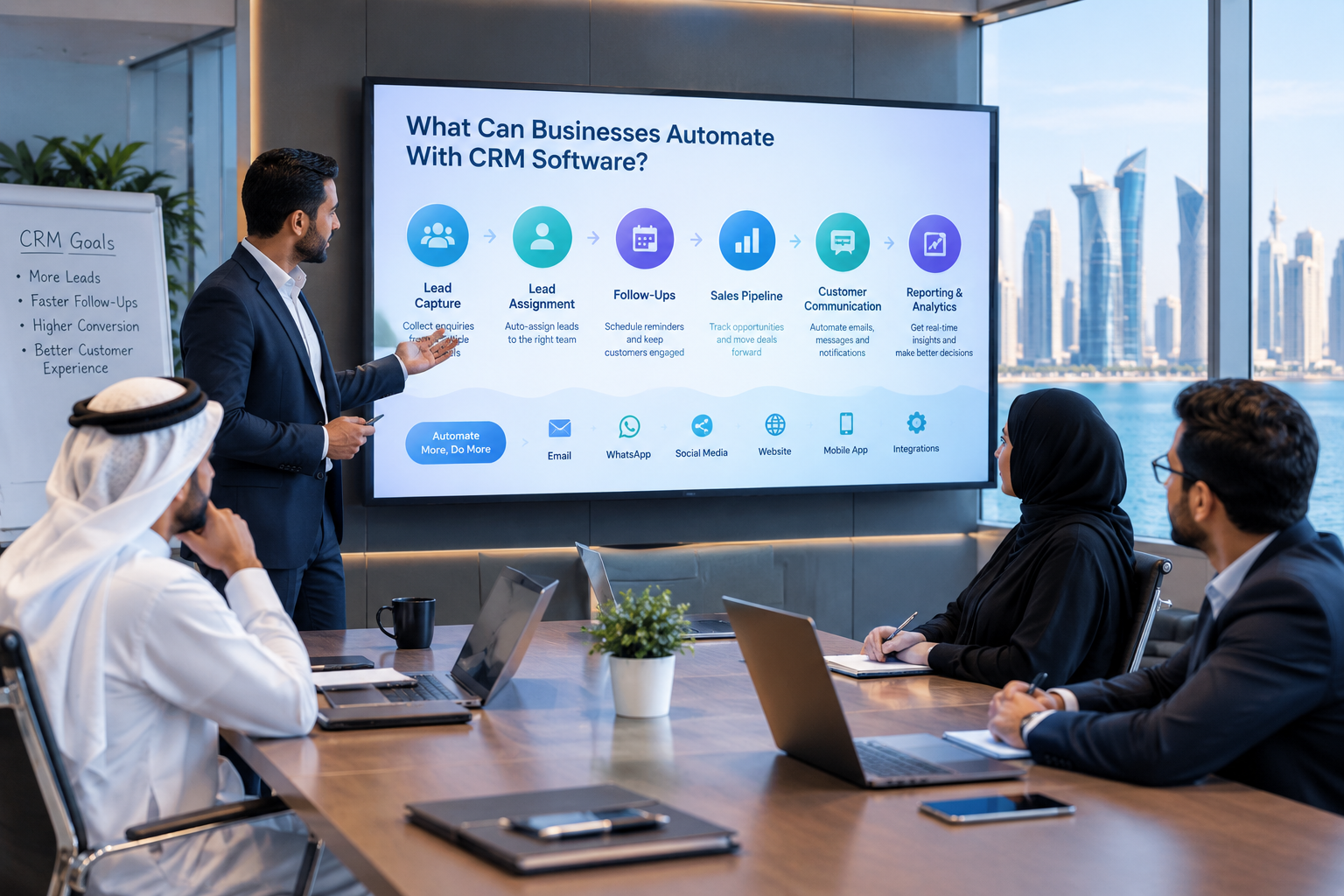
What Can Businesses Automate With CRM Software?
Not every business requires the same automation.
The right approach is to identify repetitive activities that occur frequently and follow predictable rules.
Lead Capture Automation
Leads may arrive from:
Website forms
Landing pages
Social media
Advertising campaigns
Email
Phone calls
Mobile applications
Contact centres
Online enquiries
Instead of manually entering every enquiry, businesses can connect lead sources to their CRM.
For example:
Website form → CRM lead → Lead source recorded → Sales team notified
This creates a structured starting point for the sales process.
Lead Assignment
Once a lead enters the CRM, it can be automatically assigned according to predefined rules.
Possible rules include:
Sales territory
Product category
Lead source
Customer type
Branch
Language
Service requested
Employee availability
For example, a company with multiple sales teams could assign leads based on product category.
This can reduce the need for managers to manually distribute every enquiry.
Follow-Up Automation
Follow-up is one of the most important CRM automation use cases.
A salesperson may speak with dozens of customers during a week. Remembering every future action manually can become difficult.
A CRM can create tasks such as:
New lead → Follow up within one business day
or:
Quotation sent → Follow up after three days
or:
Customer inactive → Create re-engagement task
Automation does not replace the salesperson.
It helps make sure the salesperson knows what needs attention.
Sales Pipeline Automation
CRM automation can also help maintain the sales pipeline.
For example:
New Lead → Contacted → Qualified → Proposal → Negotiation → Won/Lost
When a deal moves from one stage to another, the CRM can trigger relevant actions.
Moving a deal to Proposal could create a follow-up task.
Moving it to Won could notify finance or customer success.
Moving it to Lost could require a reason to be recorded.
This creates more consistent sales processes.
CRM Automation for Real Estate Businesses in Qatar
Real estate is a strong example of where CRM automation can support complex customer workflows.
A real estate company may manage:
Property enquiries
Buyers
Sellers
Tenants
Owners
Agents
Property listings
Site visits
Documents
Contracts
Payments
Follow-ups
Commissions
A possible automated workflow could be:
New property enquiry
↓
Create lead
↓
Assign agent
↓
Send notification
↓
Schedule follow-up
↓
Record customer requirements
↓
Schedule property viewing
↓
Update opportunity
↓
Contract or negotiation stage
The exact workflow should reflect the organization's actual sales process.
If a company requires a CRM connected with property management, finance, document management, portals, or other business applications, a custom system may be considered instead of forcing the process into a generic CRM.
CRM Automation for Education Businesses
Education organizations can also use CRM automation to manage enquiries and admissions.
A prospective student may interact with an organization through a website, campaign, phone call, or enquiry form.
A workflow could be:
Student enquiry → Lead created → Course interest recorded → Counsellor assigned → Follow-up scheduled → Application status updated
Further automation could support:
Application reminders
Counselling appointments
Parent enquiries
Admission follow-ups
Document collection
Course enquiries
Student communication
CRM functionality can also become part of a wider education platform. Businesses and institutions with broader education technology requirements can explore education technology solutions.
CRM Automation for Professional Services
Professional service companies often manage enquiries that require multiple interactions before a customer becomes a client.
Examples include:
Consulting
Legal services
Marketing agencies
IT services
Business advisory
Engineering services
Recruitment
A workflow could be:
Enquiry → Qualification → Consultation → Proposal → Negotiation → Client onboarding
Automation can create tasks and notifications at appropriate stages while keeping the customer record centralized.
CRM Automation for Retail and E-Commerce
Retail and e-commerce businesses can connect CRM activity with customer purchasing behavior.
Possible workflows include:
New customer registration
Abandoned enquiry follow-up
Order-related communication
Customer support escalation
Repeat-purchase reminders
Loyalty workflows
Customer segmentation
For example:
New customer → Purchase completed → Customer profile updated → Follow-up communication → Customer support available
The CRM can become part of a larger customer-management ecosystem rather than operating as an isolated database.
CRM Automation and WhatsApp
For many businesses, customer communication does not happen exclusively through email.
Customers may communicate through messaging platforms, phone calls, websites, and social channels.
When appropriate integrations are available, CRM systems can connect communication channels with customer records.
For example:
Customer message → Customer identified → CRM record retrieved → Conversation recorded → Sales task created
Businesses should design these integrations carefully.
A messaging integration should not simply create more notifications. It should help employees understand customer context and take the correct next action.
CRM Automation and Email
Email automation can support predictable customer workflows.
For example:
New Enquiry
A customer submits an enquiry.
The system can:
Create the lead.
Assign the responsible employee.
Send a confirmation.
Create a follow-up task.
Record the communication.
Proposal Follow-Up
A proposal is sent.
The CRM can:
Record the proposal date.
Create a follow-up task.
Notify the salesperson.
Update the opportunity timeline.
The exact automation should depend on the company's sales process and communication policies.
CRM Automation and AI
Traditional CRM automation works primarily through predefined rules.
AI can introduce another layer.
For example, AI may help with:
Lead classification
Customer message summarization
Sales email drafting
Conversation analysis
Customer intent detection
Document processing
Sales recommendations
Report summarization
Natural-language search
A conventional workflow might be:
Lead → CRM → Employee
An AI-supported workflow could be:
Customer message → AI interprets request → CRM retrieves relevant information → Suggested response → Employee review → CRM updated
AI should not automatically receive unrestricted access to business information.
Businesses should define permissions, data access, human review requirements, and security controls before deploying AI-connected CRM workflows.
CRM Automation Integrations
CRM automation becomes more useful when the CRM can communicate with other systems.
Common integrations include:
System | Possible CRM Integration |
|---|---|
Website | Lead capture |
Mobile app | Customer accounts and activity |
Communication history | |
Messaging | Customer conversations |
ERP | Sales and operational data |
Accounting | Customer and invoice information |
Payment system | Payment status |
E-commerce | Orders and customer activity |
Calendar | Meetings and appointments |
Marketing platforms | Campaign and lead information |
Customer portal | Self-service access |
AI systems | Intelligent assistance and automation |
Businesses requiring multiple systems to communicate may need web application development or API-based integration as part of their overall CRM architecture.
CRM Automation vs Manual CRM Management
The difference becomes clearer when comparing common activities.
Manual Process | Automated CRM Process |
|---|---|
Employee enters lead manually | Lead created automatically |
Employee remembers follow-up | Task generated automatically |
Manager distributes leads manually | Leads assigned using rules |
Reports prepared manually | Dashboards update from CRM data |
Customer information copied between systems | Systems exchange data through integrations |
Sales stages updated inconsistently | Workflow rules support standardized stages |
Employees search multiple systems | Centralized customer information |
Automation does not eliminate the need for employees.
Instead, it moves employees away from repetitive administrative work and toward activities such as selling, advising, negotiating, solving customer problems, and building relationships.
What Features Should a CRM Automation System Have?
The exact feature set depends on the organization, but businesses may consider the following capabilities.
Lead Management
The system should capture, organize, assign, and track leads.
Customer Profiles
Employees should be able to view relevant customer information in one place.
Sales Pipeline
The CRM should make opportunities visible across different stages.
Task Management
Employees should know what actions need to be completed and when.
Workflow Automation
Businesses should be able to define triggers, conditions, and actions.
Notifications
Important events should generate appropriate alerts.
Reporting
Managers should be able to understand sales activity and pipeline performance.
Role-Based Access
Employees should only access information appropriate to their responsibilities.
Integration Support
The CRM should be capable of communicating with other required business systems.
Auditability
Important changes and actions should be traceable where required.
CRM Automation Security
Automation creates efficiency, but it also increases the importance of proper access control.
A CRM can contain sensitive business information such as:
Customer names
Contact details
Sales records
Contracts
Communication history
Documents
Financial information
Internal notes
Businesses should consider:
User authentication
Role-based permissions
Secure APIs
Encryption
Audit logs
Backup procedures
Data retention
Access reviews
Third-party integrations
Secure cloud infrastructure
Security should be considered during CRM architecture and development rather than added as an afterthought.
For organizations with complex infrastructure requirements, cloud and DevOps solutions can form part of a broader application architecture.
CRM Automation in Qatar: Important Business Considerations
A Qatar-based business should not select or build CRM automation simply because automation is a popular technology trend.
The first question should be:
Which business problem are we trying to solve?
For example, a company may discover that its main problem is not lead capture.
It may actually be:
Slow follow-ups
Poor sales visibility
Duplicate customer information
Manual reporting
Lack of communication history
Disconnected software
Difficult approval processes
The automation strategy should address the real bottleneck.
Businesses should also consider the languages, customer channels, internal teams, branches, approval structures, and existing software used within the organization.
For companies operating across multiple departments, CRM may also need to communicate with ERP, accounting, inventory, HR, or other business platforms.
How to Implement CRM Automation Step by Step
A successful CRM automation project should begin with the business process rather than the software interface.
Step 1: Map the Existing Customer Journey
Document how a customer currently moves through the business.
For example:
Enquiry → Sales call → Qualification → Meeting → Proposal → Negotiation → Contract → Customer
Step 2: Identify Repetitive Tasks
Look for tasks employees perform repeatedly.
Examples:
Data entry
Notifications
Follow-up reminders
Lead assignment
Status updates
Report generation
Step 3: Prioritize Automation
Do not automate every process immediately.
Start with workflows that are:
Frequent
Repetitive
Rule-based
Time-consuming
Prone to human error
Step 4: Define Automation Rules
For each workflow, define:
Trigger → Condition → Action → Responsible person
This makes the automation logic easier to test and maintain.
Step 5: Connect Required Systems
Identify whether the CRM needs to connect with:
Website
Mobile application
Email
Messaging
ERP
Accounting
Payment systems
Marketing platforms
AI tools
Step 6: Test the Workflow
Test both normal and unusual situations.
For example:
What happens when a lead does not respond?
What happens when an employee is unavailable?
What happens when duplicate information is submitted?
What happens when an integration fails?
Step 7: Train Employees
Employees should understand what automation does and what still requires human action.
Step 8: Measure the Results
After implementation, monitor whether the system is actually improving the process.
Possible metrics include:
Lead response time
Follow-up completion
Sales pipeline movement
Conversion rates
Customer response time
Number of overdue tasks
Manual data-entry workload
Customer retention
Sales-cycle duration
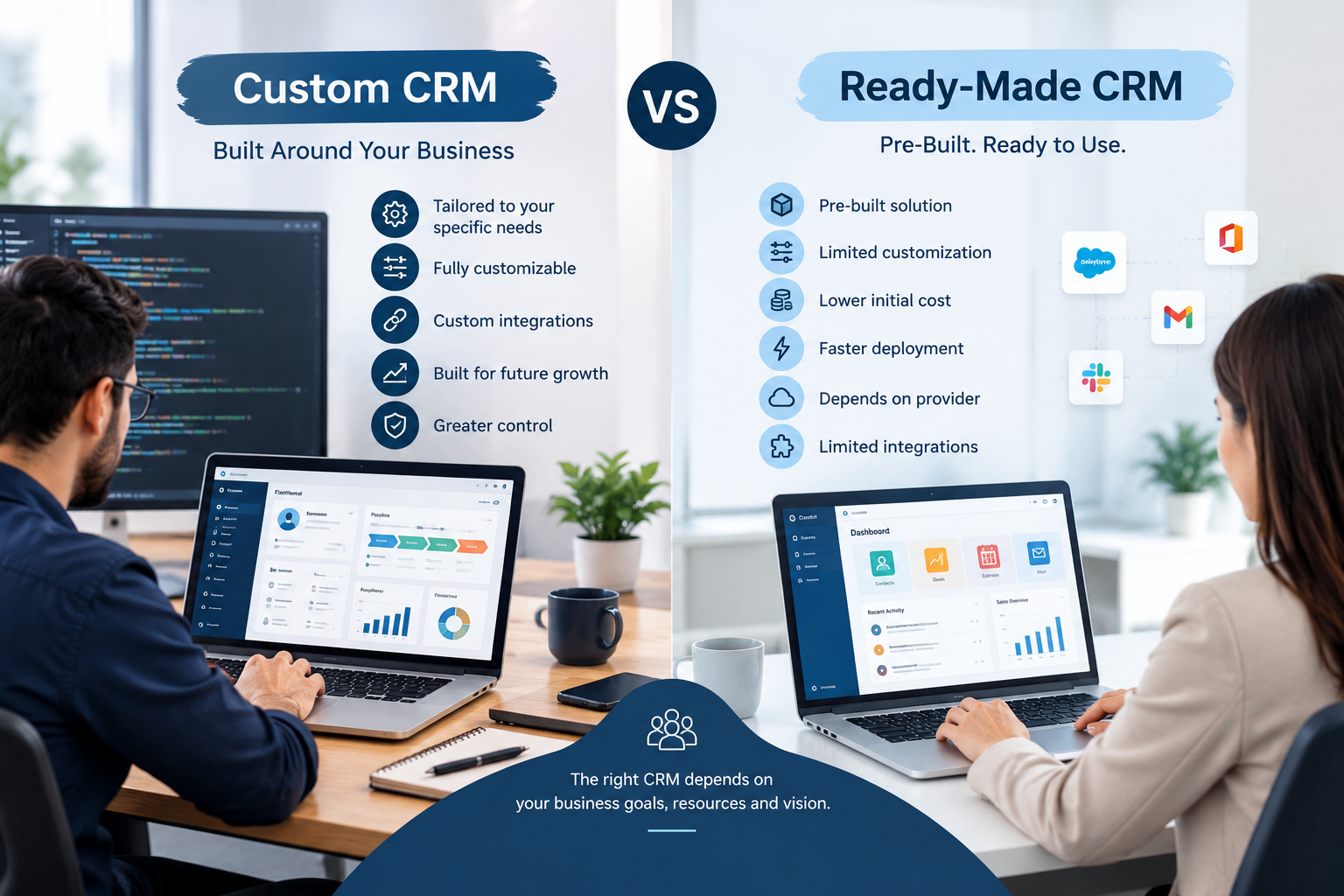
Custom CRM Automation vs Ready-Made CRM
A ready-made CRM can be appropriate when its workflows closely match the organization's requirements.
However, businesses sometimes have processes that are difficult to represent using standard CRM configurations.
Consider a company with this workflow:
New Lead → Sales Agent → Manager Approval → Document Verification → Finance Approval → Contract → Payment → Customer Portal
If the standard CRM cannot support the required process without multiple workarounds, the business may consider custom development.
A custom CRM can be designed around specific business rules, integrations, roles, dashboards, and workflows.
This does not mean custom CRM is automatically the right option.
The decision should depend on:
Business complexity
Existing software
Integration requirements
Budget
Long-term roadmap
Internal processes
Scalability requirements
Security requirements
Maintenance capabilities
Businesses evaluating custom solutions can review Galaxium Coding's projects and portfolio to understand the types of digital solutions and software projects presented by the company.
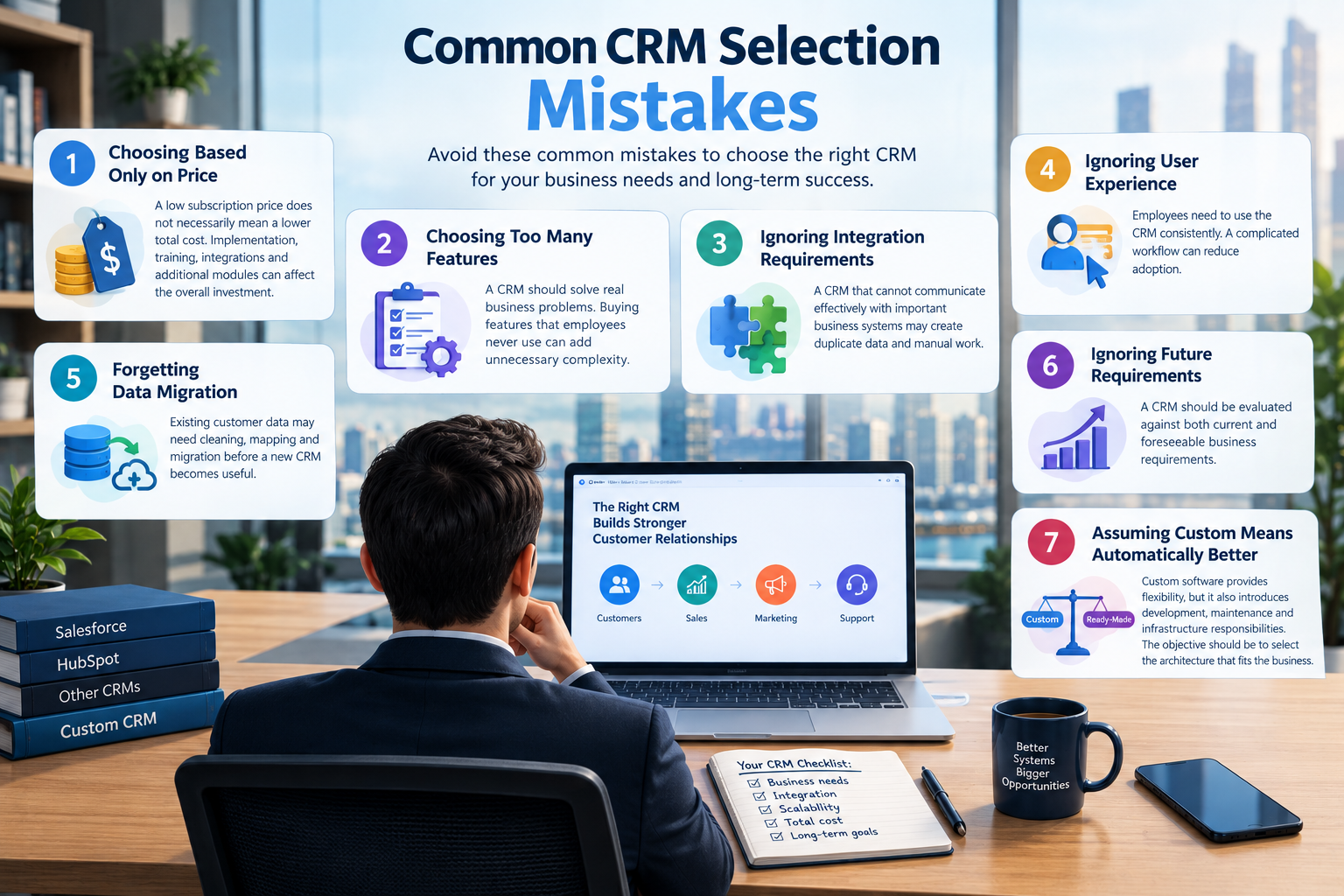
Common CRM Automation Mistakes
Automating a Bad Process
Automation makes a process faster, but it does not automatically make the process better.
If the original workflow is unnecessarily complicated, automating it may simply make a bad process operate faster.
Automating Everything
Not every activity should be automated.
Customer relationships often require human judgment.
Creating Too Many Notifications
Employees can become overwhelmed if every CRM event generates an alert.
Notifications should be prioritized.
Ignoring Data Quality
Automation depends on reliable data.
Incorrect customer records can create incorrect automated actions.
Forgetting Exceptions
Real businesses do not always follow perfectly predictable workflows.
The system should have processes for exceptions and human intervention.
Failing to Monitor Automation
CRM workflows should be reviewed periodically.
Businesses change.
Sales processes change.
Products change.
Customer expectations change.
Automation should evolve with the business.
How Much Does CRM Automation Cost?
There is no single CRM automation cost for every business.
The cost can depend on whether a company uses an existing CRM, configures automation within that platform, integrates multiple systems, or develops a custom CRM.
Important cost factors can include:
Number of users
CRM platform
Number of workflows
Integration requirements
Custom development
AI functionality
Data migration
Mobile applications
Customer portals
Reporting requirements
Security requirements
Hosting
Maintenance and support
A simple automation workflow may be relatively straightforward.
A connected CRM platform involving websites, mobile apps, ERP, accounting, messaging, AI, and customer portals is a much larger software project.
For businesses that require a system designed around their specific workflows, custom software development can provide an alternative to forcing complex processes into a standard platform.
How to Choose a CRM Automation Development Partner
Businesses should evaluate more than the software's appearance.
Important questions include:
Does the provider understand your business process?
A CRM should support the way the business operates.
Can the system integrate with existing software?
Discuss APIs, databases, websites, mobile applications, ERP, accounting, and other systems early.
How will security be handled?
Ask about authentication, authorization, data protection, backups, and auditability.
Can the system scale?
The solution should be able to support additional users, branches, workflows, and integrations as the company grows.
Is the solution customizable?
If the business has unique workflows, customization may become important.
What happens after launch?
CRM software requires maintenance, improvements, monitoring, and updates.
A technology partner should understand the system beyond the initial development phase.
The Future of CRM Automation
CRM systems are moving beyond simple contact databases.
Modern CRM platforms can increasingly connect:
Customer Data + Sales + Communication + Automation + AI + Analytics
Instead of simply recording what happened, software can increasingly help employees determine what should happen next.
For example:
Customer enquiry
↓
CRM identifies customer
↓
Lead qualification
↓
Sales assignment
↓
Automated follow-up
↓
Employee receives prioritized task
↓
Customer interaction recorded
↓
Sales dashboard updated
The next stage of CRM development is likely to involve deeper integration between customer data, business applications, automation engines, AI, and analytics.
However, technology should remain connected to business objectives.
The goal is not to add more automation.
The goal is to create a customer-management process that is easier to operate, measure, and improve.
Final Thoughts
CRM automation can help businesses in Qatar organize customer information, reduce repetitive administrative tasks, improve follow-up consistency, and create clearer sales workflows.
The most effective approach starts with the business process.
Identify where leads are lost.
Find where employees spend unnecessary time.
Understand where customer information becomes fragmented.
Then determine which tasks can safely and usefully be automated.
For some organizations, configuring an existing CRM may be enough.
For businesses with complex workflows, multiple integrations, unique approval processes, or specialized customer journeys, custom CRM or broader business software development may be more appropriate.
Galaxium Coding helps businesses explore custom software, CRM, automation, web applications, mobile applications, integrations, and other digital solutions. Businesses can contact Galaxium Coding to discuss their software and automation requirements.
Frequently Asked Questions About CRM Automation
What is CRM automation?
CRM automation uses software workflows to perform repetitive customer-management and sales tasks automatically, such as lead assignment, follow-up reminders, notifications, status updates, and data synchronization.
What can CRM automation automate?
Common examples include lead capture, lead assignment, follow-ups, sales pipeline updates, notifications, customer communication, reporting, task creation, and integrations with other business systems.
Is CRM automation useful for small businesses?
It can be useful when a business has repetitive customer-management tasks. The appropriate level of automation depends on the number of customers, sales activity, workflows, and operational complexity.
Can CRM automation work with WhatsApp?
CRM systems can potentially integrate with messaging platforms when suitable APIs and integrations are available. The exact functionality depends on the messaging platform, CRM architecture, permissions, and business requirements.
Can CRM automation use AI?
Yes. AI can potentially support lead qualification, message analysis, summarization, recommendations, document processing, customer assistance, and other CRM workflows. AI access should be controlled through appropriate permissions and business rules.
Is custom CRM better than ready-made CRM?
Neither option is automatically better for every business. Ready-made CRM software may work well when standard workflows meet business requirements. Custom CRM development can be considered when a company requires specialized workflows, integrations, permissions, or business logic.
How long does CRM automation implementation take?
The timeline depends on the complexity of the project. A small configuration may require significantly less work than a custom CRM connected with ERP, accounting, websites, mobile applications, messaging, AI, and customer portals.
How can a Qatar business start with CRM automation?
Start by mapping the existing customer journey, identifying repetitive tasks, documenting business rules, selecting priority workflows, and determining which systems need to be integrated. From there, the business can evaluate an existing CRM configuration or a custom development approach.
Conclusion
CRM automation is most valuable when it solves a real operational problem.
For businesses in Qatar, the opportunity is not simply to automate more tasks. It is to build a connected customer-management process where leads, employees, communication, sales activity, and business systems work together.
A well-designed CRM automation strategy can provide greater visibility, more consistent workflows, and a stronger foundation for future digital growth.