How AI Can Improve CRM and Sales Management
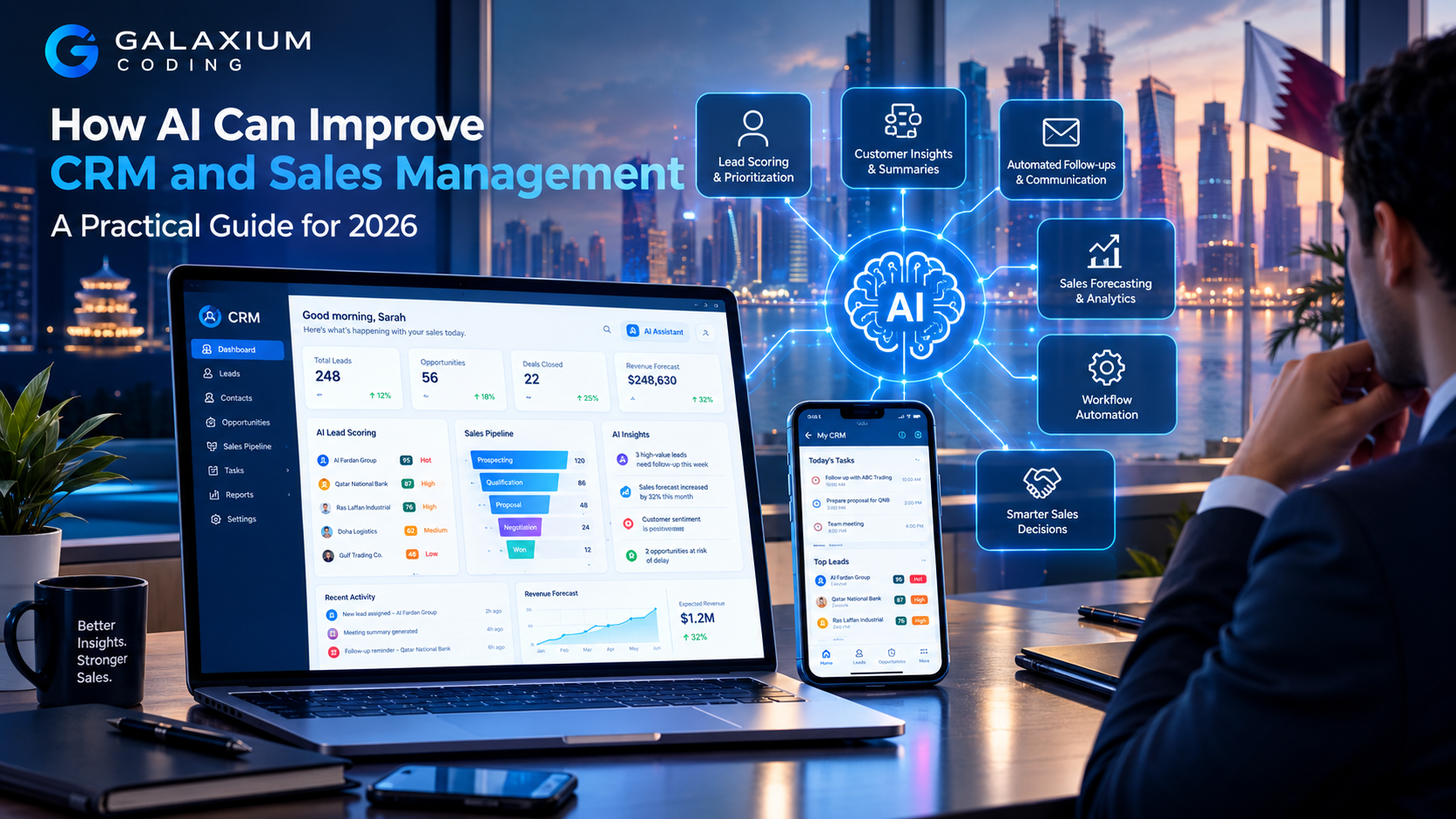
AI can transform CRM from a customer database into an intelligent sales-management system that helps teams prioritize, analyze and act.
How AI Can Improve CRM and Sales Management: A Practical Guide for 2026
Customer relationship management systems have become central to how businesses manage leads, customers, sales pipelines, follow-ups, and customer communication.
But a CRM can still leave sales teams with a significant amount of manual work.
Sales representatives may spend time reading customer histories, updating records, writing follow-up emails, reviewing opportunities, preparing for meetings, searching for information, and deciding which leads deserve attention first.
This is where AI in CRM can make a meaningful difference.
AI can help CRM systems move beyond simply storing customer information. When implemented properly, AI can analyze business data, summarize customer activity, identify patterns, recommend next actions, automate repetitive tasks, and help sales managers make better-informed decisions.
Modern CRM platforms are already incorporating capabilities such as record summarization, predictive lead and opportunity scoring, meeting preparation, natural-language assistance, and AI-powered sales agents. Microsoft, for example, documents AI capabilities in Dynamics 365 Sales that can summarize leads and opportunities, surface recent changes, assist with meeting preparation, and help sales teams prioritize work. Microsoft Dynamics 365 Sales AI capabilities
For businesses considering custom software development, AI can also be integrated into CRM workflows according to the organization's specific processes rather than being treated as a separate chatbot.
The important question is not simply:
"How can we add AI to our CRM?"
The better question is:
"Which CRM and sales processes can AI improve, and how should AI fit into the way our team already works?"

What Is AI in CRM?
AI in CRM refers to the use of artificial intelligence to analyze customer, lead, sales, communication, and business data and assist with CRM-related tasks and decisions.
A traditional CRM primarily helps employees:
Store customer records
Track leads
Manage contacts
Record sales activities
Manage opportunities
Schedule follow-ups
Monitor pipelines
Generate reports
An AI-enabled CRM can add another layer.
It can potentially:
Prioritize leads
Summarize customer histories
Identify important changes
Recommend follow-up actions
Generate draft communications
Analyze sales conversations
Identify sales trends
Support forecasting
Automate repetitive CRM updates
Answer questions about authorized business data
Detect opportunities for additional engagement
The difference is important.
A traditional CRM primarily helps employees access and record information.
An AI-enhanced CRM can also help employees understand information and decide what to do next.
Why AI Matters for CRM and Sales Management
Sales teams often work with large amounts of information.
A single customer relationship may involve:
Website enquiries
Emails
Phone calls
Meetings
Proposals
Quotations
Contracts
Support conversations
Previous purchases
Sales opportunities
Customer preferences
Notes from sales representatives
Marketing interactions
The problem is not always a lack of data.
The problem can be the amount of information employees need to process.
AI can help turn large amounts of CRM information into more manageable summaries and recommendations.
For example, instead of a sales manager manually reviewing 50 opportunities, an AI-enabled system could potentially identify:
"Five opportunities have had no recorded activity in the last two weeks."
Or:
"Three high-value opportunities have upcoming expected close dates but unresolved follow-up tasks."
The AI does not replace the sales manager's judgment. It helps bring important information to the manager's attention faster.
This distinction is central to successful AI implementation.
10 Ways AI Can Improve CRM and Sales Management
1. AI Can Prioritize Leads
One of the most useful applications of AI in CRM is lead prioritization.
Sales teams rarely have unlimited time. When hundreds of leads exist in a CRM, employees need a practical way to determine which prospects deserve attention first.
AI can analyze available signals and help rank leads according to predefined or learned patterns.
Potential signals may include:
Lead source
Customer industry
Previous interactions
Company information
Engagement history
Website activity
Previous purchases
Communication frequency
Deal size
Sales stage
Historical conversion patterns
Predictive lead scoring is already available in modern CRM platforms. Microsoft documents systems that use predictive models to score leads based on signals from lead, contact, and account data. Microsoft's predictive lead scoring documentation
Example
Imagine a company receives 200 enquiries each month.
Without prioritization:
200 leads → Sales team → Manual review → Follow-up
With AI-assisted prioritization:
200 leads → AI analysis → Priority ranking → Sales team → Focused follow-up
The sales team still makes the final decision, but employees can spend more time on prospects that appear more relevant.
2. AI Can Summarize Customer and Opportunity Records
Sales representatives often need to understand a customer quickly before making a call or attending a meeting.
That information may be distributed across multiple CRM fields.
An AI assistant can summarize important information into a concise overview.
For example:
Customer: ABC Trading
Relationship: 3 years
Open Opportunity: Enterprise software upgrade
Recent Activity: Proposal sent
Last Contact: 5 days ago
Main Concern: Implementation timeline
Next Action: Follow up on proposal
Instead of opening numerous CRM records and reading every note, the sales representative can begin with a structured summary.
Microsoft's current Dynamics 365 Sales documentation describes AI-generated summaries for leads, accounts, and opportunities. Microsoft's CRM record summarization documentation
This can be particularly useful for:
Sales managers
Account managers
New sales representatives taking over accounts
Customer success teams
Executives preparing for important meetings
3. AI Can Help Salespeople Prepare for Meetings
Sales preparation can consume considerable time.
Before a customer meeting, a salesperson may need to review:
Previous meetings
Customer notes
Open opportunities
Previous purchases
Emails
Proposals
Support issues
Outstanding tasks
Recent interactions
AI can help consolidate relevant information into a meeting preparation summary.
A sales representative could potentially ask:
"Summarize this customer's relationship with us and highlight the three most important topics for today's meeting."
The CRM could then provide an answer based on authorized information.
The result should not be treated as an unquestionable source of truth. Salespeople should still verify important information, particularly when decisions depend on incomplete or changing data.
4. AI Can Improve Follow-Ups
Follow-up is one of the most important parts of sales management.
Yet it is also easy to miss.
A salesperson may have dozens of opportunities at different stages, each requiring a different next action.
AI can help identify:
Overdue follow-ups
Opportunities without recent activity
Customers who have become inactive
Leads that require another contact
Deals approaching important dates
Accounts with unresolved issues
An AI-assisted workflow could look like:
New lead → CRM → AI analyzes lead → Sales assignment → Follow-up reminder → Sales activity → CRM update
More advanced systems can combine AI with automation.
For example:
Customer enquiry → AI qualification → CRM record → Sales assignment → Automated notification → Human follow-up
This approach connects AI with the CRM instead of keeping AI isolated from the actual sales process.
5. AI Can Help Generate Sales Communication
Sales teams frequently write similar types of communication:
Follow-up emails
Meeting confirmations
Proposal messages
Product explanations
Appointment reminders
Re-engagement emails
Customer updates
AI can help draft these messages using relevant CRM information.
For example:
CRM information:
Customer requested pricing
Proposal was sent
Customer has not responded
Last communication was seven days ago
The AI could prepare a draft follow-up message.
The salesperson can then review, modify, and send it.
This creates an important human-in-the-loop workflow:
CRM data → AI draft → Human review → Customer communication
The goal should not be to send automatically generated messages to every customer without oversight.
The goal is to reduce repetitive writing while allowing the salesperson to maintain responsibility for the final communication.
6. AI Can Help Sales Managers Understand the Pipeline
Sales managers need visibility into what is happening across the sales pipeline.
Traditional dashboards can show numbers such as:
Total opportunities
Pipeline value
Closed deals
Open leads
Conversion rates
Sales by representative
Sales by period
AI can add another layer by helping interpret those numbers.
For example, instead of only showing:
Pipeline Value: QAR 2,000,000
an AI-assisted system might help a manager ask:
"Which opportunities should receive attention this week?"
Or:
"Which sales representatives have opportunities with no recent activity?"
Or:
"What changed in the pipeline compared with last week?"
This turns CRM reporting from a passive dashboard into a more interactive management tool.
7. AI Can Improve Sales Forecasting
Sales forecasting is another area where AI can be useful.
Traditional forecasting may depend heavily on:
Sales representative estimates
Pipeline stages
Historical performance
Expected close dates
Deal values
AI and machine-learning models can potentially analyze historical patterns and current opportunity data to identify signals associated with successful or unsuccessful deals.
For example:
Historical data + Current pipeline + Deal activity + Customer signals → Forecasting model → Management insight
Predictive opportunity scoring is one example of this approach. Microsoft describes predictive models that calculate scores for open opportunities using historical data and provide influencing factors that can help salespeople understand why an opportunity receives a particular score. Microsoft predictive opportunity scoring documentation
However, businesses should treat AI forecasting as decision support rather than a guaranteed prediction.
Markets change.
Customers change.
Sales strategies change.
A model trained on historical data can support judgment, but it should not eliminate human review.
8. AI Can Detect Sales Opportunities
AI can potentially help identify opportunities hidden inside existing customer data.
For example, a CRM might reveal that:
A customer has increased purchases
A customer has not purchased a related product
A customer is approaching contract renewal
A customer has repeatedly requested a particular service
A customer has become more active recently
Similar customers frequently purchase an additional service
These patterns can help sales teams identify potential upselling or cross-selling opportunities.
A simple workflow could be:
Customer history → AI analysis → Opportunity identified → Sales notification → Human review → Customer engagement
The AI identifies a possibility.
The salesperson decides whether the opportunity is commercially appropriate.
9. AI Can Reduce CRM Data-Entry Work
CRM adoption can suffer when employees view data entry as an administrative burden.
Salespeople may forget to update:
Call notes
Lead status
Opportunity stages
Follow-up dates
Customer information
Meeting outcomes
Tasks
AI can potentially reduce some of this manual work.
For example:
Sales meeting → Conversation data → AI summary → Suggested CRM updates → Human confirmation
Or:
Customer email → AI extracts relevant information → CRM field suggestion → Employee approval
This can help keep CRM records more current while reducing repetitive administrative tasks.
The exact implementation depends on the CRM platform, integrations, data permissions, and business workflow.
10. AI Can Give Sales Managers Natural-Language Access to CRM Data
Traditional CRM systems require users to navigate menus, filters, reports, and dashboards.
AI can introduce a natural-language interface.
Instead of searching manually, an authorized manager could ask:
"Show me the largest open opportunities this month."
Or:
"Which customers have not been contacted recently?"
Or:
"Summarize the performance of our sales pipeline."
Or:
"Which deals are at risk based on the information currently available?"
This type of interface can make CRM information easier to access.
However, the quality of the answers depends heavily on data quality, system integration, permissions, and the design of the AI workflow.
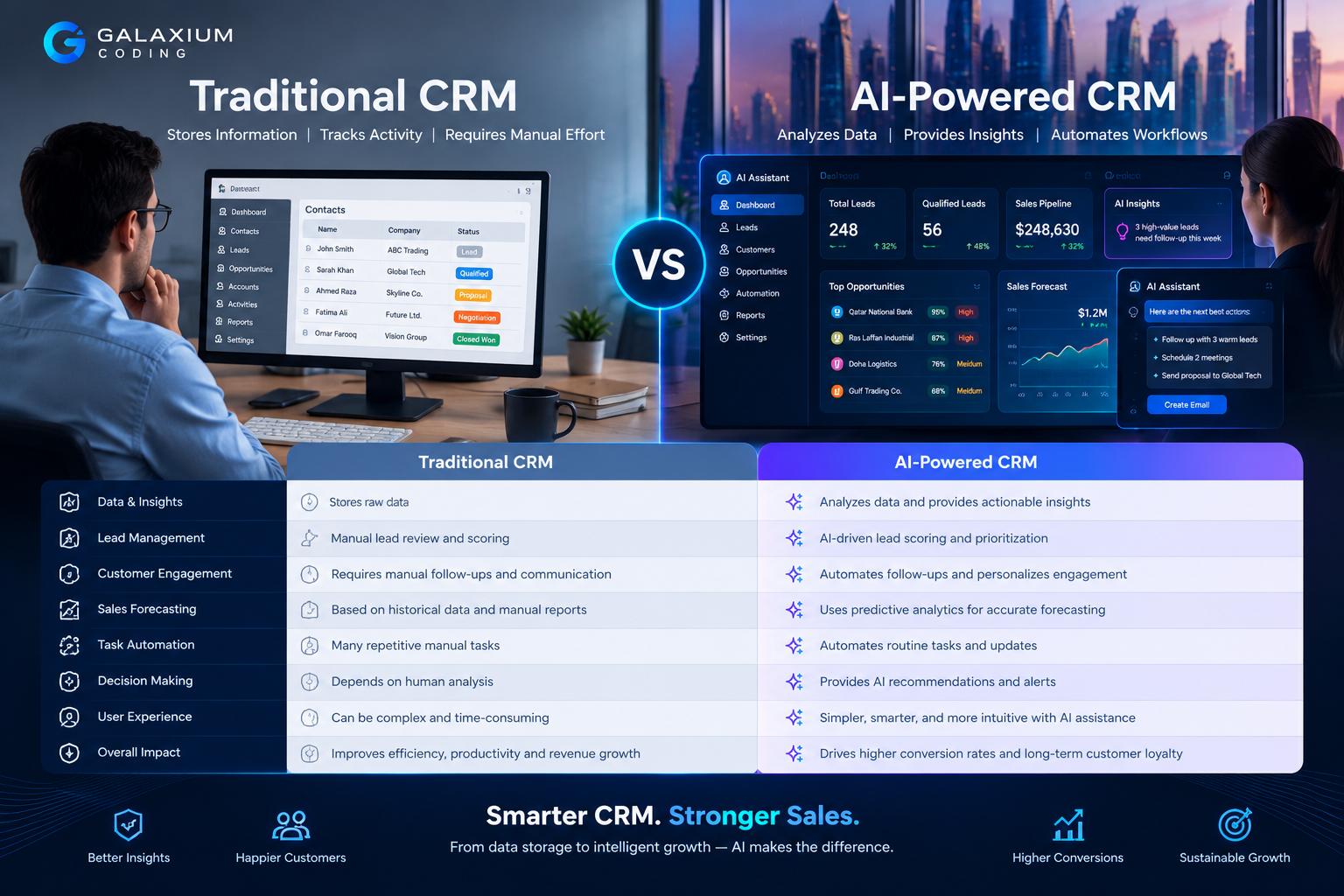
AI CRM vs Traditional CRM
The difference between traditional and AI-enhanced CRM can be summarized as follows:
Area | Traditional CRM | AI-Enhanced CRM |
|---|---|---|
Customer records | Stores information | Stores and summarizes information |
Lead management | Tracks leads | Can help prioritize leads |
Sales pipeline | Displays opportunities | Can identify patterns and priorities |
Reporting | Shows dashboards | Can help interpret business data |
Follow-ups | Uses tasks/reminders | Can identify missed or important actions |
Communication | Stores messages | Can assist with drafting and summarizing |
Meetings | Stores notes | Can assist with preparation and summaries |
Forecasting | Uses reports and estimates | Can support predictive analysis |
Data entry | Often manual | Can assist with extraction and updates |
Management | Reviews dashboards | Can ask questions using natural language |
The objective is not necessarily to replace the traditional CRM.
Instead, AI can make the CRM more useful.
How AI Fits Into a Modern CRM Architecture
AI should not operate as an isolated layer disconnected from business systems.
A practical architecture could look like:
Website / Mobile App / Email / Customer Channels
↓
CRM
↓
Business Database
↓
AI Services
↓
Business Rules + APIs
↓
Sales Team / Management / Automated Workflows
For example:
Website enquiry
↓
CRM creates lead
↓
AI analyzes lead information
↓
Lead receives priority
↓
Sales representative is notified
↓
AI prepares customer summary
↓
Sales representative contacts customer
↓
Meeting information is added to CRM
↓
AI summarizes activity
↓
Manager sees updated pipeline
This is where web application development and API integration can become important. AI needs reliable ways to interact with the systems where business information actually exists.
For businesses with multiple applications, cloud and DevOps solutions can also support the infrastructure, deployment, monitoring, and integration requirements of a modern CRM ecosystem.
AI CRM for Businesses in Qatar
For businesses in Qatar, AI-enabled CRM can be relevant across a wide range of sectors.
Potential use cases include:
Real Estate
AI can help sales teams organize property enquiries, prioritize prospective buyers or tenants, summarize customer interactions, and identify follow-up opportunities.
Professional Services
A CRM can combine enquiries, proposals, meetings, contracts, and account information while AI assists employees with summaries and follow-ups.
Education
AI-enabled CRM workflows can help organizations manage enquiries, applications, communications, and prospective student interactions.
Retail and E-Commerce
AI can help analyze customer activity, purchase history, enquiries, and engagement patterns.
Hospitality
Customer information can be combined with reservations, enquiries, preferences, and service interactions.
B2B Companies
AI can support longer sales cycles involving multiple contacts, proposals, negotiations, account management, and recurring relationships.
For organizations that require a CRM connected to other internal systems, custom software development services can provide a way to design workflows around actual business requirements.
The important point is that Qatar-specific CRM implementation should be based on the company's real operating model rather than simply adding AI to an existing platform without a clear purpose.
What Data Does an AI-Powered CRM Need?
AI is only as useful as the information available to it.
A business may need data from:
Customer records
Lead records
Sales opportunities
Emails
Meetings
Website enquiries
Customer support
Orders
Invoices
Product information
Marketing interactions
Previous sales
Account history
Before implementing AI, businesses should examine data quality.
Common problems include:
Duplicate customers
Missing information
Incorrect contact details
Inconsistent naming
Outdated records
Incomplete sales stages
Unstructured notes
Data stored across disconnected systems
If poor-quality information is fed into an AI workflow, the output may also be unreliable.
Therefore:
Better data → Better context → Better AI assistance
AI CRM Security and Data Governance
CRM systems contain sensitive business information.
They may include:
Customer names
Contact information
Commercial discussions
Pricing
Contracts
Sales forecasts
Internal notes
Account information
Employee information
AI implementation should therefore include security from the beginning.
Important considerations include:
Access Control
Users should only access information appropriate to their roles.
Data Permissions
AI should respect the same business permissions that apply to the underlying CRM data.
Auditability
Organizations should consider how AI-generated actions, recommendations, and updates are recorded.
Human Oversight
Important customer-facing or commercial decisions should have appropriate human review.
Data Retention
Businesses should understand how CRM and AI data is stored, processed, and retained.
Integration Security
APIs and system integrations should be protected and monitored.
Modern AI CRM systems should be designed as business systems, not simply as chatbots connected to a database.
Common Mistakes When Adding AI to CRM
Mistake 1: Adding AI Without a Business Problem
A company may add an AI chatbot because competitors are using AI.
That does not automatically create value.
Start with a problem:
"Our salespeople spend too much time reviewing customer histories."
Then determine whether AI can help.
Mistake 2: Automating Everything
Not every sales activity should be automated.
Customer negotiations, complex complaints, high-value relationships, and strategic decisions often require human judgment.
AI should support people where it creates value.
Mistake 3: Ignoring Data Quality
AI cannot compensate for a badly maintained CRM indefinitely.
Clean and structured data should be part of the project.
Mistake 4: Treating AI Output as Always Correct
AI can make mistakes.
Generated summaries, recommendations, classifications, and written communication should be reviewed according to their risk and importance.
Mistake 5: Building AI Separately From the CRM
A standalone AI chatbot may look impressive but provide limited business value if it cannot access the right systems.
The greater opportunity often comes from:
AI + CRM + APIs + Business Data + Automation
Mistake 6: Measuring Activity Instead of Outcomes
The number of AI-generated emails is not necessarily a meaningful business KPI.
Better measurements may include:
Lead response time
Follow-up completion
Sales productivity
Opportunity progression
Conversion rates
Forecast accuracy
CRM data completeness
Time spent on administrative work
Customer response time
The exact metrics should depend on the organization's goals.
How to Implement AI in CRM Step by Step
A practical implementation can begin with a focused use case.
Step 1: Map the Sales Process
Document how leads currently move through the organization.
For example:
Enquiry → Lead → Qualification → Opportunity → Proposal → Negotiation → Won/Lost
Identify where employees spend unnecessary time.
Step 2: Identify High-Value AI Opportunities
Possible starting points include:
Lead prioritization
Customer summaries
Follow-up recommendations
Meeting preparation
Sales reporting
Email drafting
CRM data extraction
Step 3: Review the Data
Determine:
Where customer information is stored
Whether records are complete
Which systems need integration
Who can access each type of information
What data AI actually needs
Step 4: Choose the Right Architecture
The solution may involve:
Existing CRM functionality
AI APIs
Custom software
Workflow automation
Business databases
Cloud infrastructure
API integrations
Mobile applications
Step 5: Start With One Workflow
Instead of trying to implement ten AI features simultaneously, choose one meaningful workflow.
For example:
Lead → AI qualification → CRM priority → Sales notification
Measure the result.
Step 6: Add Human Review
Determine where employees need to approve AI-generated actions.
Step 7: Measure Results
Compare performance before and after implementation.
Step 8: Expand Gradually
Once one workflow works reliably, extend AI into other areas.
This phased approach can reduce implementation risk and make it easier for employees to adapt.

How Much Does AI-Powered CRM Cost?
There is no single price for an AI-powered CRM.
The cost depends on the solution.
Factors can include:
Number of users
CRM platform
Existing software
Custom development requirements
AI functionality
Number of integrations
Data migration
Cloud infrastructure
Security requirements
Mobile applications
Automation complexity
Reporting requirements
Ongoing maintenance
A company adding an AI assistant to an existing CRM may have a very different project from an organization building a custom CRM platform with AI, mobile applications, ERP integration, analytics, and automation.
For this reason, businesses should define the workflow and requirements before focusing on a final price.
Should You Add AI to an Existing CRM or Build a Custom AI CRM?
The answer depends on the business.
Situation | Existing CRM + AI | Custom CRM + AI |
|---|---|---|
Standard sales workflow | Often suitable | May be unnecessary |
Highly specialized process | May require customization | More flexibility |
Many existing integrations | Often practical | Can be designed around them |
Unique approval workflows | May be restrictive | Highly customizable |
Existing CRM data | Easier to extend | Requires migration or integration |
Special AI workflows | Depends on platform | Can be designed specifically |
Full control over architecture | Limited | Greater control |
The right decision is not necessarily "custom is better."
A business should choose the approach that best matches its operational complexity, budget, integration requirements, and long-term strategy.
Galaxium Coding's projects and portfolio can also help businesses understand the types of technology solutions that can be developed around specific operational needs.
What Will AI-Powered CRM Look Like in the Future?
CRM is gradually moving from a system employees manually operate toward a system that can actively assist them.
Future CRM environments may increasingly combine:
AI assistants
AI agents
Predictive analytics
Natural-language search
Automated data entry
Sales recommendations
Customer intelligence
Voice interfaces
Workflow automation
Business intelligence
CRM and ERP integration
The direction is already visible in modern sales platforms. Current Microsoft documentation describes AI assistance for sales summaries, predictive scoring, meeting preparation, natural-language interaction, and AI agents for lead and opportunity workflows. Microsoft Dynamics 365 Sales documentation
However, the future of CRM should not be viewed as "AI replacing salespeople."
A more practical model is:
AI handles information-heavy and repetitive work → Salespeople focus on relationships, judgment, negotiation, and strategy.
Final Thoughts
AI can make CRM systems significantly more useful when it is connected to real business processes.
The most valuable applications are not necessarily the most complicated ones.
A business may begin with something as simple as:
CRM → AI customer summary → Sales representative
Then expand to:
Lead → AI qualification → CRM → Sales assignment → Follow-up
And eventually:
Customer → CRM → AI → Analytics → Recommendation → Sales action → Automated workflow
The important principle is to start with a genuine business problem.
AI can help sales teams understand customers faster, prioritize leads, prepare for meetings, identify opportunities, improve follow-ups, analyze pipelines, and reduce repetitive administrative work.
For businesses evaluating an AI-enabled CRM, the best approach is usually to combine good CRM data, clear workflows, secure integrations, appropriate AI capabilities, and human oversight.
If your organization is considering an AI-powered CRM, business automation, or a custom customer management platform, contact Galaxium Coding to discuss the requirements and determine which technology approach fits your business.
Frequently Asked Questions
What is AI in CRM?
AI in CRM refers to using artificial intelligence to analyze customer and sales information and assist with activities such as lead prioritization, summaries, forecasting, communication, recommendations, and workflow automation.
How does AI improve sales management?
AI can help sales managers identify important opportunities, analyze pipeline activity, prioritize leads and deals, summarize customer information, identify inactive opportunities, and make CRM data easier to understand.
Can AI automatically qualify sales leads?
Yes, AI can be designed to analyze lead information and assign priorities or scores based on defined criteria and available historical data. Human review may still be appropriate, particularly for important or complex prospects.
Can AI write sales emails?
AI can assist with drafting sales emails using relevant information from a CRM or other authorized business systems. Businesses should establish appropriate review and approval processes before sending AI-generated customer communication.
Can AI predict which sales deals will close?
AI and predictive machine-learning systems can estimate the likelihood of opportunities converting based on historical and current data. These predictions should be treated as decision-support information rather than guarantees.
Is AI CRM suitable for small businesses?
It can be. Small businesses do not necessarily need a complex AI platform. A focused use case such as lead prioritization, customer summaries, follow-up assistance, or automated CRM updates may provide more practical value than implementing many AI features at once.
Is it better to buy a CRM or build one with AI?
It depends on the business. Standard sales processes may work well with an existing CRM, while highly specialized workflows, complex integrations, or unique business requirements may justify a custom CRM solution.
How can AI connect with an existing CRM?
AI can connect to CRM systems through APIs, platform integrations, databases, automation tools, and other approved interfaces. The architecture should consider authentication, permissions, data quality, security, and human oversight.
Does AI replace salespeople?
AI is better viewed as a sales-support technology. It can automate repetitive work and help employees process information faster, while salespeople remain responsible for relationships, negotiations, decisions, and complex customer interactions.
What should a company do before implementing AI in CRM?
Start by mapping the existing sales process, identifying repetitive or information-heavy tasks, reviewing CRM data quality, defining measurable objectives, checking integration requirements, and selecting one high-value workflow for an initial implementation.