ERP Software in Doha
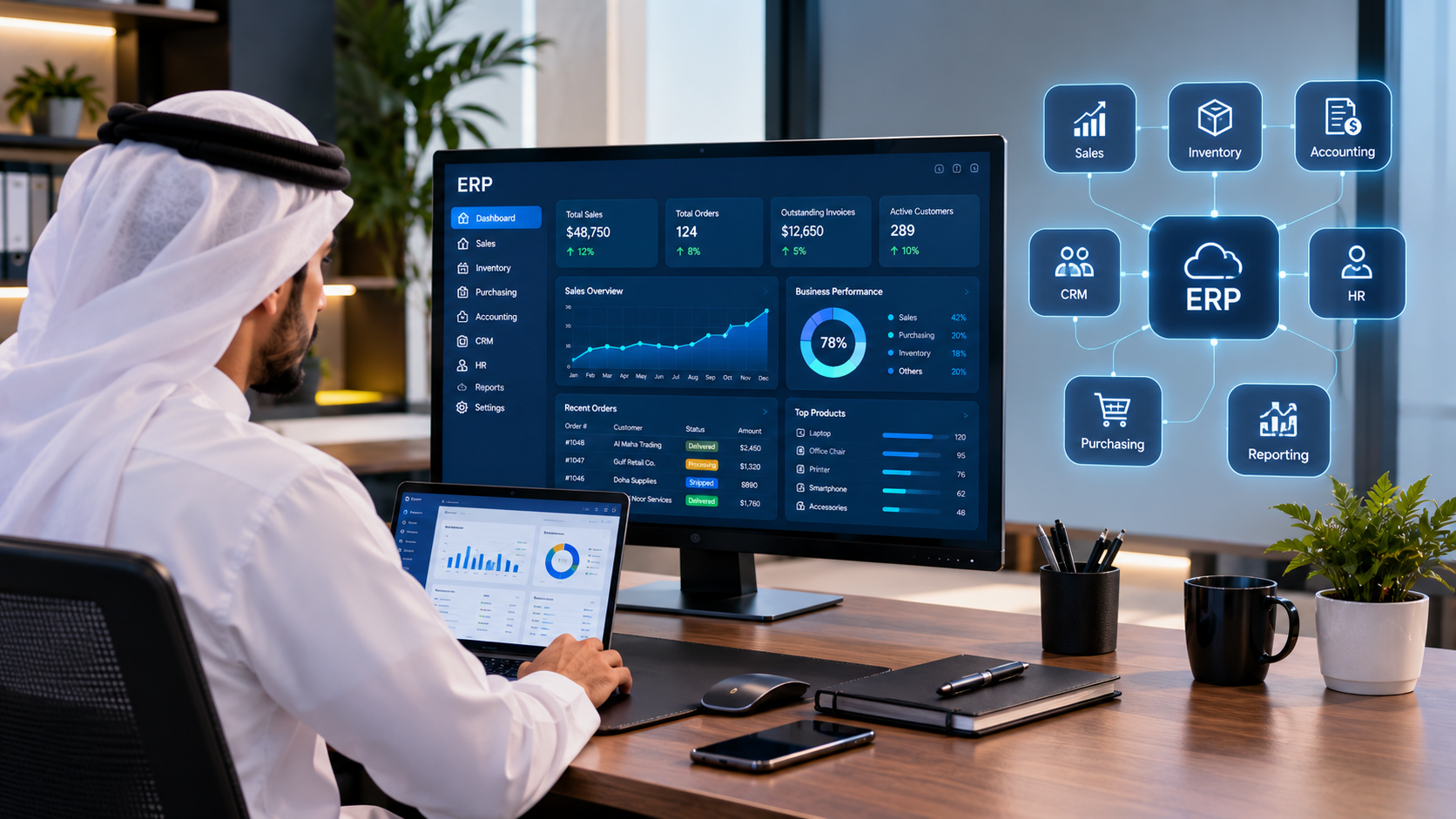
Modern ERP software connects business operations, data, automation, AI and management analytics through one centralized platform.
ERP Software in Doha : Complete Guide to Enterprise Resource Planning, Business Management & Automation
Businesses are becoming more connected, but many companies still operate with disconnected systems.
Sales may be managed in one application.
Accounting may use another.
Employees may be managed through separate HR software.
Inventory may exist in spreadsheets.
Customer information may be stored in a CRM.
Managers may receive reports manually.
And employees may still rely on email, WhatsApp and spreadsheets to move information between departments.
As a business grows, this approach can become increasingly difficult to manage.
This is where ERP software in Qatar can make a significant difference.
An Enterprise Resource Planning system, commonly called an ERP, brings multiple business functions together into a centralized digital platform.
Instead of managing different departments through disconnected systems, an ERP can connect areas such as:
Accounting and finance
Sales
Purchasing
Inventory
Human resources
Payroll
CRM
Projects
Operations
Customer management
Reporting
Business analytics
Documents
Workflow automation
Mobile applications
AI-powered business assistance
For businesses in Qatar, the opportunity is even broader because ERP software can be designed around the company's industry, organizational structure, workflows, languages and technology requirements.
This guide explains what ERP software is, how ERP systems work, what modules businesses may need, the difference between ready-made and custom ERP software, ERP implementation considerations, integrations, AI, mobile applications, security, costs and how to choose an ERP software company in Qatar.
What Is ERP Software?
ERP stands for Enterprise Resource Planning.
An ERP system is software that allows an organization to manage and connect multiple business processes through a centralized platform.
Instead of keeping information isolated inside different applications, an ERP can create a shared business environment where departments can work with connected information.
For example:
Sales
↓
Customer
↓
Invoice
↓
Payment
↓
Accounting
↓
Management Report
A more advanced ERP can connect even more processes:
Customer
↓
CRM
↓
Sales
↓
Inventory
↓
Purchasing
↓
Accounting
↓
HR
↓
Management Dashboard
↓
Mobile Application
↓
AI & Automation
The objective is not simply to put many features inside one application.
The objective is to connect business processes so that information can move through the organization more efficiently.
Why Are Businesses in Qatar Looking at ERP Software?
As companies grow, managing business operations manually becomes increasingly difficult.
A small organization might initially manage its operations using spreadsheets, email and separate applications.
As the company expands, it may have:
More employees
More customers
More products
More transactions
Multiple departments
Multiple branches
Larger inventories
More suppliers
More financial transactions
More customer enquiries
More management reporting requirements
At this point, disconnected systems can create operational problems.
Employees may enter the same information multiple times.
Managers may wait for reports.
Different departments may have different versions of the same information.
Inventory information may not match sales records.
Customer information may be duplicated.
Accounting data may need to be transferred manually.
An ERP system can bring these processes into one connected environment.
What Does an ERP System Do?
There is no single ERP configuration that works for every business.
A manufacturing company may need production planning.
A retail company may need POS and inventory.
A real estate company may need properties, tenants, payments and contracts.
A construction company may need projects, procurement, employees and financial management.
A healthcare business may require specialized operational workflows.
A professional services company may prioritize CRM, projects, billing and employee management.
Therefore, an ERP should be designed around the actual business.
Common ERP modules include the following.
1. Accounting & Finance
Accounting is one of the most important components of an ERP system.
Depending on the business requirements, financial functionality may include:
Chart of accounts
Income and expenses
Sales invoices
Purchase invoices
Payments
Receivables
Payables
Financial reports
Tax-related records
Expense management
Cash flow information
Financial dashboards
Transaction history
Connecting accounting with other modules can reduce manual data entry.
For example:
Sale
↓
Invoice
↓
Payment
↓
Accounting Record
↓
Financial Dashboard
This can give management a clearer view of financial activity.
2. Inventory Management
Inventory management is critical for companies that buy, store or sell physical products.
An ERP inventory module can potentially manage:
Products
Categories
Warehouses
Stock levels
Stock movements
Purchases
Sales
Transfers
Adjustments
Suppliers
Product costs
Stock reports
Low-stock notifications
The major advantage comes when inventory is connected to other parts of the system.
For example:
Customer Order
↓
Sales
↓
Inventory
↓
Warehouse
↓
Delivery
↓
Accounting
This creates a connected workflow rather than separate manual processes.
3. Sales Management
ERP software can connect sales activities with customers, products, inventory and accounting.
A sales module may include:
Quotations
Sales orders
Customers
Products
Pricing
Discounts
Invoices
Payments
Sales representatives
Sales reports
Sales targets
Notifications
Management can then see sales activity through dashboards instead of waiting for manually prepared reports.
4. CRM
Customer Relationship Management, or CRM, can be integrated into an ERP platform.
CRM functionality may include:
Leads
Contacts
Customers
Follow-ups
Sales opportunities
Communication history
Tasks
Customer notes
Sales pipelines
Customer activity
Notifications
An integrated CRM can connect directly with sales and other business processes.
For example:
Lead
↓
Qualified Customer
↓
Quotation
↓
Sales Order
↓
Invoice
↓
Payment
Instead of losing information between separate applications, the complete customer journey can be recorded in one system.
5. Human Resources & Payroll
An ERP can also connect employees and HR operations.
HR functionality may include:
Employee profiles
Departments
Job positions
Attendance
Leave management
Employee documents
Payroll
Benefits
Performance information
Employee notifications
HR reports
Businesses with larger teams can benefit from having employee information centralized.
6. Purchasing & Procurement
Purchasing is another major ERP component.
A purchasing system can manage:
Suppliers
Purchase requests
Purchase orders
Quotations
Supplier records
Goods received
Purchase invoices
Payments
Procurement workflows
Purchase reports
Purchasing can be connected directly to inventory and accounting.
For example:
Stock Level Falls
↓
Purchase Request
↓
Supplier Quotation
↓
Purchase Order
↓
Goods Received
↓
Inventory Updated
↓
Supplier Invoice
↓
Accounting
This type of workflow can significantly reduce repetitive administrative work.
ERP for Different Industries in Qatar
ERP software should not be treated as a generic product.
Different industries require different workflows.
ERP for Retail
Retail businesses may require:
POS
Products
Inventory
Purchasing
Customers
Sales
Accounting
Promotions
Branch management
Reporting
ERP for Pharmacies
Pharmacy operations may require:
POS
Products
Inventory
Suppliers
Purchasing
Expiry tracking
Customer management
Accounting
Reporting
Mobile access
Specialized requirements should be identified before development or implementation.
ERP for Real Estate
A real estate ERP or business management platform may include:
Properties
Units
Owners
Tenants
Contracts
Payments
Maintenance
CRM
Documents
Reports
Customer portals
ERP for Construction
Construction companies may require:
Projects
Employees
Procurement
Materials
Vendors
Expenses
Project budgets
Documents
Reports
Field operations
ERP for Professional Services
Professional service companies may benefit from:
CRM
Leads
Clients
Projects
Employees
Tasks
Timesheets
Billing
Accounting
Reporting
The correct ERP configuration depends on the organization's actual workflow.
Ready-Made ERP vs Custom ERP Software
One of the most important decisions is whether to use an existing ERP platform or develop a custom ERP system.
Ready-Made ERP
A ready-made ERP is an existing software platform with predefined functionality.
Advantages can include:
Faster implementation
Existing features
Established ecosystem
Existing integrations
Predictable functionality
However, businesses may need to adapt their processes to the software.
There may also be limitations when a company has highly specialized workflows.
Custom ERP Software
A custom ERP is developed specifically around the requirements of a business.
Instead of asking:
"How can our business adapt to this software?"
the approach becomes:
"How should the software support the way our business operates?"
Custom ERP development can be appropriate when a company requires:
Unique workflows
Specialized business rules
Custom dashboards
Industry-specific modules
Multiple integrations
Mobile applications
Customer portals
Employee portals
AI functionality
Advanced automation
Custom reporting
Custom development can also allow the platform to evolve as the company grows.
ERP Software vs Business Management Software
The terms ERP and business management software are sometimes used interchangeably, but they can represent different scopes.
A business management platform may focus on specific operational functions such as:
Customers
Sales
Inventory
Employees
Accounting
Projects
An ERP generally emphasizes broader integration between business functions.
The important question is not what the software is called.
The important question is:
Can the system manage the processes your business actually needs?
ERP and Mobile Applications
Modern ERP software does not have to be limited to desktop computers.
A mobile application can provide access to business information while employees and managers are away from their desks.
Depending on requirements, a mobile ERP application may allow users to:
View dashboards
Check sales
Manage customers
Approve requests
View inventory
Check employee information
Receive notifications
Monitor projects
Review reports
Communicate with customers
For businesses with field employees, sales teams or multiple branches, mobile access can become particularly valuable.
A connected architecture can look like:
ERP Backend
↙ ↓ ↘
Web Application | Mobile Application | APIs
This means employees can access the same underlying business information through different interfaces.
ERP Integrations
A modern ERP should not necessarily operate in isolation.
Businesses may need to connect their ERP with:
Payment gateways
Banks
Email systems
SMS services
WhatsApp
CRM platforms
Accounting systems
E-commerce platforms
Websites
Mobile applications
Maps
Cloud services
Shipping systems
Third-party APIs
For example:
Website
↓
API
↓
ERP
↓
CRM
↓
Accounting
↓
Management Dashboard
Integration can eliminate repetitive data entry and help different systems communicate.
ERP and AI
Artificial intelligence is changing what business software can do.
Traditional ERP systems primarily record and process information.
AI can help businesses interpret information and automate actions.
Potential AI applications include:
AI Business Assistant
Employees can ask questions about permitted business information using natural language.
AI Customer Support
AI can answer common customer questions.
AI Sales Assistance
AI can help sales teams prioritize leads and identify follow-up opportunities.
AI Reporting
AI can summarize business activity and highlight important trends.
AI Document Processing
AI can assist with extracting information from documents.
AI Forecasting
AI can potentially help identify patterns in sales, inventory or other business data.
AI Automation
AI can become part of workflows instead of operating as a separate chatbot.
For example:
Customer enquiry
↓
AI understands request
↓
ERP retrieves relevant information
↓
AI responds
↓
CRM record updated
↓
Employee notified if required
This is where ERP, AI and automation begin to operate as one business ecosystem.
ERP Automation
Automation is one of the most valuable aspects of integrated business software.
Consider a simple example.
Without automation:
Customer places order.
↓
Employee records order.
↓
Employee checks inventory.
↓
Employee contacts warehouse.
↓
Employee prepares invoice.
↓
Employee updates accounting.
↓
Employee sends confirmation.
With an integrated ERP:
Customer places order.
↓
System records order.
↓
Inventory is checked.
↓
Order is processed.
↓
Invoice is generated.
↓
Accounting is updated.
↓
Customer receives notification.
The exact workflow depends on the business, but the principle remains the same:
Let software handle repetitive processes so employees can focus on higher-value work.
ERP Dashboards & Business Intelligence
An ERP can become a central source of business information.
Management dashboards may display:
Sales
Revenue
Expenses
Inventory
Customers
Employees
Outstanding payments
Purchasing
Projects
Performance
KPIs
Operational activity
Instead of asking different departments to prepare separate reports, management can access information through centralized dashboards.
This can support faster decision-making.
ERP User Roles & Permissions
Not every employee should have access to every part of an ERP.
A properly designed system can use roles and permissions.
For example:
Sales Employee
Access:
Customers
Leads
Quotations
Sales
Accountant
Access:
Invoices
Payments
Expenses
Financial reports
HR Manager
Access:
Employees
Attendance
Leave
Payroll
Administrator
Access:
System configuration
Users
Permissions
Integrations
All modules
Role-based access can help protect sensitive business information and reduce accidental changes.
ERP Security
ERP systems can contain some of the most valuable information inside a company.
This can include:
Customer information
Employee information
Financial records
Business documents
Sales data
Supplier information
Internal communications
Security should therefore be considered from the beginning.
Depending on the project, ERP security may involve:
Secure authentication
Role-based permissions
Access controls
Secure APIs
Encryption
Database security
Backups
Monitoring
Audit logs
Secure hosting
Regular maintenance
Security requirements should be evaluated according to the organization's data, industry and regulatory environment.
Arabic & English ERP Software in Qatar
Qatar's business environment includes both Arabic- and English-speaking users.
For many organizations, bilingual software can therefore be an important requirement.
A bilingual ERP may need to support:
Arabic interfaces
English interfaces
Arabic data
English data
Right-to-left layouts
Left-to-right layouts
Arabic reports
English reports
Arabic notifications
English notifications
Multilingual documents
Bilingual support should be considered during system architecture rather than added at the end of development.
Cloud ERP vs On-Premise ERP
Businesses also need to consider where their ERP system will operate.
Cloud ERP
A cloud-based ERP is hosted on cloud infrastructure and accessed through the internet.
Potential advantages include:
Remote access
Easier scalability
Centralized infrastructure
Automated deployment
Access from multiple locations
On-Premise ERP
An on-premise ERP operates on infrastructure controlled by the organization.
This may be appropriate for businesses with specific infrastructure, security or operational requirements.
Hybrid Approach
Some organizations may require a combination of cloud and local systems.
The correct architecture depends on:
Security requirements
Business size
Number of users
Locations
Integrations
Compliance
Performance
Budget
Operational requirements
How Much Does ERP Software Cost in Qatar?
There is no single ERP development price.
The cost depends on the scope and complexity of the system.
Factors can include:
Number of modules
Number of users
Number of branches
User roles
Database architecture
Web application
Mobile application
Integrations
Accounting requirements
Inventory requirements
CRM
HR
Payroll
Reporting
AI
Automation
Security
Hosting
Data migration
Customization
Testing
Training
Maintenance
A small business management system with a few modules is very different from an enterprise platform connecting multiple departments, branches, mobile applications, AI and third-party systems.
Therefore, businesses should request a detailed scope before comparing ERP development prices.
ERP Implementation: A Practical Process
A successful ERP project should begin with business requirements rather than technology.
Step 1: Business Analysis
Understand:
Current processes
Departments
Employees
Customers
Products
Existing software
Manual processes
Problems
Goals
Step 2: Requirements
Document the required:
Modules
Features
Workflows
User roles
Reports
Integrations
Step 3: System Architecture
Design the:
Database
Backend
Frontend
APIs
Authentication
Infrastructure
Security model
Step 4: UI/UX Design
Create interfaces for:
Administrators
Employees
Managers
Customers
Mobile users
Step 5: Development
Develop and integrate the required modules.
Step 6: Testing
Test:
Functionality
Security
Performance
Mobile responsiveness
Integrations
User permissions
Data accuracy
Step 7: Data Migration
If replacing an existing system, data may need to be migrated carefully.
Step 8: Deployment
Deploy the system to the selected hosting or infrastructure environment.
Step 9: Training
Employees should understand how to use the system and how their workflows have changed.
Step 10: Maintenance
After launch, software may require:
Updates
Security improvements
Bug fixes
New features
Monitoring
Performance optimization
Additional integrations
ERP should be viewed as an evolving business platform rather than a one-time installation.
How to Choose an ERP Software Company in Qatar
Choosing an ERP development partner is a major decision.
Do not compare companies only by price.
Consider the following.
1. Understand Their Experience
Look for evidence of:
Business software
ERP
CRM
POS
Inventory systems
Accounting systems
HR software
Mobile applications
APIs
AI
Automation
2. Review Real Projects
Ask for actual projects or demonstrations.
A company that has only built websites may not have the same experience as a team that develops complex business software.
3. Understand the Technology
Ask what technology will be used and why.
The technology should match the requirements rather than being selected simply because it is popular.
4. Ask About Integrations
If you already use payment systems, accounting software, CRM, websites or other applications, discuss integration before development begins.
5. Ask About Data Ownership
Understand:
Where data is stored
Who controls the infrastructure
How backups work
What happens if you change providers
6. Ask About Security
Security should be part of the architecture.
7. Ask About Scalability
Your ERP should be capable of growing with the business.
8. Ask About Support
Clarify:
Maintenance
Updates
Bug fixing
Monitoring
Technical support
Future development
Custom ERP Software Development With Galaxium Coding
Galaxium Coding develops technology solutions around individual business requirements.
Our software development approach can include:
Custom business software
ERP-style platforms
CRM systems
Business management systems
Web applications
Mobile applications
API integrations
Cloud solutions
AI integration
Business automation
Custom dashboards
Depending on project requirements, technology can include modern frameworks and backend systems such as React, Next.js, Laravel, Node.js, databases and API-based integrations.
The objective is not simply to create a large application.
The objective is to create a system that helps the business operate more efficiently.
For example, a business may require:
CRM
Sales
Inventory
Accounting
HR
Purchasing
Mobile App
AI
Automation
All connected through one business platform.
That is where custom software can become particularly valuable.
ERP Is More Than Software
An ERP system should not be viewed simply as a collection of screens and modules.
It represents the way information moves through a business.
A successful ERP can connect:
People
↓
Processes
↓
Data
↓
Software
↓
Automation
↓
AI
↓
Business Decisions
The best ERP system is not necessarily the one with the most features.
It is the one that helps the business manage its actual operations.
The Future of ERP Software in Qatar
ERP systems are becoming increasingly connected with other technologies.
The future business platform may combine:
ERP
CRM
POS
Mobile applications
Websites
Cloud infrastructure
AI
Voice AI
Automation
Analytics
Digital payments
Customer portals
Employee portals
API integrations
Instead of operating separate systems, businesses can move toward connected digital ecosystems.
Imagine a customer contacting a company through its website.
The AI assistant understands the enquiry.
The CRM identifies the customer.
The ERP retrieves relevant information.
The system checks availability.
The AI provides the answer.
The appointment is created.
The customer receives confirmation.
The sales team receives the lead.
Management can see the activity in its dashboard.
That is the direction in which business software is moving:
From disconnected applications to connected intelligent business platforms.
Final Thoughts
ERP software can help businesses move away from disconnected tools, repetitive manual processes and fragmented information. Instead of relying on separate spreadsheets, accounting applications, customer databases, inventory systems and manually prepared reports, a modern ERP platform can bring important business operations together in one connected environment.
For a growing company, this can make a significant difference.
When sales, purchasing, inventory, accounting, customer management, employees and management reporting operate independently, employees often have to move information from one system to another. This creates additional administrative work and can increase the possibility of duplicated, outdated or inconsistent information.
An integrated ERP system changes this approach.
Instead of asking employees to constantly transfer information between different systems, the business can create workflows in which information moves automatically from one stage to another.
For example:
Customer inquiry → CRM → quotation → sales order → inventory → invoice → payment → accounting → management reporting
This type of connected workflow can help management obtain a clearer picture of what is happening across the organization.
However, ERP implementation should not begin with the question:
"Which software has the most features?"
A better question is:
"What does our business need the system to accomplish?"
That difference is extremely important.
A business should not purchase an ERP simply because another company is using it, because it has hundreds of modules, or because it appears to be the most advanced platform available.
The right ERP should be selected according to the company's actual requirements.
Before choosing a system, business owners and managers should identify the processes that are currently creating problems.
For example:
Are employees entering the same customer information multiple times?
Is inventory information difficult to track?
Are sales and accounting using different systems?
Are managers waiting for employees to prepare reports?
Is purchasing being handled manually?
Are customer follow-ups being forgotten?
Is employee information stored in spreadsheets?
Are different branches using separate systems?
Is management unable to see real-time business performance?
Are employees spending too much time on repetitive administrative work?
These questions are often more important than the number of features listed on an ERP provider's website.
ERP Should Solve Business Problems
The purpose of ERP is not simply to digitize paperwork.
The real objective is to improve the way a business operates.
A well-planned ERP system can help create a more structured environment in which information is available to the right people at the right time.
For example, a sales employee may need access to customer information and previous orders.
An inventory employee may need to see stock levels, purchase orders and warehouse movements.
An accountant may need access to invoices, payments, expenses and financial information.
A manager may need a complete dashboard showing sales, expenses, inventory, customers and business performance.
Instead of creating separate systems for each department, an integrated platform can connect these requirements.
Businesses that need a broader technology platform can also explore custom software development, particularly when standard ERP products cannot fully support their workflows.
Galaxium Coding's [custom software development services] can be used to create business applications, enterprise systems, ERP-style platforms, CRM systems, cloud applications and other customized solutions.
Ready-Made ERP or Custom ERP?
There is no universal answer.
For some businesses, a ready-made ERP platform may be the most practical choice.
A ready-made solution can provide an established collection of features, existing integrations, regular updates and a faster implementation process.
For a business with standard processes, this can be an excellent option.
However, businesses with specialized workflows may eventually discover that their software does not operate exactly the way they need.
They may need:
Custom approval workflows
Specialized dashboards
Industry-specific calculations
Unique customer portals
Custom inventory processes
Special employee workflows
Custom payment integrations
Mobile applications
Internal management tools
AI assistants
Advanced automation
Connections with existing software
In these situations, custom ERP software may provide greater flexibility.
The goal is not to build custom software simply because it is possible.
The goal is to determine whether customization provides enough business value to justify the investment.
ERP Is Becoming More Than Accounting and Inventory
Modern ERP systems are evolving beyond traditional accounting and inventory management.
A connected business platform can combine:
ERP + CRM + HR + Accounting + Inventory + POS + E-Commerce + Mobile + AI + Automation + Analytics
This creates an environment in which different parts of the business can communicate with one another.
For example, an online customer order could automatically create a sales transaction, reduce inventory, notify the fulfillment team, generate an invoice and update management reporting.
A sales representative could use a mobile application to access customer information while visiting a client.
A manager could monitor business performance from a dashboard.
An AI assistant could help summarize reports or identify unusual patterns.
These capabilities can turn ERP from a simple record-keeping system into a broader business management platform.
ERP, Websites and Web Applications
Businesses should also think about ERP as part of a larger digital ecosystem.
A company website does not necessarily need to operate independently from its internal systems.
A modern business can connect its website with:
CRM
ERP
Inventory
Accounting
Customer accounts
Payment gateways
Booking systems
Mobile applications
Marketing systems
Internal dashboards
For companies that need this type of connected environment, Galaxium Coding also provides [custom web application development], including business dashboards, e-commerce platforms, SaaS applications and systems that integrate with other business technologies.
This means a website can become much more than an online brochure.
It can become an important component of the company's business infrastructure.
ERP and Mobile Applications
Mobile applications can also become an important part of an ERP strategy.
Employees may need to access business information while outside the office.
Sales representatives may need customer information.
Managers may need dashboards.
Delivery employees may need orders and delivery information.
Customers may need to place orders or monitor their accounts.
A connected mobile application can communicate with the company's central business platform through secure APIs.
Businesses considering this approach can explore [mobile application development] as part of a wider digital transformation strategy.
The important point is that the mobile application should not become another isolated system.
It should communicate with the company's ERP, CRM, database or other core business systems.
ERP and Cloud Technology
Cloud infrastructure can also make modern business platforms more accessible and scalable.
Instead of depending entirely on local servers, businesses can deploy applications using cloud infrastructure designed around their security, availability and scalability requirements.
For companies building larger platforms, [cloud and DevOps solutions] can support deployment, infrastructure management, monitoring, backups, scalability and continuous software improvement.
The technology architecture should be selected according to the requirements of the business.
A small company does not necessarily need an extremely complex infrastructure.
Likewise, a large organization with multiple branches, large databases and thousands of users may require a much more sophisticated architecture.
ERP and Artificial Intelligence
Artificial intelligence is another area that businesses should consider when planning their future technology strategy.
AI can potentially be integrated into ERP and business-management systems for:
Automated reporting
Sales forecasting
Customer support
Lead qualification
Document processing
Data analysis
Business recommendations
Voice assistants
Workflow automation
Internal knowledge search
Customer communication
The important point is that AI should solve a real business problem.
Adding an AI chatbot simply because AI is popular does not necessarily create value.
Instead, businesses should identify where employees spend time performing repetitive tasks and determine whether AI or automation can improve those processes.
For example:
Customer inquiry → AI assistant → qualification → CRM → sales employee
Or:
Invoice received → document processing → accounting system → verification → approval
These types of workflows can potentially reduce manual work while improving the speed at which information moves through the organization.
ERP and Qatar's Digital Transformation
The discussion around ERP is also relevant to Qatar's broader digital transformation.
Qatar National Vision 2030 places emphasis on economic development, innovation, diversification and building a competitive knowledge-based economy. Businesses operating in Qatar are therefore operating within an environment where digital transformation is becoming increasingly important.
Qatar's Digital Agenda 2030 also focuses on developing a thriving digital economy and accelerating digital adoption.
For a business owner, this does not mean that every company needs to immediately purchase expensive enterprise software.
It means businesses should consider how technology can improve productivity, customer experience, decision-making and long-term competitiveness.
An ERP system can be one component of that strategy.
A website can be another.
A mobile application can be another.
AI and automation can become additional layers.
The objective is to build these technologies into a connected digital ecosystem rather than creating isolated tools that cannot communicate with one another.
Choosing the Right Technology Partner
Selecting the technology partner can be just as important as selecting the software.
A business should look beyond the sales presentation and evaluate:
Previous projects
Technical capabilities
Industry experience
Security practices
Integration capabilities
Scalability
Support
Maintenance
Communication
Project management
Long-term development capabilities
Businesses can review the [Galaxium Coding portfolio and projects] to understand the types of digital solutions that can be developed for organizations.
It is also useful to understand who will actually build and maintain the system.
A technology partner should be able to understand the business requirement before recommending a technical solution.
This is particularly important for ERP projects because ERP touches multiple departments simultaneously.
Start With Business Requirements
Before approaching an ERP provider or software development company, a business should document its requirements.
A simple requirements document can include:
Company information
Industry
Number of employees
Number of branches
Current software
Current problems
Operations
Sales process
Purchasing process
Inventory process
Customer management
Employee management
Accounting
Technology
Website
Mobile application
POS
Payment gateways
APIs
Cloud hosting
Future requirements
AI
Automation
Advanced analytics
Additional branches
Customer portal
Employee portal
This makes it much easier for a technology partner to understand what the business actually needs.
Start Small and Scale
Businesses also do not necessarily need to implement every feature at once.
A practical approach may be:
Phase 1: Sales + Customers
Phase 2: Inventory + Purchasing
Phase 3: Accounting
Phase 4: HR + Employees
Phase 5: Website + E-Commerce
Phase 6: Mobile Application
Phase 7: Automation
Phase 8: AI + Advanced Analytics
This approach can allow the business to build its technology infrastructure progressively.
Instead of spending heavily on features that may never be used, the company can prioritize the areas that provide the greatest immediate value.
The Future of ERP in Qatar
The future of ERP is likely to move toward increasingly connected business platforms.
Instead of having one system for accounting, another for CRM, another for HR, another for inventory and another for customer communication, businesses will increasingly look for systems that can communicate across these areas.
The future business platform could look like:
Customer
↓
Website / Mobile App
↓
CRM
↓
ERP
↓
Inventory / Purchasing / Accounting
↓
HR / Operations
↓
AI / Automation
↓
Management Dashboard
This type of architecture can provide management with a much clearer understanding of the organization.
The goal is not simply to have more technology.
The goal is to have technology that works together.
Ready to Build Your Business Management Platform?
If your business is currently managing customers, employees, sales, inventory, accounting, operations or other processes through disconnected systems, it may be time to consider a more integrated approach.
Galaxium Coding helps businesses design and develop custom software, web applications, mobile applications, AI solutions, cloud platforms and business automation systems around real operational requirements.
You can learn more about the company through the [About Galaxium Coding] page and explore its technology services before deciding what type of solution is appropriate for your organization.
For businesses that need a complete software platform, Galaxium Coding can help evaluate the requirements and determine whether the appropriate approach is:
Ready-made ERP
Customized ERP
Custom business software
CRM
POS
Inventory management
Accounting integration
HR software
Web application
Mobile application
AI-powered business platform
Business automation
Cloud-based infrastructure
The best solution is not necessarily the most expensive one.
It is the solution that solves the right problems.
From Disconnected Tools to One Connected Platform
Imagine a business where:
Customer data
is connected to
CRM
which connects to
Sales
which connects to
Inventory
which connects to
Accounting
which connects to
HR
which connects to
Management reporting
and all of these systems can communicate with:
Website + Mobile App + AI + Automation
That is the real opportunity behind modern ERP.
Instead of simply replacing spreadsheets with another piece of software, businesses can redesign the way information moves throughout the organization.
This can help create a business that is more measurable, more connected and potentially more efficient.
Technology Should Grow With Your Business
Your business may start with a simple website.
Then you may need customer management.
Then online sales.
Then inventory.
Then accounting integration.
Then employee management.
Then a mobile application.
Then automation.
Then AI.
Technology should therefore be considered as a long-term business strategy rather than a one-time purchase.
Galaxium Coding works with businesses that want to develop technology around their current operations while keeping future growth in mind.
You can also explore the [Galaxium Coding Blog] for additional articles covering software development, AI, websites, mobile applications, business automation and digital transformation.
Why Customization Can Matter
Every business has different workflows.
A pharmacy operates differently from a construction company.
A restaurant operates differently from a real estate company.
A trading company operates differently from a professional services company.
An education organization has completely different requirements from a retail business.
That is why software should ultimately be evaluated according to the organization's processes.
A system that works perfectly for one company may not be the right solution for another.
Galaxium Coding's approach is to understand the business requirement first and then determine the appropriate technology architecture.
This can involve existing software, custom development, APIs, databases, cloud infrastructure, mobile applications and AI depending on the project.
Your Next Step
If you are currently researching ERP software in Qatar, do not begin by asking only:
"How much does ERP cost?"
Start by asking:
"What do we need our business technology to accomplish?"
Then identify:
What systems you currently use.
Where your employees lose time.
Which processes are repetitive.
Which information is difficult to access.
Which departments need to communicate.
Which systems need integration.
What your business may need in the next three to five years.
Whether ready-made software can meet those requirements.
Where customization would provide additional value.
How AI and automation could improve your operations.
Once these requirements are clear, the right architecture, modules, integrations and automation can be designed around those requirements.
For some businesses, a ready-made ERP may be the best solution.
For others, custom ERP software may provide greater flexibility.
For another organization, the best approach may be a combination of existing software and custom integrations.
There is no single answer for every business.
The right choice depends on the organization's size, industry, workflows, budget, technology requirements, employees, customers and long-term objectives.
For businesses looking for ERP software in Qatar, the opportunity is not simply to digitize existing processes.
It is to build a more connected, measurable and intelligent organization.
Ready to Build Your Business Management Platform?
If you are planning an ERP system, custom business software, web application, mobile application, AI solution or business automation platform, the next step is to define your requirements clearly.
You can [contact Galaxium Coding] to discuss your business requirements and explore what type of technology platform could be built for your organization.
You can also review the company's [software development services], [web application services], [mobile application development services], and [cloud and DevOps services] to understand the different technologies that can form part of a modern business platform.
If you want to understand the company's background and capabilities, visit the [About Galaxium Coding] page.
If you want to see previous work, explore the [Galaxium Coding projects and portfolio].
For additional technology insights, visit the [Galaxium Coding Blog] and [Digital Intelligence resource center].
Businesses can also explore specialized industry solutions, such as [education technology solutions], when their requirements involve learning management systems, virtual classrooms, student information systems or other education platforms.
The goal is simple:
Don't just buy software. Build technology that helps your business grow.
Your ERP should not simply store information.
Your ERP should help your people work.
Your systems should communicate.
Your data should become useful.
Your repetitive processes should become automated.
Your customers should receive a better experience.
And your management team should have the information needed to make better decisions.
That is the real value of digital transformation.
Ready to move from disconnected systems to a connected business platform?
[Discuss your software requirements with Galaxium Coding] and explore what can be built specifically for your business.