Custom Software Development Process: From Idea to Launch

The custom software development process transforms a business idea into a tested, deployed, and continuously improved digital solution
Custom Software Development Process: From Idea to Launch
Building custom software is more than writing code.
A successful software product starts with a business problem, moves through careful planning and design, and then progresses through development, testing, deployment, and continuous improvement.
Whether you are planning a CRM, ERP, customer portal, internal business system, mobile application, SaaS platform, or AI-powered solution, understanding the custom software development process can help you make better decisions, control project risks, and build a product that actually supports your business.
A typical process looks like this:
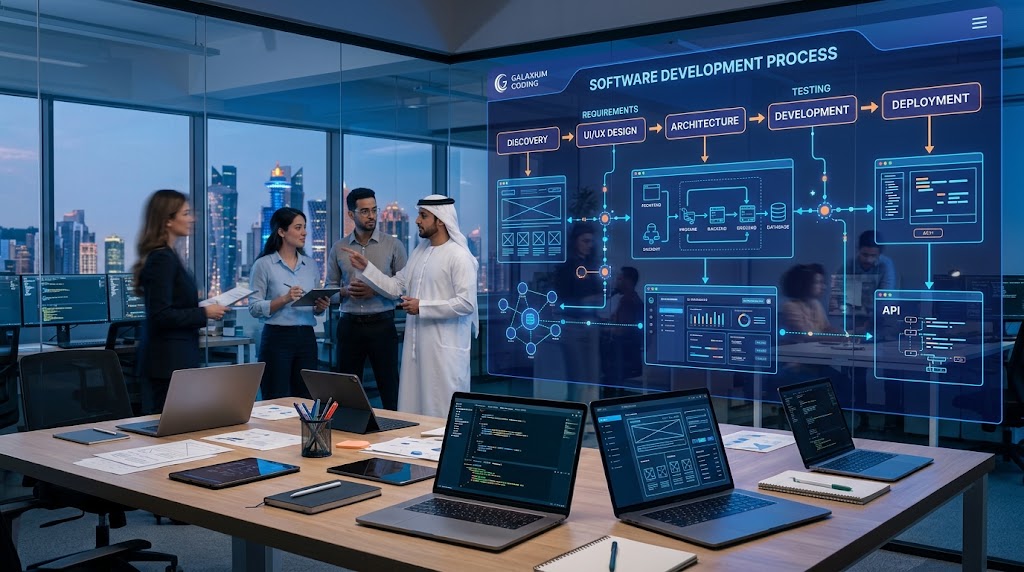
Business Idea → Discovery → Requirements → Planning → UI/UX Design → Architecture → Development → Integration → Testing → Deployment → Training → Maintenance → Continuous Improvement
The exact process can vary depending on project size and complexity, but the underlying principle remains the same:
Understand the problem first, design the right solution, build it carefully, test it thoroughly, and improve it after launch.
Businesses looking for a tailored technology solution can explore custom software development services to understand how a professional development team can turn business requirements into a working software platform.

What Is the Custom Software Development Process?
The custom software development process is a structured series of activities used to transform a business requirement or idea into a functioning software product.
Unlike buying ready-made software, custom development starts with understanding what the organization actually needs.
The process may involve:
Business analysis
Requirement gathering
Project planning
Technical architecture
UI/UX design
Database design
Software development
API integration
Quality assurance
Security testing
Deployment
User training
Monitoring
Maintenance
Future enhancements
The goal is not simply to produce software.
The goal is to create a solution that solves a real business problem.
Why a Structured Development Process Matters
A software project can become expensive when requirements are unclear or decisions are made too late.
For example, imagine a business begins development without clearly defining:
Who will use the system
What features are required
What data needs to be stored
Which systems need integration
What reports managers need
What security requirements exist
How the system will scale
What should happen after launch
The development team may still produce software, but it may not solve the actual business problem.
A structured process reduces this risk by creating checkpoints throughout the project.
It also gives business owners a clearer understanding of:
What is being built
Why it is being built
How much work is involved
What happens next
What needs approval
How the final product will be evaluated
The Custom Software Development Process at a Glance
Stage | Main Objective | Typical Output |
|---|---|---|
1. Discovery | Understand the business problem | Project vision |
2. Requirements | Define what the system must do | Requirements document |
3. Planning | Define scope, resources and milestones | Project roadmap |
4. UI/UX Design | Plan the user experience | Wireframes and designs |
5. Architecture | Plan the technical foundation | System architecture |
6. Development | Build the software | Working features |
7. Integration | Connect external systems | APIs and integrations |
8. Testing | Find and resolve problems | Tested release |
9. Deployment | Make the software available | Production system |
10. Training | Prepare users | Trained users and documentation |
11. Maintenance | Keep the system reliable | Updates and support |
12. Improvement | Expand the product | New features and optimization |
Let's look at each stage in detail.
Step 1: Start With the Business Problem
The first step is not choosing a programming language.
It is understanding the problem.
A business might say:
“We need custom CRM software.”
But that statement does not explain why the software is required.
A better discovery conversation asks:
What problem does the current CRM create?
How are leads currently managed?
Where is customer information stored?
Which tasks are performed manually?
What information do sales managers need?
Which systems need to communicate with the CRM?
What reports are missing?
What should customers be able to do?
What should employees be able to do?
Example
Suppose a real estate company manages leads through spreadsheets, messaging applications and separate property records.
The actual problem may not be “we need a CRM.”
The problem could be:
Lead information is fragmented, follow-ups are missed, property information is difficult to manage, and managers cannot see sales performance in real time.
That distinction matters.
Once the real problem is understood, the software can be designed around solving it.
Step 2: Discovery and Business Analysis
After identifying the business problem, the next stage is discovery.
This is where the development team learns how the organization operates.
The team may examine:
Business objectives
Existing workflows
Departments
Users
Customers
Current software
Manual processes
Data sources
Reporting requirements
Security requirements
Integration requirements
Future plans
Who Should Be Involved?
Depending on the project, stakeholders may include:
Business owners
Department managers
Employees
IT teams
Finance teams
Sales teams
Operations teams
Customers
Project managers
The people who actually use the system often provide valuable information that senior management may not see.
Why Discovery Is Important
A software application can technically work while still being inconvenient for its users.
For example, management may want ten different reports, while employees need a simpler interface that lets them complete daily tasks quickly.
Good discovery identifies both requirements.
Step 3: Gather and Document Requirements
Once the business is understood, requirements can be documented.
Requirements explain what the software needs to do.
They can include:
Functional Requirements
These describe what the system should do.
Examples:
Users can create accounts.
Managers can approve requests.
Customers can submit orders.
Employees can upload documents.
Administrators can create reports.
Customers receive notifications.
Non-Functional Requirements
These describe how the system should operate.
Examples include:
Security
Performance
Reliability
Scalability
Availability
Accessibility
Response time
Data protection
User Roles
A business application may have different users.
For example:
Administrator
Manage users
Configure settings
View all data
Manager
Approve requests
View reports
Monitor employees
Employee
Complete assigned tasks
Update records
Upload documents
Customer
View account
Submit requests
Track orders
Receive notifications
Clearly defining roles early makes later development much easier.
Step 4: Define the Minimum Viable Product
One of the most important decisions is determining what should be included in the first version.
A business may have 50 ideas for its software.
That does not mean all 50 should be built before launch.
Instead, separate requirements into:
Must have
Important
Nice to have
Future
The first release can focus on the core functionality required to solve the primary business problem.
Example
A customer-management platform might eventually require:
Customer profiles
Sales pipeline
Email integration
WhatsApp integration
AI assistant
Mobile application
Advanced analytics
Automated marketing
Customer portal
Predictive analytics
The first release might focus on:
Customer Profiles + Leads + Sales Pipeline + Basic Reporting
Additional capabilities can be introduced after the core system is validated.
This approach can reduce unnecessary initial complexity.
Step 5: Project Planning
After requirements are defined, the project needs a roadmap.
Planning typically covers:
Project scope
Features
Priorities
Development phases
Team responsibilities
Milestones
Dependencies
Testing
Deployment
Budget considerations
Communication process
A project roadmap helps everyone understand what is expected.
Scope Matters
One of the biggest risks in custom software projects is uncontrolled scope expansion.
A project starts with:
“We need a CRM.”
Then it becomes:
“Let's also add HR.”
Then:
“Let's add accounting.”
Then:
“Let's build a mobile app.”
Then:
“Can we add AI?”
Each individual feature may sound reasonable.
Together, they can transform a small project into a much larger one.
This is why requirements and scope should be documented before development begins.
Step 6: Choose the Technology and Architecture
Once the requirements are understood, the technical architecture can be planned.
Architecture determines how major parts of the software will work together.
This can include:
Frontend
Backend
Database
APIs
Authentication
Cloud infrastructure
File storage
Notifications
Third-party services
Monitoring
Security controls
Galaxium Coding's software development capabilities include requirement analysis, Agile development, quality assurance, scalable architecture, deployment, maintenance, documentation, and support.
Technology Should Follow Requirements
There is no single technology stack that is correct for every project.
The appropriate technology depends on factors such as:
Application type
Number of users
Performance requirements
Integration requirements
Security requirements
Development team expertise
Infrastructure
Budget
Future scalability
A business should avoid choosing technology simply because it is currently popular.
The better question is:
Which technology is appropriate for this particular product?
Step 7: Design the UI and User Experience
Before developers build every screen, designers can create the user experience.
UI/UX design considers:
Navigation
Layout
Buttons
Forms
Dashboards
Mobile responsiveness
Accessibility
User workflows
Visual hierarchy
Wireframes
Wireframes provide a simplified representation of screens.
For example:
Login → Dashboard → Customers → Customer Profile → Create Order → Confirmation
Wireframes allow stakeholders to review the workflow before extensive development begins.
Why UX Matters
A technically powerful system can still fail if employees find it difficult to use.
Good UX should help users:
Find information quickly
Understand what to do
Complete tasks efficiently
Avoid mistakes
Receive useful feedback
For browser-based platforms, businesses may also consider web application development when the system needs to be accessible across desktops, tablets, and mobile devices.
Step 8: Design the Database
For many business applications, data is at the center of the system.
A custom application may store:
Customers
Employees
Products
Orders
Payments
Documents
Appointments
Transactions
Inventory
Projects
The database needs to be structured so information can be stored, retrieved, updated, and protected efficiently.
Example
A sales platform could have relationships between:
Customer → Lead → Sales Representative → Property → Appointment → Proposal → Contract → Payment
Good database planning reduces duplication and helps the application produce reliable reports.
Step 9: Develop the Software
Now the actual development begins.
Depending on the project, developers may build:
Frontend interfaces
Backend services
APIs
Databases
Authentication
Business logic
Dashboards
Notifications
Mobile functionality
Administrative panels
Modern development teams commonly use iterative development rather than waiting until the very end to demonstrate the product.
Agile Development
In an Agile approach, the project can be divided into smaller development cycles.
For example:
Sprint 1: Authentication and user management
Sprint 2: Customer management
Sprint 3: Sales workflow
Sprint 4: Reporting
Sprint 5: Integrations
This gives stakeholders opportunities to review progress and provide feedback.
Step 10: Integrate External Systems
Many custom applications do not operate independently.
They need to communicate with other systems.
Examples include:
Payment gateways
Accounting systems
CRM platforms
ERP systems
Email services
SMS providers
Maps
Cloud storage
Identity providers
AI services
E-commerce platforms
APIs are often used to allow systems to exchange information.
Example Workflow
A customer places an order:
Website → Order Management → Payment Gateway → Inventory → Accounting → Customer Notification
Without integration, employees might need to manually transfer information between systems.
With appropriate integrations, these steps can potentially be automated.
Step 11: Build Security Into the Software
Security should be considered throughout development rather than added immediately before launch.
Business software may contain sensitive information such as:
Customer records
Employee data
Financial information
Business documents
Passwords
Transactions
Internal communications
Security measures can include:
Authentication
Role-based permissions
Encryption
Secure APIs
Input validation
Access controls
Logging
Backups
Monitoring
Secure infrastructure
The appropriate controls depend on the application and its risk profile.
For businesses operating in Qatar, regulatory, contractual, and industry-specific requirements should also be considered where applicable.
Step 12: Quality Assurance and Testing
Testing is one of the most important stages of the custom software development process.
Software should not simply be tested to determine whether it opens.
It should be tested to determine whether it works correctly under realistic conditions.
Functional Testing
Does each feature behave as expected?
Integration Testing
Do connected systems exchange information correctly?
Performance Testing
Does the system remain responsive under expected workloads?
Security Testing
Are sensitive areas appropriately protected?
User Acceptance Testing
Can actual users complete their tasks successfully?
Compatibility Testing
Does the application work across supported browsers, devices, and operating systems?
Regression Testing
Do new changes accidentally break existing features?
Testing should happen throughout development rather than being treated as a final five-minute task.
Step 13: User Acceptance Testing
Before production launch, business stakeholders should review the software.
This is commonly called User Acceptance Testing (UAT).
Users can test real-world workflows such as:
Create Customer → Assign Salesperson → Schedule Follow-Up → Generate Proposal → Record Payment
The goal is to confirm that the system supports the business process.
UAT can reveal issues that technical testing alone may not identify.
For example:
A required field may be missing.
A report may not show the information managers need.
A workflow may require too many clicks.
A user role may have incorrect permissions.
Fixing these issues before launch is generally preferable to discovering them after the system has been deployed.
Step 14: Prepare for Deployment
Once the software has passed testing, deployment preparation begins.
This can include:
Production environment setup
Database configuration
Domain configuration
SSL/security configuration
Environment variables
Backup configuration
Monitoring
User accounts
Data migration
Deployment procedures
For cloud-based systems, infrastructure and deployment practices become particularly important.
Businesses requiring cloud infrastructure and operational support can explore cloud and DevOps solutions.
Step 15: Data Migration
If replacing an existing system, the business may already have valuable data.
This might include:
Customer records
Employee information
Product catalogs
Orders
Historical transactions
Documents
Inventory
Migration should be planned carefully.
A typical process may involve:
Extract → Clean → Transform → Validate → Import → Verify
Data should not simply be copied from one database into another without checking its quality.
Common Data Problems
Existing data may contain:
Duplicates
Missing fields
Incorrect formats
Old records
Invalid values
Inconsistent names
Cleaning data before migration can prevent problems in the new system.
Step 16: Deployment and Launch
Deployment is when the software moves into its production environment and becomes available to real users.
But a launch should be treated as a controlled transition rather than simply pressing a button.
A launch plan may include:
Final backup
Database migration
Production deployment
DNS configuration
Security checks
Monitoring
User account activation
Final testing
Support availability
For larger systems, a phased rollout may be safer than immediately moving every user onto the new platform.
Step 17: User Training and Documentation
Even well-designed software requires user adoption.
Training may include:
Demonstrations
User guides
Video tutorials
Administrator training
Documentation
Frequently asked questions
Support procedures
Different users may need different training.
For example:
Employees: Daily workflows
Managers: Reporting and approvals
Administrators: User management and system configuration
IT Team: Technical administration and monitoring
Training can significantly influence whether a software project delivers its intended business value.
Step 18: Post-Launch Monitoring
Launching software does not mean the project is necessarily finished.
After launch, the development team may monitor:
Application performance
Server health
Errors
Security events
Database performance
User activity
Failed integrations
Customer feedback
Real-world usage can reveal problems that were not visible during development.
This is why monitoring and support should be included in the project plan.
Step 19: Maintenance and Updates
Software requires ongoing maintenance.
Post-launch work can include:
Bug fixes
Security updates
Performance improvements
Database maintenance
Infrastructure updates
API changes
Browser compatibility updates
Operating-system compatibility
New features
Galaxium Coding's software-development service specifically includes deployment and maintenance alongside development, testing, architecture, documentation, and support.
Step 20: Continuous Improvement
The best business software evolves with the organization.
After launch, businesses can evaluate:
Which features are being used?
Where do employees still experience delays?
Which processes remain manual?
What reports are missing?
What do customers request?
Which integrations would provide additional value?
Where could automation help?
This creates a continuous cycle:
Build → Launch → Measure → Learn → Improve → Expand
Over time, the software can become increasingly aligned with the business.
How Long Does Custom Software Development Take?
There is no single timeline for every custom software project.
A small internal application may require considerably less time than an enterprise platform with multiple departments, integrations, mobile applications, advanced security, and AI capabilities.
The timeline can be affected by:
Number of features
Number of users
Complexity of workflows
UI/UX requirements
Integrations
Data migration
Mobile applications
AI functionality
Security requirements
Testing
Stakeholder feedback
Scope changes
The best way to estimate a project is to define the requirements first and then create a roadmap based on the actual scope.

What Does Custom Software Development Cost?
The cost of custom software depends heavily on complexity.
Factors can include:
Number of modules
User roles
Database requirements
Integrations
Mobile applications
AI functionality
Automation
Security
Hosting
Maintenance
For a Qatar-specific discussion of these factors, see Galaxium Coding's guide to custom software development cost in Qatar.
The important point is that software cost should be evaluated against expected business value.
A system that reduces significant manual work, improves customer service, or connects previously disconnected processes may provide value beyond its initial development cost.
Example: From Business Problem to Software Launch
Consider a growing distribution company.
The Initial Problem
The company manages:
Customers in spreadsheets
Inventory in separate software
Orders through email
Payments in accounting software
Delivery information manually
Management struggles to see the complete order lifecycle.
Discovery
The development team maps the process:
Customer → Order → Inventory → Payment → Delivery → Invoice
Requirements
The company needs:
Customer management
Order management
Inventory
Payment status
Delivery tracking
Reports
User permissions
Design
A dashboard is designed for management.
Employees receive simpler screens based on their roles.
Development
The team builds the platform in phases.
Integration
The system connects with the required accounting and payment services.
Testing
Users test orders, inventory updates, payments, reports, and permissions.
Launch
The new platform is deployed and employees receive training.
Improvement
After launch, management requests automated notifications and additional reporting.
The project therefore becomes an evolving business platform rather than a one-time software installation.
Custom Software Development for Different Types of Businesses
The development process remains broadly similar across industries, but the requirements can be very different.
Retail
Retail software may include:
Inventory
POS integration
Orders
Customers
Loyalty
E-commerce
Reporting
Real Estate
Real estate software may include:
Property management
Leads
Agents
Follow-ups
Appointments
Documents
Commissions
Customer portals
Education
Education platforms may require:
Students
Teachers
Courses
Attendance
Fees
Exams
Parent portals
Learning management
Galaxium Coding also provides technology solutions for education through its education technology services.
Healthcare
Depending on requirements and applicable regulations, healthcare platforms may involve:
Patient management
Appointments
Records
Billing
Notifications
Staff management
Healthcare software requires particular attention to privacy, security, access controls, and applicable regulatory requirements.
Custom Software Development in Qatar
For businesses in Qatar, custom software projects can support a wide range of operational requirements.
The process should focus on the company's actual business model rather than simply applying a generic “Qatar” template.
Depending on the organization, relevant considerations can include:
Arabic and English interfaces
Local business workflows
Payment integrations
Customer portals
Employee management
Cloud infrastructure
Data security
Mobile access
Business automation
AI integration
Multi-branch operations
Qatar's broader digital transformation environment also creates opportunities for businesses to connect software, cloud, AI, mobile applications, and automation.
However, technology selection should always follow the specific business requirement.
Common Mistakes in the Software Development Process
1. Starting Development Too Early
Jumping directly into coding without understanding the requirements can create expensive changes later.
2. Trying to Build Everything at Once
A huge first release can increase complexity, cost, and time.
Prioritize the core business problem.
3. Ignoring Users
Software designed without input from actual users may be technically functional but difficult to use.
4. Treating Security as an Afterthought
Security should be considered from architecture through deployment and maintenance.
5. Underestimating Integrations
Connecting third-party systems can require significant planning and testing.
6. Changing Scope Constantly
Continuous additions can affect deadlines, budgets, architecture, and testing.
7. Ignoring Post-Launch Support
Software needs maintenance and improvement after launch.
8. Choosing Technology Before Understanding the Problem
The programming language or framework is not the business objective.
The business problem comes first.
How to Choose a Custom Software Development Partner
Choosing the right development partner can have a major impact on the outcome.
Before starting, ask potential providers:
Do You Understand Our Business Problem?
A development partner should ask questions rather than simply quote a price.
How Do You Handle Requirements?
Ask how requirements will be documented and approved.
What Development Methodology Do You Use?
Understand how progress, feedback, testing, and releases will be managed.
How Do You Handle Security?
Ask about authentication, permissions, APIs, encryption, backups, and infrastructure.
How Will You Test the Software?
Testing should be a defined part of the process.
What Happens After Launch?
Ask about:
Maintenance
Monitoring
Bug fixes
Security updates
Support
New features
Can the Software Scale?
Discuss future users, branches, transactions, integrations, and functionality.
Can We Review Your Previous Work?
Reviewing a development company's projects and portfolio can help you understand the type of technology work it delivers.
What Should Be Included in a Software Development Agreement?
Before development starts, important commercial and technical details should be documented.
These may include:
Project scope
Deliverables
Milestones
Payment structure
Acceptance criteria
Change requests
Support
Maintenance
Hosting
Security responsibilities
Data ownership
Source-code ownership
Third-party services
Intellectual property
Confidentiality
Termination conditions
Clear documentation helps reduce misunderstandings later.
How to Make the Development Process More Efficient
Businesses can improve software projects by:
Define the Problem Clearly
Do not start with a feature list alone.
Define the business outcome.
Prioritize Features
Separate essential features from future improvements.
Involve Users Early
Get feedback before development is complete.
Review Progress Regularly
Frequent demonstrations can identify misunderstandings early.
Keep Documentation Updated
Requirements, architecture, APIs, workflows, and user instructions should remain documented.
Plan for Maintenance
Decide who will maintain the system after launch.
Think About Scalability
Consider future users, data, branches, integrations, and functionality.
Frequently Asked Questions
What are the main stages of custom software development?
The main stages typically include discovery, requirements gathering, planning, design, architecture, development, integration, testing, deployment, training, maintenance, and continuous improvement.
How does custom software development start?
It should start by identifying the business problem and understanding the users, workflows, requirements, data, integrations, and desired outcomes.
How long does it take to develop custom software?
The timeline depends on scope and complexity. Features, integrations, number of users, mobile applications, AI, security, testing, and stakeholder feedback can all affect the schedule.
Is testing part of the software development process?
Yes. Testing should occur throughout development and before production launch. It can include functional, integration, performance, security, compatibility, regression, and user acceptance testing.
What happens after custom software launches?
Post-launch activities can include monitoring, bug fixes, security updates, performance improvements, user support, new integrations, and feature development.
Can custom software integrate with existing systems?
Yes. Depending on the capabilities of the existing platforms, APIs and other integration methods can allow custom software to communicate with external systems.
Should a business build an MVP first?
An MVP can be useful when the business needs to validate a product or workflow before investing in a larger platform. It should contain the minimum functionality necessary to test the core proposition.
Who should be involved in software requirements?
Business owners, managers, employees, technical teams, and other relevant stakeholders should contribute where appropriate. Actual users are particularly valuable because they understand daily workflows.
What is Agile software development?
Agile is an iterative approach in which software is developed in smaller cycles, allowing teams and stakeholders to review progress, receive feedback, and adjust priorities throughout the project.
What is the most important part of custom software development?
There is no single stage that guarantees success. However, clearly understanding the business problem and requirements early can prevent many downstream problems.
How can I start a custom software project in Qatar?
Start by documenting the business problem, users, workflows, required features, integrations, and desired outcomes. Then discuss those requirements with a development partner that can evaluate the technical approach and project scope.
Final Thoughts
The custom software development process is a journey from a business problem to a working digital solution.
The strongest projects do not begin with:
“Which technology should we use?”
They begin with:
“What problem are we trying to solve?”
From there, the process can move through discovery, requirements, planning, design, architecture, development, integrations, testing, deployment, training, maintenance, and continuous improvement.
The software should ultimately make the business more capable—not simply give it another application to manage.
For businesses considering a new custom platform, the next step is to clearly define the problem, identify the users and workflows, and determine what the first useful version should accomplish.
You can then discuss your requirements with Galaxium Coding to explore a practical approach to custom software development, web applications, mobile solutions, cloud technology, and business automation.