Cloud-Native Software Development: What Businesses Need to Know
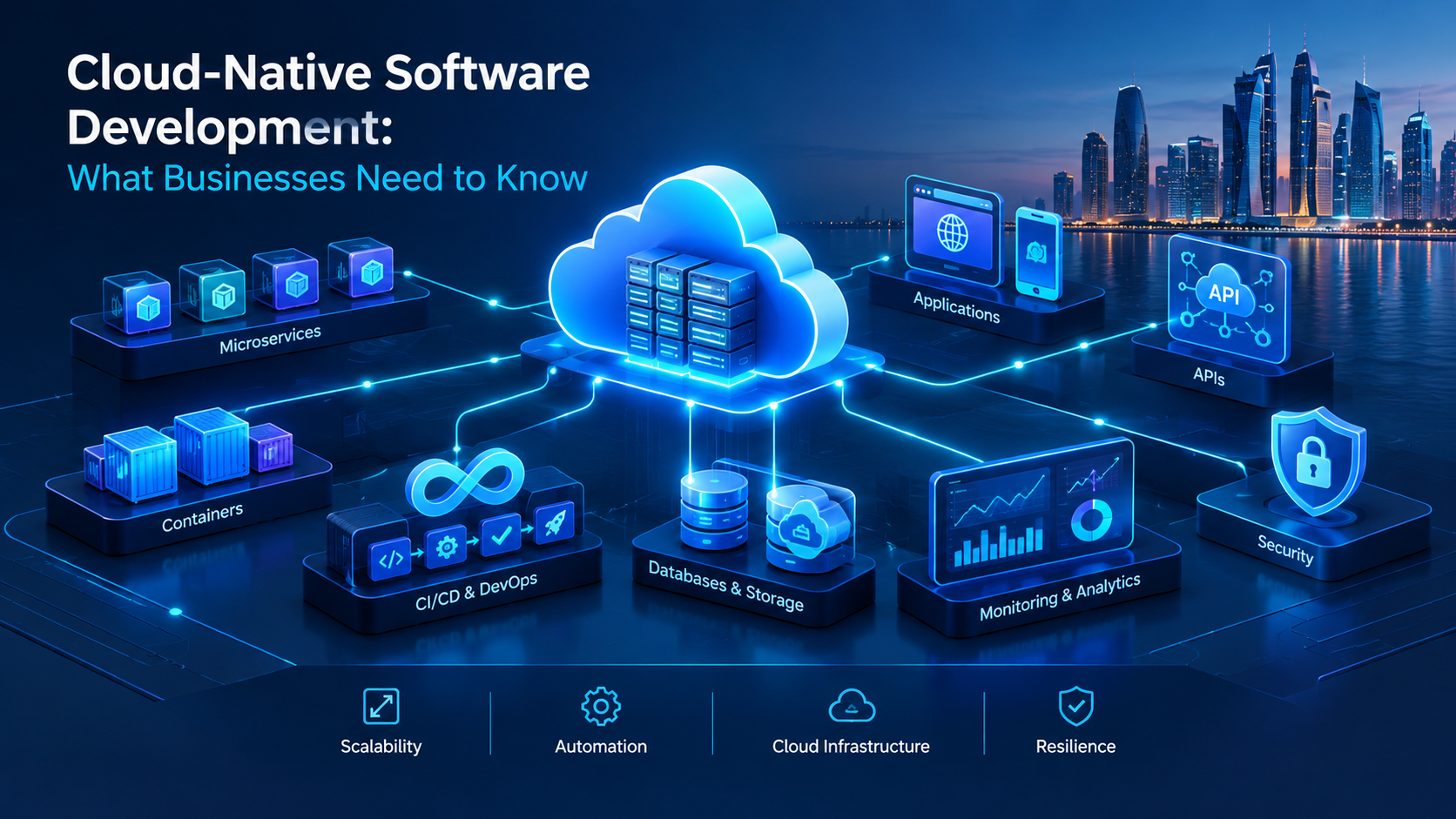
Cloud-native software connects modern application architecture, cloud infrastructure, automation and DevOps practices to support scalable digital systems.
Cloud-Native Software Development: What Businesses Need to Know
Businesses increasingly depend on software for sales, customer service, operations, finance, communication, analytics and internal workflows. As these systems become more important, organizations also need technology that can handle changing workloads, new integrations, growing customer demand and continuous product improvements.
This is where cloud-native software development becomes relevant.
Cloud-native development is an approach to designing, building, deploying and operating applications so they can take advantage of cloud infrastructure and services. Instead of simply moving an existing application from an on-premises server to the cloud, a cloud-native application is designed around cloud capabilities such as elasticity, automation, distributed services and continuous delivery.
For a business, the important question is not simply whether an application uses the cloud.
The more useful question is:
Is the software architecture designed to take advantage of what the cloud can actually provide?
A traditional application can be hosted in the cloud and still behave like an application designed for a single physical server. A cloud-native application, by contrast, can be designed to scale, deploy, recover and evolve using cloud-oriented architecture and engineering practices.
Businesses considering custom software development can therefore benefit from understanding cloud-native principles before selecting an architecture.
This guide explains what cloud-native software development means, how it works, its major components, benefits, limitations, security considerations, costs, implementation process and situations where it may or may not be appropriate.
What Is Cloud-Native Software Development?
Cloud-native software development is an approach to building and operating applications that are designed to take advantage of cloud infrastructure and services.
Google Cloud describes cloud-native development as an approach for building and running scalable applications that take advantage of cloud-based services and delivery models. It also explains that cloud-native architectures commonly break applications into loosely coupled services rather than treating the entire application as one inseparable unit.
AWS similarly describes cloud-native applications in terms of technologies and practices such as microservices, containers, orchestration, continuous integration, continuous delivery, DevOps, automation and serverless computing.
In practical business terms, cloud-native development can involve:
Cloud infrastructure
Containers
Microservices
APIs
Managed databases
Serverless computing
Automated deployment
Continuous integration and delivery
Infrastructure automation
Monitoring and observability
Automated scaling
Security controls
DevOps practices
However, cloud-native does not simply mean putting software on AWS, Microsoft Azure, Google Cloud or another cloud provider.
A better way to understand it is:
Cloud hosting means software runs on cloud infrastructure.
Cloud-native development means software is designed and operated to take advantage of cloud capabilities.
That distinction matters when businesses are planning new software platforms.
Cloud Hosting vs Cloud-Native Development
These concepts are often confused.
Consider a company running a traditional application on an internal server.
The company decides to move the server to the cloud.
The application may now be hosted in a cloud environment, but its architecture has not necessarily changed.
It could still have:
One large application
One database
Manual deployment
Fixed server capacity
Limited automation
Strong dependencies between components
Manual scaling
Limited fault isolation
This is different from designing a cloud-native application.
A cloud-native architecture may instead use:
Multiple independently deployable services
Containers
Automated deployment
API-based communication
Managed cloud services
Automated scaling
Centralized monitoring
Infrastructure automation
Stronger fault isolation
The difference can be summarized as follows:
Cloud-hosted software | Cloud-native software |
|---|---|
Existing application moved to cloud | Application designed around cloud capabilities |
May retain traditional architecture | Usually uses modern distributed architecture where appropriate |
Scaling may remain manual | Automated scaling can be built into the architecture |
Deployment may remain manual | CI/CD can automate delivery |
Often depends heavily on a single application instance | Components can be independently deployed when appropriate |
Cloud is primarily infrastructure | Cloud becomes part of the application strategy |
Neither approach is automatically correct for every business.
The right architecture depends on the application's requirements, complexity, budget, users, integrations, security requirements and expected growth.
Why Are Businesses Moving Toward Cloud-Native Development?
Modern businesses increasingly operate in environments where software requirements change quickly.
A company may need to:
Add new features
Connect another business system
Support more users
Launch a mobile application
Integrate AI
Introduce new payment methods
Expand into another market
Create customer portals
Automate internal workflows
Improve analytics
Release software updates more frequently
A rigid architecture can make these changes expensive or slow.
Cloud-native architecture can provide an engineering foundation for handling these requirements more flexibly.
For example, imagine a retail company with an online platform.
Its system may include:
Website → Product Catalog → Customer Accounts → Orders → Payments → Inventory → Notifications → Analytics
If everything is tightly coupled inside one large application, a change in one area can affect several other parts.
A more modular architecture can separate important capabilities so that individual components can evolve more independently.
This does not mean every business should immediately adopt dozens of microservices.
In fact, unnecessary architectural complexity can create new problems.
The goal is to choose an architecture that provides the right balance between flexibility and operational simplicity.
How Does Cloud-Native Software Development Work?
Cloud-native development combines application architecture, cloud infrastructure and software engineering practices.
A typical environment may look like:
Users → Web/Mobile Application → API Layer → Application Services → Databases/Cloud Services → Monitoring & Analytics
Behind this architecture, automated development and deployment processes may connect:
Developer → Source Code → Automated Tests → Build → Container/Image → Deployment → Monitoring
The exact architecture varies by project.
A small business application may require only a few services, while a large enterprise platform may contain many independently deployable components.
The key principle is that the architecture should reflect the application's actual requirements.
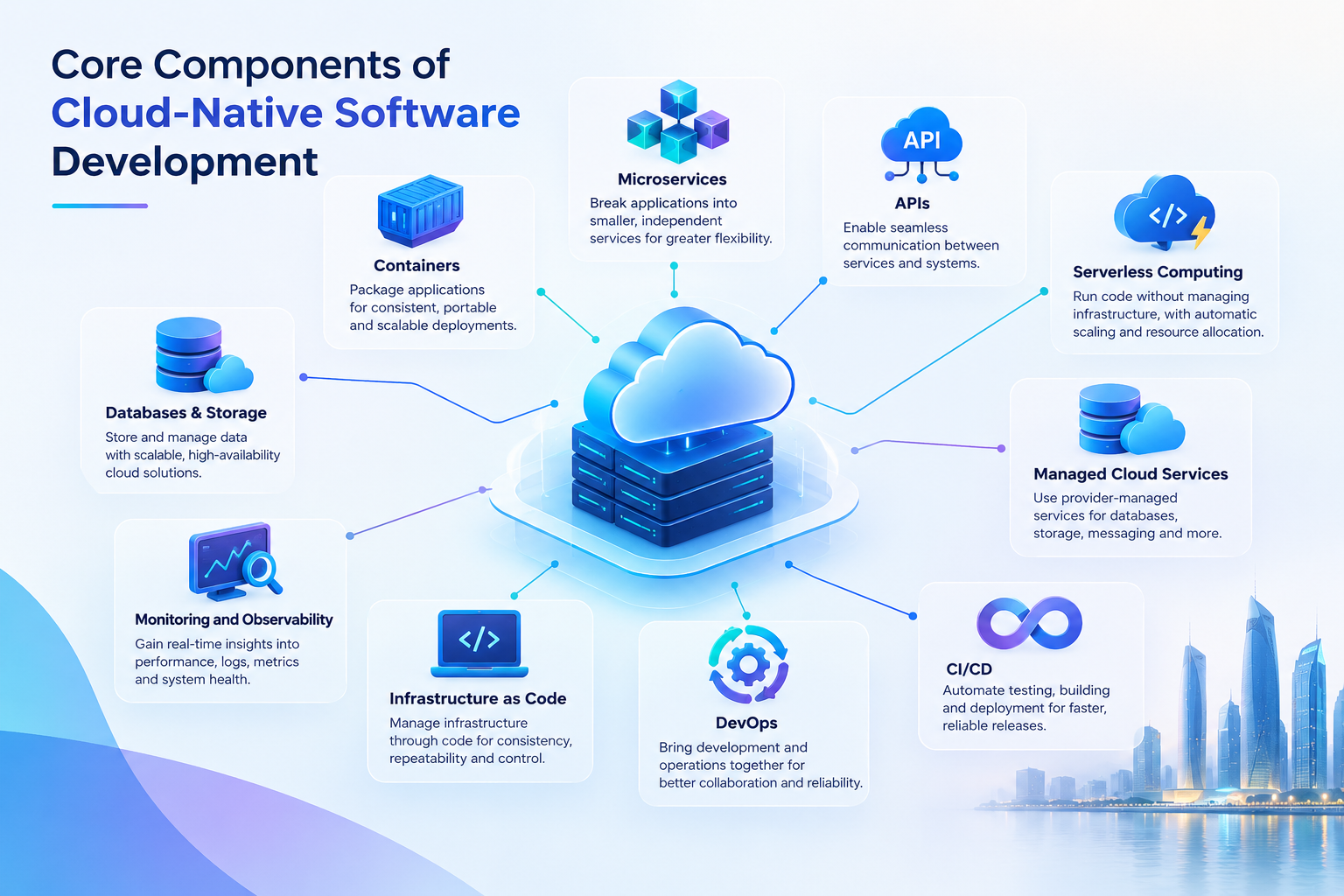
Core Components of Cloud-Native Software Development
1. Containers
Containers package an application and its dependencies into a consistent runtime environment.
They help developers move software between development, testing and production environments with greater consistency.
Containers can be particularly useful when businesses need:
Repeatable deployments
Isolated application components
Consistent environments
Scalable workloads
Automated deployment pipelines
Containerization does not automatically make an application cloud-native, but it is commonly used as part of cloud-native architectures.
2. Microservices
Microservices architecture divides an application into smaller services that perform specific functions.
For example, an e-commerce platform might separate:
Customer service
Product service
Order service
Payment service
Inventory service
Notification service
Each service can potentially be developed, deployed and scaled independently.
This can make large systems easier to evolve.
However, microservices also introduce complexity.
Businesses may need to manage:
Service communication
Authentication
Monitoring
Logging
Network failures
Data consistency
Deployment dependencies
Infrastructure
Therefore, microservices should be introduced because they solve a real architectural problem, not simply because they are considered modern.
3. APIs
APIs allow different software components and systems to communicate.
For a business, APIs can connect:
CRM systems
ERP systems
Payment gateways
Mobile applications
Websites
Accounting software
Inventory systems
AI services
Customer portals
External partner systems
A cloud-native application often depends heavily on APIs because its services need reliable ways to exchange data.
API design therefore becomes an important part of architecture.
4. Serverless Computing
Serverless computing allows developers to run application functions without directly managing the underlying servers.
AWS describes serverless computing as a cloud-native model in which the cloud provider manages the underlying server infrastructure and automatically handles resources according to application requirements.
Serverless can be useful for specific workloads such as:
Background processing
File processing
Notifications
Scheduled tasks
API functions
Event-driven workflows
It does not mean there are literally no servers.
The infrastructure still exists, but the cloud provider manages much of it.
5. Managed Cloud Services
Cloud providers offer managed services for many technical requirements.
These can include:
Databases
Object storage
Messaging
Authentication
Monitoring
Data processing
Machine learning
Networking
Backup
Security
Using managed services can reduce the amount of infrastructure a development team needs to operate directly.
However, managed services also create vendor dependencies and ongoing costs, so they should be selected carefully.
6. CI/CD
Continuous integration and continuous delivery help development teams automate the process of testing and releasing software.
AWS identifies continuous integration and continuous delivery as important cloud-native practices because they allow teams to integrate changes frequently, test them automatically and keep software ready for deployment.
A simplified workflow might look like:
Developer commits code → Automated tests → Build → Security checks → Deployment → Monitoring
This can reduce reliance on manual deployment processes.
For businesses, the benefit is not simply technical convenience.
It can make it easier to release improvements and fixes in a controlled way.
7. DevOps
DevOps brings development and operations practices closer together.
A cloud-native environment often requires developers and infrastructure teams to collaborate around:
Deployment
Infrastructure
Monitoring
Security
Performance
Reliability
Incident response
AWS identifies DevOps as an important part of cloud-native development because automation and collaboration can help teams improve software delivery.
Businesses evaluating Cloud & DevOps solutions should therefore look beyond cloud hosting and consider the entire development and operations lifecycle.
8. Infrastructure as Code
Infrastructure as Code, often abbreviated as IaC, allows infrastructure configurations to be defined using code or configuration files.
Instead of manually creating every infrastructure component, teams can automate infrastructure provisioning and configuration.
This can improve:
Repeatability
Deployment consistency
Documentation
Version control
Environment management
For larger systems, infrastructure automation can become an important part of operational efficiency.
9. Monitoring and Observability
Cloud-native systems can contain many services and infrastructure components.
Without proper monitoring, identifying problems can become difficult.
Businesses may need visibility into:
Application performance
Serverless functions
Containers
APIs
Database performance
Errors
Traffic
Resource usage
Security events
User activity
Observability generally involves logs, metrics and traces that help technical teams understand what is happening inside distributed systems.
What Are the Benefits of Cloud-Native Software Development?
Cloud-native development can provide several benefits, but the actual results depend on how well the architecture is designed and operated.
1. Scalability
Cloud-native applications can be designed to handle changing workloads.
For example, an online business may have:
Normal weekday traffic
High weekend traffic
Seasonal demand
Marketing campaigns
Sudden traffic spikes
Automated scaling can help applications adjust resources according to demand.
This is particularly useful when workloads are unpredictable.
2. Faster Software Delivery
Automated CI/CD pipelines can reduce manual steps between development and deployment.
This can allow businesses to:
Release features more frequently
Fix bugs faster
Automate testing
Reduce deployment errors
Standardize releases
The objective is not to release software as quickly as possible.
The objective is to create a reliable process for delivering software changes.
3. Flexibility
Cloud-native architectures can make it easier to introduce new technologies or services.
For example, a company may initially build a customer platform and later add:
AI assistants
Payment integrations
Analytics
Mobile applications
Automated notifications
Recommendation systems
A modular architecture can make such changes easier when the system has been designed with appropriate boundaries.
4. Better Fault Isolation
In a distributed architecture, failures can potentially be isolated to individual components.
For example, if a notification service experiences a problem, the business may still be able to allow customers to browse products or place orders.
However, this requires deliberate architectural design.
Poorly designed distributed systems can actually make failures harder to understand.
5. Improved Resource Utilization
Cloud infrastructure allows businesses to align resources with demand more dynamically.
This can be useful for businesses whose workloads change throughout the day or year.
Instead of permanently maintaining maximum infrastructure capacity, certain workloads can scale according to actual requirements.
6. Easier Integration
Modern businesses rarely operate with one software system.
They may use:
CRM
ERP
Accounting
Payment systems
E-commerce
HR platforms
Mobile apps
Analytics
AI services
Cloud-native systems can be designed around APIs and event-driven integrations, making it possible to connect different services.
7. Support for Continuous Improvement
Cloud-native development works well with iterative software development.
Instead of building a huge application and waiting months or years before releasing improvements, teams can develop and release smaller changes continuously.
This can help businesses respond to:
Customer feedback
Market changes
Operational requirements
Security issues
New business opportunities
What Are the Challenges of Cloud-Native Development?
Cloud-native architecture is not a universal solution.
It can introduce significant technical and operational complexity.
1. Increased Architecture Complexity
A traditional application might have one main application and database.
A cloud-native system could have:
Multiple services
Containers
APIs
Queues
Databases
Monitoring tools
Deployment pipelines
Cloud services
Managing all of these components requires expertise.
2. Higher Operational Requirements
Cloud-native applications require ongoing monitoring, security management, deployment management and infrastructure maintenance.
A business should therefore consider the operational model before choosing the architecture.
3. Cloud Costs Can Become Difficult to Predict
Cloud infrastructure can be cost-efficient, but poor architecture or uncontrolled resource usage can create unexpected bills.
Potential cost drivers include:
Compute
Storage
Database usage
Data transfer
API calls
Logging
Monitoring
Serverless execution
Managed services
Cloud cost management should therefore be part of architecture planning.
4. Vendor Lock-In
A business that depends heavily on proprietary cloud services may find it more difficult to move to another provider later.
Vendor lock-in is not always bad.
A managed service may provide significant business value.
The important point is to understand the trade-off before committing to a technology strategy.
5. Skills Requirements
Cloud-native development requires knowledge across several areas.
Teams may need expertise in:
Cloud platforms
Containers
Networking
APIs
Databases
Security
CI/CD
DevOps
Monitoring
Distributed systems
Businesses should consider whether these capabilities exist internally or whether they need an experienced technology partner.
Cloud-Native vs Traditional Software Architecture
The choice between traditional and cloud-native architecture should be based on business requirements.
Factor | Traditional Architecture | Cloud-Native Architecture |
|---|---|---|
Deployment | Often centralized | Often automated |
Scaling | Frequently manual | Can be automated |
Architecture | Often monolithic | Often modular/distributed |
Infrastructure | More directly managed | More cloud-managed services |
Releases | Can be less frequent | Designed for continuous delivery |
Operations | Traditional infrastructure management | DevOps and automation |
Complexity | Can be simpler initially | Can be more complex |
Best fit | Smaller or stable workloads | Dynamic and evolving workloads |
This table should not be interpreted as meaning cloud-native is always better.
A small internal application with 20 users may not need a complex microservices architecture.
A customer-facing platform with millions of transactions and multiple integrations may have stronger reasons to consider cloud-native architecture.
When Should a Business Consider Cloud-Native Development?
Cloud-native development may be worth considering when a business has one or more of the following requirements.

High or Unpredictable Traffic
If application usage changes significantly, automated scaling can be valuable.
Examples include:
E-commerce
Ticketing
Booking platforms
Delivery applications
Online marketplaces
Customer portals
Rapid Product Development
Businesses launching digital products may need to release features frequently.
A cloud-native development approach can support automated testing and deployment.
Multiple Integrations
A platform that needs to communicate with many external systems may benefit from API-oriented architecture.
Large or Growing User Base
If the number of users is expected to increase significantly, scalability should be considered during architecture planning rather than added as an afterthought.
Complex Digital Platforms
Cloud-native architecture can be useful for larger platforms involving:
CRM
ERP
Customer portals
Mobile applications
Analytics
AI
E-commerce
Business automation
Businesses planning connected web platforms can also explore web application development as part of a broader application architecture.
When Might Cloud-Native Be Unnecessary?
Not every software project needs cloud-native architecture.
A simple internal application may not require:
Dozens of microservices
Kubernetes
Complex service meshes
Extensive distributed infrastructure
Multiple deployment environments
For example, a small internal reporting application used by 10 employees may work perfectly well with a simpler architecture.
The objective should be:
Use enough architecture to solve the business problem, but avoid complexity that does not create business value.
This is one of the most important principles businesses should understand before beginning cloud-native development.
Cloud-Native Security Considerations
Security should be incorporated from the beginning.
Cloud-native applications can have many components, which means there can also be many potential security boundaries.
Important areas include:
Identity and Access Management
Users, applications and services should receive appropriate permissions.
The principle of least privilege can help reduce unnecessary access.
API Security
APIs should be protected through appropriate authentication, authorization, validation and monitoring.
Data Protection
Businesses should consider how sensitive information is:
Stored
Transmitted
Backed up
Accessed
Retained
Deleted
Secrets Management
Passwords, API keys and other sensitive credentials should not simply be stored inside application source code.
Container Security
Container images and dependencies should be reviewed and maintained.
Logging and Monitoring
Security-relevant events should be monitored so suspicious activity can be investigated.
Backup and Disaster Recovery
Businesses should understand:
What data is backed up
How frequently backups occur
Where backups are stored
How recovery works
How long recovery may take
Security is therefore not one feature that can be added at the end.
It is part of the architecture.
Cloud-Native Development for Businesses in Qatar
For businesses in Qatar, cloud-native development can be relevant to broader digital transformation initiatives, particularly when organizations are building customer-facing platforms, internal business systems, mobile applications, AI-enabled services or integrated digital ecosystems.
However, Qatar-specific requirements should be evaluated according to the actual business and project.
A company may need to consider:
Data protection requirements
Industry-specific compliance
Customer data
Employee information
Payment information
Arabic and English interfaces
Multi-branch operations
Integration with existing business systems
Business continuity
Cloud region and data residency considerations where applicable
The technology architecture should follow the organization's requirements rather than simply choosing a cloud platform because it is popular.
For example, a Qatar-based business building a customer platform might require:
Website → Mobile App → CRM → Payments → ERP → Analytics → AI
A cloud-native architecture can potentially provide a foundation for connecting these components while allowing individual services to evolve over time.
Businesses should nevertheless validate regulatory and data-handling requirements with qualified legal, compliance and security professionals where necessary.
Cloud-Native Architecture Example
Consider a logistics company building a digital delivery platform.
The business needs:
Customer registration
Order creation
Driver management
Delivery tracking
Payment processing
Notifications
Customer support
Reporting
A possible architecture could include:
Customer Web App
↓
Mobile Driver App
↓
API Gateway
↓
Authentication Service
Order Service
Driver Service
Payment Service
Notification Service
Reporting Service
↓
Databases and Cloud Storage
↓
Monitoring and Analytics
The architecture can then connect to external systems through APIs.
The driver application could communicate with delivery services without directly accessing every internal system.
The notification component could process SMS, email or push notifications separately.
The reporting service could consume relevant operational data without becoming tightly coupled to the transaction-processing components.
This is an example of how cloud-native thinking can influence application architecture.
The actual implementation would depend on the project's scale, security requirements, expected traffic, development team and budget.
How Much Does Cloud-Native Software Development Cost?
There is no single fixed price for cloud-native software development.
The cost depends on the scope and technical complexity of the project.
Major cost factors include:
Cost Factor | Why It Matters |
|---|---|
Application size | More features require more development |
Architecture | Distributed systems can require additional engineering |
Number of services | More services can increase development and operations |
Cloud infrastructure | Resources generate ongoing costs |
Integrations | External systems require API development and testing |
Security | Security requirements affect architecture and implementation |
Database requirements | Large or complex datasets can require specialized solutions |
CI/CD | Automation requires setup and maintenance |
Monitoring | Observability tools can create additional costs |
Testing | Distributed applications may require broader testing |
Maintenance | Cloud-native systems require ongoing management |
Businesses should separate development costs from ongoing cloud and operational costs.
For example:
Initial project costs
Discovery
Architecture
UI/UX
Development
Integration
Testing
Deployment
Ongoing costs
Cloud infrastructure
Monitoring
Security
Maintenance
Support
Backups
New development
A professional software team should help businesses estimate both sides rather than focusing only on the initial development quotation.

How to Build a Cloud-Native Application
A structured implementation process can reduce unnecessary complexity.
Step 1: Define the Business Problem
Start with the business objective.
Ask:
What problem will the software solve?
Who will use it?
What workflows should it improve?
What systems must it connect to?
How many users are expected?
How quickly might usage grow?
Step 2: Define Requirements
Document:
Core features
User roles
Business rules
Integrations
Security requirements
Reporting
Performance expectations
Mobile requirements
Future expansion
Step 3: Choose the Architecture
Determine whether the project should use:
Monolithic architecture
Modular monolith
Microservices
Serverless
Event-driven architecture
A hybrid approach
A modular monolith can sometimes be a better starting point than microservices for a smaller product.
Step 4: Select Cloud Services
Choose infrastructure according to the requirements.
Potential components include:
Compute
Containers
Databases
Storage
Networking
Authentication
Messaging
Monitoring
Backup
Avoid selecting services simply because they are technically advanced.
Step 5: Design Security
Security should be considered before development begins.
Define:
Authentication
Authorization
Data protection
API security
Secrets management
Logging
Backup
Recovery
Step 6: Build Automated Development Pipelines
Set up automated processes for:
Code testing
Builds
Security checks
Deployment
Environment management
This creates a repeatable software delivery process.
Step 7: Test the Application
Testing should cover more than individual features.
Consider:
Functional testing
API testing
Integration testing
Security testing
Performance testing
Load testing
Failure scenarios
Distributed applications should also be tested for communication failures between services.
Step 8: Deploy and Monitor
After deployment, monitor:
Performance
Errors
Resource usage
Security events
Availability
User activity
Deployment is not the end of the project.
Cloud-native systems require ongoing observation and improvement.
Common Cloud-Native Development Mistakes
1. Using Microservices Too Early
Microservices can be valuable, but they also create operational complexity.
Do not divide an application into dozens of services simply because microservices are popular.
2. Ignoring Cloud Costs
Cloud usage should be monitored from the beginning.
3. Treating Security as a Final Step
Security needs to influence architecture, APIs, infrastructure and application development.
4. Building Without Monitoring
If a distributed application cannot be observed properly, diagnosing problems becomes much harder.
5. Choosing Technology Before Understanding the Business
The business problem should drive the architecture.
Not the other way around.
6. Creating Excessive Vendor Dependency
Cloud providers offer powerful services, but businesses should understand the long-term implications of depending heavily on provider-specific technologies.
7. Forgetting Operational Ownership
Someone must be responsible for:
Deployments
Monitoring
Security
Backups
Updates
Incident response
Cost management
Cloud-native does not mean maintenance-free.
Cloud-Native Software and AI
Cloud-native architecture can also support AI-enabled applications.
For example, a business platform might include:
Customer → Website → AI Assistant → API → CRM → Business Database
Another architecture could connect:
Mobile App → AI Service → Business Logic → ERP → Analytics
Cloud-native infrastructure can provide scalable components for AI workloads, APIs, background processing and data services.
However, AI should not automatically be added to every cloud-native project.
The business should first identify the problem AI is expected to solve.
Potential applications include:
Customer support
Document processing
Lead qualification
Data analysis
Forecasting
Recommendations
Internal knowledge assistants
Workflow automation
For businesses exploring a broader digital platform, cloud-native development can therefore become part of a larger technology strategy involving software, AI, APIs and automation.
How to Choose a Cloud-Native Development Partner
Selecting a development partner involves more than asking whether they can deploy software to the cloud.
Businesses should evaluate:
Technical Architecture Experience
Ask how the company approaches:
Scalability
APIs
Databases
Containers
CI/CD
Security
Monitoring
Business Understanding
The development partner should understand the actual business workflow.
For example, a CRM for a real estate company may need different workflows from a CRM used by an education organization.
Integration Capabilities
Ask whether the development team can integrate:
Payment gateways
ERP systems
CRM systems
Accounting systems
Mobile applications
AI services
External APIs
Security Approach
Ask how security is handled across development, deployment and maintenance.
Support After Launch
Clarify whether the development partner provides:
Monitoring
Maintenance
Bug fixing
Updates
Infrastructure support
New features
Technical assistance
Portfolio and Relevant Experience
Review actual projects where possible.
Businesses can explore Galaxium Coding's projects and portfolio to understand the types of technology solutions the company presents across software and digital projects.
What Should Businesses Ask Before Starting a Cloud-Native Project?
Before development begins, decision-makers should be able to answer questions such as:
Business Questions
What problem are we solving?
Who are our users?
What business process needs improvement?
What does success look like?
Technical Questions
How many users do we expect?
What systems need integration?
What data will the application handle?
What level of availability is required?
What are our performance requirements?
Security Questions
What data is sensitive?
Who should have access?
What security controls are required?
What backup and recovery process do we need?
Financial Questions
What is the development budget?
What cloud costs should we expect?
What will ongoing maintenance cost?
Which services may increase costs as usage grows?
Operational Questions
Who will monitor the application?
Who handles incidents?
How will updates be deployed?
How will cloud usage be monitored?
Answering these questions early can prevent expensive architectural changes later.
Is Cloud-Native Software Development Right for Every Business?
No.
Cloud-native development can provide significant advantages, but the architecture should match the business problem.
It may make sense for:
Growing SaaS platforms
High-traffic applications
Digital marketplaces
Large customer portals
Complex business platforms
Applications with frequent releases
Systems with many integrations
Workloads with variable demand
A simpler architecture may be more appropriate for:
Small internal tools
Low-traffic applications
Stable workloads
Simple websites
Early-stage prototypes
Applications with limited integration requirements
The most important decision is not whether cloud-native is fashionable.
It is whether the architecture provides meaningful value for the business.
Final Thoughts
Cloud-native software development represents a way of designing and operating applications around the capabilities of modern cloud infrastructure.
It can involve:
Containers
Microservices
APIs
Serverless computing
Managed cloud services
CI/CD
DevOps
Infrastructure automation
Monitoring
Security
The potential benefits include scalability, faster delivery, flexibility, automation and support for continuously evolving software.
But cloud-native development also introduces complexity.
Businesses need to consider infrastructure costs, security, operational requirements, technical skills, vendor dependencies and long-term maintenance.
The best architecture is therefore not necessarily the most complicated one.
A well-designed solution should begin with the business problem, understand the users and workflows, define technical requirements and then select the appropriate architecture.
For organizations planning a new digital platform, Galaxium Coding provides software development services and Cloud & DevOps solutions that can be considered when evaluating custom software, cloud infrastructure and modern application development.
Businesses can also contact Galaxium Coding to discuss their software requirements and determine what type of architecture may fit their specific project.
Frequently Asked Questions
What is cloud-native software development?
Cloud-native software development is an approach to building and operating applications so they can take advantage of cloud capabilities such as scalability, automation, distributed services, managed infrastructure and continuous delivery.
Is cloud-native the same as cloud-hosted?
No. Cloud-hosted software can simply be an existing application running on cloud infrastructure. Cloud-native software is designed around cloud capabilities and commonly uses practices such as automation, modular architecture, containers, APIs and continuous delivery.
What technologies are used in cloud-native development?
Common technologies and practices include containers, microservices, APIs, serverless computing, managed databases, CI/CD, DevOps, infrastructure automation and monitoring.
Is Kubernetes required for cloud-native software?
No. Kubernetes is widely used for container orchestration, but cloud-native development does not require every project to use Kubernetes. The appropriate technology depends on the application's requirements and operational complexity.
Is cloud-native development expensive?
Costs vary considerably. Businesses need to consider both initial development costs and ongoing cloud expenses such as compute, storage, databases, data transfer, monitoring, security and maintenance.
Can a small business use cloud-native architecture?
Yes, but a small business may not need a highly complex cloud-native architecture. A simpler cloud-based or modular architecture may provide the required scalability without introducing unnecessary operational complexity.
Does cloud-native software improve scalability?
It can. Cloud-native architectures can use cloud capabilities such as automated scaling and distributed services to respond to changing workloads. However, scalability still depends on how the application and infrastructure are designed.
Is cloud-native software more secure?
Cloud-native architecture does not automatically make software secure. Security depends on application design, identity management, access controls, APIs, infrastructure configuration, monitoring, data protection and operational practices.
Can cloud-native applications use AI?
Yes. Cloud-native systems can integrate AI services, machine learning workloads, AI APIs, document processing, assistants and automation workflows where these technologies solve a genuine business problem.
Should every business migrate to cloud-native architecture?
No. Businesses should evaluate their current systems, expected growth, workload, integrations, security requirements and budget before selecting an architecture.
What is the first step in a cloud-native software project?
The first step should be understanding the business problem and requirements. Architecture and technology choices should follow the project's actual needs rather than being selected first.