Cloud Migration for Businesses: Complete Guide to Benefits, Process, Security and Costs

Cloud migration helps businesses move applications, databases, and IT infrastructure to scalable cloud environments while planning for security, performance, and business continuity.
Cloud Migration for Businesses: Complete Guide to Benefits, Process, Security and Costs
Cloud migration is the process of moving a business's applications, databases, files, servers, and other IT resources from existing infrastructure to cloud-based environments. It can help organizations modernize their technology, support remote teams, improve scalability, and build a more flexible foundation for future growth.
For businesses in Qatar and across the GCC, cloud migration can be an important step toward improving operational efficiency and connecting business systems. However, moving to the cloud is not simply a matter of copying files to an online server. A successful migration requires careful planning, security assessment, workload selection, testing, cost management, and ongoing optimization.
This guide explains how cloud migration works, which migration strategies businesses can choose, what benefits and challenges to expect, how to plan a secure migration, and which factors influence the overall cost.
What Is Cloud Migration?
Cloud migration is the process of transferring digital resources from an existing IT environment to cloud infrastructure or moving workloads between cloud platforms.
These resources may include:
Business applications and software
Databases and data warehouses
Files, documents, and digital records
Websites and web applications
Email and collaboration systems
Virtual machines and servers
Business management platforms such as CRM and ERP
Backup and disaster recovery systems
APIs and application integrations
A company might move an application from an office server to a cloud environment. Another business might migrate its database while keeping certain applications on existing infrastructure. A larger organization may move multiple applications and databases in stages.
The right approach depends on business priorities, technical requirements, security obligations, budget, and the condition of the existing systems.
Businesses planning a broader technology upgrade can also explore cloud and DevOps solutions to understand how cloud infrastructure, deployment processes, and ongoing software operations can support modern business applications.
Why Are Businesses Moving to the Cloud?
Traditional IT infrastructure often requires businesses to purchase hardware, maintain physical servers, manage upgrades, and plan capacity well before it is needed. These responsibilities can become increasingly complicated as a company grows.
Cloud computing offers another approach. Organizations can use infrastructure and services provided by cloud platforms rather than managing every component themselves.
Common reasons for migrating include:
Supporting business growth without repeatedly purchasing physical servers
Improving access to applications for distributed teams
Replacing outdated infrastructure
Improving backup and disaster recovery capabilities
Supporting business applications with changing workloads
Connecting systems across branches and locations
Enabling modern analytics, automation, and AI workloads
Improving the speed and consistency of software deployment
However, cloud migration is not automatically cheaper or more secure. Results depend on the architecture, provider, workload, configuration, and management practices.
A business should identify the operational problem it wants to solve before choosing a cloud platform.
Types of Cloud Migration
Different workloads require different migration approaches. Understanding the main types helps businesses choose a strategy that fits their needs.
1. On-Premises to Cloud Migration
This involves moving applications, databases, files, or servers from company-managed infrastructure to a cloud platform.
For example, a company operating its inventory application on an office server may migrate the application and database to cloud infrastructure so authorized employees can access the system securely from different locations.
This approach can reduce dependence on physical office infrastructure, although some workloads may still require local systems.
2. Cloud-to-Cloud Migration
Cloud-to-cloud migration involves transferring workloads from one cloud provider to another or moving services between cloud environments.
A business might consider this approach because of pricing, service availability, performance, technical requirements, or a change in its cloud strategy.
Before migrating, the organization should assess application compatibility, data transfer costs, downtime, provider-specific services, and the effort required to adapt existing integrations.
3. Hybrid Cloud Migration
A hybrid cloud environment combines cloud services with on-premises infrastructure.
For example, a company might run its customer-facing website in the cloud while retaining a legacy application on a local server because it depends on specialized equipment or an older integration.
Hybrid environments can support gradual modernization, but they require reliable connectivity, consistent identity management, monitoring, and clear security policies.
4. Data Center Migration
A data center migration involves moving some or all workloads from a physical data center to cloud infrastructure or another hosting environment.
It may involve virtual machines, storage systems, databases, networking, and applications.
Because these components are often interconnected, businesses need a detailed inventory and a dependency map before moving production workloads.
5. Application Migration
Application migration focuses on moving software applications into a new hosting environment.
Some applications can be moved with minimal modification. Others need changes to their architecture, database connections, authentication, storage, or deployment process.
Applications should be tested for functionality, performance, security, and integration compatibility after migration.
6. Database Migration
Database migration involves moving data from an existing database system to a new database service, server, or cloud platform.
The process can include transferring records, adapting database schemas, updating connections, validating data integrity, and switching applications to the new database.
Database migrations require particular care because errors can affect business records, customer transactions, reporting, and operational continuity.
The Six Common Cloud Migration Strategies
Cloud migration strategies are often described using the “six Rs.” These approaches help organizations decide whether to move, modify, replace, or retain existing systems.
1. Rehost: Move Without Major Changes
Rehosting, often called lift and shift, means moving an application to cloud infrastructure with minimal changes to its existing architecture.
Best suited for: Applications that need to move quickly or systems that are compatible with the target environment.
Advantages:
Can reduce the amount of application redevelopment
May support a relatively straightforward migration
Can help businesses leave aging physical infrastructure
Limitations:
Does not automatically modernize the application
Existing performance or maintenance problems may remain
Cloud costs can be higher than expected if resources are not optimized
2. Replatform: Make Targeted Improvements
Replatforming involves making selected changes while retaining most of the application's existing architecture.
For example, a business might move its application to cloud infrastructure while replacing a self-managed database with a managed database service.
Best suited for: Businesses seeking selected cloud benefits without rebuilding an entire application.
3. Refactor or Re-Architect: Redesign the Application
Refactoring or re-architecting involves making more substantial changes so an application can take better advantage of cloud-native capabilities.
This may involve containers, managed services, event-driven architecture, or independently deployable application components.
Best suited for: Strategic applications that need greater scalability, resilience, or flexibility.
This approach generally requires more planning, development, testing, and investment than a simple infrastructure move.
4. Repurchase: Replace the Existing Solution
Repurchasing means replacing an existing application with a different product, often a cloud-based subscription service.
For example, a company may replace a self-hosted business application with a suitable SaaS platform.
Best suited for: Systems that are expensive to maintain or no longer meet business requirements.
The organization should consider data export, licensing, integrations, customization, and employee training before replacing the system.
5. Retain: Keep Selected Systems Where They Are
Not every application needs to move immediately.
A business may retain a workload because of technical dependencies, compliance considerations, licensing restrictions, or the cost of migration.
Retained systems should still be monitored and reviewed periodically.
6. Retire: Decommission Unnecessary Systems
Migration planning often reveals applications that are no longer used or that duplicate other systems.
Retiring these applications can reduce maintenance work, licensing costs, security exposure, and unnecessary infrastructure.
Before decommissioning anything, confirm that the system has no remaining business dependencies and that required records are preserved.

Cloud Migration Strategies Compared
Strategy | Main approach | Typical complexity |
|---|---|---|
Rehost | Move with minimal changes | Low to moderate |
Replatform | Make targeted platform changes | Moderate |
Refactor | Redesign for cloud capabilities | High |
Repurchase | Replace with another product | Varies |
Retain | Keep the existing system | Low immediate migration effort |
Retire | Decommission an unnecessary system | Low to moderate |
These complexity levels are indicative, not universal. A seemingly simple application may have complicated dependencies, while a larger system may be relatively straightforward if it is already designed for migration.
Key Benefits of Cloud Migration for Businesses
1. Scalability and Flexible Capacity
Business workloads rarely remain constant. An e-commerce platform may experience increased activity during promotions, while an internal business application may see predictable usage during office hours.
Cloud infrastructure can allow businesses to adjust computing, storage, and other resources according to workload requirements.
Depending on the architecture, scaling can be manual, scheduled, or automated.
The key is to configure resources correctly. Simply moving an application to the cloud does not guarantee automatic scaling.
2. Reduced Dependence on Physical Infrastructure
Maintaining on-premises servers can require hardware purchases, physical space, power, cooling, replacement planning, and technical support.
Cloud migration can reduce the need to own and maintain some of this infrastructure.
However, businesses still need to manage cloud resources, access controls, configurations, applications, and operational responsibilities. Some workloads may also continue to require local equipment.
3. Improved Remote Access
Cloud-hosted applications can support employees working from different branches or locations.
For example, a company with teams in Doha and other locations may use a centrally hosted business application rather than maintaining separate systems at every office.
Secure access still requires appropriate authentication, authorization, network controls, and device policies.
4. Backup and Disaster Recovery
Cloud platforms can support geographically separated backups, replicated data, recovery environments, and automated infrastructure deployment.
These capabilities can help businesses prepare for server failures, accidental deletion, cyber incidents, and other disruptions.
However, backup and disaster recovery must be designed and tested. A cloud provider does not automatically guarantee that every application can be restored within the time a business needs.
5. Faster Deployment and Development
Cloud environments can make it easier for technical teams to create test environments, deploy new versions, automate infrastructure, and monitor applications.
When combined with DevOps practices, businesses can improve deployment consistency and reduce manual operational tasks.
Organizations developing new digital products can also explore custom software development services to plan applications around their business requirements.
6. Access to Modern Technology
Cloud platforms offer services that can support data analytics, machine learning, application integration, managed databases, and other modern capabilities.
A business may be able to introduce these services without building every supporting infrastructure component itself.
The right services depend on the organization's goals, technical capabilities, data requirements, and budget.
7. Better Support for Business Growth
A well-designed cloud environment can support new branches, additional users, new applications, and changing workloads.
This flexibility can be valuable for growing businesses, but scaling should be planned around actual usage and operational requirements rather than assumed to be unlimited or free.
Cloud Migration Challenges and Risks
Cloud migration can improve an IT environment, but poorly planned migrations can introduce new problems.
Downtime and Business Disruption
Moving production applications may require temporary service interruptions, especially when databases or systems need a final synchronization before switching over.
Businesses should define acceptable downtime, communicate maintenance windows, test the cutover process, and prepare a rollback plan.
For critical applications, techniques such as replication, phased migration, or parallel operation may help reduce disruption when technically appropriate.
Data Loss or Inconsistency
Incorrect migration procedures can result in missing records, duplicated information, incomplete files, or differences between the original and migrated databases.
Mitigation measures include:
Creating verified backups before migration
Validating record counts and important business totals
Checking data integrity
Testing application transactions
Restricting uncontrolled changes during cutover
Keeping recovery options available until acceptance testing is complete
Unexpected Cloud Costs
Cloud services may charge for compute resources, storage, database operations, network traffic, monitoring, backups, and premium support.
Costs can increase if oversized resources remain running, unused storage accumulates, or data transfer charges are overlooked.
Cost forecasting and ongoing monitoring should be part of the migration plan.
Security Misconfiguration
Cloud environments still require strong security practices.
Common risks include excessive permissions, publicly exposed storage, weak authentication, unencrypted data, insecure application interfaces, and insufficient monitoring.
Security should be designed into the migration rather than added after deployment.
Legacy Application Compatibility
Older applications may depend on particular operating systems, hardware, database versions, network configurations, or third-party software.
These dependencies can make migration more complicated than expected.
An application assessment should identify unsupported components and required changes before the migration begins.
Vendor Lock-In
Some cloud services use provider-specific technologies that can make moving to another platform more difficult.
Vendor lock-in is not always a problem; a managed service may provide meaningful operational benefits. However, businesses should understand the cost of switching, data export options, and architectural dependencies.
Employee Readiness
Cloud migration can change how employees access systems, store documents, and perform routine tasks.
Training, documentation, access instructions, and support arrangements help employees adopt the new environment.
How to Migrate to the Cloud: Step-by-Step Process
A successful cloud migration follows a structured process that combines business planning with technical preparation.
Step 1: Define Business Objectives
Start by identifying why the business wants to migrate.
Possible objectives include:
Replacing aging servers
Improving application availability
Supporting remote employees
Reducing infrastructure management
Improving disaster recovery
Modernizing business applications
Supporting expansion or seasonal demand
Define measurable success criteria wherever possible.
For example, a company may want to reduce planned maintenance disruption, improve recovery capabilities, or shorten the time needed to deploy application updates.
Avoid using “move everything to the cloud” as the only objective. It does not define what success looks like.
Step 2: Audit the Existing IT Environment
Create an inventory of applications, servers, databases, storage, integrations, and network dependencies.
For each workload, document:
Business owner and purpose
Number and type of users
Operating system and software versions
Data volume and growth
Performance requirements
Security classification
Integration dependencies
Licensing restrictions
Current operating costs
Availability and recovery requirements
This assessment helps identify which workloads can move easily and which require additional work.
Step 3: Classify Applications by Priority
Not every application should be migrated at the same time.
A practical classification might include:
Low-risk workloads: Internal tools with limited dependencies and flexible maintenance windows.
Business-critical workloads: Applications that support daily operations, customer transactions, or financial processes.
Complex legacy workloads: Systems with older technology, undocumented integrations, or specialized infrastructure requirements.
Begin with workloads that provide useful learning opportunities without exposing the business to unacceptable operational risk.
Step 4: Select a Cloud Deployment Model
Businesses can choose between public, private, and hybrid cloud models.
Public cloud: Infrastructure and services provided through a cloud provider's shared platform, with logical isolation between customers.
Private cloud: Cloud infrastructure dedicated to one organization, managed internally or by a service provider.
Hybrid cloud: An arrangement that combines public cloud services with private or on-premises infrastructure.
The correct model depends on workload requirements, control needs, existing systems, security, costs, and technical capability.
A private cloud is not automatically more secure, and a public cloud is not automatically less secure. Actual security depends on architecture, configuration, operations, and governance.
Step 5: Choose a Cloud Provider
Potential providers include Amazon Web Services (AWS), Microsoft Azure, and Google Cloud.
Compare them using business and technical requirements rather than brand recognition alone.
Evaluate:
Availability of required services in relevant locations
Data storage and processing requirements
Security and identity management
Database and application compatibility
Network connectivity
Backup and recovery options
Monitoring and technical support
Pricing and billing tools
Existing employee skills
Integration with current systems
Data export and exit options
Review the providers' official documentation and service terms before making a decision.
For example, the AWS Cloud Adoption Framework provides guidance for organizing cloud adoption across business and technical areas.
Step 6: Build the Migration Architecture
Plan how applications, data, networking, identity, monitoring, and backups will operate in the new environment.
Architecture decisions may include:
Virtual machines versus containers
Managed versus self-managed databases
Storage classes and retention policies
Network segmentation and secure connectivity
Authentication and access permissions
Logging and monitoring
Backup frequency and recovery procedures
High availability and redundancy
Development, testing, and production environments
Keep the architecture as simple as the business requirements allow. Overengineering increases complexity and may create unnecessary costs.
Step 7: Estimate Costs and Prepare a Budget
Estimate the initial migration investment and ongoing operating costs.
Include infrastructure, data transfer, application changes, security controls, testing, training, support, and possible parallel operation during the transition.
Separate one-time migration costs from recurring cloud charges.
The budget should also include a contingency for unexpected compatibility issues or remediation work.
Step 8: Back Up Data and Prepare for Recovery
Before changing production systems, confirm that the original environment can be restored if something goes wrong.
Check backup completeness, retention, access controls, and recovery procedures.
For important workloads, conduct a recovery test instead of assuming that successful backup jobs prove recoverability.
Document the conditions under which the business would stop the migration and return to the original environment.
Step 9: Migrate a Pilot Workload
Choose a relatively low-risk application or workload to validate the planned approach.
The pilot should test:
Data transfer
Application compatibility
Network connectivity
User access
Security controls
Performance
Monitoring and alerting
Backup and recovery
Actual operating costs
Record what works and what needs to change before migrating more important systems.
Step 10: Migrate Applications and Data in Phases
Move workloads according to their dependencies and business priorities.
A typical sequence may be:
Prepare the target environment.
Transfer or replicate the data.
Deploy or configure the application.
Update connections and integrations.
Synchronize any changes made during the migration.
Validate the system.
Switch users or traffic to the new environment.
Monitor the system closely.
Retain the original environment until acceptance criteria are met.
The precise order varies by workload. Some applications need to move together because they depend on the same database or authentication service.
Step 11: Test and Validate
After migration, verify that the application works as expected.
Testing should cover:
Core business functions
Data accuracy and completeness
User permissions
Application integrations
Response times and workload capacity
Security controls
Logging and monitoring
Backup and restoration
Business continuity procedures
Ask business users to confirm that critical workflows operate correctly before declaring the migration complete.
Step 12: Train Employees and Update Documentation
Employees should know how to access the new environment and report problems.
Update operating procedures, access instructions, incident response plans, and technical documentation.
Clearly identify who is responsible for managing the infrastructure, applications, security, backups, and support.
Step 13: Optimize and Monitor the Environment
Migration is not the end of the process.
After the transition, review usage, costs, performance, security alerts, and reliability.
Remove unnecessary resources, adjust capacity, review permissions, improve monitoring, and update recovery plans as needed.
A regular review cycle helps ensure that the new environment continues to support business objectives.
Cloud Migration Security: What Businesses Need to Know
Security is one of the most important considerations in cloud migration, especially when systems contain customer information, employee records, financial data, or confidential business documents.
Identity and Access Management
Give users and applications only the permissions they need.
Use role-based access, multi-factor authentication, separate administrative accounts, and periodic permission reviews where appropriate.
Remove unnecessary accounts and credentials during the migration.
Encryption
Protect sensitive information in transit and at rest using appropriate encryption mechanisms.
Review how encryption keys are generated, stored, rotated, and accessed. Check whether applications and integrations support the required security settings.
Network Security
Restrict access to databases, administrative interfaces, and internal services.
Use appropriate network segmentation, private connectivity, firewall rules, and secure remote-access methods.
Avoid exposing services to the public internet unless there is a clear requirement and suitable protection.
Monitoring and Logging
Maintain logs that help teams identify unusual access, configuration changes, failed authentication attempts, and application errors.
Define alerting procedures and decide who will investigate security events.
Logs should be protected against unauthorized alteration and retained according to operational and legal requirements.
Backup and Ransomware Resilience
Backups should be protected from accidental deletion and unauthorized access.
Where appropriate, use immutable or separately controlled backups and test restoration regularly.
Do not assume that replication alone is sufficient: unwanted changes or ransomware activity may also be replicated.
Shared Responsibility
Cloud security responsibilities are divided between the provider and the customer, with the exact split depending on the service.
The provider may manage underlying infrastructure, while the customer remains responsible for areas such as data, user permissions, application security, and service configuration.
Review the relevant provider's shared-responsibility guidance before migrating.
Businesses should also review applicable contractual, industry, and Qatar-specific data protection obligations with qualified legal or compliance professionals. The correct requirements depend on the data, sector, service, and business arrangement.
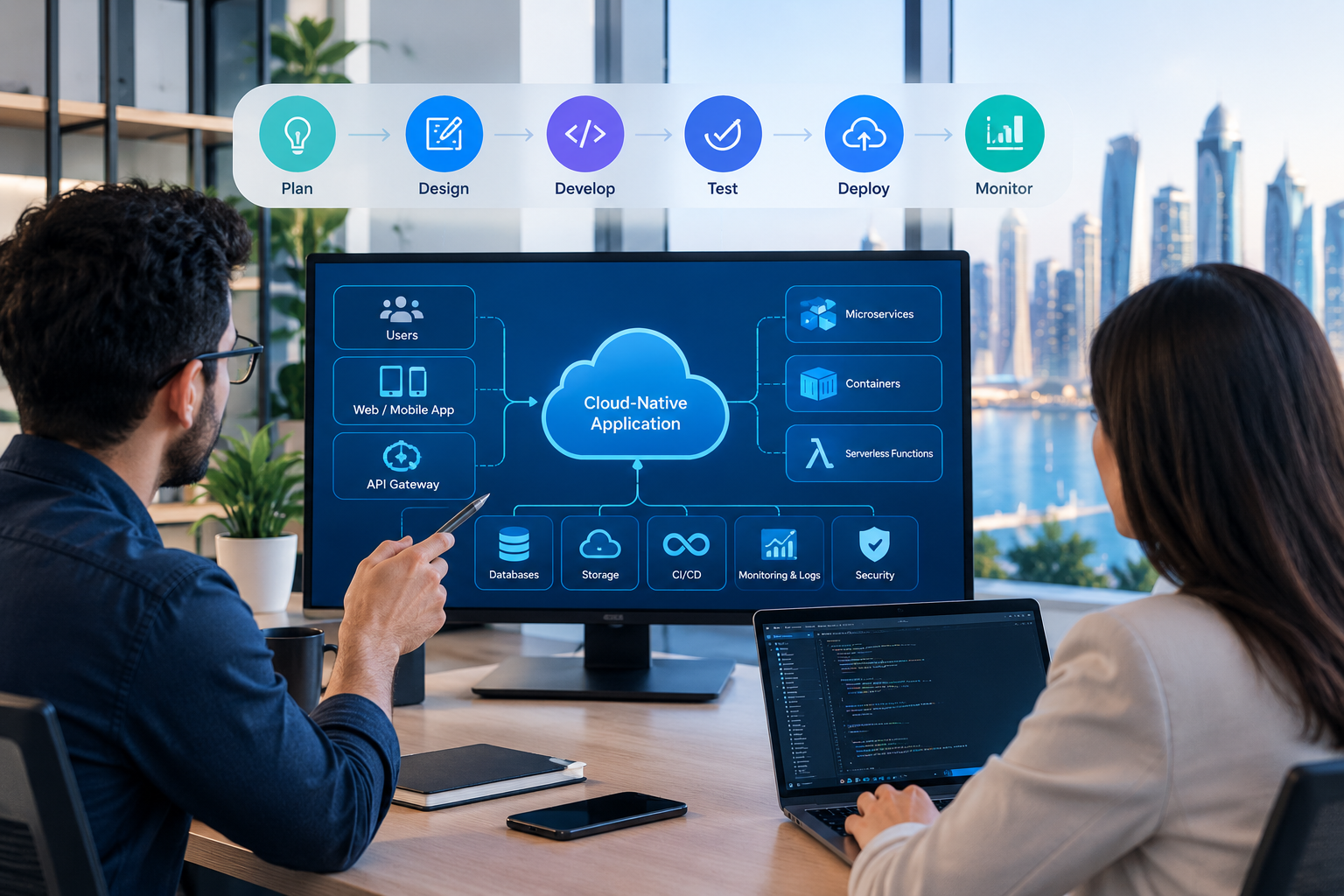
Cloud Migration Considerations for Businesses in Qatar
Businesses in Qatar may have operational, regulatory, and commercial requirements that affect their migration plans.
Data Location and Governance
Before choosing a hosting region, identify where data may be stored, processed, replicated, and backed up.
Review the applicable legal obligations, contractual commitments, customer requirements, and sector-specific rules.
Do not assume that every type of data must be hosted in Qatar, or that every cloud provider's regional offering meets every business requirement. Confirm the details for the particular workload.
Arabic and English Business Applications
Companies serving multilingual customers or employees may need Arabic and English interfaces, correct text rendering, appropriate search behavior, and support for right-to-left layouts.
If cloud migration also involves application modernization, test these requirements as part of the project.
Connectivity and Application Performance
Cloud performance depends on more than the provider's processing capacity. Network connectivity, application architecture, database location, and data transfer patterns can all affect response times.
Test applications from the locations where employees and customers will use them.
For systems with frequent database access, placing the application and database appropriately can reduce unnecessary network latency.
Industry-Specific Requirements
Financial services, healthcare, education, retail, and other sectors may have different data handling, availability, and audit requirements.
Before migration, identify which requirements apply to the organization and document how the proposed architecture will address them.
Business Continuity
Companies should plan for network interruptions, provider service disruptions, accidental data deletion, and application failures.
Define acceptable recovery time and data loss objectives, and test whether the proposed backup and recovery arrangements can meet them.
For businesses developing new platforms or upgrading existing systems, web application development can be considered alongside cloud planning when application architecture needs to change.
How Much Does Cloud Migration Cost?
There is no single price for cloud migration. The total cost depends on the existing environment, migration strategy, data volume, application complexity, downtime requirements, security needs, and the target cloud services.
A small application migration may involve limited configuration and testing. An enterprise migration involving many databases, legacy systems, integrations, and strict recovery requirements can require substantial planning and engineering.
Main Cloud Migration Cost Factors
1. Infrastructure
Compute, storage, networking, managed databases, load balancing, and other cloud services contribute to recurring costs.
2. Data Transfer
Moving large datasets may require additional network charges, temporary storage, or specialized transfer arrangements.
3. Application Modernization
Applications that need code changes, database adaptation, or architectural redesign require additional development and testing.
4. Security and Compliance
Identity management, encryption, monitoring, audit requirements, and security testing can add to the project budget.
5. Downtime and Parallel Operation
Some migrations require the old and new environments to run simultaneously for a period. This can increase short-term costs.
6. Testing and Validation
Functional testing, performance testing, recovery exercises, and user acceptance testing require time and resources.
7. Training and Support
Employees and technical teams may need training, documentation, ongoing support, and updated operational procedures.
8. Ongoing Optimization
Cloud spending should be reviewed regularly. Resource adjustments, storage lifecycle policies, and removal of unused services can help control recurring costs.
One-Time Costs Versus Recurring Costs
One-time migration costs | Recurring operating costs |
|---|---|
Assessment and planning | Cloud compute and storage |
Data migration and transfer | Database and managed services |
Application modifications | Network traffic and connectivity |
Testing and cutover | Monitoring and logging |
Training and documentation | Backup and disaster recovery |
Temporary parallel operation | Support and ongoing maintenance |
How to Estimate the Budget
A useful estimation process includes:
Inventory the existing infrastructure and applications.
Measure current resource usage and storage volumes.
Select a migration strategy for each workload.
Estimate the engineering and testing effort.
Calculate target cloud service costs using the provider's pricing tools.
Include data transfer, backup, monitoring, and support.
Model expected growth and peak demand.
Estimate the cost of operating both environments during transition.
Include a reasonable contingency for unknown dependencies.
Review actual spending after migration and adjust the architecture.
Compare the expected total cost of ownership, not just the monthly server bill. Existing infrastructure also has costs, including maintenance, staffing, hardware replacement, facilities, licensing, and downtime risk.
The most economical strategy depends on the business. Rehosting may minimize initial engineering effort, while modernization may deliver operational benefits that justify a larger initial investment.
Cloud Migration Examples Across Industries
The following are illustrative scenarios, not claims about specific customer projects.
Retail and E-Commerce
An online retailer may migrate its website, product database, and order-processing services to cloud infrastructure.
Potential benefits include flexible capacity during promotional periods, centralized monitoring, and improved options for backup and recovery.
The migration plan should account for payment integrations, inventory accuracy, order consistency, and customer experience during cutover.
Healthcare
A healthcare organization may migrate selected administrative applications, appointment systems, or document-management services.
The project must carefully address access permissions, sensitive information, auditability, backup procedures, and applicable healthcare requirements.
Critical clinical workloads require particularly careful risk assessment and recovery planning.
Education
An educational institution may use cloud infrastructure to support learning platforms, student portals, digital resources, and remote access.
The architecture should account for busy periods such as registration and examinations, as well as student data protection and availability requirements.
Real Estate
A real estate company may migrate its website, lead management system, property database, and customer portal.
A connected architecture can help teams access current property information and customer enquiries across branches.
Businesses building integrated property platforms may also consider custom software development when standard applications do not support their workflows.
Professional Services
Consulting firms, accounting companies, and other professional service providers may move document systems, collaboration applications, and internal business tools to cloud services.
Access control, document retention, client confidentiality, and reliable recovery are particularly important.
Cloud Migration Best Practices
A well-planned migration can reduce disruption and make the new environment easier to manage.
Start With Business Priorities
Do not migrate technology simply because it is old or because cloud adoption is popular.
Identify the business problem, define success criteria, and choose a migration approach that addresses it.
Document Dependencies
Applications often rely on databases, scheduled jobs, file shares, authentication services, and external APIs.
Map these relationships before moving workloads to avoid unexpected failures.
Use a Pilot Before a Large Rollout
A pilot reveals practical issues with connectivity, compatibility, cost, and user access.
Apply the lessons from the pilot to the broader migration plan.
Automate Repeatable Tasks
Where appropriate, use infrastructure as code, deployment pipelines, automated tests, and repeatable configuration processes.
Automation can improve consistency and make it easier to reproduce or recover environments.
Establish Cost Controls Early
Configure budgets, billing alerts, tagging, and resource ownership from the beginning.
Review usage regularly rather than waiting until the end of the month to discover unexpected charges.
Keep Security Part of Every Phase
Review permissions, network exposure, encryption, logging, and backups throughout the migration.
Security checks should be part of deployment and acceptance criteria.
Prepare a Rollback Plan
Define what would trigger a rollback, who can authorize it, and how data consistency will be preserved.
A rollback plan should be tested or rehearsed where feasible, especially for critical systems.
Measure Results
Compare the new environment against the original objectives.
Useful measures may include application availability, response time, recovery performance, deployment time, support effort, and total operating cost.
Common Cloud Migration Mistakes to Avoid
Migrating Without an Assessment
Moving applications without understanding dependencies can lead to unexpected outages and additional costs.
Better approach: Complete an application and infrastructure inventory before selecting the migration sequence.
Assuming Cloud Always Costs Less
Cloud services can be cost-effective, but poor resource management and unsuitable architecture can increase spending.
Better approach: Forecast realistic usage and monitor actual costs after migration.
Ignoring Data Protection
Incorrect permissions, untested backups, or exposed services can create significant risks.
Better approach: Establish security requirements, access controls, and recovery procedures before production cutover.
Moving Every Workload at Once
Large-scale migrations can create unnecessary operational risk when teams lack sufficient testing or rollback capacity.
Better approach: Group workloads according to dependencies, complexity, and business priority.
Forgetting About Employees
Even a technically successful migration can fail operationally if users do not understand the new system.
Better approach: Communicate changes, train users, and provide clear support channels.
Failing to Optimize After Migration
Leaving unused resources running or retaining unnecessary storage can erode the expected benefits.
Better approach: Treat optimization as a continuing operational responsibility.
Cloud Migration vs. Cloud Modernization
Cloud migration and cloud modernization are related but different activities.
Cloud migration focuses on moving applications, data, or infrastructure into a cloud environment. Cloud modernization focuses on improving how applications are built, deployed, integrated, and operated.
Area | Cloud migration | Cloud modernization |
|---|---|---|
Primary objective | Move workloads | Improve architecture and capabilities |
Application changes | May be minimal | Often more substantial |
Typical methods | Rehosting or replatforming | Refactoring, containers, managed services |
Initial engineering effort | Often lower for simple workloads | Often higher |
Potential benefits | Infrastructure flexibility and reduced hardware dependence | Improved agility, scalability, and maintainability |
Best approach | Depends on workload urgency and compatibility | Depends on long-term business and technical goals |
Businesses do not need to modernize every application immediately. A phased approach can move suitable workloads first and modernize strategic systems when there is a clear business case.
Cloud Migration and DevOps: How They Work Together
DevOps combines development and operations practices to improve how software is built, tested, deployed, and maintained.
Cloud migration can create an opportunity to introduce DevOps practices, but the two are not the same thing.
A business may migrate an application without changing its deployment process. Alternatively, it may use migration as an opportunity to automate infrastructure and software releases.
Relevant practices include:
Infrastructure as code: Define infrastructure through version-controlled configuration.
Continuous integration: Validate code changes through automated build and test processes.
Continuous delivery or deployment: Standardize how tested changes reach target environments.
Monitoring and alerting: Track application health and respond to failures.
Automated recovery: Use repeatable procedures to restore services where appropriate.
Configuration management: Keep development, testing, and production environments consistent.
These practices can improve reliability and reduce manual work when implemented according to the team's capabilities and the application's requirements.
How to Choose a Cloud Migration Partner
A cloud migration partner can help assess the current environment, design the target architecture, execute the migration, and establish ongoing management practices.
Before selecting a provider, evaluate the following areas.
Technical Assessment Skills
The provider should be able to document application dependencies, identify compatibility problems, and explain the trade-offs between migration strategies.
Security and Governance
Ask how the provider will handle access control, encryption, monitoring, backups, and relevant data protection requirements.
Clarify which responsibilities belong to the business and which belong to the service provider.
Migration and Recovery Planning
A credible plan should identify phases, testing requirements, downtime assumptions, acceptance criteria, and rollback procedures.
Cost Transparency
Request a breakdown of one-time migration work and recurring infrastructure costs.
Ask how resource utilization, billing alerts, and future optimization will be managed.
Integration and Application Expertise
Cloud infrastructure must work with the organization's existing applications and business processes.
The provider should understand database migration, API connectivity, authentication, and application compatibility where these are relevant.
Documentation and Ongoing Support
The business should receive useful documentation covering architecture, access, deployment, monitoring, backups, and recovery.
Clarify what support is available after the migration is completed.
Businesses can review Galaxium Coding's projects and portfolio to learn more about its technology work and explore whether its capabilities align with their requirements. Each prospective provider should be evaluated against the specific needs of the project.
The Future of Cloud Migration
Cloud adoption continues to evolve alongside containerization, automation, managed databases, distributed architectures, and AI-enabled services.
Several developments are relevant to businesses planning their next technology investment.
Greater Use of Automation
Infrastructure provisioning, testing, monitoring, and deployment can increasingly be standardized through automation.
This can reduce repetitive operational work when supported by appropriate governance and testing.
Hybrid and Multi-Cloud Architectures
Some organizations will continue using multiple environments because of legacy systems, service requirements, resilience objectives, or business constraints.
These architectures require deliberate management of connectivity, identity, costs, and monitoring.
Multi-cloud is not automatically better than using one provider; it should solve a specific business or technical problem.
AI and Data-Intensive Applications
Cloud platforms can provide infrastructure and services for data processing, analytics, and AI applications.
Businesses considering these workloads should also evaluate data quality, privacy, model access controls, processing costs, and the suitability of the underlying infrastructure.
Greater Focus on Financial Governance
Cloud cost management is becoming an important operational responsibility.
Organizations can benefit from assigning resource ownership, reviewing utilization, forecasting spending, and aligning technical decisions with business value.
Security and Resilience by Design
Businesses will continue to need strong identity controls, reliable backups, tested recovery plans, and clear responsibility for cloud operations.
These capabilities should be built into the architecture rather than treated as optional additions.
Final Thoughts: Is Cloud Migration Right for Your Business?
Cloud migration can help businesses modernize infrastructure, support distributed teams, improve recovery options, and create a foundation for new digital services. Its value depends on selecting the right workloads, choosing a suitable architecture, controlling costs, and maintaining security throughout the process.
The best migration plan starts with business objectives rather than a particular cloud provider or technology trend.
Assess your current systems, identify the workloads that would benefit most, compare migration strategies, and test the proposed approach before committing to a large-scale transition.
For organizations in Qatar planning new digital platforms or upgrading existing business systems, Galaxium Coding offers technology services spanning software development and cloud-related solutions. Explore cloud and DevOps solutions or contact Galaxium Coding to discuss your requirements and determine an appropriate next step.
Frequently Asked Questions About Cloud Migration
1. What is cloud migration in simple terms?
Cloud migration means moving applications, data, databases, or IT infrastructure from existing servers or another environment to cloud-based services. It may involve a complete move or a phased transition of selected workloads.
2. Why do businesses migrate to the cloud?
Businesses may migrate to improve scalability, reduce dependence on physical infrastructure, support remote access, modernize applications, strengthen disaster recovery, or make it easier to deploy new services. The actual benefits depend on the design and management of the environment.
3. What are the six Rs of cloud migration?
The six Rs are rehost, replatform, refactor or re-architect, repurchase, retain, and retire. They describe different ways to handle existing applications during a cloud transition.
4. How long does cloud migration take?
The timeline depends on the number of applications, data volumes, technical dependencies, security requirements, testing needs, and acceptable downtime. A small, independent workload may move relatively quickly, while a complex enterprise environment may require a phased program over an extended period.
5. Is cloud migration expensive?
Costs vary according to infrastructure, application complexity, data transfer, engineering effort, testing, security, training, and ongoing cloud usage. Businesses should calculate both one-time migration costs and recurring operating expenses before deciding.
6. Is cloud migration secure?
Cloud migration can be secure when appropriate controls are implemented. These include strong authentication, least-privilege access, encryption, secure networking, monitoring, backups, and regular security reviews. Security also depends on the responsibilities assigned to the cloud provider and the customer.
7. Will cloud migration cause downtime?
It can, depending on the application and migration method. Some workloads can be transferred with limited interruption, while others require maintenance windows or a controlled cutover. Replication, staged migration, and rehearsed rollback procedures can help manage risk.
8. What is the difference between cloud migration and cloud modernization?
Cloud migration moves workloads into a cloud environment. Cloud modernization improves the architecture or operating model of applications, potentially using containers, managed services, automation, or cloud-native designs. Migration may happen without extensive modernization.
9. Which cloud provider is best for a business?
There is no universal best provider. AWS, Microsoft Azure, and Google Cloud should be compared according to required services, compatibility, data location, security, pricing, connectivity, available expertise, and long-term operational needs.
10. Can a business use both cloud and on-premises infrastructure?
Yes. A hybrid cloud approach combines cloud services with on-premises infrastructure. It can be useful when some systems need to remain in place, but it requires careful planning for security, connectivity, identity, and operations.
11. What should Qatar businesses consider before cloud migration?
Businesses should assess data storage and processing requirements, applicable legal and sector-specific obligations, security, connectivity, application performance, disaster recovery, and the location of cloud services. Requirements should be verified for the particular business and workload rather than assumed to be identical across every industry.
12. Can an old application be moved to the cloud?
Often, but not always without changes. Compatibility, operating system support, database dependencies, licensing, and performance requirements determine whether an application can be rehosted, replatformed, or needs more extensive modernization.
13. How can businesses control cloud migration costs?
Businesses can control costs by auditing workloads, selecting suitable resource sizes, forecasting data transfer, monitoring actual usage, configuring billing alerts, removing unused resources, and reviewing architecture regularly. Cost management should continue after migration.
14. What should a cloud migration plan include?
A migration plan should include business objectives, a workload inventory, dependency mapping, migration strategy, target architecture, security controls, budget, backup and recovery procedures, testing, employee training, cutover arrangements, rollback criteria, and post-migration monitoring.
15. Does cloud migration require a complete business system rebuild?
No. Many workloads can be moved with limited changes. Rebuilding or re-architecting is only necessary when there is a clear technical or business reason, such as compatibility limitations, scalability requirements, or a modernization objective.