Cloud Backup and Disaster Recovery for Businesses: A Complete Guide
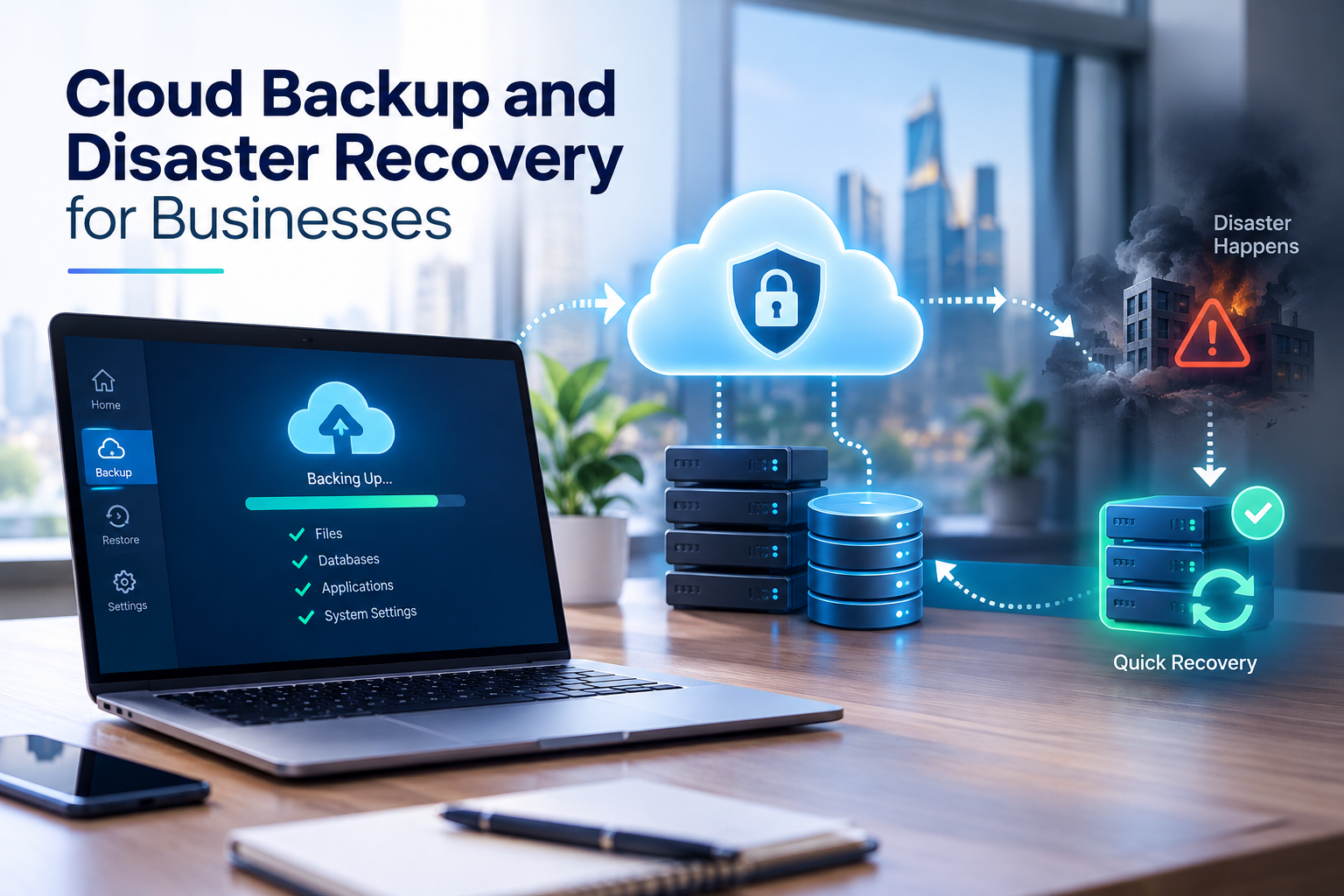
Protect business data and restore critical systems with a reliable cloud backup and disaster recovery strategy.
Cloud Backup and Disaster Recovery for Businesses: A Complete Guide
Businesses depend on digital systems to manage customer information, process transactions, communicate with employees, and deliver services. But what happens when important files disappear, a server fails, a cyberattack disrupts operations, or a critical application becomes unavailable?
Without a reliable recovery plan, even a temporary IT disruption can affect customer relationships, revenue, productivity, and business continuity.
Cloud backup and disaster recovery help businesses protect their data and restore essential systems after unexpected incidents. Cloud backup creates protected copies of important information, while disaster recovery focuses on bringing applications, infrastructure, and business services back online after a disruption.
For businesses in Qatar and other growing digital markets, these capabilities are important parts of a broader cloud and IT resilience strategy.
What Is Cloud Backup?
Cloud backup is the process of copying business data to secure cloud storage so it can be recovered if the original information is deleted, damaged, corrupted, or made inaccessible.
Instead of keeping every backup on the same computer or physical server as the original data, businesses can store backup copies in a separate cloud environment managed through their chosen cloud platform or service provider.
Depending on the solution, cloud backups can protect:
Customer records and CRM databases
Financial documents, invoices, and accounting information
Employee records and business documents
Website files and application databases
E-commerce orders and inventory records
Email data and collaboration files
Software configurations and application infrastructure
For example, a company using a custom CRM system may schedule automatic backups of its customer database every few hours. If a database error damages recent records, the company can restore an appropriate backup instead of rebuilding its information manually.
Cloud backup is not simply about storing files online. A reliable solution also requires access controls, retention policies, monitoring, and regular restoration tests.
What Is Disaster Recovery?
Disaster recovery is the process of restoring business IT systems and services after an incident prevents them from operating normally.
A disaster does not necessarily involve a natural event. It can include:
Hardware or server failure
Ransomware or another cyberattack
Accidental deletion of important information
Application deployment errors
Database corruption
Cloud service or infrastructure disruption
Power or network outages
Damage to a physical office or data centre
A disaster recovery plan explains how a business will restore its systems, where recovery resources will run, who is responsible for each task, and how the company will verify that services are working again.
For example, if an online ordering application becomes unavailable because its production server fails, a disaster recovery plan may direct the technical team to restore the application and its database in a recovery environment. The team then validates transactions, reconnects dependent services, and redirects users to the recovered application.
Cloud backup and disaster recovery are closely related, but they are not the same. A backup provides recoverable data; a disaster recovery strategy provides a defined way to restore the systems and services that depend on it.
Cloud Backup vs. Disaster Recovery: What Is the Difference?
Area | Cloud backup | Disaster recovery |
|---|---|---|
Primary purpose | Protect copies of business data | Restore systems and services |
Main focus | Files, databases, configurations, and recovery points | Applications, infrastructure, connectivity, and operations |
Typical activity | Create and retain backups | Restore systems or fail over to a recovery environment |
Main concern | Can the required data be recovered? | How quickly can critical services resume? |
Testing | Restore sample files and databases | Simulate an outage and test end-to-end recovery |
Business outcome | Reduced risk of permanent data loss | Reduced disruption and downtime |
Businesses often need both. A recovery environment without reliable data protection may restore an application that contains corrupted or outdated information. Backups without a tested recovery procedure may leave a company unable to resume operations quickly.
Why Do Businesses Need Cloud Backup and Disaster Recovery?
1. Protection Against Data Loss
Business data can be lost through accidental deletion, software errors, failed storage devices, or malicious activity. Maintaining independent, recoverable copies reduces the risk of losing critical information permanently.
A suitable backup policy identifies which information must be protected, how frequently it should be copied, and how long each recovery point should be retained.
2. Faster Recovery After IT Disruptions
When a critical system fails, employees may be unable to process orders, access customer records, or perform essential tasks.
A documented recovery process gives technical teams clear instructions instead of forcing them to invent a solution during an emergency.
The actual recovery time depends on the selected architecture, the amount of data involved, available infrastructure, network capacity, and the complexity of the application.
3. Better Protection Against Ransomware
Ransomware can encrypt business files or disrupt production systems. If attackers can also access backup systems, the organisation may lose its ability to recover.
Businesses should consider isolated or immutable backup copies, separate administrative permissions, multifactor authentication, encryption, and tested recovery procedures. Backup copies should be protected from the same compromised accounts and systems that could affect production data.
Restoring files alone may not be sufficient after a cyberattack. Businesses must also verify that the restored environment is clean and that the original security weakness has been addressed.
4. Support for Business Continuity
Business continuity means keeping essential business functions operating during and after a disruption.
For example, a retailer may need to continue receiving orders even if its primary application environment becomes unavailable. A recovery strategy can help restore the ordering platform, payment integrations, inventory data, and customer notifications in a controlled sequence.
Disaster recovery supports business continuity, but it does not replace the wider plan for employee communication, customer updates, alternative working arrangements, and operational decision-making.
5. Greater Confidence in Digital Operations
Businesses increasingly rely on web applications, mobile applications, cloud platforms, and integrated business systems. Reliable backup and recovery processes help organisations manage the risks associated with this dependence.
Companies planning new digital systems can also incorporate resilience requirements during development rather than attempting to add them after a major failure. This can be part of a broader custom software development strategy.
How Does Cloud Backup and Disaster Recovery Work?
A typical cloud backup and recovery process involves several connected stages.
Step 1: Identify Critical Data and Systems
Start by documenting the systems that support daily business activities. These may include:
Production databases
Customer-facing websites and applications
CRM and ERP platforms
Financial and payroll systems
File storage and collaboration tools
Application code, configurations, and infrastructure definitions
Not every system has the same recovery priority. A business should identify which services must return first and which can remain unavailable for longer.
Step 2: Create Automated Backups
Configure scheduled or continuous backups according to business requirements. The schedule should reflect how frequently data changes and how much information the organisation can afford to lose.
A system that processes orders throughout the day may require more frequent recovery points than an archive of historical documents.
Automated monitoring should identify failed backup jobs, missed schedules, storage issues, and unexpected changes in backup size.
Step 3: Secure and Retain Backup Copies
Backups should be protected against unauthorised access, accidental deletion, and compromise of production credentials.
Useful controls include encryption, role-based access, multifactor authentication, separate backup administration, retention rules, and immutable storage where appropriate.
For additional resilience, businesses may maintain copies in a separate account, environment, or geographic location. The design should account for the possibility that the primary environment and its backups could be affected by the same incident.
Step 4: Prepare a Recovery Environment
A recovery environment may consist of cloud infrastructure, replicated databases, standby servers, or resources that can be created when required.
The appropriate design depends on the business's recovery targets. Some organisations can tolerate restoring systems from backups over several hours, while others need a prepared environment that can take over much more quickly.
Application code, network settings, security permissions, encryption keys, and external integrations may all be necessary for a successful recovery.
Step 5: Restore and Validate Systems
When an incident occurs, the response team determines its scope, selects a suitable recovery point, and restores the affected systems.
Before resuming normal operations, the team should verify:
Data integrity and completeness
Application availability and functionality
User authentication and access permissions
Database and API connectivity
Payment or other critical integrations
Security status of the restored environment
Step 6: Test the Recovery Plan
A successful backup job does not prove that the data can be restored or that the application will function after recovery.
Regular tests should confirm that backup copies are accessible, recovery procedures are accurate, and responsible staff understand their roles. More comprehensive exercises should measure whether the business can meet its agreed recovery targets.
Understanding RTO and RPO
Two important measurements help businesses design an appropriate disaster recovery strategy: Recovery Time Objective (RTO) and Recovery Point Objective (RPO).
What Is Recovery Time Objective (RTO)?
RTO is the target for how long a system can remain unavailable after a disruption before it needs to be restored.
For example, if an order-processing application has an RTO of two hours, the recovery plan should aim to restore that service within two hours of the disruption, subject to the agreed measurement and testing approach.
A lower RTO generally requires more preparation, automation, and recovery resources.
What Is Recovery Point Objective (RPO)?
RPO describes how much data loss, measured in time, the business can tolerate following a disruption.
If a database has an RPO of 30 minutes, the recovery strategy should aim to limit lost transactions to approximately the most recent 30 minutes of data, assuming the relevant recovery points are available.
More frequent backups or continuous replication may help achieve a lower RPO, but replication alone is not a substitute for independent backups. Errors or malicious changes can sometimes be replicated to another system.
RTO vs. RPO at a Glance
Example requirement | RTO | RPO |
|---|---|---|
Critical order-processing system | 1 hour | 15 minutes |
Internal reporting application | 8 hours | 4 hours |
Historical document archive | 24 hours | 24 hours |
These figures are illustrative examples, not universal standards. Each organisation should set targets according to operational impact, data change rates, cost, and available recovery capabilities.
The AWS Well-Architected Framework also recommends defining recovery objectives, selecting a strategy to meet them, and testing the recovery implementation. See the official AWS disaster recovery guidance.
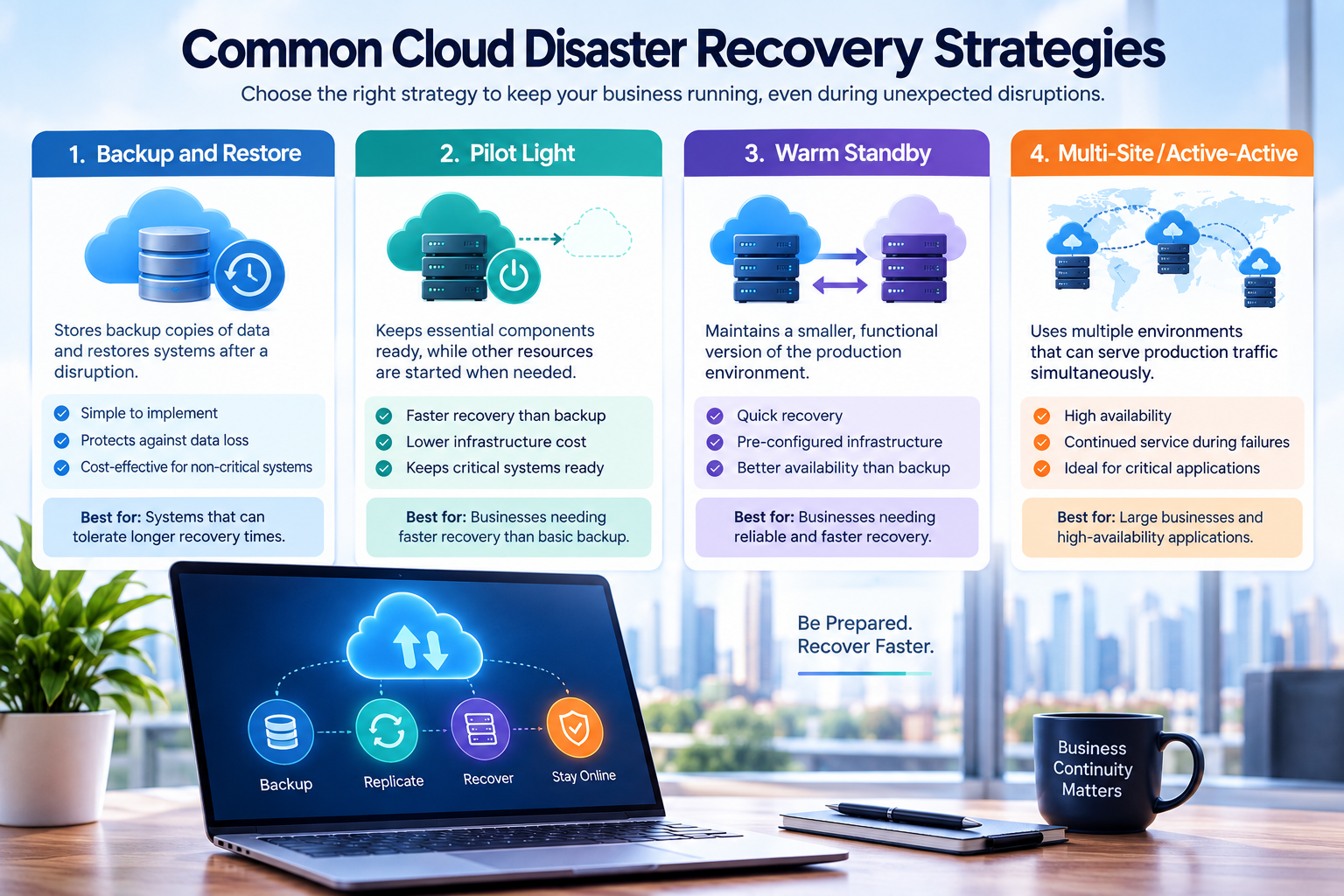
Common Cloud Disaster Recovery Strategies
There is no single recovery architecture that fits every business. The right choice depends on how quickly services must return, how much data loss is acceptable, and how much the organisation can invest in resilience.
1. Backup and Restore
In this approach, the business stores backup copies and rebuilds or restores the required systems after a disruption.
Best suited for: Systems that can tolerate longer recovery times and organisations prioritising a simpler, lower-cost approach.
Advantages:
Relatively straightforward to implement
Can provide protection against accidental deletion and data corruption
Does not always require continuously running duplicate infrastructure
Limitations:
Recovery may take longer because infrastructure must be restored or recreated
Large datasets may require significant transfer and restoration time
Application dependencies and configurations must also be recovered
2. Pilot Light
A pilot-light strategy keeps essential components of the recovery environment prepared, while other resources are started or expanded when needed.
Best suited for: Businesses that require faster recovery than basic backup and restore but do not need a fully operational duplicate environment at all times.
Advantages:
Reduces the amount of standby infrastructure that must remain active
Keeps important recovery components ready
Can reduce the time needed to rebuild the full system
Limitations:
Additional components still need to be started and configured
Recovery depends on tested procedures and available capacity
Data replication, networking, and application dependencies require careful planning
3. Warm Standby
Warm standby maintains a smaller but functional version of the production environment. It can be scaled up during a disaster.
Best suited for: Businesses that need relatively rapid recovery and can justify maintaining a partially active secondary environment.
Advantages:
Core infrastructure is already running
Recovery may be faster than rebuilding everything from scratch
Provides a prepared alternative when the primary environment fails
Limitations:
Requires ongoing infrastructure and maintenance costs
The standby environment must be monitored and kept up to date
Scaling and failover procedures must be tested
4. Multi-Site or Active-Active Recovery
In an active-active architecture, multiple environments can serve production traffic simultaneously. Depending on the design, traffic may be redirected when one environment becomes unavailable.
Best suited for: Applications with demanding availability requirements, such as high-volume digital services or business-critical platforms.
Advantages:
Can support continued service when an environment fails
May reduce interruption for supported failure scenarios
Distributes workloads across multiple environments
Limitations:
More complex to design, operate, and test
Requires careful handling of data consistency and conflicting updates
Can have substantially higher infrastructure and operational costs
The most advanced strategy is not automatically the best one. Businesses should choose an approach that meets their recovery objectives without introducing unnecessary complexity.
Essential Features of a Reliable Cloud Backup Solution
When evaluating a backup platform or managed cloud service, consider the following capabilities.
Automated and Scheduled Backups
Automation reduces reliance on staff remembering to copy files manually. Schedules should reflect data criticality and be monitored for failed or incomplete jobs.
Point-in-Time Recovery
Point-in-time recovery allows supported systems to return to a selected earlier state. This can be valuable when a database becomes corrupted or incorrect changes are discovered after they occur.
Availability and retention of point-in-time recovery depend on the specific service and configuration.
Encryption and Access Controls
Sensitive business information should be protected during transfer and storage. Access should be restricted to authorised users and service identities, with stronger authentication for privileged accounts.
Retention and Versioning
Retention policies determine how long backup copies are preserved. Versioning can help recover earlier versions of files, while retention controls reduce the risk of important recovery points being deleted too soon.
Backup Isolation and Immutability
Where supported, immutable backup storage can prevent protected recovery points from being altered or deleted during a defined retention period.
Isolation is also important. A backup destination that shares the same administrator credentials and permissions as production may remain vulnerable to the same attack.
Monitoring and Alerts
Backup dashboards and alerts help IT teams identify failures, unusual activity, capacity problems, and missed recovery points before they become critical.
Recovery Testing
A solution should support practical restoration tests. Businesses should periodically restore representative files, databases, and applications to verify that the process works as expected.
Cloud Backup Security: How to Protect Business Data
Cloud storage does not automatically make business data secure. Protection depends on configuration, access management, monitoring, and operational procedures.
Use the Principle of Least Privilege
Give users and applications only the permissions they need. Backup administrators should not automatically receive unrestricted access to every production system, and ordinary users should not be able to delete protected recovery copies.
Enable Multifactor Authentication
Require multifactor authentication for administrative accounts and other high-risk access. Where possible, separate backup administration from routine production administration.
Keep Independent Recovery Copies
Maintain protected copies that are difficult for an attacker or a compromised account to alter. Depending on business requirements, this may involve immutable storage, separate accounts, or another recovery environment.
Monitor Backup Activity
Investigate unexpected deletion attempts, sudden changes in backup volume, repeated job failures, and unusual access patterns. Monitoring is most useful when alerts reach a team that can respond.
Test Cyber Recovery Procedures
After ransomware or another destructive incident, do not assume that the latest backup is safe to restore. Identify a known-good recovery point, assess the affected environment, remove the source of compromise, and validate restored systems before reconnecting them to production.
For additional technical guidance, review the AWS security best practices for securing backups. Specific controls should be adapted to the cloud platform and business environment in use.

Cloud Backup and Disaster Recovery for Businesses in Qatar
Businesses in Qatar may depend on digital systems for customer service, property management, retail transactions, education, logistics, financial administration, and internal operations.
A disruption affecting one application can also affect the systems connected to it. For example, if an e-commerce platform loses access to its order database, the company may also experience problems with inventory updates, delivery scheduling, customer notifications, and reporting.
A suitable cloud backup and disaster recovery plan should address several practical considerations.
Data Protection and Applicable Requirements
Businesses should identify the legal, contractual, and industry-specific requirements that apply to their data. Requirements may vary depending on the information involved, the sector, the organisation's role, and the services it uses.
Before selecting a cloud region or storage provider, evaluate data residency, cross-border transfers, access controls, contractual commitments, and relevant privacy or regulatory obligations. Do not assume that every cloud service or region is automatically suitable for every category of business information.
Cloud Region and Availability Planning
A business should assess which failure scenarios its recovery architecture must withstand. Redundancy within one location may help with certain infrastructure failures, while a separate geographic recovery environment may be needed for broader regional disruptions.
The location of backup data, the availability of recovery resources, and the time required to transfer or restore information should be considered together.
Protect Business-Critical Applications
For many organisations, essential systems include CRM, ERP, HR, payroll, accounting, customer portals, and custom web applications.
Recovery plans should identify dependencies between these systems. Restoring a web application is not enough if its database, authentication service, payment gateway, or external API remains unavailable.
Businesses developing or upgrading digital platforms can explore cloud and DevOps solutions as part of their broader infrastructure planning.
Plan for Business Growth
A backup strategy should evolve as data volumes, transaction rates, and application dependencies increase. Review backup capacity, retention, restoration performance, and recovery costs as the business expands.
For organisations investing in new web application development, resilience requirements should be considered alongside performance, security, integration, and scalability.
Practical Example: Recovering a Business Application
Consider a fictional Qatar-based retail company that uses a web application to manage orders, customer details, and inventory.
The company experiences a database failure that makes its order-processing application unavailable.
A planned recovery process might look like this:
Detect: Monitoring identifies the database failure and alerts the technical team.
Assess: The team determines which systems are affected and selects an appropriate recovery point.
Prepare: The team provisions or activates the required recovery infrastructure.
Restore: The database is restored or recovered using the configured backup and recovery mechanisms.
Validate: The team checks orders, customer records, stock levels, and application integrations.
Resume: Traffic is directed to the recovered application after the required checks are completed.
Review: The company documents the cause, measures recovery performance, and identifies improvements.
The company might set an illustrative RTO of two hours and an RPO of 15 minutes for this application. Those targets are useful only if the selected architecture can achieve them in testing.
This example demonstrates why recovery planning must cover the entire service, not just a copy of its database.
How to Implement a Cloud Backup and Disaster Recovery Plan
A structured implementation process helps businesses turn backup tools into a dependable recovery capability.
Step 1: Conduct a Risk Assessment
Identify possible disruptions and evaluate their business impact. Consider data loss, cyberattacks, infrastructure failure, human error, third-party outages, and loss of access to critical systems.
Step 2: Classify Data and Prioritise Workloads
Group systems according to business importance, sensitivity, dependencies, and recovery needs. Determine which services must return first and which can wait.
Step 3: Define RTO and RPO
Agree on acceptable downtime and data loss for each critical workload. Involve business owners, technical teams, and relevant risk or compliance stakeholders.
Step 4: Select the Backup and Recovery Architecture
Compare backup and restore, pilot light, warm standby, and active-active approaches. Choose based on business requirements, complexity, cost, and recovery performance.
Step 5: Configure Security and Automation
Set up backup schedules, encryption, identity controls, retention rules, monitoring, and appropriate separation between production and backup environments.
Step 6: Document Recovery Procedures
Record the people responsible for declaring an incident, initiating recovery, restoring data, validating systems, communicating with stakeholders, and approving a return to normal operations.
Step 7: Test and Improve
Run recovery exercises, measure actual RTO and RPO, and correct any gaps. Update the plan when infrastructure, applications, team responsibilities, or business priorities change.
A disaster recovery plan should be treated as an ongoing operational responsibility rather than a document created once and forgotten.
Common Cloud Backup and Disaster Recovery Mistakes
Assuming Synchronisation Is the Same as Backup
Synchronisation keeps copies of data aligned across locations. If unwanted changes or deletions are synchronised, they may affect multiple copies. Independent recovery points and retention controls provide a different form of protection.
Keeping All Backups in One Environment
If production systems and backups share the same failure domain, credentials, or administrative controls, a single incident may affect both. Consider separate security boundaries and recovery locations where justified.
Never Testing Restores
A completed backup job confirms that a process ran; it does not necessarily prove that a complete application can be recovered. Perform restoration tests and verify the integrity of the recovered data.
Ignoring Application Dependencies
An application may depend on databases, authentication services, DNS, APIs, encryption keys, and external platforms. A recovery plan should include these dependencies and the order in which they must be restored.
Choosing an Expensive Strategy Without Clear Requirements
Maintaining multiple active environments can be valuable for systems with strict availability targets, but it can add unnecessary cost and operational burden to less critical applications. Set recovery objectives before choosing the architecture.
Failing to Assign Responsibility
A technically sound recovery plan may still fail if nobody knows who can authorise failover or who is responsible for validating restored systems. Define responsibilities and practise the process with the people involved.
How Much Does Cloud Backup and Disaster Recovery Cost?
There is no single price for business cloud backup and disaster recovery. Costs depend on the volume of data, retention period, backup frequency, storage type, network transfer, recovery infrastructure, and operational support.
Important cost components include:
Backup storage: The amount of protected data and how long copies are retained.
Replication: The resources and network transfer required to maintain copies in another environment.
Standby infrastructure: Servers, databases, networking, and other resources kept ready for recovery.
Data restoration and transfer: Charges or resource usage associated with moving and recovering information.
Monitoring and security: Tools and services used to protect and manage backup operations.
Testing and maintenance: Staff time and technical work needed to verify and improve recovery readiness.
Managed support: External expertise for monitoring, incident response, and recovery operations, if required.
A backup-and-restore approach can be more economical for systems that tolerate longer recovery periods. Warm standby and active-active designs typically require more ongoing resources, although the actual cost depends on implementation.
Businesses should compare the cost of resilience with the potential impact of downtime and data loss. The objective is not necessarily to eliminate every possible interruption; it is to achieve an acceptable level of risk and recovery performance.
How to Choose a Cloud Backup and Disaster Recovery Provider
Before selecting a provider or implementation partner, ask the following questions.
Can the solution protect all critical data, applications, and configurations?
Does it support the business's RTO and RPO targets?
Are backup copies protected from compromised production credentials?
Can the solution support separate recovery environments when required?
How are failed backup jobs and suspicious activity detected?
Can the provider demonstrate a realistic restoration and recovery test?
What storage, transfer, infrastructure, and support costs should be expected?
Who is responsible for incident coordination and recovery execution?
Can the solution accommodate future growth and changing requirements?
Does the design address the business's applicable security and data protection obligations?
Ask for a clear description of responsibilities. A cloud provider may supply infrastructure and storage capabilities, while the business or its implementation partner remains responsible for aspects such as application configuration, access policies, recovery procedures, and validation.
For businesses building connected digital platforms, Galaxium Coding provides a starting point for exploring software development and cloud-related services relevant to business technology projects.
The Future of Cloud Backup and Disaster Recovery
Cloud backup and disaster recovery are evolving as businesses adopt more cloud services and face increasingly complex operational and security risks.
Several developments are shaping modern approaches.
More Automated Recovery
Automation can help provision infrastructure, execute approved recovery steps, and reduce manual errors. Automated processes still require safeguards, testing, and clear authorisation rules.
Stronger Protection Against Destructive Cyberattacks
Immutable storage, isolated recovery environments, separate administrative boundaries, and controlled recovery approvals can help protect recovery points against destructive events.
Greater Integration with Cloud-Native Applications
Applications built around cloud infrastructure may use infrastructure as code, automated deployment, managed databases, and monitoring to make recovery environments more repeatable.
More Frequent Recovery Validation
Organisations can improve confidence in their recovery capabilities by testing procedures regularly and monitoring whether actual performance continues to meet business targets.
These capabilities can improve resilience, but technology alone is not sufficient. Effective recovery also depends on clear responsibilities, realistic objectives, secure configurations, and regular practice.
Final Thoughts
Cloud backup and disaster recovery help businesses prepare for unexpected data loss, cyberattacks, infrastructure failures, and application outages. Backup protects recoverable copies of important information, while disaster recovery provides the processes and resources needed to restore business services.
The right approach begins with identifying critical systems, defining RTO and RPO, selecting suitable recovery architecture, protecting backup copies, and testing restoration procedures.
For businesses in Qatar, these decisions should also account for application dependencies, data protection obligations, service availability, and future growth.
A practical recovery plan does not need to be the most complex or expensive option available. It needs to be secure, regularly tested, and aligned with the organisation's real operational requirements.
If your business is planning new digital systems or reviewing its cloud infrastructure, contact Galaxium Coding to discuss your software and cloud technology requirements.
Frequently Asked Questions
1. What is cloud backup and disaster recovery?
Cloud backup stores recoverable copies of business data in cloud storage. Disaster recovery is the broader process of restoring applications, infrastructure, and services after an incident. Businesses commonly use both as part of their resilience strategy.
2. Is cloud backup enough for disaster recovery?
Not always. A backup can preserve data, but the business may still need servers, application code, configuration, network connectivity, credentials, and documented recovery procedures to restore its services. The required components depend on the system and recovery objectives.
3. How often should a business back up its data?
Backup frequency should reflect how quickly data changes and how much data loss the business can tolerate. A frequently updated transactional database may need more frequent backups or continuous protection than a static document archive.
4. What is the difference between RTO and RPO?
RTO is the target for restoring a service after an interruption. RPO is the target for the maximum amount of data loss measured in time. Both should be defined according to business impact and verified through testing.
5. Can cloud backup protect a business against ransomware?
Cloud backup can support recovery from ransomware if protected recovery points remain available and trustworthy. Businesses should use suitable access controls, isolated or immutable copies where appropriate, monitoring, and tested cyber recovery procedures. Backups alone do not prevent ransomware infections.
6. Is cloud backup more secure than local backup?
Security depends on the architecture and its configuration. Cloud storage can offer encryption, access controls, isolation, and automated management, but a poorly configured cloud environment can still be exposed. Local backups can also play a role when they are properly secured and managed.
7. What is the best disaster recovery strategy for a small business?
Backup and restore may be a practical starting point for a small business that can tolerate longer recovery times. Businesses with stricter availability requirements may need pilot light or standby infrastructure. The decision should follow a risk assessment and agreed recovery objectives.
8. How much does cloud disaster recovery cost?
Costs vary with data volume, backup frequency, retention, replication, standby infrastructure, data transfer, monitoring, and support. Comparing options against the business's RTO and RPO helps identify an appropriate balance between cost and resilience.
9. Should a business keep backups in a different cloud region?
A separate region can help protect against certain regional disruptions, depending on the architecture and services used. Businesses should also consider separate access controls, recovery dependencies, data transfer costs, and any applicable data residency or regulatory requirements.
10. How often should disaster recovery plans be tested?
The testing schedule should reflect system criticality, business risk, and the frequency of infrastructure changes. Tests can range from restoring individual files to conducting end-to-end recovery exercises. Critical systems should have a documented schedule and measurable recovery targets.
11. Does disaster recovery include websites and business applications?
Yes. A comprehensive plan may include website files, application code, databases, configuration, networking, authentication, and third-party dependencies. Restoring only the files may not be sufficient to make an application operational.
12. Why should Qatar businesses plan for cloud disaster recovery?
Businesses that depend on digital transactions, customer information, internal applications, or connected services need a plan for restoring those capabilities after a disruption. A suitable strategy should reflect the organisation's systems, operational priorities, security risks, and applicable data protection requirements.