AI Workflow Automation vs Traditional Automation
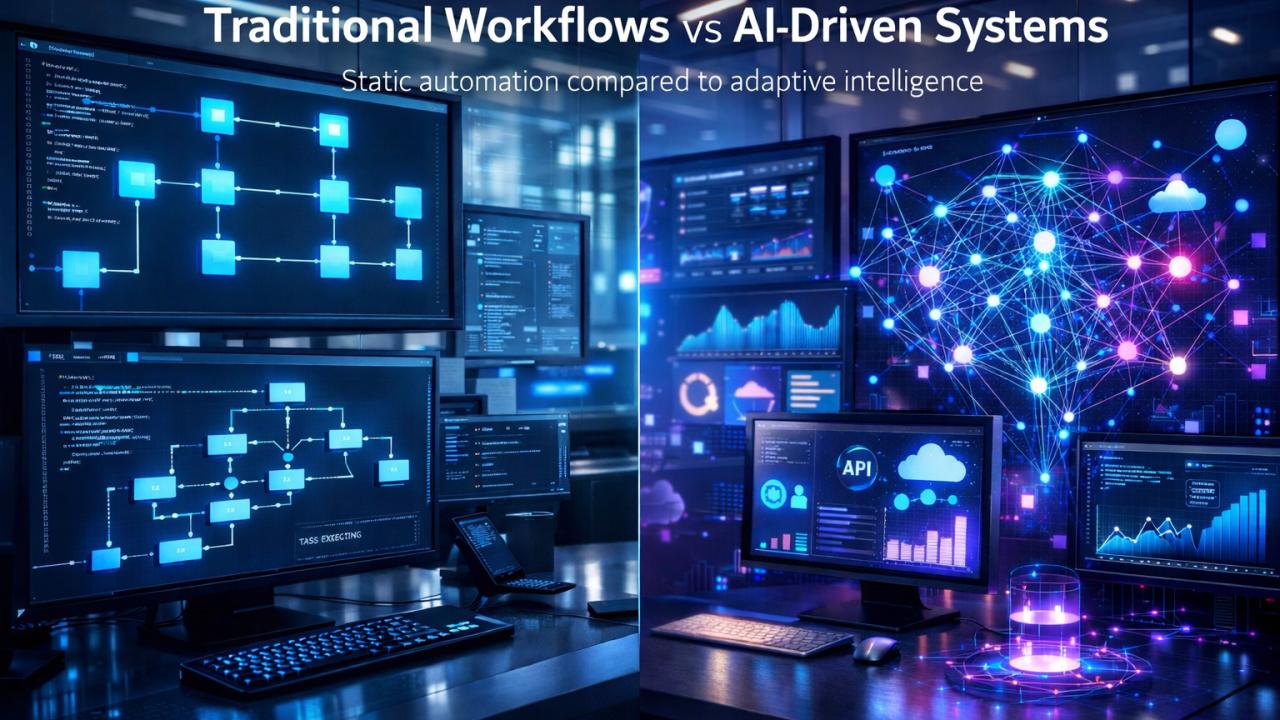
AI workflow automation adds intelligent interpretation to traditional rule-based processes, helping businesses handle complex inputs while retaining control over business actions.
AI Workflow Automation vs Traditional Automation: Key Differences, Benefits and Business Use Cases
Businesses are increasingly using automation to reduce repetitive work, connect software systems, and improve operational efficiency. However, not every process requires artificial intelligence. Some workflows work best with simple rules, while others need AI to interpret documents, understand customer messages, or process information that does not follow a fixed format.
Understanding AI workflow automation vs traditional automation helps businesses choose the right approach without investing in unnecessary complexity.
Traditional automation follows predefined instructions to perform predictable tasks. AI workflow automation adds artificial intelligence to selected steps, allowing systems to interpret information, classify requests, extract data, generate responses, or recommend actions before a workflow continues.
For example, a traditional workflow can send an invoice reminder when a payment becomes overdue. An AI-enabled workflow can additionally read a supplier's email, identify the invoice being discussed, summarize the issue, and route the case to the appropriate employee.
Both approaches have a role in modern business operations. The right choice depends on the task, available data, acceptable risk, integration requirements, and expected return on investment.
Businesses exploring broader custom software development services can use these principles to determine whether a simple workflow, an AI-assisted process, or a combination of both best fits their operational requirements.
What Is Traditional Workflow Automation?
Traditional workflow automation uses predefined rules, triggers, conditions, and actions to complete repetitive business processes. It generally works best when the required inputs and expected outcomes are known in advance.
A workflow might begin when a customer submits a form, a payment is received, an employee requests leave, or a record changes in a business application.
The system then follows the instructions configured by the business.
How Traditional Automation Works
A typical rule-based workflow follows these steps:
Trigger: A predefined event occurs.
Condition: The system checks whether specific requirements are satisfied.
Action: The system performs an assigned task.
Notification: Relevant users receive an update when necessary.
Recordkeeping: The workflow logs the result or updates a database.
For example, when a customer submits a website enquiry, the automation could create a CRM record, assign the lead to a salesperson, send a confirmation email, and create a follow-up reminder.
Each action follows an established rule rather than interpreting the meaning of the enquiry.
Businesses can create these workflows with workflow automation platforms, application integrations, scheduled jobs, or custom-built software. Microsoft's Power Automate documentation provides examples of connecting applications, synchronizing information, and automating business processes.
Common Examples of Traditional Automation
Traditional automation is useful for processes such as:
Sending appointment reminders at scheduled times.
Creating customer records from completed forms.
Updating inventory when an order is confirmed.
Routing invoices according to fixed approval limits.
Sending payment notifications when an invoice becomes overdue.
Assigning support tickets according to selected categories.
Generating recurring reports from structured databases.
Notifying managers when a leave request requires approval.
These tasks are often predictable and can be completed without an AI model.
Benefits of Traditional Automation
Predictability: The workflow follows defined rules, making its expected behavior easier to understand and test.
Operational consistency: The same conditions trigger the same configured actions.
Lower complexity for simple tasks: Straightforward workflows do not need an AI model or the additional infrastructure it may require.
Auditability: Rules, events, and execution logs can make it easier to trace why an action occurred.
Integration: Traditional automation can connect business applications through APIs, built-in connectors, databases, and other integration methods.
However, a rule-based workflow may struggle when important information arrives in an unexpected format or requires interpretation before the next action can be selected.
What Is AI Workflow Automation?
AI workflow automation combines conventional workflow logic with artificial intelligence. AI handles selected tasks that involve interpreting information, identifying patterns, classifying content, extracting data, or generating context-sensitive outputs.
The workflow engine still coordinates the process. AI adds an intelligence layer where fixed rules alone may not be sufficient.
For instance, a business may receive customer enquiries through email, website forms, and messaging platforms. Traditional automation can process fields that follow a standard format. AI can help interpret free-text messages and identify the customer's intent before the workflow routes the enquiry.
How AI Workflow Automation Works
An AI-enabled workflow commonly follows this sequence:
Trigger: A message, document, record, or event enters the system.
AI processing: A model interprets the available information or extracts relevant details.
Validation: The system checks the output against required fields, business rules, confidence thresholds, or permitted values.
Decision or routing: The workflow determines the next action.
Execution: Approved actions occur in connected business applications.
Human review: An employee handles uncertain, sensitive, or exceptional cases where required.
Monitoring: The business reviews results, errors, and workflow performance.
Not every AI workflow needs every step. The design depends on the task and its risk level.
For a practical example, Microsoft's AI Builder documentation for Power Automate explains how AI capabilities can be incorporated into automated processes.
Common Examples of AI Workflow Automation
AI can add value when a business process involves less-structured information.
Examples include:
Reading supplier emails and classifying requests.
Extracting invoice details from documents with varying layouts.
Summarizing customer conversations before a sales call.
Categorizing support tickets using their message content.
Identifying the language of incoming enquiries.
Drafting responses based on approved business information.
Extracting key details from contracts for employee review.
Classifying customer feedback by topic or sentiment.
Searching internal knowledge sources to help employees answer questions.
Assisting employees with reports by summarizing large volumes of information.
These applications do not make AI infallible. Model outputs may be incorrect, incomplete, or inconsistent, so important actions should be validated and governed appropriately.
AI Workflow Automation vs Traditional Automation: Key Differences
The main difference is how each approach handles information and determines what happens next. Traditional automation relies primarily on predefined rules. AI workflow automation can use AI to interpret information before applying workflow rules or selecting an appropriate next step.
Comparison factor | Traditional automation | AI workflow automation |
|---|---|---|
Decision logic | Predefined conditions and rules | AI interpretation combined with workflow rules |
Input format | Usually structured and predictable | Can handle structured and less-structured inputs |
Natural-language understanding | Requires explicit rules or additional tools | Can interpret text using suitable AI models |
Document processing | Best with predictable formats and fixed fields | Can extract and classify information from varied documents |
Output consistency | Consistent when inputs and rules are consistent | May vary and requires suitable validation |
Setup requirements | Define triggers, conditions, and actions | Also configure AI tasks, instructions, evaluation, and safeguards |
Cost factors | Platform, integration, maintenance, and execution costs | Also potentially includes model usage, testing, monitoring, and review |
Error handling | Can handle known exceptions through rules | Needs rules plus safeguards for uncertain or incorrect AI outputs |
Best fit | Repetitive, predictable processes | Processes that require interpretation or context |
Human involvement | Needed for exceptions and approvals | Particularly important for uncertain or consequential decisions |
Neither approach is universally superior. A predictable task may be easier to manage with conventional automation, while an information-heavy task may benefit from AI.
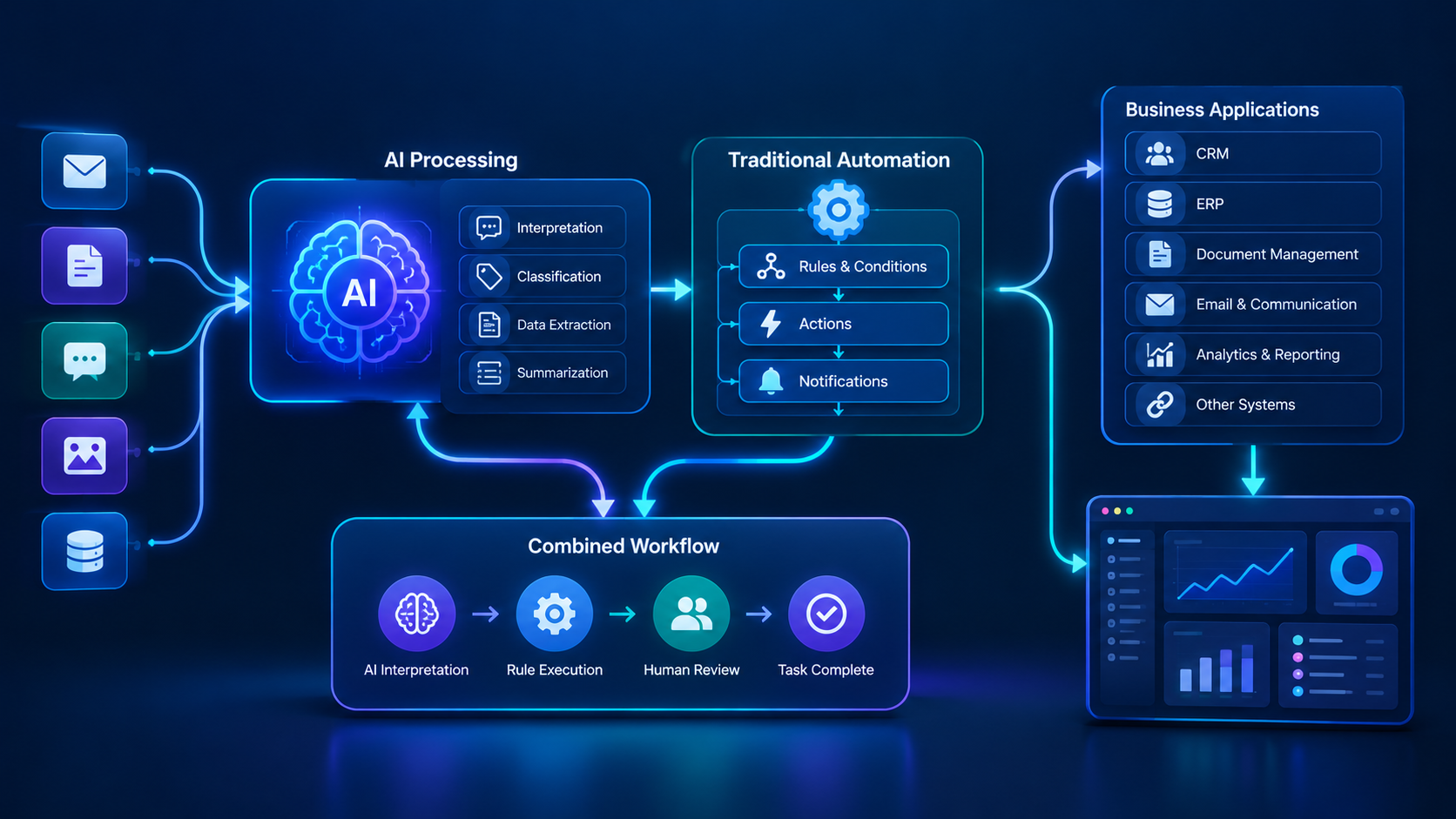
How AI and Traditional Automation Work Together
Businesses do not have to choose only one approach. In many cases, the strongest design combines AI for interpretation with conventional automation for execution.
Consider a company receiving hundreds of customer enquiries every week.
A traditional workflow may require customers to select a predefined category before their requests can be routed. An AI-enabled system could interpret the customer's message and identify the likely category automatically.
The workflow engine can then perform predictable actions using established business rules.
Example: Automated Customer Enquiry Management
Traditional workflow
Customer submits form → CRM creates lead → Salesperson receives notification → Follow-up reminder is created.
AI-enhanced workflow
Customer submits a message → AI extracts the requirement and summarizes the enquiry → Validation checks required information → CRM creates or updates the lead → Rules assign the lead → Salesperson receives a summary and follow-up task.
The AI handles interpretation. The conventional workflow handles record creation, assignment rules, notifications, and scheduling.
This division makes the system easier to control than relying on an AI model to make every decision independently.
For organizations developing connected business applications, web application development can provide an interface for managing records, reviewing AI outputs, tracking workflow status, and monitoring exceptions.
Business Use Cases: Which Type of Automation Fits Best?
The most appropriate approach depends on what the process actually needs to accomplish.
1. Sales and CRM
Traditional automation is suitable for assigning leads according to region, creating follow-up tasks, and sending scheduled reminders.
AI workflow automation can help classify free-text enquiries, summarize previous conversations, extract customer requirements, and draft follow-up messages.
Recommended approach: Combine AI-assisted lead understanding with rule-based assignment, CRM updates, and reminders.
2. Finance and Accounts
Traditional automation can send payment reminders, calculate totals using deterministic rules, and route invoices according to established approval limits.
AI can help extract invoice details from varied document layouts, classify supplier emails, or summarize discrepancies for an accounts employee.
Recommended approach: Use AI to extract information where necessary, validate amounts and required fields, and keep financial approvals governed by explicit controls.
3. Human Resources
Traditional automation can notify managers of leave requests, create onboarding tasks, and schedule reminders.
AI can assist with classifying HR enquiries, summarizing policy documents, and extracting information from submitted forms.
Recommended approach: Automate administration while keeping employment decisions, sensitive cases, and policy exceptions under appropriate human oversight.
4. Customer Support
Traditional automation can route tickets according to selected categories, send acknowledgments, and notify customers when ticket statuses change.
AI can interpret incoming messages, identify likely topics, summarize conversations, and prepare suggested answers based on approved information.
Recommended approach: Use AI for understanding and response assistance, with escalation rules for uncertain or sensitive cases.
5. Inventory and Operations
Traditional automation is often ideal for stock thresholds, reorder notifications, scheduled maintenance reminders, and order-status updates.
AI may help classify supplier communications, summarize operational reports, or identify patterns in historical data.
Recommended approach: Keep stock calculations and transaction updates deterministic. Introduce AI where interpretation or analysis provides a clear additional benefit.
6. Document Management
Traditional automation can rename files, move documents, notify reviewers, and apply fixed approval sequences.
AI can help identify document types, extract key information, and summarize lengthy files.
Recommended approach: Combine document classification and extraction with required-field checks, access permissions, and human review for important records.
Industry Applications of AI Workflow Automation
Different industries need different levels of automation. A useful implementation begins with the process and its risks rather than the assumption that every department needs AI.
Industry | Traditional automation example | AI workflow example |
|---|---|---|
Retail | Stock alerts and order confirmations | Product enquiry classification and customer feedback analysis |
Real estate | Lead assignment and viewing reminders | Property enquiry interpretation and lead summaries |
Healthcare | Appointment reminders and administrative notifications | Administrative document extraction and enquiry classification, subject to privacy safeguards |
Education | Attendance notifications and application tracking | Enquiry classification and document summarization |
Logistics | Shipment status updates and scheduled notifications | Classification of delivery exceptions and summaries of shipment communications |
Professional services | Task assignment and deadline reminders | Contract summarization and email classification |
Hospitality | Booking confirmations and check-in reminders | Guest request interpretation and service-ticket routing |
These are illustrative use cases, not guarantees of accuracy or business results. Each implementation needs to account for the organization's software, data, security obligations, and operational requirements.
Benefits of AI Workflow Automation
AI workflow automation can create value when the AI component solves a genuine limitation in an existing process.
Better Handling of Unstructured Information
Customer messages, scanned documents, emails, and reports do not always follow the same format. AI can help interpret these inputs and convert relevant details into structured information.
Less Manual Classification
Employees may spend time reading messages and deciding which department should handle them. AI can help categorize requests, while the workflow applies routing rules.
Faster Access to Relevant Information
AI can summarize permitted documents or customer history, helping employees find important information without manually reviewing every item.
More Flexible Customer Interactions
AI can help a system understand different ways of expressing the same request, making it useful for customer support and enquiry management.
Improved Workflow Visibility
When integrated with business applications, AI processing and conventional automation can provide status updates, exception queues, and performance reports.
Support for Growing Operations
A well-designed workflow can process more requests without requiring every step to be performed manually. Actual capacity depends on system design, service limits, data quality, and the number of cases requiring human review.
Benefits of Traditional Automation
Traditional automation remains valuable because many business processes do not need AI.
Consistent Rule Execution
A well-defined rule can repeatedly perform the same task under the same conditions.
Easier Testing of Predictable Processes
Developers can test specified inputs against expected outcomes and verify that the workflow behaves as intended.
Clear Operational Controls
Businesses can define who is allowed to initiate, approve, or complete specific actions.
Reduced Unnecessary Complexity
Simple tasks can often be automated without introducing model selection, prompt design, model evaluation, or additional AI monitoring.
Reliable Integration Patterns
Traditional automation can connect applications, move structured data, schedule tasks, and perform transactions using defined interfaces.
For many organizations, improving existing rule-based workflows is the sensible first step. AI can be introduced later where evidence shows that a process needs better interpretation or classification.
Challenges and Risks to Consider
Both approaches require planning, testing, monitoring, and maintenance. AI introduces additional considerations because its outputs may not always be correct.
Challenges With Traditional Automation
Workflows can become difficult to maintain when business rules change frequently.
Unexpected inputs may cause a process to fail or route information incorrectly.
Systems with incompatible formats may require additional integrations.
Complex sets of exceptions can make rules difficult to manage.
A workflow cannot interpret information that its configured logic does not account for.
Challenges With AI Workflow Automation
AI may misclassify a request or extract an incorrect value.
Model outputs may vary across similar inputs.
Sensitive business information must be handled according to appropriate access and privacy controls.
Model usage and additional infrastructure may increase costs.
AI workflows require testing against realistic examples and failure cases.
Incorrect outputs can trigger downstream errors if validation is missing.
Employees may over-rely on generated recommendations without checking them.
Why Human Oversight Matters
Human oversight should be proportional to the impact of a potential error.
A system that categorizes a low-risk internal message may operate with limited intervention after successful testing. A workflow involving financial commitments, sensitive employee records, healthcare information, or legally significant decisions needs stronger controls.
A practical design can send low-confidence outputs to a review queue, require approval before consequential actions, and record what the AI suggested and what the authorized employee decided.
The goal is not to remove people from every workflow. It is to direct human attention toward the cases where it matters most.
AI Workflow Automation vs Traditional Automation: Cost Considerations
There is no universal cost difference between the two approaches. Total cost depends on the process, existing software, number of integrations, implementation complexity, usage, security requirements, and ongoing maintenance.
Traditional automation may have costs associated with workflow configuration, licenses, integrations, testing, and support.
AI workflow automation may include those same expenses, along with model usage, AI integration, output evaluation, additional monitoring, and human review.
What Affects the Cost?
Workflow complexity: A single notification is simpler than a workflow connecting CRM, accounting, email, document storage, and approval systems.
Input variability: AI may require additional configuration and testing when inputs vary widely.
Integration requirements: Connecting existing applications can be a significant part of either project.
Usage volume: AI model usage and workflow execution costs depend on the selected services and how often the process runs.
Risk controls: Validation, audit logs, access controls, and review processes may add implementation work but are important to reliability.
Maintenance: Business rules, integrations, data formats, and AI models may all require ongoing review.
How to Evaluate Return on Investment
Businesses should compare the total cost of a workflow with its measurable operational value.
A simple calculation is:
Estimated net benefit = Measurable operational savings − Total automation costs
For example, suppose a business estimates that automating a repetitive process saves 40 employee hours each month. If the fully loaded value of those hours is QAR 50 per hour, the estimated monthly labor capacity released is QAR 2,000.
That figure is an illustrative calculation, not a guaranteed cash saving. Actual financial benefit depends on whether the saved time reduces overtime, avoids additional hiring, improves throughput, or allows employees to perform more valuable work.
A sound evaluation should also consider error rates, turnaround time, customer experience, and ongoing operating expenses.
How to Choose the Right Automation Strategy
Before selecting a platform or commissioning custom development, review the process itself.
Step 1: Map the Current Workflow
Document the trigger, inputs, decisions, actions, responsible employees, exceptions, and final outcome.
A process map helps identify unnecessary steps before they are automated.
Step 2: Identify Where Interpretation Is Required
Ask whether the system receives predictable fields or needs to understand free text, documents, images, or complex requests.
If every decision can be expressed reliably as a fixed rule, AI may not be necessary.
Step 3: Evaluate Existing Software
Determine whether your current CRM, ERP, accounting system, or workflow platform already supports the required automation.
Avoid introducing a new platform when an existing system can meet the need safely and efficiently.
Step 4: Assess the Consequences of Errors
Identify what happens if the workflow assigns a request incorrectly, extracts a wrong value, sends an inaccurate message, or updates a record incorrectly.
Use stronger validation and human approval for high-impact actions.
Step 5: Compare Total Costs
Estimate implementation, subscription, integration, usage, monitoring, employee training, and maintenance costs.
Compare these with measurable improvements rather than relying on general claims about AI productivity.
Step 6: Pilot One Process
Start with a limited, measurable workflow. Compare its performance with the existing process and test normal cases, unusual inputs, failures, and recovery procedures.
Step 7: Expand Based on Evidence
Only extend automation after the pilot demonstrates acceptable reliability, security, operational value, and maintainability.
Businesses requiring connected systems can explore cloud and DevOps solutions as part of the wider architecture where cloud infrastructure, deployment, monitoring, and scaling are relevant.
AI Workflow Automation for Businesses in Qatar
For businesses in Qatar, the decision between AI workflow automation and traditional automation should reflect the organization's operational needs, existing technology, and applicable data-protection requirements.
A company may begin with conventional workflows for lead management, invoice reminders, employee onboarding, and appointment notifications. It may then add AI to interpret customer enquiries, process varied documents, or summarize internal information.
Potential considerations include:
Whether the workflow needs Arabic, English, or multilingual input handling.
Whether existing CRM, ERP, accounting, and customer-service systems can be integrated.
Whether data access, storage, and processing arrangements meet applicable requirements.
Whether the system needs role-based access, audit trails, and approval controls.
Whether the team can monitor errors and maintain the workflow after deployment.
Whether the project has measurable business objectives.
Organizations should verify relevant legal and regulatory requirements with qualified advisers and authoritative sources before handling sensitive or regulated data.
Galaxium Coding provides technology services including custom software, web applications, mobile applications, and cloud solutions. Businesses considering a tailored implementation can review the company's software development services and project portfolio to assess relevant capabilities and examples.
Common Mistakes to Avoid
1. Using AI for Every Task
Adding AI to a simple reminder or fixed calculation may introduce complexity without solving a meaningful problem.
Better approach: Use AI only where interpretation, classification, extraction, or another AI capability adds measurable value.
2. Automating a Poorly Designed Process
Automation can make an inefficient process run faster without making it better.
Better approach: Remove unnecessary steps and clarify ownership before implementing the workflow.
3. Allowing AI to Execute Unchecked Actions
An incorrect interpretation can create downstream problems if it automatically changes important records or initiates consequential actions.
Better approach: Validate outputs, restrict permissions, and require approval where appropriate.
4. Ignoring Integration Requirements
A workflow may perform well in isolation but fail to exchange information correctly with existing applications.
Better approach: Test data mapping, API permissions, failure handling, duplicate records, and recovery procedures.
5. Measuring Success Only by Speed
Faster processing is not useful if error rates, customer complaints, or rework increase.
Better approach: Track quality, completion time, exception rates, user experience, and total cost together.
6. Forgetting Maintenance
Both traditional and AI workflows can break when APIs, business rules, document formats, or software versions change.
Better approach: Assign an owner, monitor performance, document dependencies, and review the workflow regularly.
The Future of Workflow Automation
Workflow automation is moving toward systems that combine deterministic execution with AI-supported interpretation and decision assistance.
Businesses may increasingly use AI to understand requests, summarize records, extract information, and assist employees while conventional workflow engines manage permissions, transactions, scheduling, and approvals.
The important development is not that traditional automation disappears. It is that organizations can select different levels of intelligence for different steps within the same process.
A well-designed system may use a simple rule for a payment notification, AI for classifying an accompanying email, and human approval for a disputed invoice.
This approach can provide flexibility without surrendering control over important business actions.
The future of automation will depend less on using the newest technology everywhere and more on combining suitable tools with sound process design, reliable data, appropriate oversight, and measurable business objectives.
Conclusion: Which Automation Approach Should Your Business Choose?
AI workflow automation and traditional automation solve related but different problems.
Traditional automation is well suited to predictable tasks with clearly defined rules. AI workflow automation is useful when a process must interpret unstructured information, classify requests, extract data, or generate context-sensitive outputs.
For many businesses, the best solution is a combination: AI handles interpretation, conventional automation executes defined actions, and people review uncertain or high-impact decisions.
Start by identifying the process that consumes unnecessary time, assessing its inputs and risks, and establishing a measurable baseline. Then choose the simplest approach that meets the requirement reliably.
If your organization needs to connect AI capabilities with existing business applications, contact Galaxium Coding to discuss your software and workflow requirements.
Frequently Asked Questions
1. What is the difference between AI workflow automation and traditional automation?
Traditional automation follows predefined rules and conditions to perform tasks. AI workflow automation adds AI capabilities that can interpret information, classify content, extract data, or generate responses before a workflow proceeds.
2. Is AI workflow automation better than traditional automation?
Not always. Traditional automation is often the better choice for predictable tasks such as notifications, scheduled reports, and fixed calculations. AI is useful when the process involves unstructured information or requires interpretation. Many businesses benefit from combining both.
3. Can AI and traditional automation work together?
Yes. AI can interpret a message or document, while a conventional workflow applies validation rules, updates records, sends notifications, and routes approvals. This division can help maintain control over important actions.
4. What are examples of AI workflow automation?
Examples include classifying customer enquiries, extracting invoice details, summarizing customer conversations, identifying document types, categorizing support tickets, and preparing suggested responses for employees.
5. What are examples of traditional automation?
Examples include sending appointment reminders, assigning leads according to fixed rules, updating inventory after a transaction, creating scheduled reports, and notifying managers about approval requests.
6. Is AI workflow automation more expensive?
It can be, but the difference depends on the solution. AI workflows may add model usage, testing, monitoring, and review costs. The total cost should be compared with measurable operational benefits rather than assumed to be higher or lower in every case.
7. Can small businesses use AI workflow automation?
Yes. A small business might begin by using AI to classify customer enquiries or extract details from supplier documents, then use conventional automation to update its CRM and notify employees. A limited pilot is often a practical starting point.
8. Does AI workflow automation eliminate human involvement?
No. AI can reduce repetitive interpretation and administrative work, but employees may still need to review uncertain outputs, approve consequential actions, handle exceptions, and oversee performance.
9. How can a business measure automation success?
Useful measures include processing time, error rate, manual hours required, exception volume, customer response time, operating cost, and employee adoption. Establish a baseline before implementation and compare results after deployment.
10. What should businesses in Qatar consider before implementing AI automation?
Businesses should evaluate existing software, integration needs, language requirements, data quality, privacy and security obligations, employee training, ongoing maintenance, and expected business value. Applicable legal and regulatory requirements should be verified for the specific use case.
11. Should a business replace its existing automation with AI?
Not necessarily. Existing workflows may already handle predictable tasks effectively. A better approach is to identify specific limitations, introduce AI where it addresses them, and retain reliable rule-based steps wherever they remain suitable.
12. How should a company get started with workflow automation?
Choose one repetitive process, map its current steps, identify its problems, define success measures, and compare rule-based automation with AI-assisted alternatives. Pilot the selected approach, test exceptions, and expand only when the results justify doing so.