Software Testing and QA Services: Complete Business Guide
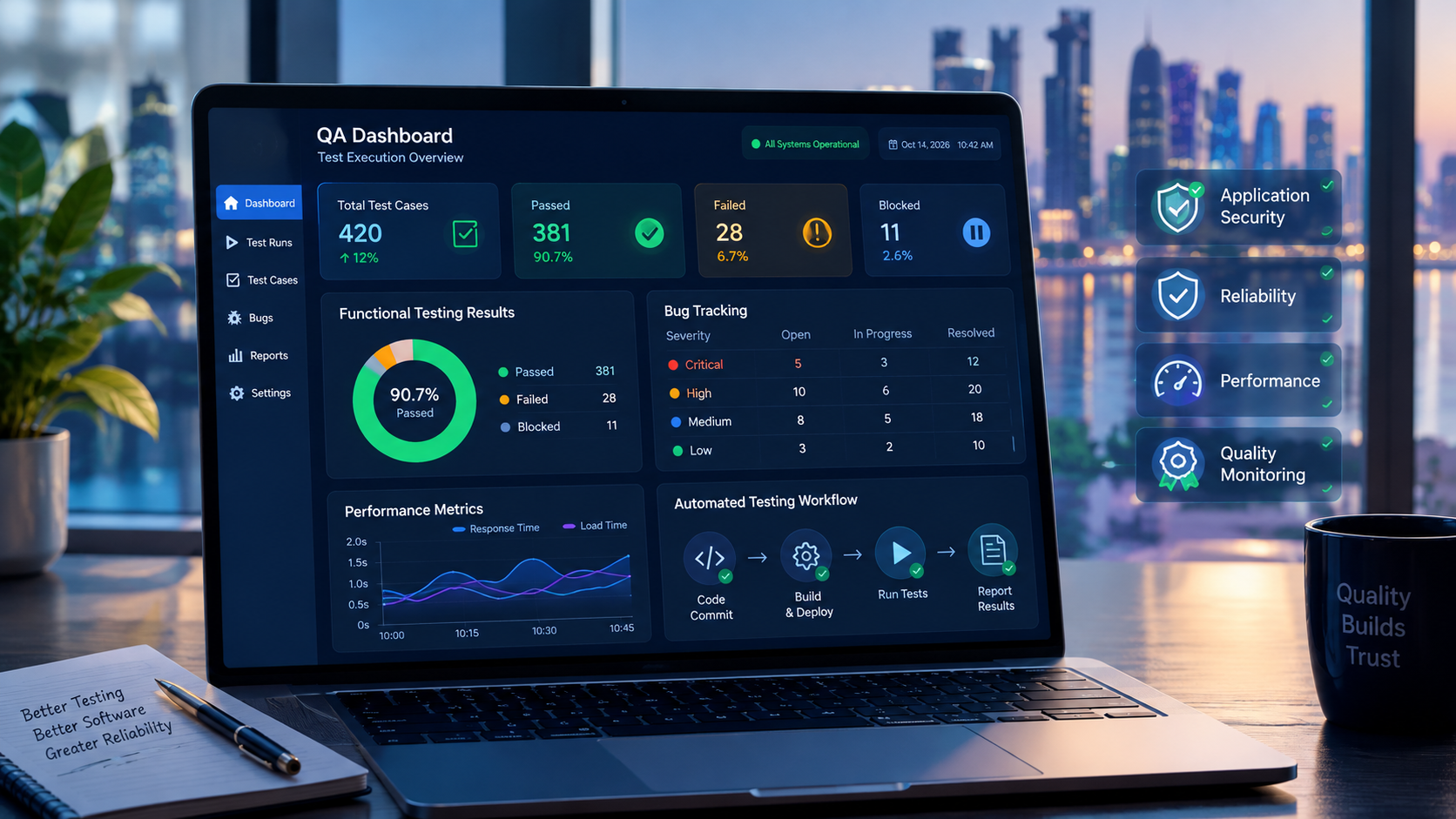
Software testing and quality assurance help businesses identify defects, validate application performance, and improve software reliability before and after launch.
Software Testing and QA Services: Complete Business Guide
Software applications are expected to work reliably, protect business data, perform efficiently, and deliver a consistent user experience. However, even a well-developed application can contain defects that affect customers, disrupt internal operations, or create unexpected costs after launch.
This is why software testing and quality assurance (QA) services are important for businesses investing in digital products.
Software testing helps identify defects and verify whether an application behaves as expected. Quality assurance takes a broader approach by improving the processes, standards, and practices used to build reliable software. Together, they help businesses reduce technical risks, improve product quality, and deliver more dependable digital experiences.
For organizations in Qatar developing business applications, e-commerce platforms, mobile apps, customer portals, or enterprise systems, a structured QA strategy can support smoother launches and long-term software reliability.
This guide explains what software testing and QA services include, which testing methods businesses should consider, how the QA process works, what affects costs, and how to select a suitable testing partner.
What Are Software Testing and QA Services?
Software testing and QA services are professional activities designed to evaluate software quality, identify defects, verify requirements, and improve confidence in an application's behavior before and after release.
Although the terms are often used together, quality assurance and software testing have different purposes.
What Is Software Quality Assurance?
Software quality assurance focuses on the processes used to develop and maintain software. It helps teams establish consistent practices, review requirements, manage defects, and prevent avoidable quality problems.
QA activities may include:
Reviewing business and technical requirements.
Establishing testing standards and acceptance criteria.
Assessing development workflows.
Reviewing test plans and test coverage.
Improving defect management procedures.
Integrating testing into development and release processes.
Monitoring quality indicators across software releases.
The objective is to make quality a continuous responsibility rather than a final inspection.
What Is Software Testing?
Software testing involves evaluating an application, its components, or its behavior to identify defects and determine whether specified requirements are satisfied.
Testing may involve manually checking features, running automated test scripts, examining application responses, simulating user activity, and evaluating performance under different conditions.
For example, testing an online store may involve verifying that customers can register, browse products, add items to their carts, complete payments, and receive accurate order confirmations.
A test team may also check what happens when a payment fails, a network connection is interrupted, or two customers attempt to purchase the last available item.
QA vs. Software Testing: What Is the Difference?
Area | Quality assurance (QA) | Software testing |
|---|---|---|
Primary purpose | Improve and control software development processes | Evaluate software behavior and identify defects |
Main focus | Defect prevention and process improvement | Defect detection and verification |
Typical activities | Standards, reviews, planning, quality monitoring | Test execution, automation, functional checks |
Timing | Throughout the software lifecycle | At appropriate stages throughout development and maintenance |
Outcome | More consistent development and delivery practices | Evidence about software behavior and identified issues |
Both activities are necessary for a dependable software delivery process. Testing alone cannot guarantee that every defect will be found, and documented QA processes cannot replace actual testing.
Businesses should treat them as complementary parts of an overall quality strategy.
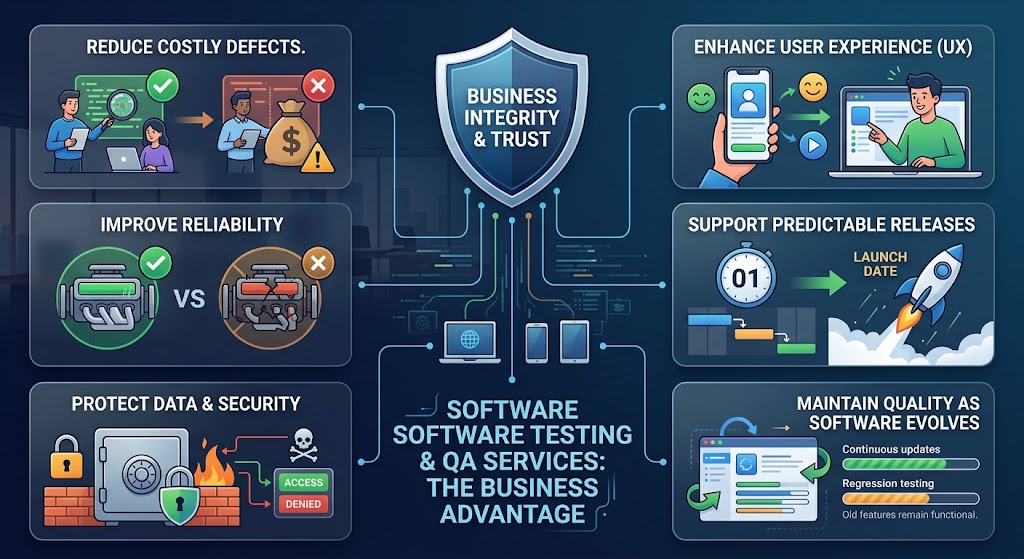
Why Are Software Testing and QA Services Important for Businesses?
A software defect can affect much more than a single feature. It may prevent customers from completing transactions, create inaccurate records, expose sensitive information, or interrupt business operations.
Professional QA services help businesses investigate these risks before they become expensive production problems.
1. Reduce the Risk of Costly Defects
A defect discovered during development can often be corrected before it affects customers. If the same issue reaches production, resolving it may require emergency fixes, data correction, customer communication, and additional release work.
Consider a CRM system that incorrectly assigns leads to sales representatives. The error might cause missed follow-ups and inaccurate performance reports.
Testing the assignment rules, permissions, and reporting logic before deployment can help identify the issue earlier.
2. Improve Application Reliability
Customers expect software to behave consistently across supported workflows and operating conditions.
QA teams evaluate whether an application continues to work correctly when users enter unexpected information, navigate between screens, repeat actions, or interact with connected systems.
Reliability testing is particularly important for business-critical applications such as inventory platforms, financial systems, booking services, and employee management software.
3. Protect Business and Customer Data
Security testing helps identify weaknesses in authentication, authorization, input validation, session management, and other application controls.
For example, a test may verify that an ordinary employee cannot access administrative reports or another customer's private records by changing a URL or request parameter.
Testing does not replace secure development or a comprehensive security assessment, but it can reveal important weaknesses before release.
4. Improve User Experience
A feature can technically work while still being difficult to use.
QA activities can identify confusing navigation, inconsistent validation messages, broken layouts, inaccessible controls, and workflows that require unnecessary steps.
Testing with representative users and realistic scenarios helps determine whether the software supports the tasks people actually need to complete.
5. Support More Predictable Releases
When testing is included in development planning, teams can identify risks earlier and make release decisions using documented evidence.
A structured process also makes it easier to determine which defects must be resolved before launch, which issues can be accepted temporarily, and what requires further investigation.
6. Maintain Quality as Software Evolves
Applications change as businesses introduce features, update dependencies, modify integrations, and respond to customer feedback.
Regression testing helps verify that new changes have not broken existing functionality. This becomes increasingly important as an application grows in complexity.
Businesses building or expanding digital products can incorporate QA into their custom software development process rather than treating testing as an isolated final activity.
Types of Software Testing and QA Services
Different applications require different testing methods. A small business website may need functional, compatibility, and security checks, while a large enterprise platform may require extensive integration, performance, access-control, and regression testing.
The appropriate combination depends on the application's purpose, complexity, users, technology, and business risks.
1. Functional Testing
Functional testing verifies whether software features behave according to documented requirements and expected business rules.
It focuses on what the application does rather than how its internal code is structured.
Common functional testing activities include:
Checking registration and login.
Verifying forms and field validation.
Testing search, filtering, and sorting.
Checking calculations and business rules.
Validating report generation.
Testing user permissions and approval workflows.
Verifying error messages and alternative scenarios.
Example: For an employee management application, functional testing might verify that employees can submit leave requests, managers can approve or reject them, and the final leave balance is updated correctly.
2. Manual Testing
Manual testing involves a tester evaluating software by performing actions, examining results, and comparing actual behavior against expected outcomes.
It is particularly useful when a workflow requires human judgment, exploratory investigation, or evaluation of user experience.
Manual testing can include:
Exploratory testing.
Usability checks.
New-feature validation.
Visual layout inspection.
Complex business workflow testing.
Investigating unexpected application behavior.
For example, a tester may explore how a customer moves from product discovery to checkout, looking for confusing steps that were not anticipated in the original test cases.
Manual testing can be valuable for uncovering unexpected issues, but repetitive checks can become time-consuming when an application has frequent releases.
3. Automated Testing
Automated testing uses scripts and testing tools to execute predefined checks and compare results with expected outcomes.
It is particularly useful for frequently repeated tests, large test suites, and applications that are updated regularly.
Common automation candidates include:
Login and authentication workflows.
Repeated regression tests.
Form validation.
API responses.
Database-related checks.
Critical e-commerce journeys.
Build and deployment verification.
Automation can improve repeatability and shorten feedback cycles. However, automated tests require maintenance, and poorly designed tests may produce unreliable results or overlook important scenarios.
A balanced strategy combines automation for suitable repetitive checks with manual testing for exploratory work and situations requiring human judgment.
4. Performance Testing
Performance testing evaluates how an application responds under different workloads and operating conditions.
It helps teams understand response times, throughput, resource consumption, and potential bottlenecks.
Important performance testing methods include:
Testing method | What it evaluates |
|---|---|
Load testing | Behavior under expected user or transaction volumes |
Stress testing | Behavior beyond normal operating limits |
Spike testing | Response to sudden increases in traffic |
Endurance testing | Stability during sustained workloads |
Scalability testing | Ability to handle increasing demand |
Example: A ticket-booking platform may perform well when only a few people are using it. During a major event, thousands of users might attempt to reserve seats simultaneously.
Load and stress testing can help identify database bottlenecks, slow API responses, resource limitations, and transaction failures before a similar surge occurs in production.
5. Security Testing
Security testing evaluates whether application controls adequately protect systems, accounts, and information against potential attacks and unauthorized access.
Depending on the application and its risk profile, activities may include:
Authentication and authorization testing.
Session management checks.
Input validation testing.
API security testing.
Access-control verification.
Sensitive data exposure checks.
Dependency and configuration reviews.
Vulnerability assessment and penetration testing where appropriate.
Security testing should be planned according to the threat model and the sensitivity of the information involved.
For additional technical guidance, businesses can consult the OWASP Web Security Testing Guide, which provides a structured resource for testing web application security.
Security testing is not a guarantee that software is completely secure. It should be combined with secure development, appropriate infrastructure controls, monitoring, and ongoing vulnerability management.
6. API Testing
Application programming interfaces (APIs) allow different software systems to communicate.
API testing verifies that requests, responses, authentication, data formats, error handling, and business rules work correctly between connected components.
For example, an e-commerce application might connect its website to a payment gateway, inventory system, accounting platform, and delivery service.
API testing can verify that:
Valid requests receive the expected responses.
Invalid requests are handled safely.
Unauthorized users cannot access protected endpoints.
Payment failures do not create falsely confirmed orders.
Inventory changes are reflected correctly.
Repeated requests do not create unintended duplicate transactions.
Timeouts and unavailable services are handled appropriately.
API testing is especially important for businesses using interconnected applications or building custom digital platforms.
7. Integration Testing
Integration testing examines whether different software modules and external systems work correctly together.
A feature may pass its individual tests while still failing when connected to another component.
For example, an HR system might correctly record an approved leave request, but the attendance module may fail to reflect the updated status.
Integration testing helps identify issues involving data exchange, API contracts, authentication, timing, error handling, and dependencies between systems.
8. Regression Testing
Regression testing checks whether existing functionality continues to work after software changes.
Changes that may require regression testing include:
Adding new features.
Fixing defects.
Updating libraries or frameworks.
Modifying database structures.
Changing user permissions.
Updating payment integrations.
Releasing new mobile application versions.
A business management platform, for instance, may introduce a new sales reporting feature. Regression testing can verify that customer records, invoices, permissions, and existing reports continue to function as expected.
Automated regression suites can be particularly useful for frequently updated applications.
9. Compatibility Testing
Compatibility testing checks whether software works across the environments it officially supports.
These environments may include:
Desktop and mobile browsers.
Different screen sizes and resolutions.
Supported operating systems.
Mobile devices and OS versions.
Network conditions.
Supported hardware configurations.
For businesses providing web application development or mobile application development, compatibility testing helps uncover environment-specific issues that might otherwise go unnoticed.
The test matrix should focus on the devices, browsers, and operating systems that matter to the intended audience rather than attempting to test every possible combination.
10. User Acceptance Testing (UAT)
User acceptance testing determines whether the software meets business requirements and supports real operational workflows.
Business representatives, designated users, or product owners typically validate the application against agreed acceptance criteria.
For a property management platform, UAT might include:
Creating a property record.
Adding a unit and assigning its owner.
Registering a prospective tenant.
Preparing and approving a tenancy contract.
Recording a payment.
Generating a management report.
The goal is to verify that the complete workflow meets the business need, not simply that each individual screen functions.
UAT should have defined acceptance criteria, representative test data, documented results, and an agreed process for handling defects.
11. Accessibility Testing
Accessibility testing evaluates whether people with different abilities can use an application effectively.
Depending on the product, checks may include keyboard navigation, visible focus indicators, form labels, color contrast, screen-reader support, and meaningful error messages.
The W3C Web Accessibility Initiative provides information about the Web Content Accessibility Guidelines (WCAG).
Accessibility requirements should be identified early, and testing should combine automated checks with manual evaluation. Automated tools alone cannot establish that an application is fully accessible.
12. Database and Data Migration Testing
Applications frequently depend on accurate, consistent data.
Database testing verifies data integrity, queries, constraints, calculations, and transactions. Data migration testing checks whether information remains accurate when transferred between systems.
Typical checks include:
Comparing record counts before and after migration.
Validating required fields.
Checking relationships between records.
Verifying financial totals.
Detecting missing or duplicated records.
Confirming permissions and data visibility.
Testing rollback and recovery procedures.
This type of testing is particularly valuable when replacing legacy software, implementing an ERP, or consolidating information from multiple business systems.
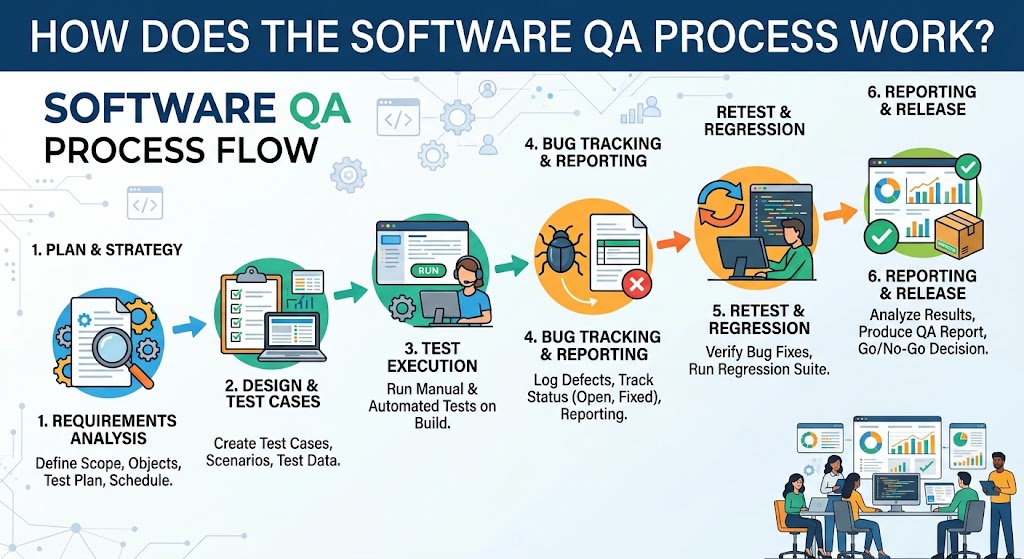
How Does the Software QA Process Work?
A professional QA process should be adapted to the project instead of following the same checklist for every application.
The following workflow provides a practical starting point.
Step 1: Requirements analysis
Review business objectives, user stories, technical specifications, integrations, and acceptance criteria. Identify requirements that are unclear, incomplete, or difficult to verify.
Step 2: Risk assessment and test planning
Identify critical workflows, sensitive data, technical dependencies, and likely failure points. Define the testing scope, responsibilities, tools, schedule, and release criteria.
Step 3: Test design and environment setup
Prepare test cases, test data, expected results, and suitable testing environments. Configure the required browsers, devices, services, accounts, and integrations.
Step 4: Test execution
Perform appropriate functional, integration, performance, security, compatibility, and other selected tests. Record actual results and supporting evidence.
Step 5: Defect reporting and retesting
Document reproducible defects, assign priorities, work with developers to resolve them, and retest fixes. Run regression tests where changes could affect existing functionality.
Step 6: Acceptance and release assessment
Compare test results with agreed release criteria. Document unresolved risks, confirm required approvals, and determine whether the software is ready for deployment.
Step 7: Post-release monitoring
Monitor production behavior, investigate incidents, collect user feedback, and update regression tests as the application evolves.
What Should a QA Test Plan Include?
A useful test plan should define:
Scope and objectives.
Features included and excluded.
Testing types and methods.
Requirements and acceptance criteria.
Test environments and data.
Tools and automation responsibilities.
Defect severity and priority definitions.
Entry and exit criteria.
Roles and approval responsibilities.
Known risks, dependencies, and limitations.
Reporting and release procedures.
The plan should be detailed enough to guide the team without becoming unnecessary documentation that is difficult to maintain.
Manual Testing vs. Automated Testing: Which Is Better?
Manual and automated testing solve different problems. Choosing between them should depend on the application, the frequency of changes, the type of test, and the consequences of failure.
Comparison | Manual testing | Automated testing |
|---|---|---|
Execution | Performed by a person | Executed by scripts and tools |
Initial setup | Often quicker for small, exploratory tasks | Requires test design, coding, and configuration |
Repeated execution | Requires repeated human effort | Can be repeated efficiently once configured |
Exploratory testing | Well suited | Limited without human-guided investigation |
Regression testing | Useful for selected scenarios | Often effective for stable, repeatable checks |
Maintenance | Test procedures need updating | Scripts and test infrastructure need updating |
Best use | Usability, exploration, new or changing workflows | Repetitive checks, critical journeys, continuous integration |
When Should Businesses Choose Manual Testing?
Manual testing is useful when a feature is new, requirements are evolving, the expected behavior is difficult to express as fixed assertions, or human judgment is important.
For example, evaluating whether a checkout process is confusing may require a tester to observe the flow, interpret messages, and investigate unexpected interactions.
When Should Businesses Choose Test Automation?
Automation is appropriate when tests need to run frequently, have predictable expected outcomes, and provide enough value to justify their development and maintenance.
A login test, for example, might be executed after every significant application update to verify that authentication continues to work.
Is a Hybrid QA Strategy Better?
For many business applications, a hybrid approach is practical.
Automate stable, high-value regression checks.
Use manual testing for exploratory investigation and usability evaluation.
Automate appropriate API and integration checks.
Perform targeted security testing based on application risks.
Involve business users in acceptance testing.
The objective is not to automate every possible test. It is to use the right testing method for each risk and requirement.
Software Testing for Different Business Applications
QA requirements vary considerably depending on the software being developed. Testing should reflect how the application will be used in real business operations.
E-Commerce Websites and Online Stores
E-commerce testing focuses on the complete shopping journey, from browsing products to payment and order fulfillment.
Important test scenarios include:
Product search, filtering, and sorting.
Shopping cart calculations and discounts.
Stock availability and inventory updates.
Successful and failed payments.
Duplicate payment or order prevention.
Shipping costs and delivery selections.
Refunds and order cancellations.
Customer notifications.
Mobile and browser compatibility.
A critical scenario is an interrupted payment. The system should handle the interruption consistently and avoid presenting an order as successfully paid when confirmation has not been received.
CRM and Sales Management Systems
CRM testing verifies that customer information, sales activities, and reporting remain accurate.
Testing may cover:
Lead creation and assignment.
Customer record updates.
Follow-up reminders.
Sales pipeline stages.
Duplicate record handling.
Role-based access.
Quotation and approval workflows.
Dashboard calculations.
Notifications and integrations.
A practical example is checking whether a lead assigned to one salesperson remains visible to authorized managers without exposing restricted customer information to unrelated employees.
ERP and Business Management Software
ERP systems connect business processes across departments. A defect in one module may affect several others.
Testing should cover workflows involving finance, HR, inventory, sales, procurement, and reporting where applicable.
For example, a sales order may affect inventory availability, invoicing, accounting records, and delivery processing. Integration testing should verify that these systems exchange information consistently.
Mobile Applications
Mobile QA evaluates behavior across supported devices, screen sizes, operating systems, and network conditions.
Important scenarios include:
Installation and application updates.
Login and session expiration.
Push notifications.
Permissions and privacy settings.
Offline and poor-network behavior.
Background and foreground transitions.
Data synchronization.
Battery and resource usage.
Accessibility and responsive layouts.
Businesses developing mobile products can incorporate testing into their mobile application development workflow to catch device-specific issues before release.
Cloud-Based Applications and SaaS Platforms
Cloud applications may depend on external APIs, distributed services, databases, identity providers, and infrastructure configurations.
Testing can include availability checks, load testing, API verification, recovery testing, configuration review, access control, and monitoring validation.
A cloud-based business platform should also be tested for appropriate behavior when a dependent service becomes unavailable. Depending on the architecture, the application may need to retry a request safely, display a useful error, or temporarily disable a dependent feature.
Software QA in Qatar: What Businesses Should Consider
Businesses in Qatar may operate customer-facing websites, enterprise applications, employee platforms, payment systems, and services that handle confidential business information.
Selecting QA services requires more than checking whether an application works in a developer's environment. Testing should reflect the actual business context, operational requirements, and applicable obligations.
1. Identify Applicable Security and Quality Requirements
The Qatar National Cyber Security Agency publishes software security and quality assurance resources, including its Software Security and Quality Assurance guidance.
These resources are relevant when assessing software security and quality requirements. Their applicability depends on the organization, system, and any relevant contractual or regulatory obligations.
Businesses should verify the latest applicable requirements with the appropriate compliance or security professionals rather than assuming that one standard applies to every private-sector application.
2. Assess Data Protection and Access Controls
Applications that process customer, employee, financial, or other sensitive information should be tested for appropriate access restrictions and secure data handling.
For example, an employee self-service portal should not expose one employee's documents or personal records to another employee without authorization.
Organizations should identify applicable Qatar data protection requirements and industry-specific obligations before finalizing their QA scope.
3. Test Realistic Business Workflows
Testing should reflect how teams actually work.
For example, a local service business may need to validate customer enquiries, quotation approvals, service scheduling, payment processing, and management reports.
An education platform may need different checks for student records, admissions, attendance, and role-based access.
4. Validate Language, Currency, and Regional Requirements
Where an application serves users in Qatar, test any relevant Arabic and English interfaces, right-to-left layouts, date formats, currency calculations, and locally used workflows.
These checks should be based on the product's actual requirements. A system that does not offer Arabic, for example, should not be judged against an Arabic-language requirement unless one has been specified.
5. Plan for Integrations and Operational Continuity
Business applications may connect to payment providers, accounting systems, customer platforms, cloud infrastructure, or third-party APIs.
Testing should verify these connections, including failure scenarios and recovery behavior. Business-critical systems should also have appropriate backup, restoration, and incident-handling plans.
For organizations planning broader digital initiatives, cloud and DevOps solutions can be relevant to deployment automation, environment management, and repeatable release processes.
How Much Do Software Testing and QA Services Cost?
There is no universal price for software testing and QA services. The cost depends on the application, testing scope, required expertise, schedule, tools, and the level of risk involved.
A limited functional test of a small website is different from a full QA engagement for a multi-module enterprise system.
Key Factors That Affect QA Costs
Cost factor | Why it matters |
|---|---|
Application complexity | More features and dependencies require additional test coverage |
Number of platforms | Different browsers, devices, and operating systems expand the test matrix |
Testing scope | Performance, security, accessibility, and integration testing require different skills and effort |
Automation requirements | Automation involves setup, scripting, infrastructure, and ongoing maintenance |
Data and integrations | Complex workflows and external services create additional test scenarios |
Defect severity and frequency | Significant defects may require repeated investigation, fixes, and regression testing |
Schedule | Compressed timelines can require additional resources or prioritization |
Documentation and reporting | Formal evidence, traceability, and compliance-related reporting add work |
Ongoing support | Continuous releases require recurring testing and maintenance |
Common QA Engagement Models
Project-based testing: A defined scope is tested for a specific release, milestone, or launch.
Dedicated QA resources: Testers work with the development team over an agreed period, supporting ongoing testing needs.
Automation-focused engagement: The priority is creating or improving automated tests for repeatable workflows and regression coverage.
Continuous QA support: Testing is incorporated into regular development, release, and maintenance activities.
How Can Businesses Estimate Their QA Budget?
A useful estimate starts with a clear scope rather than an arbitrary price per application.
List the application's major features and critical workflows.
Identify supported devices, browsers, and integrations.
Determine which testing types are required.
Assess existing documentation, test cases, and automation.
Identify security, performance, and compliance-related risks.
Estimate test design, execution, defect investigation, retesting, and reporting effort.
Define ongoing testing needs after launch.
Businesses should request a scope-based quotation that explains the deliverables, assumptions, exclusions, and responsibilities.
Avoid selecting a provider solely because its initial price is the lowest. Inadequate testing may leave important risks unaddressed, while excessive testing of low-risk areas can waste resources.
How to Choose the Right Software Testing and QA Company
A suitable QA provider should understand the application's business purpose, testing requirements, technical architecture, and operational risks.
Consider the following criteria before selecting a partner.
1. Relevant Technical Expertise
Check whether the provider can support the testing types your application needs.
A provider testing a web application may need browser automation and API testing capabilities, while an enterprise platform may require experience with integrations, data migration, performance, and complex business workflows.
2. A Clear Testing Methodology
Ask how the team handles requirements analysis, test planning, test execution, defect reporting, retesting, and release recommendations.
A structured approach should explain how testing scope is selected and how results are communicated.
The ISTQB Certified Tester Foundation Level syllabus is one established reference for testing terminology, test design, risk management, and test activities. It can help businesses understand relevant testing concepts when evaluating a provider's approach.
3. Transparent Defect Reporting
Defect reports should include enough information for developers and stakeholders to understand the issue.
Useful details include:
A clear issue summary.
Steps to reproduce the problem.
Expected and actual results.
Severity and priority.
Relevant environment and test data.
Screenshots, logs, or other evidence where appropriate.
Retesting status after a fix.
Ask for a sample report or a demonstration of the provider's reporting workflow.
4. Appropriate Automation Capabilities
If automation is important, ask which tests will be automated and why.
A good proposal should explain the expected benefits, framework choice, maintenance approach, and how automated results will be integrated into development and release processes.
Automation should support a defined quality objective rather than serve as a marketing claim.
5. Security and Confidentiality Practices
QA work may require access to source code, test accounts, business records, and technical environments.
Discuss access permissions, test-data handling, confidentiality, environment isolation, credential management, and the secure disposal of temporary data.
Sensitive production information should not be copied into testing environments without appropriate authorization and safeguards.
6. Communication and Collaboration
QA works best when testers, developers, product owners, and business stakeholders can communicate clearly.
Confirm who will report defects, who will make priority decisions, how unresolved issues will be escalated, and who is responsible for final acceptance.
7. Defined Deliverables
Before signing an agreement, confirm exactly what the engagement includes.
Deliverables might include a test plan, test cases, execution results, defect reports, automated test scripts, performance findings, security findings, and a release-readiness summary, depending on the scope.
Also clarify what is excluded, how many retesting cycles are included, and whether support continues after release.
Businesses looking for a technology partner can review Galaxium Coding's projects and portfolio to understand its publicly presented work and capabilities. For any proposed engagement, confirm the exact QA scope, deliverables, and responsibilities directly with the provider.
Common Software Testing Mistakes Businesses Should Avoid
Even organizations that allocate a budget for QA can overlook important risks if their testing strategy is poorly planned.
Testing Only Before Launch
Treating QA as the final stage leaves less time to investigate defects and make changes.
Better approach: Include testing in requirements reviews, development cycles, integration work, and release planning.
Relying Entirely on Happy-Path Tests
A happy-path test checks whether a feature works when everything goes as expected. It may not reveal what happens when a payment fails, required information is missing, or a third-party service becomes unavailable.
Better approach: Include invalid inputs, boundary conditions, permission checks, interrupted workflows, and failure-recovery scenarios.
Automating Every Test Without Prioritization
Automation requires development and maintenance. Automating unstable or rarely used workflows may consume resources without delivering sufficient value.
Better approach: Prioritize stable, frequently repeated, business-critical tests.
Ignoring Security and Permissions
An application may pass its functional tests while exposing restricted information through incorrect authorization rules.
Better approach: Include role-based access testing, API authorization checks, and security-focused test scenarios in the appropriate scope.
Using Unrealistic Test Data
Small or artificial datasets may fail to reveal problems that appear with realistic data volumes, record relationships, or business rules.
Better approach: Use representative, appropriately protected test data that reflects expected business scenarios.
Failing to Retest Fixes
A developer may resolve a reported issue without fully addressing its cause. The change may also introduce a new defect.
Better approach: Reproduce the original issue, verify the fix, and run relevant regression tests.
Measuring Quality Only by the Number of Bugs Found
Finding many defects does not automatically mean testing is effective. The number depends on the application's condition, scope, test coverage, and reporting practices.
Better approach: Evaluate whether testing covers important requirements, identifies significant risks, provides reliable evidence, and supports informed release decisions.
How to Measure Software QA Effectiveness
Quality metrics can help businesses understand testing progress and identify areas requiring improvement. They should be interpreted together rather than used as isolated performance targets.
Metric | What it helps measure |
|---|---|
Requirement coverage | Whether important requirements have corresponding tests |
Test pass rate | The proportion of executed tests that pass |
Defect severity distribution | The seriousness of identified problems |
Defect leakage | Defects discovered after release that should have been caught earlier |
Regression test coverage | The extent to which existing functionality is rechecked |
Defect resolution time | How long issues take to resolve and verify |
Automation reliability | Whether automated tests produce consistent, trustworthy results |
Production incidents | The number and impact of software problems affecting users |
Example: Interpreting QA Metrics
Imagine a business application has a high test pass rate but several critical payment scenarios have not been tested.
The pass rate alone would provide a misleading impression of readiness.
A more useful assessment would consider which tests were executed, what remains untested, whether critical defects are unresolved, and whether the application meets its agreed release criteria.
Metrics should support decisions, not replace professional judgment.
The Role of Automation, AI, and Continuous QA
Software testing practices continue to evolve as applications become more interconnected and development teams release changes more frequently.
Continuous Testing in DevOps
Continuous testing integrates suitable automated checks into development and delivery workflows.
For example, a development pipeline might run unit tests after code changes, API tests during integration, and selected end-to-end tests before deployment.
This approach can provide earlier feedback and reduce the time required to discover regressions.
However, automated checks need sensible time limits, stable environments, meaningful assertions, and clear handling of failed tests.
AI-Assisted Testing
AI-based tools can assist with activities such as generating candidate test cases, analyzing logs, grouping similar defects, identifying potential edge cases, and maintaining certain automated tests.
These capabilities may reduce some repetitive work, but AI-generated tests still need review.
AI can produce incorrect assumptions, miss important business rules, or generate tests that pass without validating the intended behavior.
Businesses should assess tools based on their actual accuracy, maintainability, data-handling practices, and compatibility with existing workflows.
Risk-Based Testing
Risk-based testing allocates more effort to features where failure could have the greatest impact.
For example, a payment transaction or privileged administrative action may deserve more rigorous testing than a low-impact decorative element.
This strategy helps teams prioritize limited time and resources without assuming that every feature carries the same level of risk.
Quality Engineering
Quality engineering expands the focus beyond finding defects in finished software. It emphasizes designing systems and development processes that make quality easier to achieve and maintain.
This can include testable architecture, clear acceptance criteria, automated checks, observability, secure development practices, and feedback from production systems.
For businesses investing in custom digital products, quality engineering can help establish a more sustainable approach to software reliability.
Frequently Asked Questions About Software Testing and QA Services
1. What do software testing and QA services include?
They can include requirements reviews, test planning, manual testing, test automation, functional and integration testing, performance evaluation, security testing, compatibility checks, regression testing, user acceptance testing support, and defect reporting. The exact scope depends on the application and business requirements.
2. When should software testing begin?
Testing should begin during requirements and design activities, not just before launch. Early reviews can identify unclear requirements, while ongoing testing helps detect defects as features are developed and integrated.
3. Is QA different from quality control?
Quality assurance primarily focuses on processes intended to prevent defects and improve how software is produced. Quality control focuses on evaluating the resulting product against requirements. Software testing is an important quality control activity, while QA includes broader process-oriented work.
4. Is manual testing still necessary when automation is available?
Yes, in many projects. Automation is effective for repeatable checks, but manual testing remains useful for exploratory investigation, usability evaluation, and situations requiring human judgment. The appropriate balance depends on the application.
5. Can automated testing guarantee defect-free software?
No. Automated tests can verify selected conditions and detect known classes of problems, but they cannot prove that every possible defect has been eliminated. Test coverage, test quality, changing requirements, and unanticipated conditions all affect the results.
6. How long does software QA testing take?
The timeline depends on application complexity, test scope, available documentation, platform coverage, integration requirements, defect frequency, and retesting effort. A small, well-defined change may need limited testing, while an enterprise application may require multiple test cycles.
7. What is the difference between functional and non-functional testing?
Functional testing checks what software does, such as creating an order or approving a leave request. Non-functional testing evaluates characteristics such as performance, security, usability, accessibility, and reliability.
8. What is regression testing, and why is it important?
Regression testing checks whether existing functionality continues to work after changes. It is important because even a small update can affect other parts of a connected application.
9. What should a business receive from a QA service provider?
Depending on the agreement, deliverables may include a test plan, test cases, execution records, defect reports, automated test assets, test summaries, and a release-readiness assessment. Businesses should agree on deliverables and exclusions before testing begins.
10. How much do QA services cost in Qatar?
There is no single price that applies to all businesses. Costs depend on the application, testing requirements, platforms, integrations, security needs, automation, timeline, and ongoing support. Request a scope-based estimate that specifies the work and deliverables.
11. Can QA services be used for existing software?
Yes. QA services can help evaluate existing websites, mobile apps, enterprise systems, and legacy applications. Testing can focus on current defects, regression risks, security weaknesses, performance bottlenecks, and areas affected by planned changes.
12. How can a business prepare for a QA engagement?
Prepare a description of the business objectives, user workflows, requirements, supported platforms, known issues, integrations, and expected release date. Provide suitable test environments and authorized access, and identify who will review defects and approve the final release.
Final Thoughts
Software testing and QA services help businesses make better-informed decisions about software quality, reliability, security, and release readiness.
The right approach goes beyond checking whether an application opens or whether its main features work. It examines critical workflows, integration behavior, performance expectations, access controls, and the risks associated with real business use.
Businesses should select testing methods according to their application, prioritize high-impact risks, combine manual and automated testing where appropriate, and incorporate quality checks throughout the software lifecycle.
For organizations in Qatar developing new applications or improving existing systems, a clearly defined QA strategy can support more dependable releases and better long-term software maintenance.
If your organization is planning a new digital product or improving an existing business application, explore Galaxium Coding's software development services and discuss the testing, quality, and delivery requirements relevant to your project. You can also contact Galaxium Coding to discuss your business objectives and potential next steps.