Lead Management Software: How to Stop Losing Potential Customers
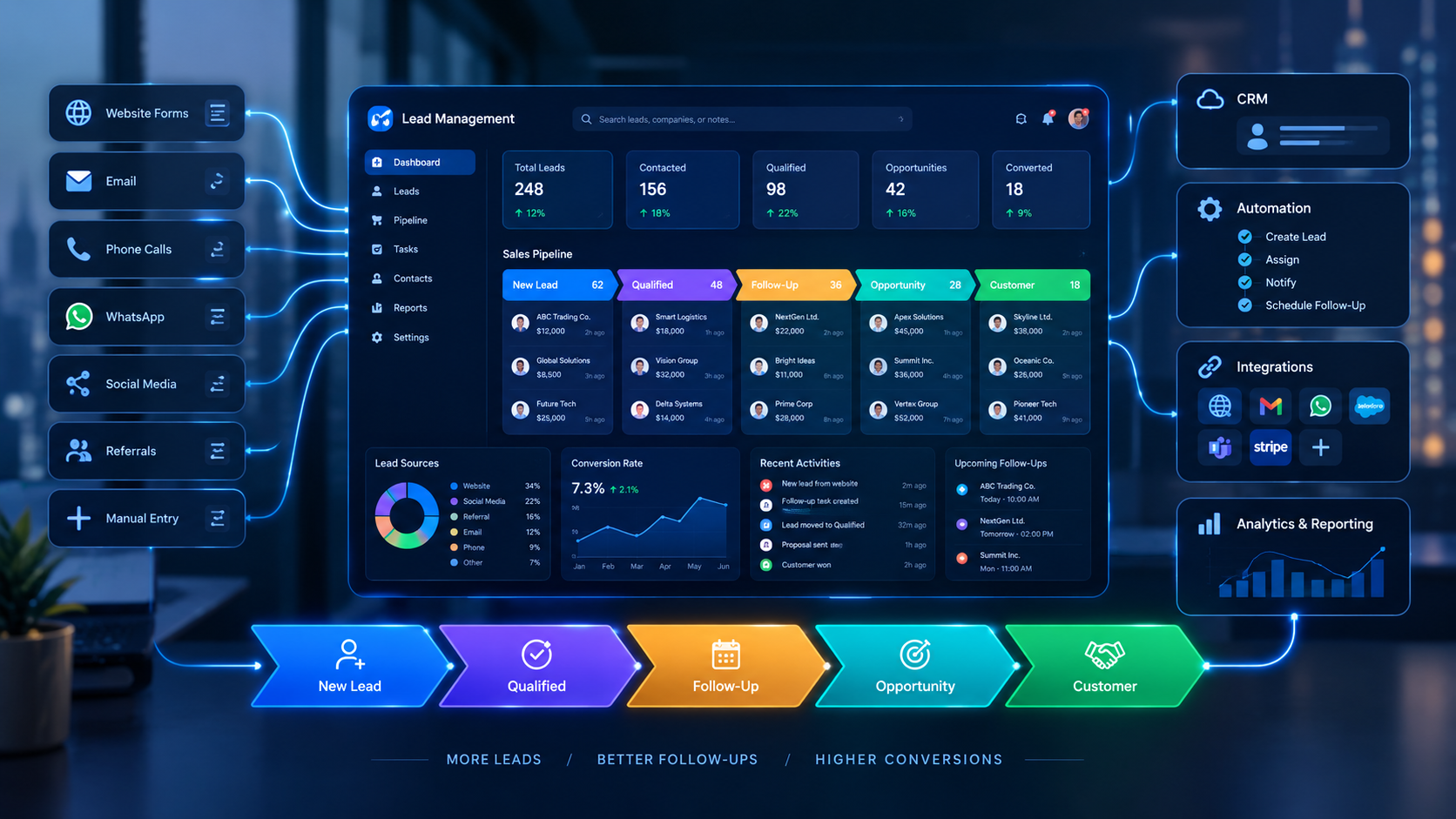
Lead management software can connect lead capture, assignment, follow-ups, sales pipelines, and customer conversion in one centralized workflow
Lead Management Software: How to Stop Losing Potential Customers
Every customer journey starts somewhere.
A website enquiry. A phone call. A social media message. A contact form. A WhatsApp conversation. A referral. A request for a quotation.
The problem is that generating a lead is only the beginning.
A business can spend money on advertising, content, SEO, social media, websites, and sales campaigns to attract potential customers — but still lose opportunities if those leads are not managed properly after they arrive.
This is where lead management software becomes important.
Instead of allowing potential customers to disappear inside spreadsheets, inboxes, messaging applications, handwritten notes, or disconnected systems, businesses can use a centralized platform to capture leads, assign them to the right employees, schedule follow-ups, track sales activity, and understand what happens to each opportunity.
For businesses exploring broader custom software development, lead management can also become part of a larger business management ecosystem connecting websites, CRM systems, sales teams, automation, analytics, and customer communication.
But software alone does not solve every sales problem.
The real objective is to create a reliable process:
Lead captured → Lead assigned → Lead qualified → Follow-up → Opportunity → Proposal → Customer
This guide explains how lead management software can help businesses reduce missed opportunities, improve follow-up discipline, organize sales pipelines, and create better visibility into customer acquisition.
What Is Lead Management Software?
Lead management software is a system used to capture, organize, qualify, assign, track, and follow up with potential customers throughout the sales process.
A basic lead record might contain:
Name
Phone number
Email address
Company
Source
Date received
Product or service of interest
Lead status
Assigned salesperson
Notes
Follow-up date
Communication history
Sales opportunity
Conversion status
Instead of keeping this information in separate places, the software creates a centralized record.
For example:
Website enquiry
↓
Lead automatically created
↓
Sales representative assigned
↓
Notification sent
↓
Follow-up scheduled
↓
Customer contacted
↓
Opportunity created
↓
Proposal sent
↓
Won / Lost
This gives the sales team a defined process instead of relying on memory.
Why Businesses Lose Potential Customers
Lead loss is not always caused by a lack of demand.
Sometimes the business already has interested prospects but fails to manage them effectively.
Common causes include:
1. Leads Are Stored in Different Places
A company may receive enquiries through:
Website forms
Email
Phone calls
WhatsApp
Facebook
Instagram
LinkedIn
Online advertising
Referral partners
Physical locations
Sales representatives
If every channel is managed separately, employees may not have a complete picture of the prospect.
One salesperson may have information in WhatsApp while another keeps leads in Excel.
The result can be duplicated records, missing information, and inconsistent follow-up.
2. Nobody Clearly Owns the Lead
A new enquiry arrives.
The sales team sees it.
Everyone assumes someone else will respond.
Eventually, nobody does.
Lead management software can reduce this problem by assigning leads according to predefined rules.
For example:
New lead → Sales team → Assigned representative → Notification
The system can make ownership visible.
3. Follow-Ups Depend on Memory
A salesperson might speak to a prospect today and think:
“I'll call them next week.”
But next week becomes two weeks.
Then the opportunity becomes cold.
A lead management system can create tasks and reminders so the next action is recorded rather than remembered.
4. Leads Are Not Properly Qualified
Not every enquiry is equally valuable.
A business may have:
High-intent prospects
Early-stage researchers
Existing customers
Price shoppers
Unqualified enquiries
Duplicate leads
Spam
Prospects that are not currently ready to buy
Without qualification criteria, sales representatives may spend too much time on low-value opportunities while important leads receive insufficient attention.
5. Managers Cannot See What Is Happening
A spreadsheet may show a list of leads.
It does not necessarily show the complete sales process.
Management may need to know:
How many new leads arrived?
Which channels generated them?
How many were contacted?
How many were qualified?
How many became opportunities?
Which salespeople have the most open leads?
Which leads have not been followed up?
How many opportunities were won?
Where are prospects dropping out?
Lead management software can turn these questions into dashboards and reports.
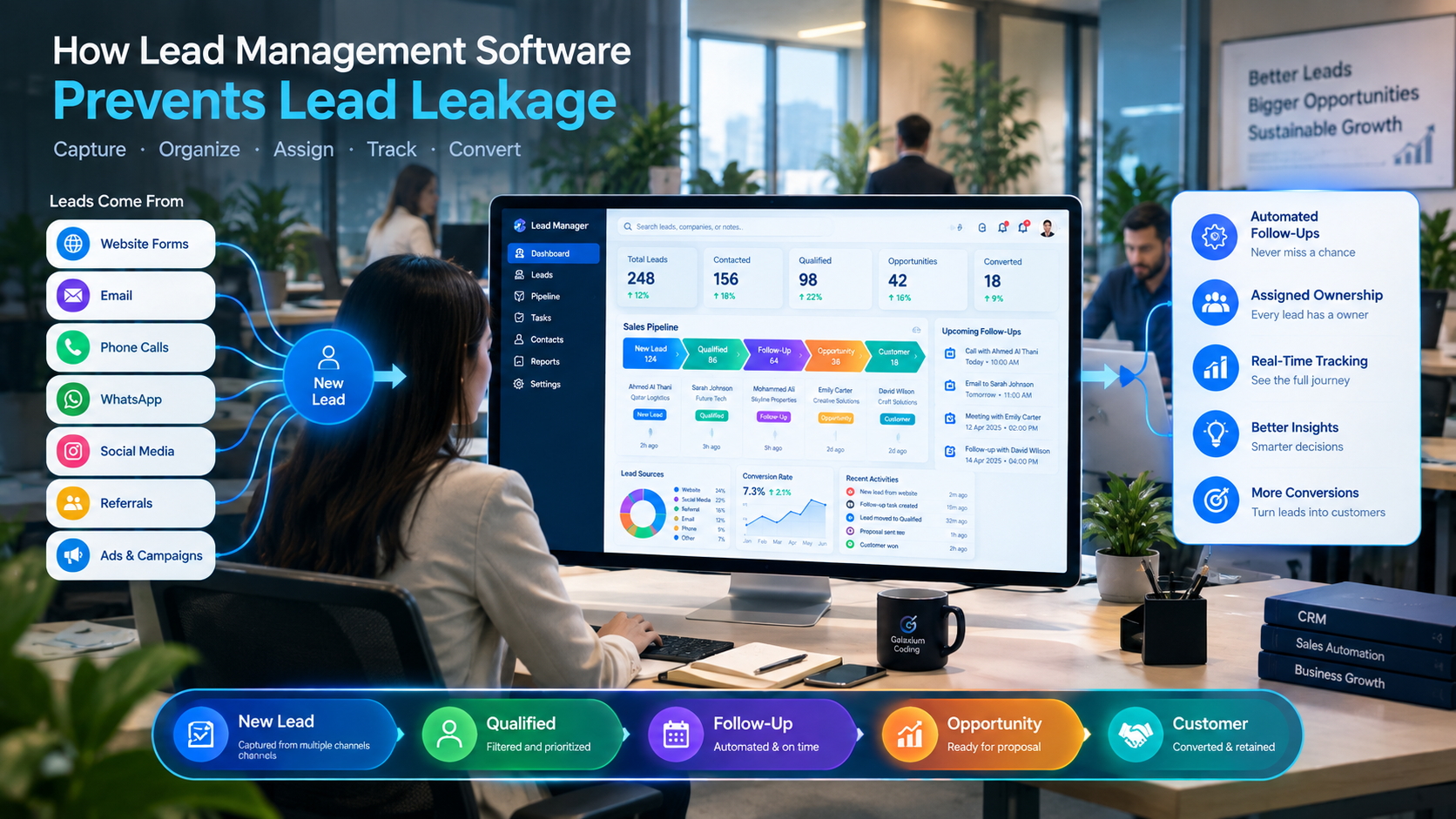
How Lead Management Software Prevents Lead Leakage
The central purpose of lead management is not simply storing customer information.
It is creating a controlled process around every potential customer.
A well-designed system can help prevent lead leakage through several stages.
1. Capture Every Lead
The first requirement is making sure leads enter the system.
For example:
Website
↓
Lead Management System
↓
CRM
↓
Sales Team
A website form can potentially send submitted information directly into a CRM or business management system rather than requiring an employee to copy the information manually.
This is particularly useful for businesses receiving many enquiries.
Businesses developing more sophisticated customer-facing systems can also consider web application development when the lead-generation process requires a custom customer portal, dashboard, enquiry platform, or integrated business application.
Example
Imagine a real estate company receives 100 property enquiries through its website.
Without integration:
Website → Email → Employee → Spreadsheet → Salesperson
With an integrated system:
Website → CRM → Property/Lead Record → Agent Assignment → Follow-Up
The second workflow provides a clearer chain of responsibility.
2. Automatically Assign Leads
Once a lead enters the system, the next question is:
Who should handle it?
Lead management software can support different assignment strategies.
Round-Robin Assignment
Leads are distributed among sales representatives in sequence.
Example:
Lead 1 → Salesperson A
Lead 2 → Salesperson B
Lead 3 → Salesperson C
Lead 4 → Salesperson A
Territory-Based Assignment
Leads are assigned based on geographic location.
For example:
Doha → Team A
Al Rayyan → Team B
Other region → Team C
Product-Based Assignment
A company selling multiple products can assign leads according to their interests.
For example:
Software → Software Team
Consulting → Consulting Team
Support → Customer Success
Expertise-Based Assignment
Leads can be routed according to salesperson expertise.
For example:
Enterprise enquiry → Enterprise Sales
SME enquiry → SME Sales
Real estate enquiry → Property Specialist
The correct approach depends on the organization's workflow.
3. Track Lead Status
A lead should not simply exist as an entry in a database.
The system should show where that lead currently stands.
A basic pipeline could include:
Stage | Meaning |
|---|---|
New | Lead has just entered the system |
Contacted | Sales representative has attempted contact |
Qualified | Lead meets defined criteria |
Opportunity | Genuine sales opportunity exists |
Proposal Sent | Commercial proposal has been issued |
Negotiation | Customer is discussing terms |
Won | Customer converted |
Lost | Opportunity did not convert |
Nurture | Customer may be suitable later |
The exact stages should match the business.
A real estate company may use:
New Enquiry → Contacted → Viewing Scheduled → Viewing Completed → Negotiation → Booking → Closed
A software company may use:
New Lead → Discovery Call → Qualified → Requirements → Proposal → Negotiation → Won
The important point is that employees should know what each stage means and what action comes next.
4. Create Follow-Up Tasks
One of the most useful functions of lead management software is follow-up management.
For every active lead, the system can potentially store:
Next action
Follow-up date
Assigned employee
Priority
Notes
Previous interaction
Communication channel
Expected value
For example:
Lead: ABC Company
Status: Proposal Sent
Next Action: Follow-up call
Date: Monday
Assigned To: Sales Representative
Priority: High
Instead of searching through old conversations, the salesperson can open the lead record and immediately see what needs to happen next.
5. Record Communication History
A prospect may communicate with a business through several channels.
For example:
Monday → Website enquiry
Tuesday → Phone call
Wednesday → WhatsApp
Friday → Email
Next Monday → Follow-up call
If these interactions are not recorded, the salesperson may not know what has already been discussed.
A centralized communication history can provide context.
It may record:
Calls
Emails
Notes
Meetings
Tasks
Messages
Documents
Proposals
Status changes
This creates a more complete customer timeline.
6. Prioritize Important Leads
Not every lead deserves exactly the same level of attention.
Lead management software can support prioritization using business-defined criteria.
For example:
High Priority
Strong buying intent
Large potential contract
Decision-maker identified
Clear requirement
Short purchasing timeline
Medium Priority
Genuine requirement
Longer buying timeline
Additional information required
Low Priority
Early research
Limited information
No immediate requirement
More advanced systems may also use scoring models.
For example:
Lead Score = Source + Engagement + Business Fit + Buying Intent + Timeline
The scoring rules should be based on the company's actual sales process rather than arbitrary numbers.
Lead Management Software vs Spreadsheet
Many businesses begin with spreadsheets.
That is not necessarily wrong.
A spreadsheet can be useful when the number of leads is small and the process is simple.
The problem appears when the business grows beyond what the spreadsheet can comfortably manage.
Area | Spreadsheet | Lead Management Software |
|---|---|---|
Lead storage | Manual | Centralized |
Assignment | Manual | Can be automated |
Follow-ups | Manual reminders | Tasks and notifications |
Communication history | Often fragmented | Centralized |
Pipeline | Basic | Structured |
Reporting | Manual | Dashboard-based |
Automation | Limited | Workflow automation |
Permissions | Basic | Role-based access |
Integrations | Often manual | APIs/integrations possible |
Scalability | Can become difficult | Designed for larger workflows |
The goal is not to replace every spreadsheet simply because software exists.
The better question is:
Has the sales process become too complex or too valuable to manage manually?
If the answer is yes, dedicated lead management software may be worth considering.
What Features Should Lead Management Software Include?
The right feature set depends on the organization.
However, several capabilities are commonly useful.
Lead Capture
The system should be able to receive leads from relevant sources.
Potential sources include:
Website forms
Landing pages
Email
Phone enquiries
Advertising campaigns
Social media
Referral channels
Manual entry
APIs
Lead Database
Each lead should have a structured record containing the information sales employees actually need.
Lead Assignment
The system should make it clear who owns each lead.
Pipeline Management
Sales representatives should be able to see where each lead is in the customer journey.
Follow-Up Management
The system should support:
Tasks
Reminders
Deadlines
Next actions
Notifications
Search and Filtering
Sales teams should be able to filter leads by:
Status
Employee
Source
Industry
Location
Date
Priority
Product
Lead score
Dashboards
Management may need visibility into:
New leads
Active opportunities
Conversion rates
Pipeline value
Sales activity
Lead sources
Follow-up performance
Reporting
Reports can help identify patterns such as which sources produce enquiries and which stages experience the most drop-off.
Automation
Automation can reduce repetitive administrative work.
For example:
New lead → Create record → Assign employee → Notify employee → Schedule follow-up
Integrations
A lead management system may need to connect with:
Website
Email
Messaging platforms
Marketing systems
Accounting
ERP
Payment systems
Customer portals
Analytics platforms
APIs can allow different systems to exchange information when the relevant platforms support integration.
Lead Management Automation Examples
Automation becomes particularly useful when the sales team handles a large number of enquiries.
Example 1: Website Lead
Customer submits form
↓
System validates information
↓
Lead created
↓
Lead assigned
↓
Salesperson notified
↓
Follow-up task created
↓
Management dashboard updated
Example 2: Lead With No Response
Suppose a salesperson does not update an active lead for several days.
A workflow could potentially notify the salesperson or manager.
Lead inactive
↓
Reminder
↓
No action
↓
Manager notification
↓
Lead reassigned or reviewed
The exact rules depend on the business.
Example 3: High-Value Lead
A high-value enquiry could trigger a different process.
High-value enquiry
↓
Lead created
↓
Senior salesperson notified
↓
Priority follow-up
↓
Manager visibility
This prevents important opportunities from being treated like ordinary enquiries.
How Different Industries Can Use Lead Management Software
Lead management is not limited to one industry.
Real Estate
Real estate businesses often manage:
Property enquiries
Buyer leads
Seller leads
Property preferences
Agent assignment
Viewing appointments
Follow-ups
Negotiations
Property documents
A lead management system can connect these activities.
For example:
Property Enquiry → Lead → Agent → Viewing → Negotiation → Booking

Education
Educational organizations can manage:
Student enquiries
Course interests
Applications
Admissions
Follow-ups
Parent enquiries
Counselling sessions
Lead management can become part of a broader education platform. Galaxium Coding also provides education technology solutions for organizations requiring digital education workflows.
Professional Services
Consulting firms, agencies, legal businesses, accounting companies, and other professional services organizations may receive enquiries that require several stages before conversion.
A system can track:
Enquiry → Consultation → Qualification → Proposal → Negotiation → Engagement
Construction
Construction companies may manage enquiries involving:
Projects
Contractors
Developers
Quotations
Site requirements
Project estimates
Follow-ups
Contract discussions
Lead management can connect the initial enquiry with later sales and project workflows.
E-Commerce
E-commerce companies usually focus heavily on transactions, but lead management can still be relevant for:
B2B enquiries
Wholesale customers
High-value purchases
Corporate accounts
Product enquiries
Partnership opportunities
Lead Management for Businesses in Qatar
For businesses in Qatar, lead management can be particularly relevant when customer acquisition happens across multiple digital and offline channels.
A business may receive enquiries through:
Corporate websites
Social media
Search advertising
Messaging
Phone calls
Events
Referrals
Physical branches
The important consideration is not simply adding the word "Qatar" to a CRM strategy.
It is understanding how the actual business receives and processes customer enquiries.
For example, a company operating multiple branches may need:
Customer Enquiry → Location Identification → Branch Assignment → Sales Representative → Follow-Up
A company selling to both individual consumers and businesses may instead need:
Enquiry → Customer Type → Qualification → Sales Team → Pipeline
The software should reflect the real workflow.
For organizations requiring a broader technology platform, business software and custom application development can connect lead management with other operational systems.
Lead Management Software and CRM: What's the Difference?
The terms lead management software and CRM are often used interchangeably, but they can describe different scopes.
Lead management focuses heavily on potential customers before and during the sales process.
CRM is broader and may include:
Leads
Contacts
Customers
Accounts
Sales opportunities
Communication history
Customer service
Tasks
Reports
Customer relationships
A simplified relationship is:
Lead Management ⊂ CRM
Lead management can therefore be one important component of a broader CRM platform.
Galaxium Coding's existing CRM guide describes CRM functionality around leads, customers, sales pipelines, follow-ups, communication, reporting, automation, integrations, and AI.
When Should a Business Move Beyond Basic Lead Tracking?
A business may want to consider dedicated lead management software when several problems start appearing at the same time.
For example:
Leads are increasing
Salespeople are missing follow-ups
Managers lack pipeline visibility
Employees maintain separate spreadsheets
Multiple channels generate enquiries
Leads are being duplicated
Customers receive inconsistent responses
Management reports require manual preparation
Sales employees spend too much time on administration
Existing software does not integrate with other systems
There is no universal lead volume at which software becomes necessary.
The decision depends on:
Lead volume + sales complexity + team size + value of opportunities + process requirements
A business receiving 20 simple enquiries per month may not need an elaborate platform.
A business receiving hundreds of enquiries across several channels may quickly outgrow manual processes.
How to Implement Lead Management Software
Implementing the software is only part of the project.
The business also needs a clear process.
Step 1: Map the Existing Process
Document what happens today.
Ask:
Where do leads come from?
Who receives them?
How are they assigned?
How quickly are they contacted?
What information is collected?
What qualifies a lead?
What happens after qualification?
How are lost leads recorded?
How are reports produced?
Step 2: Identify the Main Problems
Do not start with a list of software features.
Start with problems.
For example:
Problem: Website enquiries are manually copied into Excel.
Potential solution: Website-to-CRM integration.
Problem: Salespeople forget follow-ups.
Potential solution: Automated tasks and reminders.
Problem: Managers cannot see inactive leads.
Potential solution: Pipeline dashboard and inactivity alerts.
Step 3: Define Lead Stages
Create stages that reflect the actual sales journey.
Avoid creating dozens of stages simply because the software allows it.
Step 4: Define Ownership
Every active lead should have a clear owner.
Step 5: Define Follow-Up Rules
Decide:
When should the first contact happen?
When should the next follow-up occur?
What happens if there is no response?
When should a lead be marked as inactive?
When should it be moved to nurture?
Step 6: Connect Lead Sources
Where practical, connect relevant lead-generation channels directly to the system.
Step 7: Build Dashboards
Create dashboards for the people who actually use the information.
A salesperson needs different information from a sales manager.
Step 8: Train the Team
Even a well-designed system will fail if employees do not use it consistently.
Training should explain:
How to create and update leads
How to record communication
How to complete follow-ups
How to change statuses
How to close leads
How to use dashboards
Common Lead Management Mistakes
Mistake 1: Treating the CRM as Just a Database
A CRM should support a process, not simply store names and phone numbers.
Mistake 2: Too Many Manual Steps
If employees must repeatedly copy information between systems, the business may need integrations or automation.
Mistake 3: No Clear Definition of a Qualified Lead
Sales and marketing teams should understand what makes a lead qualified.
Mistake 4: Too Many Pipeline Stages
A complicated pipeline can make reporting harder.
Keep stages meaningful.
Mistake 5: No Follow-Up Ownership
Every active opportunity should have a responsible person.
Mistake 6: Ignoring Lost Leads
A lost lead is still information.
Businesses can analyze why opportunities were lost:
Price
Timing
Competitor
Product fit
No response
Budget
Requirements changed
This information can help improve the sales process.
Mistake 7: Building Too Much Too Soon
A company does not necessarily need AI, mobile applications, dozens of integrations, and advanced analytics on day one.
Start with the core problem.
Then expand.
Should You Buy Lead Management Software or Build a Custom System?
There are two broad approaches.
Ready-Made Software
This can be suitable when:
Requirements are standard
The business wants quick deployment
Existing integrations are sufficient
The workflow does not require major customization
Custom Software
Custom development may become relevant when:
Business processes are unusual
Multiple systems need integration
Existing CRM products do not fit the workflow
The company requires specialized dashboards
Industry-specific functionality is required
The business wants control over the system architecture
The decision should be based on requirements rather than the assumption that custom software is always better.
Galaxium Coding's existing comparison of custom and off-the-shelf software similarly highlights differences in flexibility, integrations, workflow customization, scalability, development investment, and maintenance.
Can AI Improve Lead Management?
AI can become an additional layer within a lead management system.
Possible applications include:
Lead Qualification
AI may analyze available information and help categorize leads according to predefined criteria.
Lead Summarization
AI can summarize previous conversations so sales representatives can understand the history more quickly.
Customer Communication
AI assistants can potentially answer routine questions or collect initial information before a salesperson becomes involved.
Sales Assistance
AI can help summarize pipelines, identify inactive records, or generate reports from structured data.
Forecasting and Analysis
AI-based analytics may help identify patterns in customer activity, although businesses should distinguish predictions from confirmed outcomes.
The best implementation depends on the quality of the underlying data and the specific workflow.
AI should not be added simply because it is fashionable.
How Lead Management Connects With Business Automation
Lead management becomes even more useful when connected to other business systems.
Consider this workflow:
Website
↓
Lead Management
↓
CRM
↓
Sales
↓
Quotation
↓
Payment
↓
Accounting
↓
Customer Management
Instead of employees manually moving information between disconnected applications, APIs and workflow automation can allow systems to exchange relevant information.
This is consistent with the broader business automation approach described in Galaxium Coding's existing content, where automated lead creation, assignment, follow-up, CRM updates, and management dashboards can form part of a connected workflow.
A Practical Lead Management Workflow
A simple but effective workflow might look like this:
Stage 1: Capture
Customer submits an enquiry.
Stage 2: Validate
System checks required information and potential duplicates.
Stage 3: Assign
Lead is routed to the appropriate employee.
Stage 4: Notify
Salesperson receives an alert.
Stage 5: Qualify
Salesperson determines whether the lead matches the business's criteria.
Stage 6: Follow Up
Tasks and reminders keep the opportunity moving.
Stage 7: Convert
Qualified lead becomes an opportunity or customer.
Stage 8: Measure
Management reviews conversion, pipeline, sources, and sales activity.
This process is simple enough to understand but flexible enough to adapt to different industries.
What Should Management Measure?
A lead management system becomes more valuable when it turns operational activity into useful information.
Important metrics may include:
Metric | What It Shows |
|---|---|
New leads | Volume of incoming opportunities |
Leads by source | Where enquiries originate |
Contact rate | How many leads receive contact |
Qualification rate | Percentage meeting defined criteria |
Conversion rate | Leads becoming customers |
Pipeline value | Potential sales value |
Lead response time | Speed of initial response |
Follow-up completion | Whether scheduled actions happen |
Lost-lead reasons | Why opportunities do not convert |
Sales cycle | Time from lead to conversion |
These metrics should be interpreted in context.
For example, a marketing channel generating many leads is not necessarily valuable if most leads are poorly qualified.
Likewise, a channel generating fewer leads may produce stronger opportunities.
The Real Goal: Stop Losing the Customer Journey
The purpose of lead management software is not to create another dashboard.
It is to make the customer journey more visible and controllable.
A potential customer should not disappear simply because:
An employee forgot to follow up.
An enquiry remained in an inbox.
A spreadsheet was not updated.
Nobody knew who owned the lead.
Customer information was stored in multiple systems.
A manager could not identify inactive opportunities.
A well-designed process gives every lead a place, an owner, a status, and a next action.
That is the foundation of effective lead management.
Final Thoughts
Businesses invest significant resources in generating potential customers.
The next challenge is making sure those opportunities are not lost after they arrive.
Lead management software can help businesses centralize enquiries, assign responsibility, automate follow-ups, organize sales pipelines, record communication, and give management better visibility into the customer acquisition process.
But software should follow the business process — not the other way around.
Start by identifying where leads currently disappear.
Then determine what needs to change:
Capture → Assign → Qualify → Follow Up → Convert → Measure
For companies that need more than a standard CRM, lead management can also become part of a larger custom business platform connecting websites, CRM, sales, automation, analytics, mobile applications, and other operational systems.
Galaxium Coding develops custom technology solutions around business workflows, including software applications, business systems, integrations, and automation. If your organization is evaluating a lead management platform or a broader digital system, you can contact Galaxium Coding to discuss the requirements.
Frequently Asked Questions
What is lead management software?
Lead management software helps businesses capture, organize, assign, qualify, track, and follow up with potential customers throughout the sales process.
How does lead management software stop businesses from losing leads?
It can reduce lead leakage by centralizing lead information, assigning ownership, creating follow-up tasks, tracking pipeline stages, recording activity, and providing management visibility.
Is lead management software the same as CRM?
Not exactly. Lead management generally focuses on potential customers and the sales process, while CRM can cover a broader range of customer, sales, communication, service, and relationship-management activities.
Can lead management software integrate with a website?
Yes. Depending on the website and system architecture, forms and other website interactions can potentially connect with a CRM or lead management platform through APIs or direct integrations.
Can lead management software automate follow-ups?
Yes. Systems can be configured to create reminders, tasks, notifications, and other workflow actions based on lead status, dates, activity, or business-defined rules.
Is lead management software useful for small businesses?
It can be, particularly when a business is receiving enough enquiries that manual spreadsheets, inboxes, or individual reminders are becoming difficult to manage. The appropriate system depends on the business's lead volume and process complexity.
Can lead management software use AI?
Yes. AI can potentially support lead qualification, conversation summaries, customer assistance, analytics, reporting, and other workflows. The appropriate use depends on the business process and data.
Should I use a spreadsheet or lead management software?
A spreadsheet may be sufficient for a small and simple sales process. Dedicated software becomes more relevant as lead volume, sales-team size, follow-up requirements, integrations, and reporting needs increase.
When should a business consider custom lead management software?
Custom development may be worth evaluating when the company's workflows, integrations, data requirements, dashboards, or industry processes cannot be handled efficiently by available off-the-shelf systems.
How can I choose a lead management software development company?
Look at whether the development partner understands your business workflow, can integrate required systems, has a clear development and testing process, addresses security, and can provide ongoing support. You can also review Galaxium Coding's projects and portfolio when evaluating its technology work.