ERP Modules Every Growing Business Should Consider
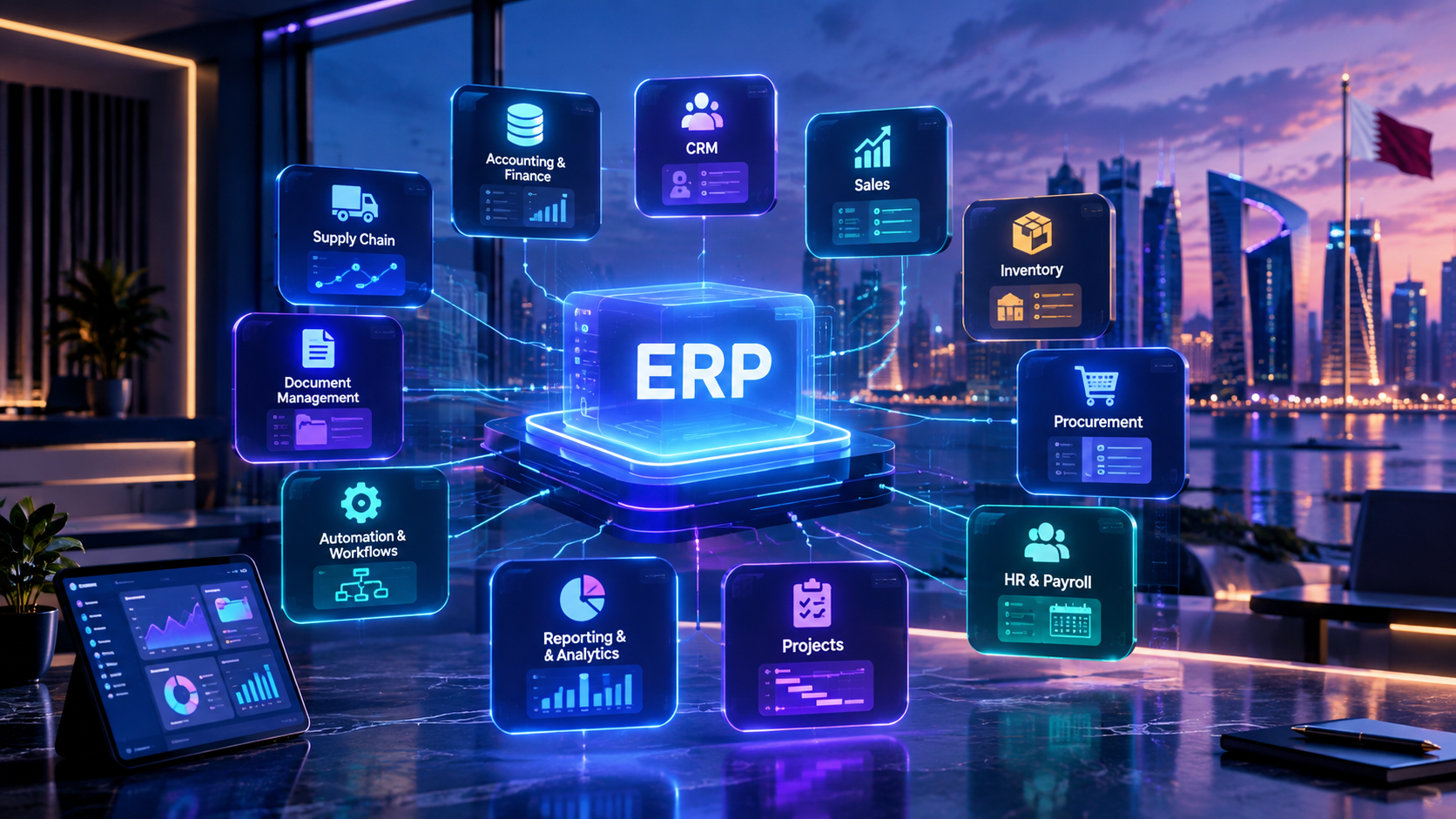
A modern ERP platform connects essential business functions to help growing companies manage operations from one connected system.
ERP Modules Every Growing Business Should Consider
As a business grows, managing operations through spreadsheets, disconnected applications, emails, and manual processes becomes increasingly difficult.
A company may have one system for accounting, another for customer management, spreadsheets for inventory, separate HR software, and different tools for purchasing and reporting. Each tool may work independently, but the business as a whole can become fragmented.
This is where an Enterprise Resource Planning (ERP) system can make a major difference.
An ERP platform brings important business processes into a connected environment. Instead of departments working with isolated information, finance, sales, inventory, procurement, HR, operations, and management can work from centralized data and coordinated workflows.
For growing companies, however, the goal should not be to activate every ERP module simply because it is available.
The better approach is to identify the modules that solve current operational problems while providing room for future growth.
Businesses looking for a platform designed around their specific workflows can also explore custom software development services from Galaxium Coding.
This guide explains the most important ERP modules a growing business should consider, what each module does, when it becomes useful, and how businesses can build an ERP roadmap without overcomplicating the system.
What Is an ERP System?
An ERP system is a centralized business software platform that connects multiple organizational functions.
Instead of maintaining separate databases for every department, an ERP can allow different teams to work with shared business information.
A typical ERP environment may connect:
Sales → CRM → Inventory → Procurement → Accounting → HR → Projects → Reporting
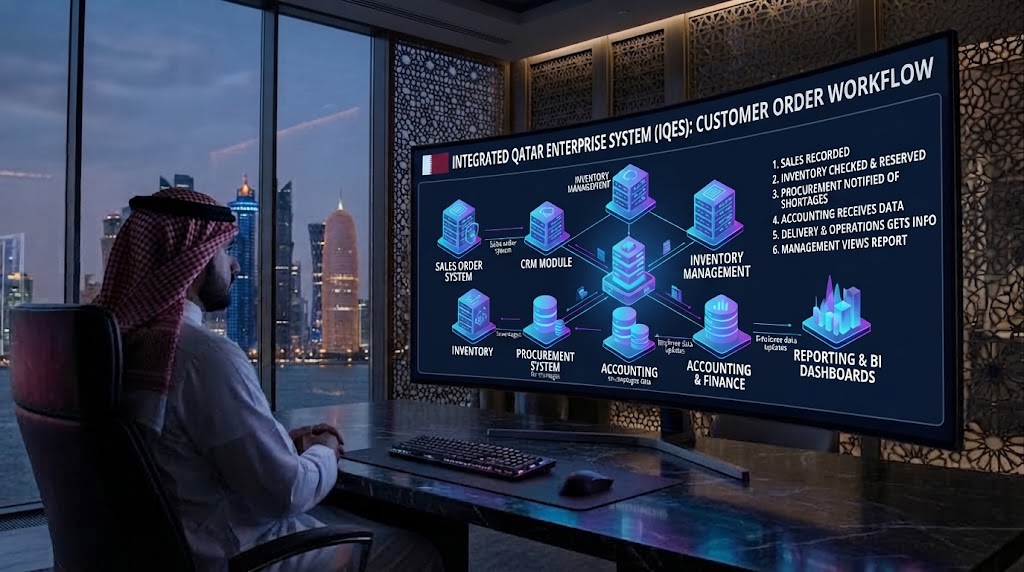
For example, when a customer places an order, the transaction could potentially trigger several connected processes:
The sales team records the order.
Inventory availability is checked.
Stock is reserved or updated.
Procurement can identify shortages.
Accounting receives the relevant financial information.
Delivery or operations teams receive the required information.
Management can see the transaction through reporting dashboards.
The exact workflow depends on the business and ERP architecture.
The key idea is that the departments do not have to operate as completely separate information silos.
Why Growing Businesses Need ERP Modules
A small business can often manage operations using spreadsheets and a few specialized applications.
As the organization expands, however, complexity increases.
A growing company may have:
More employees
More customers
More products
Multiple suppliers
Larger transaction volumes
Several branches
More complex approval processes
More financial transactions
More inventory
More reporting requirements
More compliance responsibilities
Multiple sales channels
At that point, disconnected systems can create problems such as:
Duplicate data entry
Inconsistent records
Manual reporting
Delayed approvals
Poor inventory visibility
Difficult financial reconciliation
Communication gaps between departments
Limited management visibility
Increasing administrative workload
ERP modules help address these challenges by organizing related business functions within one broader system.
The Most Important ERP Modules for Growing Businesses
There is no universal list of ERP modules that every company must implement.
The right combination depends on the industry, size, business model, number of employees, transaction volume, locations, and growth strategy.
However, several modules are particularly useful for many growing organizations.
ERP Module | Primary Purpose | Typical Users |
|---|---|---|
Accounting & Finance | Financial management and reporting | Finance teams, management |
Inventory Management | Stock visibility and control | Operations, warehouse |
Procurement | Purchasing and supplier management | Procurement, finance |
Sales Management | Orders, quotations and sales workflows | Sales teams |
CRM | Customer and lead management | Sales, marketing, support |
HR & Payroll | Employee administration | HR, management |
Project Management | Projects, tasks and resources | Project teams |
Manufacturing | Production planning and control | Manufacturers |
Supply Chain | End-to-end movement of goods | Operations, logistics |
Reporting & BI | Business intelligence and dashboards | Management, department heads |
Document Management | Centralized business documents | All departments |
Workflow & Automation | Automated approvals and processes | All departments |
Not every business needs all of these.
The goal is to build an ERP environment that matches the organization's actual requirements.
1. Accounting and Finance Module
Accounting is usually one of the most important ERP modules for a growing company.
As transaction volumes increase, financial information becomes more difficult to manage manually.
An ERP accounting module can centralize financial activities such as:
General ledger
Accounts payable
Accounts receivable
Invoicing
Expenses
Payments
Financial reporting
Tax-related records
Cash-flow monitoring
Budgeting
Financial reconciliation
Why It Matters
Without centralized financial information, management may have to collect data from multiple sources before understanding the company's financial position.
An integrated finance module can provide a more consistent view of business transactions.
For example:
Customer order → Invoice → Payment → Accounting record → Financial report
Instead of manually entering the same transaction into several systems, connected ERP workflows can reduce unnecessary duplication.
Who Should Consider It?
Almost every growing business should consider finance and accounting functionality early in its ERP roadmap.
This is particularly important when a company begins dealing with:
Multiple departments
Multiple branches
High transaction volumes
Larger supplier networks
Complex invoicing
More employees
More frequent management reporting
2. Inventory Management Module
Inventory becomes increasingly difficult to manage as a company expands.
A business may have products stored across warehouses, branches, stores, or distribution locations.
An inventory module can help businesses monitor:
Stock levels
Product movements
Warehouse locations
Stock transfers
Reorder levels
Goods received
Goods issued
Product availability
Inventory valuation
Purchase requirements
Example
Imagine a retailer selling hundreds of products.
A customer places an order.
The ERP can potentially connect:
Sales Order → Inventory Check → Stock Reservation → Delivery → Accounting
If stock is unavailable, the system may also connect the requirement to procurement.
This can help reduce the gap between what sales teams promise customers and what operations can actually deliver.
3. Procurement and Supplier Management
Growing businesses often deal with increasingly complex purchasing requirements.
A procurement module can help organize:
Supplier records
Purchase requests
Purchase orders
Quotations
Supplier comparisons
Approval workflows
Goods receipts
Supplier invoices
Purchasing history
Why Procurement Integration Matters
Consider a business that regularly purchases inventory.
Without an integrated process, an employee may:
Receive a stock warning.
Send an email to procurement.
Request supplier quotations.
Compare prices manually.
Get management approval.
Create a purchase order.
Inform the warehouse.
Send the invoice to finance.
An ERP workflow can potentially connect many of these steps.
For example:
Low Stock → Purchase Request → Approval → Purchase Order → Goods Receipt → Supplier Invoice → Accounting
This creates a more structured purchasing process.
4. Sales Management Module
Sales teams generate the transactions that ultimately drive revenue, so sales functionality is another important ERP component.
A sales module can support:
Quotations
Sales orders
Pricing
Discounts
Customer records
Order tracking
Sales representatives
Sales pipelines
Invoices
Returns
Sales reporting
For companies with more sophisticated customer relationships, sales functionality can work alongside a dedicated CRM.
The distinction is useful:
CRM: focuses heavily on relationships, leads, interactions and customer information.
Sales ERP functionality: focuses more heavily on orders, transactions, pricing, fulfillment and financial processes.
The two systems can work together.
5. CRM Module
Customer Relationship Management is often closely connected to ERP.

A CRM module can help businesses manage:
Leads
Prospects
Customers
Sales opportunities
Customer communication
Follow-ups
Sales activities
Customer history
Conversion tracking
For example:
Website enquiry → CRM lead → Sales follow-up → Quotation → Order → Customer
When CRM and ERP functionality are integrated, the organization can potentially connect the customer's journey with the actual business transaction.
This becomes particularly valuable for businesses with large sales teams or long sales cycles.
Businesses that need integrated business applications can explore Galaxium Coding's software development services for systems designed around specific operational requirements.
6. Human Resources and Payroll Module
As employee numbers increase, managing HR through spreadsheets becomes increasingly inefficient.
An HR module can centralize information such as:
Employee profiles
Departments
Job roles
Attendance
Leave
Employee documents
Payroll information
Performance records
Recruitment information
Approvals
Employee Self-Service
Modern ERP systems can also provide employee portals.
Employees may be able to:
Submit leave requests
View documents
Check attendance
Submit requests
Update selected personal information
Access company information
Managers can then approve or review requests digitally.
This reduces unnecessary administrative communication.
For businesses requiring employee-facing systems, ERP functionality can also be extended through web application development when specialized workflows are required.
7. Payroll Management
Payroll deserves special consideration because it directly affects employees and financial operations.
A payroll system may manage:
Salaries
Allowances
Deductions
Attendance inputs
Leave information
Payroll calculations
Payslips
Payroll reporting
The exact payroll configuration should reflect the company's jurisdiction, employment policies, and applicable legal requirements.
For companies operating in Qatar, payroll-related workflows should be designed around the organization's actual requirements and applicable local rules rather than assuming that a generic international configuration will be sufficient.
8. Project Management Module
Project-based businesses may need ERP functionality beyond sales and accounting.
A project management module can connect:
Customer → Contract → Project → Tasks → Employees → Expenses → Billing → Profitability
It can help manage:
Projects
Tasks
Deadlines
Project teams
Resources
Budgets
Expenses
Project documentation
Project profitability
Progress reporting
Example
A technology company receives a software development project.
The ERP could potentially connect:
Customer record
Sales opportunity
Contract
Project
Development tasks
Employee allocation
Project expenses
Customer billing
Project profitability
This gives management a broader view of the project rather than treating sales, operations and finance as separate activities.
9. Manufacturing Module
Manufacturing businesses usually require more specialized ERP functionality.
A manufacturing module may include:
Bills of materials
Production planning
Work orders
Raw materials
Production schedules
Work-in-progress
Finished goods
Machine or resource planning
Quality control
Production costing
For example:
Customer demand → Production planning → Raw materials → Manufacturing → Quality control → Finished goods → Inventory → Delivery
Manufacturing ERP can become considerably more complex than a basic accounting or inventory system.
Therefore, manufacturers should map their actual production processes before selecting or developing an ERP platform.
10. Supply Chain Management
For companies involved in distribution, logistics, wholesale, retail, or manufacturing, supply chain management can become a major ERP requirement.
A supply-chain module can connect:
Suppliers
Procurement
Warehouses
Inventory
Transportation
Orders
Deliveries
Customers
The objective is to provide greater visibility across the movement of products.
For example:
Supplier → Purchase → Warehouse → Inventory → Customer Order → Delivery
When these processes are connected, management can better understand where products are and where bottlenecks may occur.
11. Warehouse Management
Warehouse operations can become complicated surprisingly quickly.
A dedicated warehouse component can help manage:
Receiving
Put-away
Storage locations
Picking
Packing
Dispatch
Stock transfers
Returns
Inventory counts
Businesses with multiple warehouses may also require location-level visibility.
For example:
Warehouse A → Central Warehouse → Branch B
The ERP should be able to record where inventory is located and how it moves between locations.
12. Business Intelligence and Reporting
An ERP system is not only about recording transactions.
The information inside the system can also help management make decisions.
A reporting and business-intelligence module can provide dashboards covering:
Revenue
Expenses
Sales
Inventory
Outstanding payments
Customer activity
Employee information
Project performance
Procurement
Profitability
Operational KPIs

Why Real-Time Reporting Matters
Without centralized reporting, managers may wait for employees to prepare spreadsheets.
With connected ERP data, dashboards can potentially provide information much faster.
For example, management could review:
Today's Sales → Outstanding Invoices → Low Stock → Pending Purchases → Employee Requests → Project Performance
This turns ERP data into a management tool rather than simply an administrative database.
13. Document Management
Businesses generate large numbers of documents.
These can include:
Contracts
Invoices
Purchase orders
Employee documents
Supplier documents
Customer records
Project files
Internal forms
A document-management component can provide centralized storage and controlled access.
It can also help businesses connect documents with the relevant records.
For example:
Supplier → Purchase Order → Invoice → Supporting Documents
or:
Employee → Employment Record → Documents → HR Requests
Document management becomes particularly valuable as organizations grow and information becomes harder to locate.
14. Workflow and Approval Automation
Automation is one of the most useful capabilities an ERP can provide.
Instead of relying on emails and verbal instructions, businesses can define structured workflows.
For example:
Purchase Approval
Employee submits request
↓
Manager reviews
↓
Finance approves
↓
Purchase order created
↓
Supplier receives order
Leave Approval
Employee submits leave
↓
Manager reviews
↓
HR receives approved request
↓
Attendance record updates
Expense Approval
Employee submits expense
↓
Manager reviews
↓
Finance approves
↓
Accounting record created
Automating repetitive workflows can reduce administrative work and make responsibilities clearer.
15. Customer and Employee Portals
Not every ERP needs portals, but they can significantly improve accessibility.
A customer portal could allow customers to:
View orders
Track requests
Download invoices
Submit support requests
View documents
Check account information
An employee portal could allow employees to:
Request leave
Check attendance
Submit expenses
Access documents
View tasks
Receive notifications
These portals can also be delivered through web applications or mobile applications when required.
Galaxium Coding provides web application development and mobile application development capabilities for businesses that need ERP-connected digital experiences.
16. Mobile ERP Access
Business operations do not always happen behind a desktop computer.
Managers may need dashboards while traveling.
Sales representatives may need customer information during meetings.
Warehouse employees may need to update inventory from the warehouse floor.
Field employees may need to submit reports remotely.
A mobile ERP experience can support functions such as:
Sales orders
Customer information
Inventory checks
Approvals
Notifications
Attendance
Tasks
Reports
Field operations
The mobile application does not necessarily need to replicate every ERP feature.
A better approach is often to identify the workflows that genuinely benefit from mobile access.
17. API and Third-Party Integrations
ERP systems rarely operate completely alone.
A growing business may need its ERP to communicate with:
Payment gateways
Banks
E-commerce platforms
Websites
Mobile applications
CRM systems
Accounting systems
Delivery platforms
Government or regulatory services
Communication platforms
AI tools
Analytics platforms
This is why API integration should be considered during ERP planning.
For example:
E-commerce → ERP → Inventory → Accounting → Customer Notification
Without integration, employees may have to copy information manually between systems.
A well-designed architecture can reduce unnecessary duplication.
How ERP Modules Work Together
The real value of ERP does not come from individual modules operating independently.
It comes from the connections between them.
Consider a retail business.
A customer places an order online.
The workflow could look like:
Website
↓
CRM / Customer Record
↓
Sales Order
↓
Inventory
↓
Warehouse
↓
Delivery
↓
Accounting
↓
Customer Notification
↓
Management Dashboard
A single customer transaction can therefore affect multiple areas of the business.
This is one of the main reasons businesses consider ERP instead of purchasing completely disconnected software for each department.
Which ERP Modules Should a Small Business Start With?
A growing business does not necessarily need a large ERP implementation from day one.
A phased approach can be more practical.
Phase 1: Core Business Operations
Consider starting with:
Accounting
Sales
Customer management
Inventory, if applicable
Basic reporting
Phase 2: Internal Operations
Add:
HR
Payroll
Procurement
Workflow approvals
Document management
Phase 3: Advanced Operations
Consider:
Project management
Warehouse management
Manufacturing
Supply chain
Advanced analytics
Phase 4: Digital Ecosystem
Add where appropriate:
Customer portal
Employee portal
Mobile application
API integrations
AI assistants
Advanced automation
Cloud infrastructure
This staged approach can help businesses avoid paying for functionality they do not yet need.
How to Choose the Right ERP Modules
Before selecting modules, ask several practical questions.
1. Which Processes Are Currently Manual?
List tasks that require:
Spreadsheets
Repeated data entry
Email approvals
Paper forms
Manual reports
Multiple applications
These are often good candidates for automation.
2. Which Departments Need Shared Data?
If sales needs information from inventory and accounting, those systems should ideally communicate.
If HR and payroll require the same employee data, connecting those processes can reduce duplication.
3. What Problems Are Growing With the Company?
Do not choose ERP modules because competitors have them.
Choose them because they solve actual business problems.
4. What Will the Business Need in Two to Five Years?
ERP should support growth.
Consider:
More employees
More customers
More products
Additional branches
New countries
New sales channels
Mobile access
More integrations
5. Can the System Integrate With Existing Technology?
Replacing every system is not always necessary.
A good ERP strategy may involve integrating existing platforms where practical.
Custom ERP vs. Ready-Made ERP
Growing businesses often face a choice between implementing an existing ERP platform and developing a customized ERP solution.
Ready-Made ERP
Advantages can include:
Faster implementation
Established features
Existing ecosystem
Standardized processes
Potentially lower initial development effort
However, businesses may need to adapt their workflows to the software.
Custom ERP
Custom ERP can be designed around the company's actual processes.
It may be suitable when a business has:
Unique workflows
Industry-specific requirements
Complex integrations
Specialized approval processes
Custom reporting
Unique customer portals
Specialized mobile requirements
Galaxium Coding's software development capabilities include enterprise systems and ERP-style business platforms designed around business requirements.
The right choice depends on the complexity of the business and the degree of customization required.
How Much Does an ERP System Cost?
There is no single ERP price that applies to every business.
Cost can depend on:
Number of modules
Number of users
Number of branches
Customization
Integrations
Database requirements
Mobile applications
Security requirements
Reporting
Cloud infrastructure
Data migration
Training
Maintenance
Support
A basic ERP implementation with accounting, customers and reporting is very different from an enterprise platform connecting:
CRM + HR + Payroll + Procurement + Inventory + Accounting + Projects + Mobile + AI + Automation
The number and complexity of modules can significantly affect the development and implementation effort. This is also consistent with Galaxium Coding's existing guidance that software complexity increases with the number of connected modules and integrations.
ERP Security Considerations
ERP systems contain highly valuable business information.
Depending on the company, this may include:
Financial data
Employee information
Customer records
Supplier information
Business documents
Sales information
Inventory
Contracts
Security should therefore be considered from the beginning.
Important considerations can include:
Role-Based Access
Employees should only access the information they need for their responsibilities.
Authentication
Secure authentication should be used for system access.
Audit Logs
Businesses may need records showing who performed specific actions.
Data Backups
Important business data should be backed up according to the organization's requirements.
Encryption
Sensitive information should be protected appropriately both during transmission and storage.
Infrastructure Security
Cloud and server environments should be configured with appropriate security controls.
Businesses requiring secure and scalable infrastructure can also consider cloud and DevOps solutions.
ERP Implementation: Common Mistakes to Avoid
ERP projects can become difficult when businesses focus only on software features and ignore business processes.
Mistake 1: Implementing Too Many Modules at Once
More modules do not automatically mean a better ERP.
Start with the processes that matter most.
Mistake 2: Ignoring User Requirements
Employees are the people who will use the system every day.
Their workflows should be understood before implementation.
Mistake 3: Poor Data Migration
Moving inaccurate or duplicate data into a new ERP can create problems from day one.
Clean the data before migration.
Mistake 4: Ignoring Integrations
An ERP that cannot communicate with important existing systems may create another information silo.
Mistake 5: Underestimating Training
Even a technically strong ERP can fail if users do not understand how to use it.
Mistake 6: Treating ERP as a One-Time Project
Businesses change.
New branches open.
New employees join.
New products are introduced.
New regulations may apply.
New integrations become necessary.
ERP systems therefore often require ongoing maintenance and improvement.
ERP Modules by Industry
Different industries have different priorities.
Retail
Important modules may include:
Sales
Inventory
Procurement
Accounting
POS integration
Customer management
Warehouse management
Manufacturing
Common priorities include:
Manufacturing
Inventory
Procurement
Supply chain
Quality
Accounting
Production planning
Real Estate
Potential modules include:
CRM
Property management
Sales
Contracts
Payments
Customer portals
Reporting

Construction
Potential requirements include:
Project management
Procurement
Inventory
Employee management
Accounting
Document management
Site reporting
Professional Services
Useful modules can include:
CRM
Projects
Timesheets
Billing
Accounting
HR
Document management
Healthcare
Depending on the organization, ERP-related systems may include:
Finance
HR
Procurement
Inventory
Pharmacy operations
Facilities
Reporting
Healthcare organizations may also require specialized clinical systems outside the ERP itself.
ERP and AI: What Comes Next?
ERP systems are increasingly becoming connected to AI and automation.
Once business information is centralized, AI can potentially help employees interact with that information more naturally.
For example, an authorized manager might ask:
"Which products are approaching their reorder level?"
Or:
"Show me outstanding invoices from major customers."
Or:
"Which projects are currently over budget?"
The AI system could retrieve information from connected business systems and present it in a conversational format, subject to appropriate permissions and system design.
The combination can be represented as:
ERP + Data + APIs + AI + Automation = More Intelligent Business Operations
However, AI should not be added simply because it is fashionable.
The business problem should come first.
How ERP Fits Into a Modern Business Technology Ecosystem
An ERP system can become the operational core of a broader digital environment.
For example:
Website
↓
CRM
↓
ERP
↓
Accounting
↓
Inventory
↓
HR
↓
Mobile Application
↓
Cloud Infrastructure
↓
AI
↓
Business Intelligence
This is particularly relevant for businesses undergoing broader digital transformation.
Galaxium Coding's recent digital transformation guidance similarly emphasizes connecting websites, CRM, ERP, HR, accounting, inventory, mobile applications, cloud infrastructure, AI and automation rather than treating each technology as an isolated system.
The objective is not to create the biggest technology stack.
The objective is to create a technology environment that helps the business operate more efficiently.
A Practical ERP Roadmap for a Growing Business
A practical roadmap could look like this:
Stage 1 — Understand the Business
Document:
Departments
Workflows
Current software
Manual processes
Reporting requirements
Pain points
Stage 2 — Identify Core Modules
Prioritize:
Accounting
Sales
CRM
Inventory
Procurement
HR
based on actual requirements.
Stage 3 — Connect the Systems
Plan:
APIs
Databases
Payment systems
Websites
Mobile applications
Third-party platforms
Stage 4 — Automate Repetitive Work
Automate suitable processes such as:
Approvals
Notifications
Invoicing
Stock alerts
Employee requests
Customer communications
Stage 5 — Add Analytics
Create dashboards for:
Sales
Finance
Inventory
Employees
Projects
Customers
Stage 6 — Expand With Growth
Add additional modules when the business actually needs them.
This approach helps prevent ERP from becoming an unnecessarily complicated technology project.
Final Thoughts
ERP is not simply a collection of software modules.
It is a way of connecting business information and processes.
For a growing company, the most important ERP modules may include:
Accounting and finance
Sales
CRM
Inventory
Procurement
HR
Payroll
Project management
Manufacturing
Supply chain
Warehouse management
Reporting and analytics
Document management
Workflow automation
Customer and employee portals
But every company does not need every module.
The best ERP strategy starts with the business rather than the software.
Identify the processes causing the greatest operational problems, prioritize the modules that address those problems, integrate the systems that need to communicate, and create a roadmap for future growth.
For businesses that need an ERP or business management platform tailored to their workflows, Galaxium Coding can help plan and develop custom software solutions, enterprise systems, integrations and connected digital platforms.
You can also explore Galaxium Coding's projects and portfolio to understand the broader types of technology solutions the company works with.
When you're ready to discuss your requirements, contact Galaxium Coding to explore an approach suited to your business.
Frequently Asked Questions About ERP Modules
What are the most important ERP modules for a growing business?
Accounting, sales, CRM, inventory, procurement and HR are among the most commonly useful modules. The exact priority depends on the company's industry and operational requirements.
Does every business need all ERP modules?
No. Businesses should implement the modules that solve genuine operational problems. Additional modules can be introduced as the organization grows.
Is CRM part of ERP?
CRM can be integrated into an ERP platform or implemented as a connected system. ERP generally covers broader business operations, while CRM focuses primarily on customers, leads and sales relationships.
Should a small business implement ERP?
A small business may benefit from ERP when its operations become complex enough that spreadsheets and disconnected applications create significant problems. Smaller organizations can also start with a limited set of modules.
Can ERP integrate with a website?
Yes. ERP systems can be connected with websites through APIs and other integration methods. For example, an e-commerce website can potentially send orders to an ERP for inventory, fulfillment and accounting processes.
Can ERP connect with a mobile app?
Yes. A mobile application can communicate with ERP services through APIs, allowing selected ERP information and workflows to be accessed from smartphones and tablets.
Is custom ERP better than ready-made ERP?
Neither is automatically better. Ready-made ERP can be suitable when standard workflows meet business requirements. Custom ERP can be more appropriate when a company has specialized workflows, integrations or reporting requirements.
How long does ERP implementation take?
Implementation time varies significantly depending on the number of modules, users, integrations, data migration requirements, customization and testing. A smaller implementation can be considerably simpler than a large enterprise deployment.
How much does ERP software cost?
There is no universal price. Cost depends on the modules, number of users, customization, integrations, infrastructure, data migration, security, training, maintenance and support requirements.
Can AI be integrated with ERP?
Yes. AI can potentially be connected to ERP data and workflows for use cases such as analytics, natural-language queries, document processing, forecasting and automation. Proper access controls and data security are essential.