AI-Powered Medical Center Management System
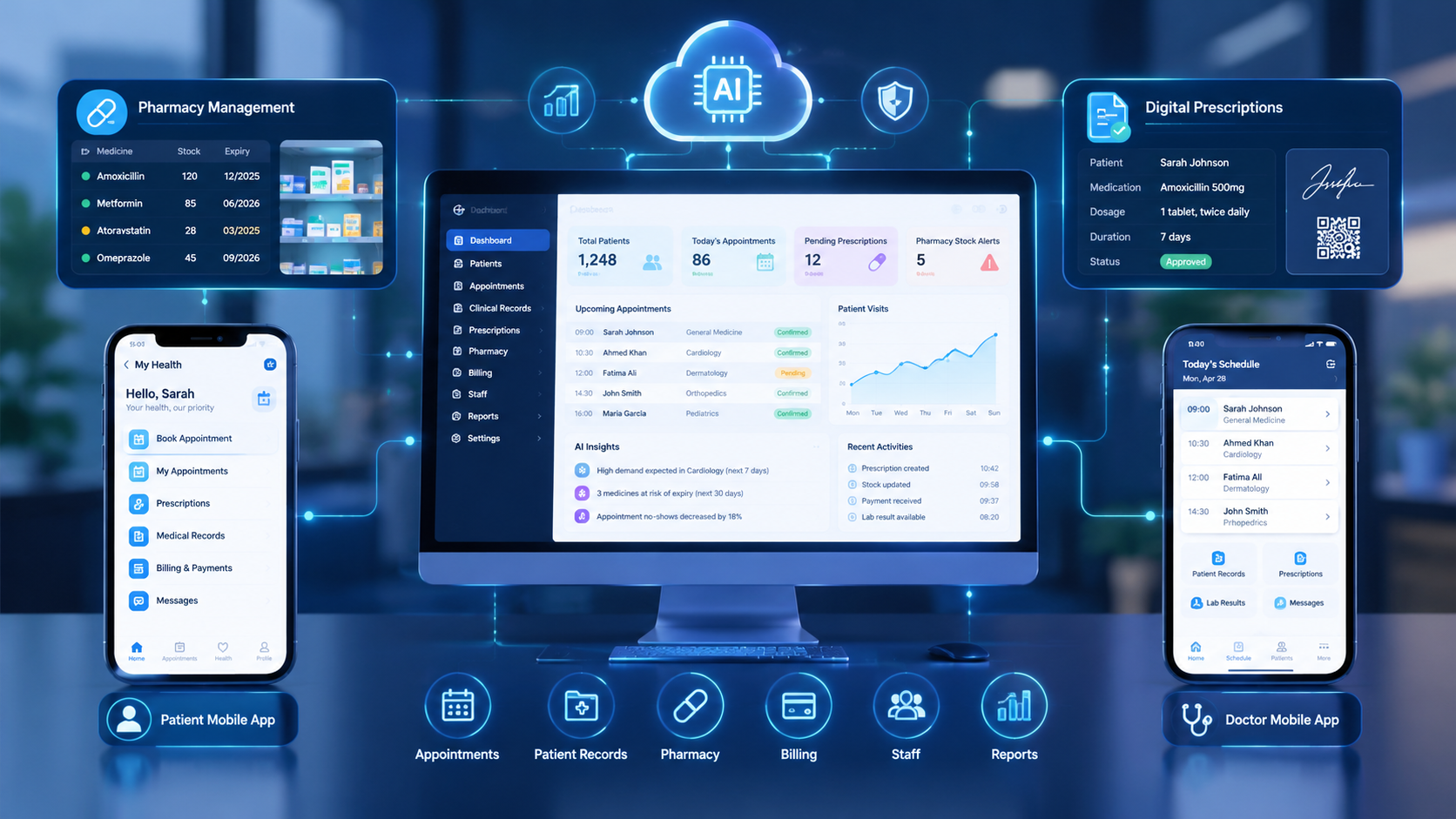
An integrated healthcare management platform can connect medical center operations, pharmacy workflows, AI-assisted insights, and mobile applications in one coordinated digital ecosystem.
AI-Powered Medical Center Management System with Integrated Pharmacy and Mobile Apps
Healthcare providers manage much more than medical consultations. A modern medical center must coordinate patient appointments, medical records, doctor schedules, laboratory requests, billing, medicine inventory, prescriptions, and communication with patients. When these activities operate through disconnected systems or manual processes, staff may spend valuable time entering the same information repeatedly, locating records, reconciling payments, and checking pharmacy stock.
An AI-powered medical center management system with integrated pharmacy management and connected mobile applications brings these activities into a coordinated digital platform. It can help medical centers organize their operations, improve information accessibility, automate routine administrative tasks, and provide patients with convenient digital services.
Instead of treating the medical center, pharmacy, and mobile apps as separate products, an integrated solution connects their workflows through shared data, controlled access, and secure application programming interfaces (APIs).
Artificial intelligence can add another layer of functionality through administrative assistance, demand forecasting, document processing, and operational reporting. However, AI should support qualified healthcare professionals rather than replace clinical judgment.
For organizations planning a connected healthcare platform, custom software development services from Galaxium Coding can be a relevant starting point for exploring tailored business software and integrated digital workflows.
This guide explains how an integrated medical center management platform works, which features matter most, how pharmacy and mobile applications connect to the central system, and what organizations should consider before development.
What Is an AI-Powered Medical Center Management System?
An AI-powered medical center management system is a digital platform designed to manage a healthcare facility's administrative and operational activities while offering selected artificial intelligence capabilities.
Depending on the organization's requirements, the platform may include:
Patient registration and profile management
Appointment scheduling and doctor availability
Electronic medical records
Consultation and prescription management
Laboratory and diagnostic workflow coordination
Billing, payments, and insurance-related administration
Pharmacy inventory and dispensing workflows
Staff and department management
Patient and doctor mobile applications
Operational dashboards and reports
AI-assisted administrative automation
The platform acts as a central source of authorized information. When a patient books an appointment, for example, the system can update the appointment calendar, notify the relevant staff, and make the appointment details available through the patient's mobile application.
If the clinician subsequently issues a prescription, an appropriately integrated pharmacy module can receive the authorized prescription details for pharmacist review and dispensing.
The exact workflow depends on the system design, permissions, clinical processes, and applicable regulations.
Traditional Medical Software vs. an Integrated AI-Powered System
Capability | Disconnected or manual systems | Integrated AI-powered system |
|---|---|---|
Patient information | May be stored in separate records | Can be accessed through a unified, permission-controlled record |
Appointments | Manual scheduling or separate calendars | Centralized scheduling and automated reminders |
Pharmacy inventory | Separate stock records or spreadsheets | Stock updates connected to dispensing and purchasing |
Prescriptions | May require repeated data entry | Can flow electronically through authorized workflows |
Reporting | Staff may compile reports manually | Dashboards and automated reporting can reduce repetitive work |
Mobile access | May be limited or unavailable | Patients and staff can use dedicated mobile interfaces |
AI assistance | Limited or unavailable | Selected administrative and analytical tasks can be AI-assisted |
Integration does not automatically guarantee accuracy or eliminate every manual task. Results depend on implementation quality, data consistency, staff training, and appropriate oversight.
Key Features of an AI-Powered Medical Center Management System
A successful healthcare platform should address the everyday needs of receptionists, doctors, nurses, pharmacists, administrators, and patients.
1. Patient Registration and Electronic Medical Records
Patient management is one of the central components of the platform.
The system can maintain structured patient profiles containing relevant information such as:
Contact details and demographic information
Appointment and consultation history
Documented medical history and allergies
Diagnoses recorded by authorized clinicians
Prescriptions and medication history
Laboratory reports and uploaded documents
Follow-up plans and referrals
Authorized users should see only the information required for their roles. For example, reception staff may need appointment and contact details, while clinicians require access to relevant clinical information.
A unified record can reduce duplicate data entry and help authorized professionals locate information more efficiently.
However, the system should not automatically treat AI-generated summaries as verified clinical facts. Original records must remain accessible, and important information should be reviewed by qualified personnel.
2. Smart Appointment Scheduling
Appointment management helps medical centers coordinate patient visits and doctor availability.
Useful features include:
Online appointment booking
Doctor-specific calendars
Department and service selection
Appointment confirmation
Cancellation and rescheduling
Automated reminders
Waiting-list management
Check-in and queue tracking
AI-assisted scheduling may analyze historical appointment patterns and identify periods of high demand. Depending on the implementation, it can recommend appointment slots or highlight potential scheduling conflicts.
For example, if a clinic regularly experiences heavy demand on Monday mornings, the system could help administrators review staffing requirements and adjust appointment availability.
Scheduling recommendations should remain subject to operational rules, doctor availability, patient needs, and staff approval.
3. Doctor and Staff Management
Medical centers need to coordinate multiple professionals, shifts, departments, and responsibilities.
A management dashboard can display:
Doctor profiles and specialties
Staff schedules and availability
Department assignments
Appointment workloads
Leave and shift information
Administrative tasks
Operational performance reports
Role-based access helps ensure that employees can perform their assigned responsibilities without receiving unnecessary access to sensitive information.
AI-assisted reporting may help managers identify recurring bottlenecks, such as appointment delays or uneven workloads. These findings can support planning, but they should be interpreted in context rather than used as automatic measures of employee performance.
4. Billing, Payments, and Financial Reporting
A connected billing module can bring consultation fees, diagnostic charges, pharmacy sales, and other approved services into a more consistent financial workflow.
Depending on the requirements, it may support:
Invoice generation
Payment recording
Refund workflows
Discount authorization
Outstanding balance tracking
Department-wise revenue reports
Pharmacy sales reporting
Integration with accounting software
For example, when a consultation is completed, the system can generate the relevant invoice according to configured billing rules. Pharmacy purchases can be recorded separately or linked to the patient's transaction where appropriate.
Payment gateways, accounting tools, and insurance systems may require additional integrations.
Financial access controls, audit logs, and reconciliation procedures remain important because incorrect transactions can affect both patient billing and business reporting.
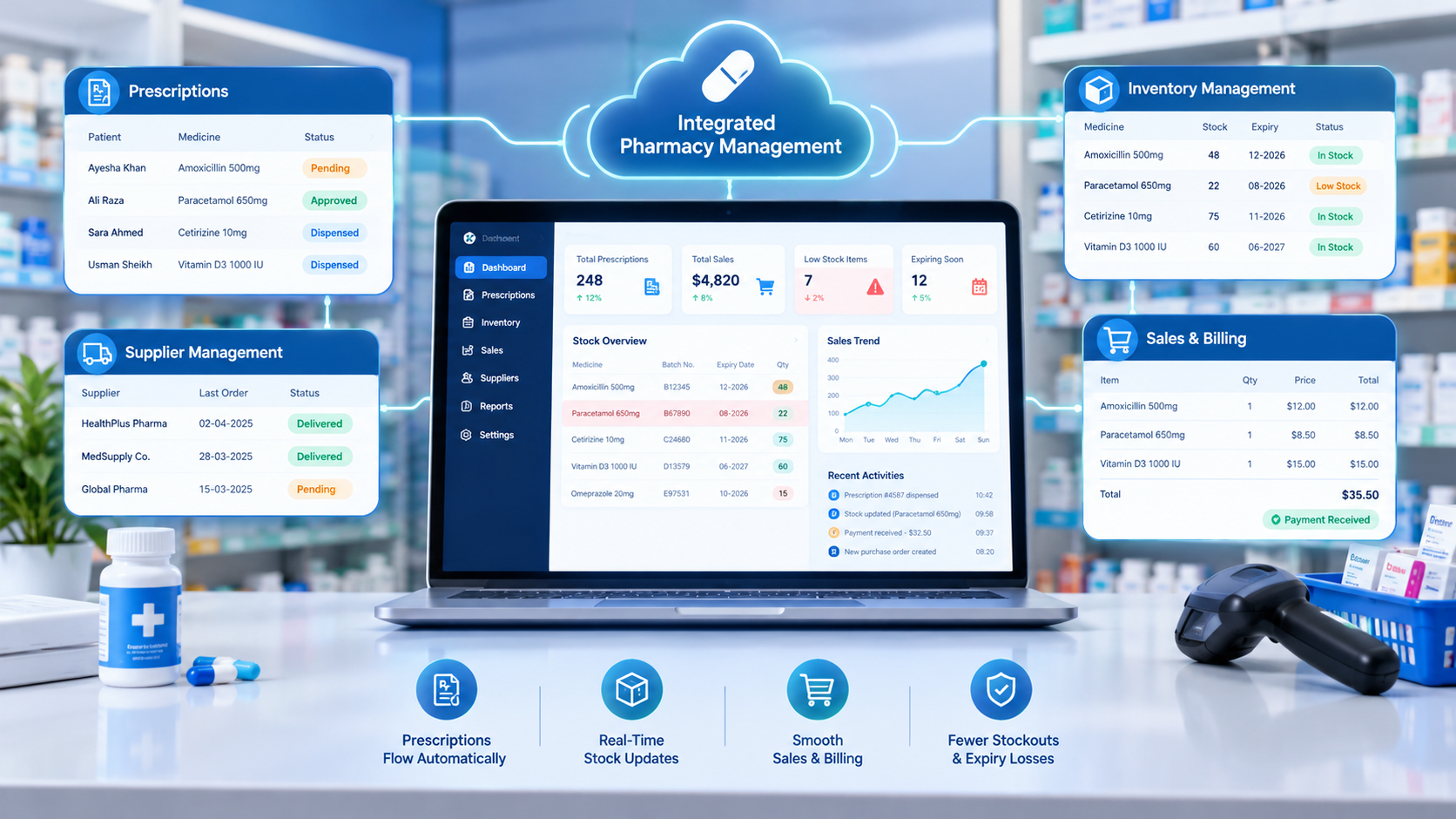
Integrated Pharmacy Management System: Connecting Prescriptions, Stock, and Sales
A pharmacy module becomes especially valuable when it connects directly with the medical center's authorized workflows.
Instead of maintaining separate medicine records, pharmacy staff can work with inventory, prescription, supplier, and billing information through a coordinated platform.
Essential Pharmacy Management Features
Medicine inventory management
The system can track medicine names, product identifiers, available quantities, suppliers, purchase prices, and selling prices where applicable.
Batch and expiry tracking
Batch-level records and expiry dates help staff identify medicines approaching expiry and follow the organization's stock-control procedures.
Prescription management
Authorized prescriptions can be transferred electronically from the clinical system to the pharmacy workflow. Pharmacists can review the details and follow the required dispensing checks.
Point-of-sale functionality
Pharmacy staff can process sales, generate receipts, record payments, and update stock quantities.
Supplier and purchasing management
The system can maintain supplier records, purchase orders, goods-received information, and reorder workflows.
Stock alerts
Configured alerts can notify authorized staff when quantities fall below minimum stock levels or when products approach their recorded expiry dates.
Pharmacy reporting
Managers can review stock movements, sales, purchasing activity, expiry-related losses, and other operational measures.
How Prescription and Pharmacy Integration Works
Consider a patient who visits a medical center for a consultation.
The patient checks in using the reception system or mobile appointment details.
The clinician reviews the patient's relevant medical information.
The clinician creates and authorizes a prescription.
The prescription becomes available in the connected pharmacy workflow.
The pharmacist checks the prescription, medicine availability, and applicable dispensing requirements.
After dispensing, the system records the transaction and updates the relevant inventory quantities.
The patient receives the appropriate receipt and, where supported, a digital transaction record.
Authorized staff can review the relevant records and reports.
This workflow can reduce repeated data entry and improve visibility between clinical and pharmacy operations. It does not remove the need for prescription validation, pharmacist review, or proper dispensing controls.
How AI Can Improve Pharmacy Operations
AI can provide additional value when it works with reliable, appropriately governed pharmacy data.
Potential applications include:
Demand forecasting: Estimating future medicine requirements using historical sales, seasonal patterns, and other relevant data.
Reorder recommendations: Highlighting products that may need replenishment based on stock levels, lead times, and configured rules.
Expiry-risk analysis: Identifying products that may approach expiry before expected use.
Anomaly detection: Flagging unusual stock movements or transaction patterns for investigation.
Administrative assistance: Helping staff search approved inventory information or summarize operational reports.
For example, an inventory dashboard might identify that a particular product regularly experiences high demand during a specific period. The system could recommend reviewing reorder quantities before that period begins.
Such predictions are estimates, not guarantees. Staff should consider supplier delays, clinical requirements, local demand, and actual stock counts before approving purchases.
Connected Mobile Applications for Patients, Doctors, and Staff
Mobile applications extend the medical center's services beyond the reception desk and administrative office.
A connected mobile solution can provide different interfaces for patients, doctors, and authorized employees while using the same underlying platform.
Galaxium Coding's mobile application development services are relevant to organizations exploring custom mobile interfaces connected to business software.
Patient Mobile App
A patient application can make routine interactions with the medical center more convenient.
Potential features include:
Secure registration and login
Appointment booking and rescheduling
Doctor profiles and available appointment slots
Appointment reminders
Access to approved reports and documents
Prescription history
Pharmacy order or refill requests, where supported
Billing information and digital receipts
Follow-up reminders
Secure communication with the medical center
A patient app should clearly distinguish administrative reminders from medical advice. Any sensitive records displayed in the application must be protected by suitable authentication, authorization, and data-handling controls.
Doctor Mobile App
A doctor-facing application can support selected clinical and administrative activities.
Depending on the intended workflow, it may offer:
Daily appointment schedules
Relevant patient records
Consultation notes
Prescription creation and review
Follow-up scheduling
Laboratory result access
Notifications about appointments or approved tasks
Secure communication with authorized staff
Clinical functionality requires particular care. Prescription approvals, record changes, and other sensitive actions should use appropriate authentication and audit trails.
AI-generated summaries or suggestions should be clearly identified and reviewed by the responsible healthcare professional before they influence patient care.
Pharmacy and Administrative Staff App
Staff applications may support operational tasks such as:
Checking inventory levels
Reviewing stock alerts
Receiving purchase notifications
Monitoring appointment queues
Viewing assigned administrative tasks
Checking approved operational reports
Receiving internal notifications
Not every task needs a mobile app. Some functions are better handled through a desktop dashboard, especially when staff must review large tables, reconcile transactions, or work with complex clinical records.
The objective is to make the right information available to the right person through an appropriate interface.
How AI Can Improve Medical Center Operations
AI should be introduced to solve identifiable problems rather than added simply to make a software product appear more advanced.
Administrative Automation
AI-assisted tools can help classify incoming requests, summarize administrative information, extract selected fields from documents, and direct routine inquiries to the appropriate department.
For example, an administrative assistant may help categorize appointment requests by service type before staff confirm the booking.
Sensitive actions should still require appropriate authorization and validation.
Operational Forecasting
Historical appointment and inventory data may help a medical center estimate demand, identify recurring busy periods, and plan resources.
Forecasts can support decisions about staffing, appointment capacity, and pharmacy purchasing, although unexpected events and changes in patient behavior can affect their accuracy.
Intelligent Search and Reporting
An AI-assisted search interface could allow an authorized manager to ask questions such as:
Which medicines are below their configured reorder levels?
Which appointments remain unconfirmed?
Which products are approaching their recorded expiry dates?
How many consultations were completed during a selected period?
The system should retrieve information from authorized data sources, apply access restrictions, and make it possible to verify important results against the underlying records.
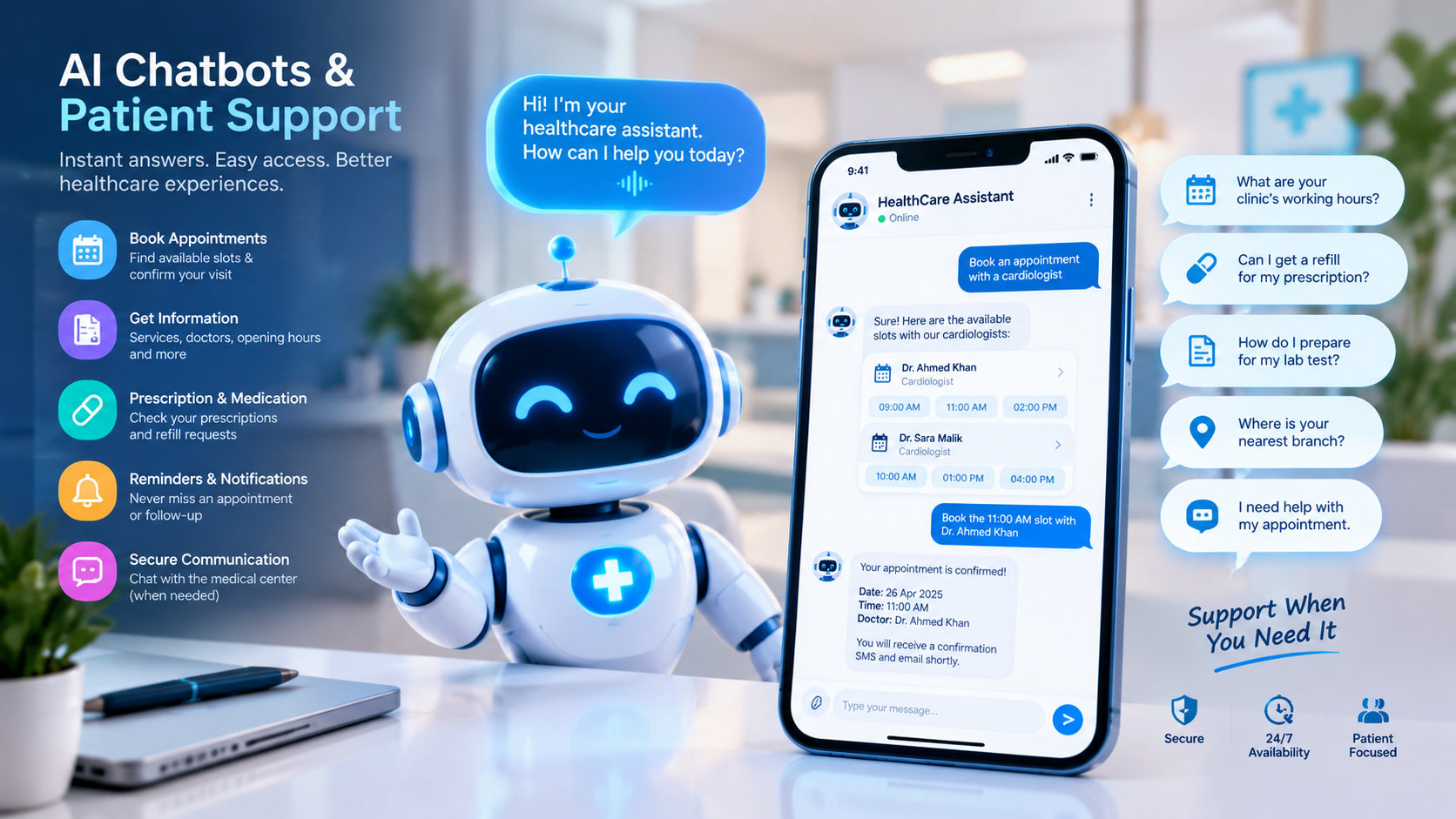
AI Chatbots and Patient Support
A healthcare chatbot can answer approved administrative questions about opening hours, appointment procedures, required documents, and available services.
It may also help patients navigate the booking process or direct them to the appropriate department.
A chatbot should not be presented as a substitute for a qualified clinician. It must have clear escalation procedures for urgent requests and avoid making unsupported diagnoses or treatment recommendations.
The World Health Organization emphasizes that AI in healthcare requires appropriate governance, human oversight, transparency, and protection of people's rights. Organizations can review the WHO guidance on ethics and governance of AI for health when evaluating proposed AI capabilities.
AI Is Not a Replacement for Clinical Judgment
There is an important difference between automating administrative work and making clinical decisions.
Appointment reminders and stock forecasting are operational use cases. Automated diagnosis, treatment recommendations, and clinical risk predictions involve additional safety, validation, and regulatory considerations.
Any proposed clinical AI functionality should be evaluated for its intended use, performance, limitations, and applicable regulatory requirements before deployment.
Benefits of an Integrated Medical Center, Pharmacy, and Mobile Platform
The value of integration comes from connecting workflows that otherwise operate separately.
Benefit | How the system can help |
|---|---|
More coordinated operations | Connects appointment, clinical, pharmacy, and billing workflows |
Reduced repetitive entry | Allows authorized information to move between connected modules |
Better stock visibility | Provides current recorded inventory and configured alerts |
Improved patient convenience | Offers mobile access to appointments and approved records |
More informed planning | Provides operational dashboards and, where appropriate, AI-assisted forecasts |
Better accountability | Uses access permissions and audit logs to record important actions |
Easier expansion | A modular architecture can support additional departments or branches |
More consistent reporting | Uses connected data to generate relevant operational reports |
These benefits depend on implementation quality, user adoption, data accuracy, and ongoing maintenance. Software alone cannot guarantee shorter waiting times, better clinical outcomes, or lower operating costs.
Recommended System Architecture and Integrations
A connected platform typically includes several technical layers.
1. Central Management Backend
The backend manages business rules, user permissions, workflow logic, and communication between modules.
It may support patient registration, appointments, clinical records, billing, pharmacy operations, and administrative reporting.
2. Secure Database
The database stores structured information and provides controlled access to relevant records.
Sensitive information should be protected through appropriate encryption, access controls, backup policies, and monitoring.
3. Web-Based Administration Dashboard
The web application provides authorized staff with access to operational tools, reports, configuration settings, and management functions.
Organizations can explore web application development when planning a browser-based management interface.
4. Mobile Applications
Patient, doctor, and staff applications communicate with the backend through authenticated APIs.
The applications should not expose database credentials or unrestricted access to sensitive information.
5. AI Services
AI capabilities may operate as separate services connected to approved data sources.
The architecture should define which information an AI service can access, how outputs are validated, whether information is retained by external providers, and which actions require human approval.
6. External Integrations
Depending on the medical center's needs, the system may integrate with:
Laboratory information systems
Diagnostic equipment platforms
Payment gateways
Accounting software
SMS and email services
Identity and authentication providers
Existing electronic health record systems
Insurance or claims platforms, where supported
Approved healthcare data exchange services
Healthcare interoperability standards, such as HL7 FHIR, may be relevant when systems need to exchange healthcare information. The appropriate standard and implementation depend on the connected systems, required data, and local requirements.
A modular architecture can make it easier to introduce additional functionality without rebuilding the entire platform. However, every integration requires compatibility checks, security testing, and clear responsibility for maintaining data consistency.
Healthcare Data Security, Privacy, and Compliance
Medical centers manage sensitive information, so security must be part of the system's design from the beginning.
An integrated platform may connect patient records, prescriptions, payment information, staff accounts, and mobile devices. A weakness in one component can create risks for the wider environment.
Important safeguards include:
Role-Based Access Control
Assign permissions according to each user's responsibilities. A pharmacist, receptionist, clinician, and system administrator should not automatically receive identical access.
Strong Authentication
Use appropriate authentication controls, secure session management, and additional verification for sensitive operations where needed.
Encryption and Secure Communication
Protect sensitive information in transit and at rest using appropriate security controls.
Audit Trails
Record important actions such as prescription changes, access to sensitive records, inventory adjustments, and administrative approvals.
Backups and Recovery
Maintain protected backups and test recovery procedures so the organization can respond to accidental deletion, hardware failures, or other disruptions.
Mobile Device Protection
Use secure application sessions, appropriate device protections, and controlled access to sensitive data. Avoid storing unnecessary patient information directly on devices.
AI Data Governance
Define what data AI tools can process, restrict access to authorized information, assess third-party providers, and establish procedures for reviewing generated outputs.
Regulatory Review
Healthcare providers must identify and comply with the laws, licensing conditions, data-protection requirements, and healthcare-specific rules applicable to their location and operations.
For organizations operating in Qatar, requirements should be reviewed against the relevant Qatari authorities and the organization's specific circumstances. A software implementation should not be assumed compliant simply because it includes security features.
The WHO's digital health resources provide additional context on responsible digital health adoption and the importance of appropriate information governance.
Medical Center Management Software in Qatar: Important Considerations
Healthcare organizations in Qatar may have different operational needs depending on whether they operate a small clinic, a multi-specialty medical center, a diagnostic facility, or a center with an in-house pharmacy.
A suitable solution should reflect the actual workflow rather than use a generic feature list for every organization.
Support for Multiple Departments
A multi-specialty center may need separate scheduling rules, department permissions, consultation workflows, and reporting for different services.
Pharmacy and Inventory Requirements
Facilities with an in-house pharmacy should identify how prescriptions, dispensing, purchasing, stock records, and expiry management need to interact with the wider platform.
Language and Accessibility
Depending on the patient population, the system may require Arabic and English interfaces, readable layouts, and accessible mobile experiences.
Local Integrations and Requirements
Payment methods, messaging services, existing healthcare software, and applicable regulatory obligations should be identified before development begins.
Cloud Hosting and Availability
Healthcare providers should evaluate hosting location, data governance, uptime requirements, disaster recovery, and access controls. The appropriate hosting model depends on operational and regulatory needs.
For organizations planning a broader digital platform, Galaxium Coding's cloud and DevOps services may be relevant to discussions about deployment, infrastructure, and ongoing software operations.
Qatar-specific requirements should be verified with the relevant authorities and qualified advisers before implementation.
How to Develop an AI-Powered Medical Center Management System
Building a healthcare management platform requires careful planning because multiple user groups, sensitive information, and operational workflows must work together.
Step 1: Identify Business and Clinical Requirements
Document how the medical center currently manages appointments, records, prescriptions, pharmacy stock, billing, and reporting.
Interview the relevant users to identify repetitive tasks, operational bottlenecks, integration needs, and security requirements.
Step 2: Define User Roles and Workflows
Map the activities of patients, reception staff, doctors, pharmacists, administrators, and other authorized users.
Specify who can create, view, edit, approve, or delete each category of information.
Step 3: Prioritize the Core Features
Start with the capabilities that address the most important operational problems.
A practical first release might include:
Patient registration
Appointment scheduling
Basic electronic records
Pharmacy inventory
Prescription workflows
Billing
Role-based access
Essential reporting
Mobile applications and advanced AI features can be introduced according to priorities, budget, and technical readiness.
Step 4: Design the User Experience
Create separate interfaces for the web dashboard and each mobile user group.
Test common tasks, such as booking an appointment, recording a consultation, reviewing stock, and processing a pharmacy transaction.
The goal is to make essential tasks understandable and efficient without overwhelming users with unnecessary features.
Step 5: Build the Core Platform and Integrations
Develop the backend, database, web interface, mobile apps, and required APIs.
Integration testing should verify that updates are handled consistently. For example, a completed pharmacy transaction should not leave the stock records inconsistent across the connected modules.
Step 6: Introduce AI Where It Adds Measurable Value
Select clearly defined use cases, such as administrative document processing or inventory forecasting.
Assess data quality, accuracy, failure cases, privacy implications, and human-review requirements before making AI features available to users.
Step 7: Test Security and Operational Reliability
Testing should cover user permissions, data validation, API security, mobile application behavior, backups, recovery, performance, and integration failures.
Clinical and pharmacy workflows require additional testing to ensure that important approvals and safety checks cannot be bypassed unintentionally.
Step 8: Train Staff and Launch in Phases
Train users according to their roles and provide clear procedures for handling errors and support requests.
A phased rollout can help the organization identify problems before extending the platform to every department.
Step 9: Monitor and Improve
After launch, review user feedback, system performance, integration errors, inventory discrepancies, and the usefulness of AI recommendations.
Use these findings to prioritize updates and maintain the platform over time.
How Much Does an AI-Powered Medical Center Management System Cost?
There is no universal development price for this type of platform. The total cost depends on the number of modules, the complexity of clinical and pharmacy workflows, integrations, mobile applications, security requirements, hosting, and ongoing support.
Project scope | Typical components | Main cost drivers |
|---|---|---|
Basic management platform | Registration, appointments, staff dashboard | Core workflows, user roles, reporting |
Integrated medical center system | Electronic records, billing, pharmacy inventory | Data migration, workflow complexity, integrations |
Multi-app healthcare platform | Patient and doctor apps, pharmacy workflows | Mobile development, APIs, synchronization |
AI-enabled enterprise solution | Selected AI tools, forecasting, advanced analytics | Data readiness, validation, monitoring, governance |
These are planning categories, not quoted prices or verified market averages.
A useful budget should separate initial development from recurring expenses such as hosting, maintenance, third-party services, security reviews, and future enhancements.
Healthcare providers should also account for staff training, data migration, testing, and operational changes. A lower initial software price may not represent the lowest total cost over the system's lifetime.
Before requesting a quotation, prepare a list of required modules, user roles, expected patient volumes, existing systems, and the AI functions that would deliver practical value.
Common Mistakes to Avoid
Treating AI as the Main Requirement
Starting with AI before understanding the workflow can lead to unnecessary expense. First identify the problem, then decide whether automation, conventional software, or AI is the most appropriate solution.
Building Disconnected Applications
Patient, doctor, and pharmacy applications should use a clearly defined integration architecture. Otherwise, the organization may reproduce the same information gaps that the platform was intended to solve.
Ignoring Pharmacy Data Quality
Incorrect product identifiers, stock quantities, batch details, or expiry dates can undermine inventory reports and AI forecasts. Data validation and reconciliation procedures are essential.
Giving Users Excessive Access
Convenience should not override privacy. Access must be limited to authorized tasks, with important actions recorded for accountability.
Overlooking Staff Training
Even a well-designed platform can fail if employees do not understand the new workflows. Training and change management should be part of the implementation plan.
Launching Every Feature at Once
A phased implementation can make testing and troubleshooting more manageable. Start with core requirements and introduce additional features when the underlying workflows are reliable.
The Future of Integrated Healthcare Management
Healthcare software is moving toward more connected workflows, better access to information, and increasingly sophisticated administrative tools.
Several developments may shape future medical center platforms:
More interoperable healthcare data exchange
AI-assisted administrative documentation
Improved forecasting for pharmacy inventory
More convenient patient self-service applications
Better operational analytics across departments
Secure integration with additional healthcare services
More structured evaluation and governance of AI features
These developments are not automatic outcomes of adding AI. Their value depends on the quality of the implementation, reliable data, appropriate oversight, and the needs of the healthcare organization.
The strongest systems will combine useful automation with clear accountability, secure information handling, and workflows that support healthcare professionals.
Conclusion
An AI-powered medical center management system with integrated pharmacy management and connected mobile applications can bring appointments, patient records, prescriptions, inventory, billing, and communication into a coordinated digital environment.
The most important advantage is not simply having more software features. It is connecting the right workflows so authorized users can access accurate information, complete their tasks efficiently, and maintain appropriate control over sensitive data.
Healthcare providers should begin by identifying their operational needs, defining essential integrations, and establishing security and governance requirements. They can then introduce AI capabilities where they provide a clear and measurable benefit.
Galaxium Coding provides software development, web application, and mobile application services that may be relevant to organizations exploring custom digital platforms. To discuss a project, review the company's software development services or contact Galaxium Coding to discuss your requirements.
Frequently Asked Questions
1. What is an AI-powered medical center management system?
It is a software platform that manages healthcare operations such as appointments, patient records, billing, and staff workflows while offering selected AI capabilities for tasks such as administrative assistance, forecasting, or reporting.
2. Can pharmacy management be integrated with medical center software?
Yes. A properly designed platform can connect authorized prescriptions, medicine inventory, dispensing records, purchasing, and pharmacy billing. The exact integration depends on the organization's requirements and the systems involved.
3. What features should a medical center management system include?
Common features include patient registration, appointments, electronic records, billing, staff management, reporting, access controls, and integrations with other healthcare systems. Facilities with an in-house pharmacy may also require inventory, batch tracking, expiry alerts, and dispensing workflows.
4. Why do healthcare providers need mobile applications?
Mobile applications can help patients book appointments and access approved information. Doctor and staff apps can support scheduling, selected record access, notifications, and operational tasks, subject to suitable permissions and security controls.
5. How can AI help pharmacy management?
AI may assist with demand forecasting, reorder recommendations, expiry-risk analysis, anomaly detection, and inventory reporting. These outputs should be reviewed by authorized staff and should not replace required pharmacy checks.
6. Is an AI-powered healthcare system secure?
Security depends on the system's architecture and implementation. Appropriate controls may include encryption, strong authentication, role-based permissions, audit trails, protected backups, secure APIs, and AI data governance. No system should be described as completely secure.
7. Can a medical center management system support multiple branches?
Yes, if the architecture is designed for multi-branch operations. Features may include branch-specific schedules, inventory, staff permissions, consolidated reporting, and controlled sharing of patient information.
8. How long does it take to develop a medical center management system?
The timeline depends on the scope, number of modules, mobile applications, integrations, data migration, security requirements, and testing needs. A focused initial release generally requires less work than a multi-branch enterprise platform with advanced AI functionality. A reliable estimate requires a defined project scope.
9. What affects the cost of healthcare software development?
Major factors include the number of features, complexity of workflows, mobile app requirements, integrations, AI functionality, data migration, security testing, hosting, and maintenance.
10. Can AI replace doctors or pharmacists in a medical center?
AI should not be treated as a replacement for qualified healthcare professionals. It can support selected administrative and analytical tasks, but clinical judgment, prescription review, dispensing responsibilities, and other regulated activities must follow applicable professional and legal requirements.
11. What should a healthcare provider consider before choosing a software development company?
Evaluate relevant technical expertise, integration capabilities, security practices, project planning, documentation, maintenance arrangements, and the provider's ability to understand healthcare workflows. Request a clear scope, deliverables, testing plan, and support agreement before proceeding.
12. How can Galaxium Coding help with a healthcare software project?
Galaxium Coding offers software development and mobile application services that can be explored for custom digital solutions. The precise suitability, scope, healthcare-specific requirements, and project deliverables should be discussed and confirmed before a development engagement.
Final Call to Action
Planning a connected medical center platform with pharmacy management, patient and doctor apps, and AI-assisted workflows?
Explore Galaxium Coding's software development services and mobile application development services, or contact the team to discuss your project requirements.